AI AGENTS
AI for Accounts Payable: What It Can and Can't Do
AI for accounts payable promises 80% automation—but what does it actually handle? Learn what AI agents do well and the four limits your team still owns.

Sanya Shah
Co-founder at Predflow

Your AP team deployed automation software six months ago. They were promised 80% touchless processing. Today, they are still manually chasing approvals, re-keying data from vendors who send PDFs in twelve different formats, and fielding calls from suppliers asking where their payment is. The software handles the clean invoices. The messy ones, which make up most of real AP volume, still land on a human desk.
This is the gap between what AI for accounts payable is sold to do and what it does reliably in production. Nearly one in five organizations already uses AI in their AP function, and momentum is accelerating. But most teams land at 40 to 50% touchless rates when vendors promised closer to 80, and the shortfall rarely gets explained clearly.
This article gives you a concrete map of both sides: what AP agents handle well today, and exactly where they will fail you if you do not design around the limits.
What AI for Accounts Payable Actually Means in 2026
Rule-based automation vs. machine learning extraction vs. AI agents
These three categories get lumped together in vendor marketing and they are not the same thing.
Rule-based automation, often called RPA, follows fixed logic. If the invoice has a PO number in field X, match it to the purchase order. If the amount exceeds $10,000, route to the CFO. It breaks the moment a vendor changes their invoice layout or a new approval rule gets added mid-cycle.
Machine learning extraction is smarter. It reads invoice documents without a fixed template, learning from examples to locate line items, amounts, and vendor details regardless of format. This is what most modern ai invoice processing software actually does under the hood.
AI agents go further. They do not just extract data. They take action across multiple systems, reason about context, handle exceptions, and escalate with judgment. Most AP tools marketed as "AI" today sit in the machine learning extraction category, not the agent category.
Why most AP tools labeled 'AI' are still productivity enhancers, not autonomous agents
The honest picture: most organizations treat AI in AP as a productivity enhancer for repetitive tasks, not as an autonomous decision-maker. That framing matters when you are evaluating vendor claims.
AP automation platforms running demos almost always show clean, well-formatted PDF invoices in controlled conditions. Real vendor invoice variety looks nothing like that. Handwritten purchase orders, scanned fax invoices, multi-page contracts with embedded billing, and non-standard layouts from international suppliers are the daily reality for most AP teams.
The capability gap between a polished demo and production performance is where implementation plans fall apart.
The adoption reality: where organizations actually are today
The shift toward AI in AP is real, but it is early. A significant share of organizations already use AI in their AP function, with roughly another 30% planning to adopt within the next 12 months. Yet only about 30% of finance professionals believe AI should make payment decisions without human involvement.
This is a useful signal. The market is adopting AI for speed and accuracy on well-defined tasks. Autonomous AP is not the near-term reality. Augmented AP, where AI handles the predictable volume and humans handle the judgment calls, is where the real wins are happening.
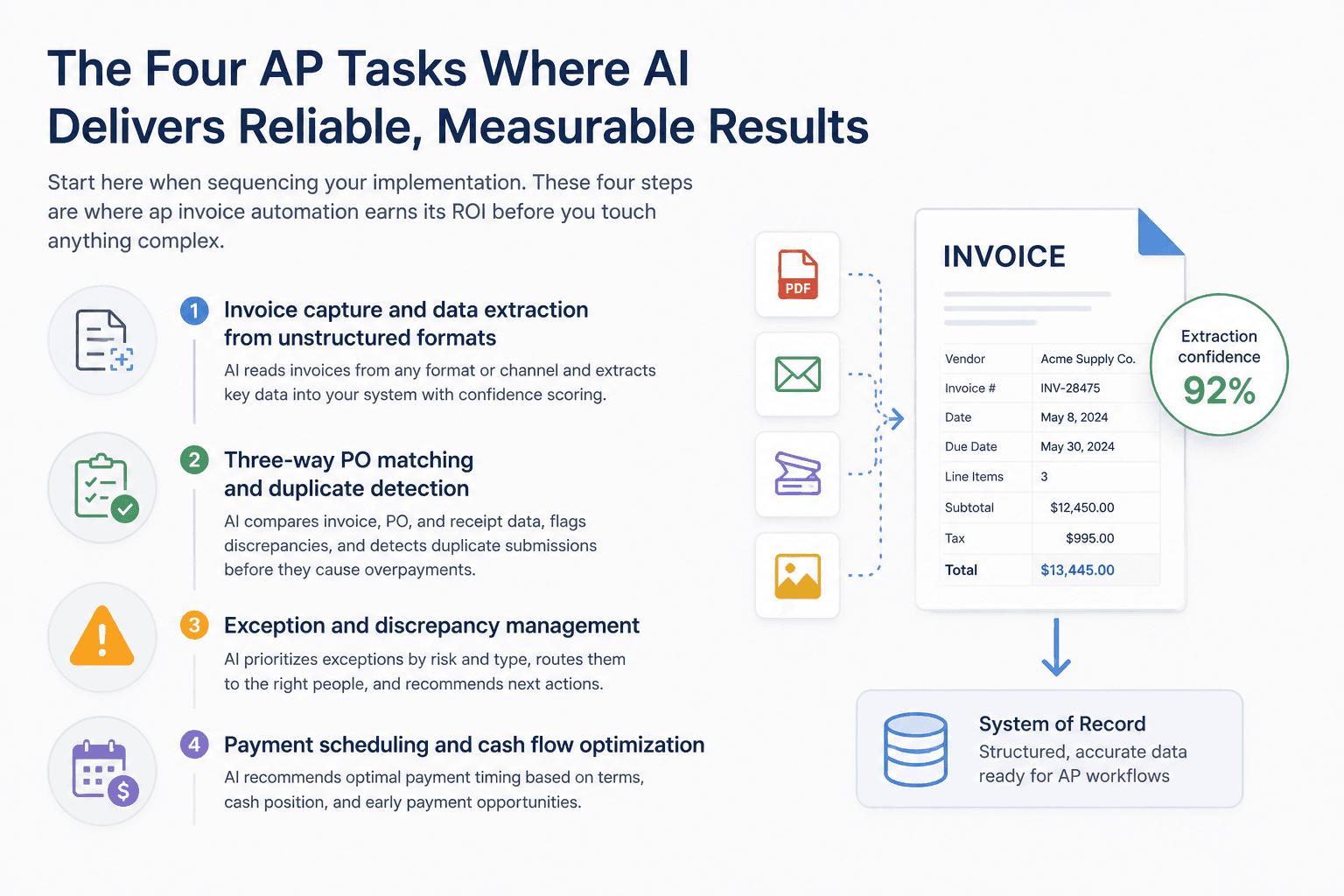
The Four AP Tasks Where AI Delivers Reliable, Measurable Results
Start here when sequencing your implementation. These four steps are where ap invoice automation earns its ROI before you touch anything complex.
Invoice capture and data extraction from unstructured formats
What the AI does: it reads incoming invoices regardless of format, vendor, or delivery channel, and extracts structured data including vendor name, invoice number, line items, amounts, tax, and payment terms into your system of record.
Realistic accuracy: high for typed PDFs from repeat vendors. Lower for scanned documents, handwritten fields, or invoices with non-standard layouts.
Where it breaks down: when a vendor sends an image-heavy invoice with no OCR layer, or when key fields appear in an unusual position the model has not seen before. Expect extraction confidence scores to flag these, and design a human review queue for anything below your accuracy threshold.
This is the right starting point for automated invoice processing software because the data quality here determines every downstream step.
Three-way PO matching and duplicate detection
What the AI does: it compares invoice data against purchase orders and goods receipt records, flags discrepancies in quantity or price, and surfaces duplicate invoice submissions before they generate double payments. If your team is new to the mechanics, our breakdown of three-way invoice matching covers how the PO, receipt, and invoice checks fit together.
Realistic accuracy: very high for standard PO-backed invoices from known vendors with consistent formats. Duplicate detection is one of the highest-confidence tasks in AP invoice processing automation.
Where it breaks down: partial deliveries, split POs across multiple receipts, and invoices that reference internal project codes rather than PO numbers create ambiguity that ML matching alone cannot resolve. A human needs to confirm intent on partial-match cases, not the system.
See it in production: What an AP agent ran end to end at Plum — invoice-to-GRN automation inside SAP, including how partial matches and exceptions were handled.
Coding suggestions and GL account classification
What the AI does: it analyzes invoice content and recommends the correct general ledger account, cost center, or project code, learning from historical coding patterns for each vendor.
Realistic accuracy: strong for recurring vendor categories. Weaker for new vendors, complex multi-line invoices, or scenarios where the same vendor bills for multiple cost categories.
Where it breaks down: coding is a judgment call when invoices span department lines or when a vendor's service description is ambiguous. AI suggestions here should be reviewed, especially in the first 60 to 90 days, to confirm the model has learned your specific GL structure.
Approval routing and exception prioritization
What the AI does: it routes invoices to the correct approver based on amount, vendor, department, cost center, and policy rules, and sorts exception queues so AP staff see the highest-risk items first rather than working through a FIFO pile.
Realistic accuracy: reliable when routing logic is well-defined and stable. Useful for reducing the time approvers spend on low-risk invoices that do not need close review.
Where it breaks down: routing logic encoded as rigid rules cannot adapt when approval hierarchies change mid-cycle or when a policy exception requires context that is not in the invoice itself.
Reliable routing only works when the AI understands process context, not just document fields. Predflow builds agents that map the full AP workflow first, including vendor behavior, approval hierarchies, and exception patterns, before automating any step. That is why its agents handle edge cases that rules-based tools escalate back to humans.
The Four Things AI for Accounts Payable Still Cannot Do Reliably
These are not reasons to avoid AI in AP. They are design constraints. Know them before you build your process, and you will know exactly where human checkpoints must stay.
Resolving vendor disputes that require relationship context
A vendor calls disputing a deduction on their payment. Resolving it requires knowing their payment history, whether there is a long-standing informal arrangement with your procurement team, and how sensitive the relationship is to delay.
No current AI system captures that context automatically. Vendor dispute resolution pulls from institutional knowledge that lives in email threads, phone call histories, and the memory of the people who manage those relationships. AP managers consistently identify this as the task automation cannot meaningfully touch.
The process implication: disputes need to route to a named human owner within a defined SLA. Do not build an AI path for resolution here. Build a clear escalation path instead.
Handling non-standard or handwritten invoice formats at scale
Data extraction errors are the most common AI failure in AP, and the source is almost always non-standard invoice formats. When key fields appear in unexpected positions, when invoices are scanned at low resolution, or when vendors send handwritten documents, extraction confidence drops sharply.
This is not a solvable problem with better training data alone. Some vendor invoice layouts are rare enough that the model will never see enough examples to become reliable. Compliance mishaps follow from posting incorrect extracted data without review.
The process implication: any invoice that triggers a low-confidence extraction score needs a human review step before it enters the matching pipeline. The AI flags it; a human clears it. That handoff must be explicit in your workflow design.
Making high-value or policy-exception payment decisions autonomously
An invoice arrives for a service that was not PO-backed, from a vendor added last week, for an amount that sits just under your approval threshold. Every indicator says someone approved this informally. Should the system pay it?
No. And no AI agent should make that call on its own. Tolerance judgment, the decision about whether a discrepancy is acceptable given business context, requires policy interpretation that current systems cannot apply reliably.
The process implication: define a clear dollar threshold and a clear set of exception conditions below which AI can auto-post, and above or outside which a human approves. That line should be set conservatively at first and adjusted as you build confidence in the system's accuracy.
Adapting to mid-cycle ERP or approval policy changes without retraining
Your company restructures its approval hierarchy in Q3. Two cost centers merge. A new VP takes over three departments and their approval limits change. Your AP agent keeps routing to the old structure until someone catches it.
This is one of the more expensive silent failures in AP automation. Rules and routing logic encoded into an invoice automation system do not self-update when organizational policy changes. They require deliberate retraining or reconfiguration, which means someone must own that process.
The process implication: every AP AI implementation needs a designated process owner who reviews routing accuracy after any organizational change, not just at go-live.
How to Sequence AI for Accounts Payable Without Breaking Your Current Workflow
The question is never whether to automate. It is where to start so you build team trust before expanding scope. If you are running high invoice volumes, the same sequencing logic applies with tighter thresholds — we cover that in how to set up AP automation for high-volume invoice teams.
Stage 1: Capture and extraction — the lowest-risk entry point
Begin with invoice capture and data extraction. This stage touches no approval logic and makes no payment decisions. It simply reads invoices and populates your system of record.
The metric to track: extraction accuracy by vendor category. Set a threshold, for example 95% field accuracy, and review everything below it manually until you have enough volume to understand which vendor formats are problematic. Do not advance to Stage 2 until this rate is stable and the team trusts the output.
This is the lowest-risk entry point because a wrong extraction is visible and correctable before it touches your GL or payment schedule.
Stage 2: Matching, coding, and duplicate checks — where ROI compounds
Once extraction is stable, activate PO matching, duplicate detection, and GL coding suggestions. This is where the ROI compounds quickly because the system starts preventing errors that cost real money: duplicate payments, misclassified expenses, and invoices that pass through without a corresponding receipt.
The guardrail to apply here: allow the AI to auto-approve invoices from known vendors with exact PO matches and amounts within tolerance. Require human review for non-PO invoices, new vendors, and any invoice where the coding suggestion confidence score is below your threshold.
Track: the percentage of invoices that auto-post without human touch versus those flagged for review. That ratio tells you how much your vendor invoice management is improving, and when you are ready for Stage 3.
Stage 3: Routing and exception triage — when to expand and what guardrails to keep
Approval routing is the highest-leverage stage and the one most sensitive to organizational change. Implement it after Stages 1 and 2 are running cleanly.
Guardrails to keep permanently: high-value invoices always route to a human approver regardless of vendor history. Policy exception cases always route to a named owner. The AI prioritizes the exception queue; it does not resolve it.
The signal that you are ready for Stage 3: your team is spending more time on genuine judgment calls and less time on data entry and routing decisions. That shift is the evidence that Stages 1 and 2 have actually worked. Scaling from one entity to many introduces its own failure modes — see our guide to scaling invoice automation across multiple sites before you expand.
Choosing an AI for Accounts Payable Platform: What to Evaluate Beyond the Demo
The demo always shows clean invoices processed in seconds. Evaluate on what happens when the invoice is a three-page scanned PDF from a vendor in Germany with a non-standard layout. For a tool-by-tool view of the market, our AP automation software comparison walks through the major platforms against these same criteria.
ERP integration depth: SAP, NetSuite, QuickBooks, Oracle, and Sage Intacct
ERP integration quality determines whether automation creates efficiency or just moves the manual work downstream.
For SAP invoice environments, confirm whether the tool writes directly to the relevant invoice tables or uses an intermediate file transfer. SAP central invoice management and vendor invoice management SAP configurations vary by deployment, and shallow integrations create reconciliation problems. For NetSuite invoice automation and netsuite bill capture, check whether the tool handles NetSuite's approval workflow natively or bypasses it. For QuickBooks ap automation and sage intacct ap automation, simpler integration paths are available but confirm two-way sync on payment status. Oracle invoice automation requires the same depth check on table-level read and write access.
Edge case handling and exception escalation design
Ask vendors specifically: what happens when extraction confidence is low? What happens when a PO match is partial? What does the human review queue look like, and how does a reviewer clear an exception and send it back through the pipeline?
If the vendor cannot show you this flow in a live demo with a messy document, that is your answer about their edge case handling.
Human oversight controls and audit trail requirements
When an AI agent moves money, the audit trail must show exactly what data was extracted, what the match result was, what rule or model made the routing decision, and which human approved the final step.
This is not optional in regulated environments. Confirm that the platform logs every agent action with a timestamp, the data state at each step, and the human intervention points. Any best invoice automation platform that cannot produce this trail on demand is a compliance risk.
Frequently Asked Questions
What does AI actually do in accounts payable automation?
AI in accounts payable extracts structured data from incoming invoices, matches them against purchase orders and receipts, suggests GL coding, detects duplicates, and routes exceptions to the right approver. It handles these steps without manual data entry for invoices that meet clean criteria. For invoices with non-standard formats, partial matches, or policy exceptions, the system flags them for human review rather than processing automatically.
How is AI different from traditional AP automation software?
Traditional AP automation uses fixed rules. If a condition matches, a specific action follows. AI-based tools use machine learning to read documents without predefined templates and can adapt to variation across vendor formats. Agentic AI goes further, taking multi-step actions across systems and reasoning about context to handle exceptions that rigid rules cannot anticipate.
What is the biggest risk of using AI for accounts payable?
The biggest risk is posting incorrect data extracted from non-standard invoices before a human has reviewed it. Extraction errors on scanned or handwritten invoices can result in wrong amounts, wrong vendors, or wrong GL coding entering your ERP. The mitigation is a mandatory review queue for any invoice below your extraction confidence threshold, not an optional one.
Which AP tasks should always have human review even with AI in place?
Vendor dispute resolution, high-value or non-PO invoice approval, policy exception decisions, and any invoice that triggers a low confidence extraction score should always have human review. These are the four categories where AI makes errors that compound downstream if left unchecked.
How long does AI accounts payable implementation typically take?
A focused pilot covering invoice capture and extraction for a single invoice type or vendor category can be running in two weeks. Expanding to matching, coding, and routing for full AP volume typically takes two to three months when ERP integration is straightforward. Complex ERP environments, multi-entity setups, or high invoice variety extend that timeline. The teams that move fastest start narrow, prove accuracy on a small volume slice, then expand.
Where to Take This Next
If your AP team is still manually touching more than half your invoice volume, the sequencing framework above gives you a starting point. Begin with extraction, track accuracy against a clear threshold, and prove the output before you automate any downstream step. That sequence builds the team trust that makes every later stage work.
If you are already past that point and hitting limits, specifically on exceptions that keep escalating to humans or routing logic that breaks every time your organization changes, that is the signal that your current tool has reached its ceiling. Rules-based automation cannot grow past itself. A context-aware agent approach, one that understands your full workflow before automating any step, is what closes that gap.
If your AP team is ready to move past productivity-tool automation and wants AI that handles the edge cases your current system escalates, explore how Predflow maps your full AP workflow before automating any step. Start with a free process assessment or demo request.
Bring 20 NetSuite bills to a 30-minute teardown
We will walk your actual invoices through capture, 3-way match and posting on the call, and tell you which steps an agent can take over. No prep beyond the PDFs.
FAQ
Frequently asked questions
What exactly is an AI agent
An AI agent is an autonomous system designed to handle specific business tasks end-to-end. Unlike simple chatbots, AI agents can reason, take actions, integrate with tools, and follow defined workflows.