Finance
AP Automation Software Comparison 2026 | 12 Platforms
Not all AP automation software fits your workflow. Compare top platforms for 2026 and find the one that actually clears your exception queue for good.

Gautam Borad
Founder at Predflow

AP professionals spend 84% of their time on payment processing alone. Yet most finance teams are still choosing ap automation software based on feature checklists, not workflow fit. The result is predictable: tools get deployed, data extraction improves, and then the exception queue sits unattended and approval routing stays manual.
The most common AP issues — invoice delays, duplicate payments, compliance gaps, and zero visibility — do not disappear just because you bought software. They persist when the platform does not match the actual process breaking down.
This guide gives finance and operations leaders a decision framework to match ap automation software to their specific process gaps. Not a ranked list of vendors. A structure for making the right call before you sign anything.
What AP Automation Software Actually Needs to Do in 2026
Most platforms will tell you they automate invoice processing. Fewer will tell you where they stop. Before comparing any tool, define what non-negotiable capabilities actually look like in 2026.
Touchless Invoice Processing: Why Data Capture Is Just the Starting Point
Touchless invoice processing means the system captures, validates, and routes an invoice without a human touching it at any stage. Data capture is table stakes. The real test is what happens after capture.
Ask vendors: what percentage of invoices reach payment approval without any human intervention on your live customer data? If they quote you a headline straight-through processing rate without segmenting by invoice type or exception volume, treat that as a red flag.
Approval Routing and Exception Handling Without Manual Handoffs
This is where most invoice automation tools fall short. Teams buy platforms expecting end-to-end automation and then discover that exceptions — mismatched POs, missing GRNs, unapproved vendors — drop into a generic queue that someone still monitors manually.
Agentic AP capabilities now cover exception handling, fraud detection, and supplier management autonomously. That is the new baseline. Any platform that cannot intelligently route exceptions based on rule logic or learned patterns is already behind the account payable process requirements teams face in 2026.
Test question for vendors: show me how your platform handles a three-way match failure on a high-value invoice outside business hours. The answer reveals whether exception handling is automated or just better-organized manual work.
Real-Time Visibility Across the Account Payable Process
Finance ops teams cannot manage what they cannot see. Real-time visibility means knowing, at any moment, where every invoice sits, what is blocking it, and what the projected payment timeline is.
This is also an audit requirement. Platforms that generate visibility reports on a 24-hour delay are not built for fast-moving finance ops. The dashboard should be live, filterable by supplier or invoice status, and exportable for compliance review without needing IT involvement.
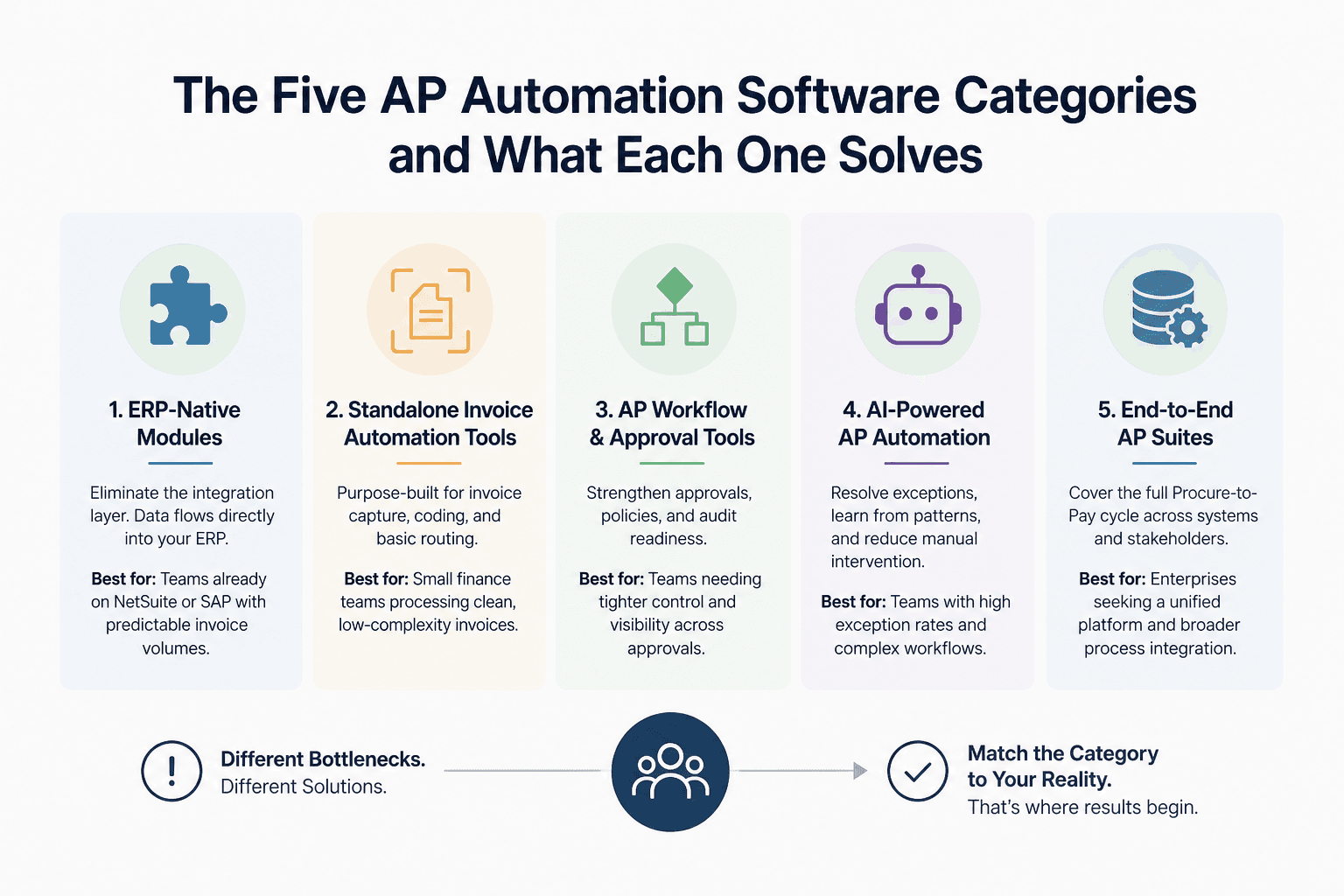
The Five AP Automation Software Categories and What Each One Solves
The AP software market is crowded. Before evaluating individual platforms, map the vendor to its category. Each category was built to solve a different bottleneck, and each has a ceiling.
ERP-Native Modules (e.g., NetSuite AP Automation): Best When You're Already Committed
What it solves: ERP-native modules like NetSuite AP automation eliminate the integration layer entirely. Invoice data flows directly into your GL, purchase orders, and vendor records without middleware.
Where it breaks: Customization is constrained by the ERP's architecture. If your approval workflows or supplier rules fall outside standard configurations, you are building workarounds inside a system not designed for it.
Reader fit: Teams already running NetSuite or SAP who process a predictable invoice mix with few exceptions. If your exception rate is high or your workflows are non-standard, this category will frustrate you quickly.
Standalone Invoice Automation Tools: Fast to Deploy, Limited on Edge Cases
What it solves: Standalone tools are purpose-built for invoice capture, coding, and basic routing. Deployment is faster than ERP modules or suites because scope is narrow.
Where it breaks: They handle clean invoices well and fall apart on edge cases. Exception handling usually means a human notification, not automated resolution. Integration with ERP and procurement systems requires additional configuration that extends the timeline.
Reader fit: Small finance teams processing moderate invoice volumes with low exception rates and a single ERP environment.
AI Invoice Automation Platforms: Handling the Exceptions Human Teams Hate
What it solves: AI invoice automation platforms go beyond OCR and template matching. They learn from historical invoice data, flag anomalies, and can route exceptions with context rather than dumping them in a queue.
Where it breaks: The AI is only as good as the data it trains on. Early-stage deployments on new supplier relationships or irregular invoice formats can produce lower accuracy until the model stabilizes.
Reader fit: Mid-market finance teams with growing invoice volumes, diverse supplier bases, and increasing exception rates that are consuming team time disproportionately.
Integrated Procure-to-Pay Suites: Full Coverage at Higher Complexity
What it solves: Procure-to-pay suites cover the full cycle from purchase requisition through supplier payment. They eliminate fragmented tool coordination by handling sourcing, PO management, receiving, and AP in one platform.
Where it breaks: Implementation complexity is significant. These suites require cross-functional buy-in from procurement, finance, and IT. Timelines of six to twelve months are common, and change management is not optional.
Reader fit: Enterprise teams with high transaction volumes, multi-entity structures, and the internal resources to manage a long implementation correctly.
AI Agent Platforms: End-to-End Workflow Automation Beyond the Invoice
What it solves: AI agent platforms do not automate a single workflow. They coordinate across workflows, systems, and exception types simultaneously. This category handles the multi-system handoffs and edge cases that standalone tools and even procure-to-pay suites leave to humans.
Where it breaks: A platform-first approach without process mapping first creates agents that automate confusion at scale. The category requires a mature understanding of your current workflow before deployment.
Reader fit: Operations leaders managing complex, exception-heavy AP processes across multiple systems who cannot scale further without automating the coordination layer itself.
Platforms like Predflow take a process-mapping-first approach. Agents are built around your existing workflow, not retrofitted over it, which is why they handle the exception-heavy, multi-system handoffs that frustrate teams using lighter invoice automation tools.
Expert evaluation should prioritize AI-driven data capture, real-time analytics, and integration depth across your existing ERP or accounting software. The category framework above is the filter. Run every shortlisted vendor through it before you compare pricing.
If you want to see what this looks like in practice for a complex multi-system environment, the invoice-to-GRN automation case study at /case-study/case-studies-invoice-to-grn-automation-sap-plum shows how the handoffs were mapped and automated end-to-end.
How to Evaluate AP Automation Software: A Six-Criteria Framework
Feature demos are designed to show you what a platform does well. This framework is designed to expose what it cannot do before you commit.
Criterion 1: Does It Handle 3 Way Matching Invoice Automatically?
Three-way matching (purchase order, goods receipt, invoice) is where most AP errors originate. A platform that cannot perform 3 way matching invoice reconciliation automatically is not automating AP. It is automating data entry.
Ask vendors: Show me a live 3 way matching invoice workflow on a mismatched receipt quantity. What triggers, what routes, and who (if anyone) gets notified?
Red flag answer: "The system flags it and your team reviews the exception." That is not automation. That is notification with extra steps.
Criterion 2: How Does It Manage Exceptions Without Human Escalation?
Exception handling is the most common evaluation blind spot in the account payable process. Every vendor will show you their clean-invoice workflow in a demo. Ask them to demo a high-exception scenario instead.
Ask vendors: What percentage of exceptions are resolved by the system without human input, and can you show me the routing logic?
Red flag answer: Vague references to "exception dashboards" without demonstrating automated resolution paths.
Criterion 3: ERP and System Integration Depth
Shallow integrations create manual handoffs at the data layer. A native connector to your ERP is meaningfully different from a middleware sync that runs on a schedule.
Ask vendors: Is the ERP integration native or API-based? What is the sync frequency and what data flows bidirectionally?
Red flag answer: "We integrate with most ERPs via Zapier or flat-file export." This means your team will be reconciling discrepancies manually.
Criterion 4: Visibility and Audit Trail Quality
Finance ops requires an audit trail that regulators and internal teams can access without IT assistance. Real-time status, user action logs, and payment history must be available in the platform itself.
Ask vendors: Can I pull a full audit trail for a specific invoice, filtered by date and user, without a database query?
Red flag answer: "Our team can generate that report for you within 48 hours."
Criterion 5: Implementation Timeline and Change Management Support
Finance teams on Reddit consistently underestimate implementation timelines and skip change management planning entirely. This is the most common reason AP automation projects stall after go-live.
Ask vendors: What is the median time from contract to first live invoice processed for a team our size? What change management resources are included?
Red flag answer: "Most teams are live in two weeks." That timeline is only credible for the simplest standalone deployments, not for teams with complex workflows or ERP dependencies.
Criterion 6: Scalability Without Proportional Headcount Growth
The point of ap automation software is to handle more invoice volume without adding headcount proportionally. If the platform requires manual configuration for every new supplier or entity, you will hit a ceiling faster than expected.
Ask vendors: How does the platform handle new supplier onboarding and new invoice formats without IT involvement?
Red flag answer: "Your implementation team will handle new templates on a case-by-case basis."
AP Automation Software Mistakes That Derail Finance Teams
These three mistakes cause more AP automation failures than any specific platform shortcoming. Each one connects directly to the evaluation criteria above.
Automating a Broken Process Instead of Fixing It First
If your current approval workflow requires five sign-offs because nobody has reviewed the policy in three years, automating it produces faster wrong outcomes. The software accelerates whatever process you give it.
The fix: map your current account payable process end-to-end before any vendor conversation. Identify which steps are genuinely necessary and which exist because nobody changed them. Automate the clean process, not the inherited one.
This mistake connects directly to Criterion 5. Teams that skip process mapping before implementation are the same teams that report six-month timelines turning into eighteen months.
Choosing a Tool Before Mapping Your Account Payable Process
Most vendor evaluation starts with a feature demo and ends with a pricing negotiation. The process mapping step happens after signing, if at all. This is backwards.
You cannot assess whether a platform handles your exception volume correctly if you do not know what your exception volume is. You cannot evaluate ERP integration depth if you have not documented which systems the invoice touches between receipt and payment.
Map first. Vendor conversations are faster, more specific, and more honest when you arrive knowing exactly where your process breaks down.
Underestimating Exception Volume and Over-Trusting Straight-Through Processing Rates
Vendors quote straight-through processing rates on their best-case invoice mix. Your invoice mix is not their best case. Exception volumes grow as supplier count grows, as purchase categories diversify, and as business complexity increases.
AP managers who have reviewed implementation retrospectives consistently report the same pattern: the tool handled clean invoices exactly as promised, but the exception queue grew because intelligent routing was not actually part of the deployment. Teams ended up managing a better-organized manual process, not an automated one.
The fix is Criterion 2. Before signing, demand a live demo of exception routing on realistic invoice scenarios from your own supplier base. If the vendor cannot or will not do this, the capability is not as strong as the sales deck suggests.
Not Sure Which Row of This Table You Are In?
Bring your invoice volume, exception rate, and ERP to a 30-minute call. We will tell you which platform fits, including when the honest answer is none of them.
Book a 30-minute AP teardown
Frequently Asked Questions
What is AP automation software and how does it differ from basic accounting software?
AP automation software manages the full invoice lifecycle, from capture and validation through approval routing and payment, with minimal manual input. Basic accounting software records transactions after a human processes them. AP automation removes the manual steps in between, handling matching, routing, and exception flagging automatically.
How long does it take to implement ap automation software?
Implementation time ranges from two weeks for simple standalone tools to twelve months or more for procure-to-pay suites with complex ERP environments. The most reliable predictor of timeline is process complexity, not platform capability. Teams that complete process mapping before implementation consistently go live faster.
Does ap automation software handle 3 way matching invoice automatically?
Most platforms claim to, but the quality varies significantly. True automated 3 way matching invoice reconciliation resolves discrepancies through rule-based logic without human escalation. Weaker implementations flag mismatches and notify a team member. Ask vendors to demo a mismatch scenario on real invoice data before committing.
What is the difference between ai invoice automation and traditional invoice automation?
Traditional invoice automation relies on templates and rules. It processes invoices that match expected formats well and fails on anything outside those parameters. AI invoice automation learns from historical data, adapts to new formats, and can route exceptions with context. The practical difference shows up in exception rate reduction and straight-through processing rates over time.
Can ap automation software integrate with NetSuite and other ERPs?
Most platforms offer ERP integration, but integration depth varies. Native connectors provide real-time bidirectional data sync. API-based integrations offer flexibility but depend on sync frequency and configuration quality. Middleware-based integrations introduce latency and additional failure points. NetSuite AP automation, as an ERP-native module, eliminates the integration layer entirely for teams already on NetSuite.
How do I know if my team is ready for ap automation?
Three signals indicate readiness: your team can document the current invoice process end-to-end, you know your monthly invoice volume and exception rate, and you have identified which specific steps are consuming the most manual time. If any of these are unclear, a process-mapping exercise should precede any platform evaluation.
Conclusion
If you know your primary bottleneck, match it to the five categories in Section 2 and run the six-criteria framework in Section 3 against your shortlist. Exception handling, ERP integration depth, and scalability are the three criteria most likely to separate platforms that work from platforms that disappoint.
If you are still unsure where the process is actually breaking down, do not start with vendor demos. Start with a process map. The worst outcome is not choosing the wrong platform. It is automating a broken process and scaling the problem at speed.
If you are still mapping where manual handoffs are costing your team the most time, Predflow offers a free workflow assessment to identify your highest-impact automation opportunity before you evaluate any platform.
Bring 20 NetSuite bills to a 30-minute teardown
We will walk your actual invoices through capture, 3-way match and posting on the call, and tell you which steps an agent can take over. No prep beyond the PDFs.
FAQ
Frequently asked questions
What exactly is an AI agent
An AI agent is an autonomous system designed to handle specific business tasks end-to-end. Unlike simple chatbots, AI agents can reason, take actions, integrate with tools, and follow defined workflows.