Finance
How to Scale Invoice Automation Across Multi-Site Operations
Rolling out invoice automation to multiple sites shouldn't mean more work, not less. Here's how to scale it without drowning in exceptions.

Khushbu Adav
Product, Predflow

You deployed invoice automation at your headquarters. It worked. Then you rolled it to three more sites, and now you spend more time managing exceptions than you did before you automated anything.
The problem is not the tool. The problem is that invoice automation built for one site hits a wall when vendor formats multiply, approval chains diverge, and local tax rules add layers no one accounted for. Most teams discover this only after go-live, when the manual handoffs they thought they eliminated start reappearing in new places.
The gap between automating invoices and scaling invoice automation is a process gap, not a technology gap. Less than 10% of finance teams globally have reached full automation, despite the majority now using some form of AI in their AP workflows. The teams stuck in the middle share one pattern: they deployed tools before they mapped the process.
This guide gives you a process-first framework to scale invoice automation across multiple sites without rebuilding from scratch at each location or adding headcount to absorb the gaps.
Why Invoice Automation Breaks Down When You Add More Sites
Scaling exposes the assumptions baked into your original automation setup. What looked like a solved problem at one site becomes a recurring failure mode at ten.
Each site runs a different vendor mix and document format
Site A gets structured PDFs from three preferred vendors. Site B gets scanned paper invoices, emailed spreadsheets, and EDI files from a completely different vendor pool. Your automation was configured for Site A's inputs.
When Site B's documents hit the same pipeline, extraction fails or produces errors that require manual correction. Nearly half of invoices globally are still processed manually, a figure that reflects exactly this fragmentation problem. The tool did not get worse. The input diversity broke the assumptions it was built on.
Approval chains and tax rules vary by location
A three-way match that works cleanly at your US facility does not map to your German operation, where VAT handling, e-invoicing compliance, and local approval hierarchies follow different rules. Most automation tools apply a single approval logic globally, which forces site managers to override the system manually for every local exception.
Those overrides accumulate. What starts as a minor workaround becomes a permanent manual step that no one has formally accounted for. Only 8% of finance teams have reached full automation, and this kind of silent exception accumulation is a major reason why.
Manual exception handling multiplies with volume
Every invoice that does not match a purchase order, falls outside a threshold, or arrives in an unrecognized format gets routed to a human. At one site, that might be ten invoices a week. Across ten sites, it becomes a full-time job for multiple people.
The exceptions themselves are not random. They follow patterns tied to specific vendors, specific sites, or specific document types. But without structured exception tracking, those patterns stay invisible and the manual work keeps growing with volume instead of shrinking.
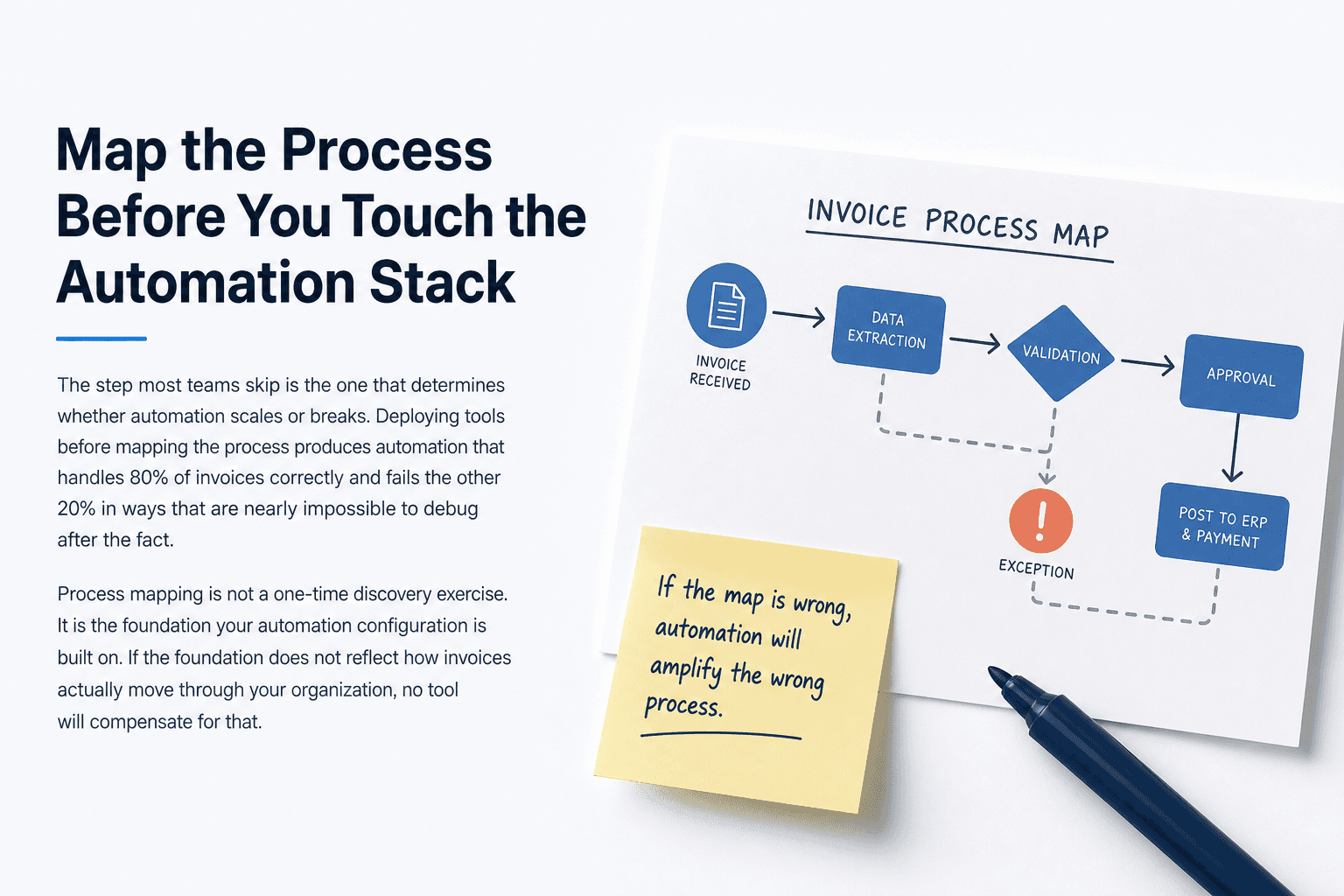
Map the Process Before You Touch the Automation Stack
The step most teams skip is the one that determines whether automation scales or breaks. Deploying tools before mapping the process produces automation that handles 80% of invoices correctly and fails the other 20% in ways that are nearly impossible to debug after the fact.
Process mapping is not a one-time discovery exercise. It is the foundation your automation configuration is built on. If the foundation does not reflect how invoices actually move through your organization, no tool will compensate for that.
Document every invoice entry point by site
Start by listing every channel through which invoices arrive at each location. Email, vendor portals, EDI feeds, scanned paper, and direct ERP submissions each introduce different data quality challenges.
Map the volume by channel and note which channels are shared across sites and which are site-specific. This tells you where standardization is achievable and where you will need site-level configuration from the start.
Pre-automation audit checklist:
List all invoice intake channels per site (email, portal, EDI, paper, other)
Record the top five vendor document formats by volume at each site
Document each approval step, who owns it, and what triggers escalation
Note all local tax, currency, and compliance requirements by jurisdiction
Identify which exceptions currently require a human decision and why
Identify the top five exception types that require human intervention
Pull three months of exception logs from your current system. If you do not have structured logs, interview the AP staff who handle escalations.
Group exceptions by type: missing PO reference, price mismatch, duplicate detection, unrecognized vendor, and tax field errors are the most common categories. Rank them by frequency, not by the frustration they cause. High-frequency exceptions are the ones your automation must handle reliably before you expand to another site.
Catalogue approval chain variants and local compliance requirements
Build a simple matrix with sites as rows and approval chain steps as columns. Mark where the process is identical across sites and where it diverges. Do the same for compliance requirements.
This matrix becomes your configuration guide. Without it, you are guessing at what the automation needs to do at each location, and guesses produce the exceptions you are trying to eliminate.
Build a Standardization Layer That Lets Sites Stay Flexible
The tension at the center of multi-site automation is this: standardize too rigidly and you break regional workflows. Stay too flexible and you cannot automate reliably. The resolution is a two-tier model that separates what must be consistent from what should remain configurable.
Define global rules versus site-level exceptions
Not everything needs to be unified. Trying to force every local practice into a single global rule is what causes automation to fail in the first place.
The goal is to identify the rules that must be consistent for your automation to function, and then explicitly allow everything else to be configured at the site level.
Global Standard | Site Flexible |
|---|---|
PO matching logic | Local tax codes and VAT rates |
Duplicate invoice detection | Invoice currency and language |
Payment terms validation | Vendor-specific document formats |
Fraud and compliance flags | Local approval authority thresholds |
Data retention policies | Regional e-invoicing format requirements |
Normalize vendor data at ingestion before it enters your ERP
The point at which invoice data enters your ERP should not be the point at which you discover a formatting problem. Data normalization needs to happen upstream, at ingestion.
This means your automation layer needs to translate vendor-specific formats into a consistent internal structure before any matching or validation logic runs. A vendor sending a scanned PDF in German should produce the same internal data fields as a vendor sending an EDI file in English. When normalization happens at the ERP layer instead, errors propagate into your financial records and become harder to correct.
Set escalation thresholds that route edge cases to the right person automatically
Every site will produce invoices that fall outside your configured rules. The question is not whether exceptions will happen, but whether the system routes them correctly when they do.
Define escalation thresholds by exception type and assign ownership by role, not by individual. A price variance above 5% might route to a category manager. An unrecognized vendor might route to procurement. An unclear tax field might route to a local finance contact.
Predflow is built around exactly this model. Rather than deploying a generic automation layer and adjusting it after problems appear, Predflow starts with your actual invoice variants, approval chains, and exception types, then configures AI agents around that specific process. The result is a system that handles your global rules and your site-level exceptions without requiring separate manual oversight for each location.
How to Roll Out Invoice Automation Site by Site Without Losing Visibility
Simultaneous multi-site rollouts almost always fail. The errors compound, the exceptions pile up, and no one has bandwidth to debug while also managing go-live pressure at five locations at once. A sequenced rollout is not slower. It is the path that actually reaches full scale.
Choose a pilot site with moderate complexity, not the easiest one
The temptation is to start with your simplest site to demonstrate a quick win. The problem is that a simple site does not surface the edge cases your configuration needs to handle.
Choose a site with moderate vendor diversity, a mixed approval chain, and at least one local compliance requirement. If your automation handles that site reliably, it is ready to scale. If it fails, you learn that with one site, not five.
Define the metrics you will track before going live
Straight-through processing rate, exception volume by type, time from invoice receipt to approval, and manual intervention rate are the four metrics that tell you whether automation is working.
Set baseline measurements before go-live. You cannot improve what you did not measure. Teams that skip baselines spend the first three months after launch debating whether performance improved instead of acting on what the data shows.
Replicate the configuration with site-specific overrides, not from scratch
When you move from the pilot to the next site, start from the pilot configuration and add site-specific overrides. Do not rebuild the automation from scratch for each location.
This is where your process map pays off. The global rules are already configured. The new site adds its tax codes, its vendor formats, and its approval routing. Everything else inherits from the baseline. The invoice automation market is growing at 14.2% annually, and new e-invoicing mandates across Europe and the Middle East went live in early 2026. Teams that build replicable configurations now are in a better position to absorb compliance changes across multiple jurisdictions.
What Good Invoice Automation Looks Like at Full Scale
Three out of four AP departments now use some form of AI or automation in their invoice workflows. But only 8% have reached full automation. The gap between those two numbers is not a technology gap. It is a maturity gap, and it shows up as persistent manual exceptions that automation was supposed to eliminate but did not.
Straight-through processing rate as your primary health metric
Straight-through processing means an invoice moves from receipt to payment approval without any human touch. That rate is your primary measure of automation maturity.
At full scale, mature operations target a straight-through rate above 80%. If you are below 60%, your exception volume is high enough that automation is not yet delivering its core value. Track this metric by site so you can see where the process gaps are concentrated.
Human oversight built in at the right points, not removed entirely
Full automation does not mean removing humans from the process. It means moving humans to where their judgment actually matters.
A well-scaled invoice automation system routes clear, low-risk invoices straight through without any human review. It escalates ambiguous or high-risk invoices to the right person with context already assembled. The AP team stops doing data entry and starts making decisions on the cases that genuinely require their knowledge.
Human oversight is a feature of mature automation, not a sign that the automation is incomplete.
Continuous improvement loops that reduce exceptions over time
Every exception your system handles is a data point. A mature automation setup captures that data, identifies patterns, and feeds them back into the configuration.
A vendor who consistently sends invoices in a non-standard format should trigger a configuration update that removes that vendor from the exception queue. Over time, this loop shrinks your exception volume without requiring manual rule-writing by your team.
Frequently Asked Questions
What is invoice automation and how does it work across multiple locations?
Invoice automation uses software to capture, validate, match, and route invoices through approval and payment without manual data entry. Across multiple locations, it works by applying a shared set of global processing rules while allowing site-specific configuration for local tax codes, vendor formats, and approval chains. The key is normalizing invoice data at ingestion so that all sites feed into a consistent internal process regardless of how different the input formats are.
How long does it take to scale invoice automation across multiple sites?
A realistic timeline for a pilot site is eight to twelve weeks from process mapping to go-live. Each subsequent site, using a replicated configuration with site-specific overrides, typically takes four to six weeks. Teams that skip process mapping before deployment often spend more time in post-launch troubleshooting than the mapping would have required.
What is the biggest reason invoice automation fails at scale?
The most common failure is deploying tools before mapping the actual process. Automation configured around assumptions rather than documented workflows produces exceptions at volume that the team then handles manually. The tool appears to be working, but the manual work has simply moved downstream rather than been eliminated.
Do we need to replace our ERP to scale invoice automation?
No. The automation layer sits upstream of your ERP, handling capture, validation, and routing before data enters the system of record. A well-designed invoice automation setup integrates with your existing ERP rather than replacing it. The goal is to deliver clean, validated invoice data to your ERP, not to change where financial records are stored.
How do we handle invoices that don't match a purchase order automatically?
Non-PO invoices should be routed by exception type rather than sent to a general queue. Configure escalation rules that assign non-PO invoices to the relevant budget owner or department head based on cost center, supplier category, or invoice value. The automation captures the invoice, flags the mismatch, assembles the relevant context, and routes it to the right person. That person approves or rejects it. The system logs the outcome and uses it to refine future routing.
Conclusion
You now have a framework: map the process first, build a standardization layer that separates global rules from site-level flexibility, sequence your rollout from a moderately complex pilot, and track straight-through processing rate as your north star metric.
The real decision is whether you build this process foundation internally or work with a platform that has already operationalized it. Building internally gives you full control but requires time, AP expertise, and someone who can translate process documentation into automation configuration. Teams that get this foundation right scale without adding headcount. Teams that skip it keep patching exceptions manually, regardless of which tool they deploy.
If you want to see how Predflow maps your invoice process before building the automation, so you are not debugging edge cases six months after go-live, book a process audit call with the team.
Bring 20 NetSuite bills to a 30-minute teardown
We will walk your actual invoices through capture, 3-way match and posting on the call, and tell you which steps an agent can take over. No prep beyond the PDFs.
FAQ
Frequently asked questions
What exactly is an AI agent
An AI agent is an autonomous system designed to handle specific business tasks end-to-end. Unlike simple chatbots, AI agents can reason, take actions, integrate with tools, and follow defined workflows.