AI AGENTS
How to Reduce Sales Admin Tasks Using AI: 7 Automation Strategies That Work
Your sales team isn't losing time because of the wrong people — it's the wrong processes. Here are 7 sales automation strategies that actually fix that.

Gautam Borad
Founder, Predflow

Your sales team is spending more time on data entry, chasing approvals, and updating records than actually selling. That is not a people problem. It is a process problem, and hiring more staff to absorb the overhead does not fix it.
Sales automation changes that equation. It removes the manual work that accumulates between systems, teams, and handoffs, freeing your operations and finance teams to focus on work that actually moves revenue. The shift is already underway: analysts tracking B2B sales trends project that by 2028, 60% of B2B seller work will be executed through conversational AI interfaces, up from a fraction of that today.
This article covers 7 specific strategies for automating sales admin tasks. Each one names the problem it solves, how the automation works, and what your team gains. You will also find a pre-implementation framework to avoid the most common deployment mistakes.
Why Sales Teams Lose Hours Every Week to Tasks Automation Should Own
Most sales admin waste is invisible until you add it up. Small delays across CRM updates, order entry, follow-up emails, and approval routing can consume a full day of productive time each week per person.
The Hidden Tax of Manual Handoffs Between Sales and Back-Office Systems
Every time a sales rep closes a deal and a separate person manually enters that order into your ERP, you have introduced a delay, a potential error, and a dependency on one person being available. Supply chain managers feel this as late purchase orders. AP teams feel it as invoice mismatches. Operations leaders feel it as missed SLAs and frustrated customers.
These manual handoffs between sales and back-office systems are where business process automation platforms deliver the most immediate return. The handoff itself is automatable. The friction is not inevitable.
Where Repetitive Work Accumulates: CRM Updates, Follow-Ups, and Order Entry
CRM data entry, follow-up scheduling, quote generation, and order status updates are not skilled work. They are pattern-based tasks that repeat hundreds of times a month. Yet most operations run them manually because no one has mapped them as automation candidates.
Automation workflow tools exist precisely for this category of work. The question is not whether to automate it. The question is which steps to target first and how to sequence the rollout without breaking existing workflows.
How to Map Your Sales Process Before Choosing Any Automation Tool
The most common reason sales automation projects fail is not bad software. It is skipping the step that comes before software: understanding exactly what your process does, where it breaks, and what exceptions it throws.
Process Mapping: Identifying Which Steps Are Truly Automatable
Start by documenting each step in your sales workflow with four components: inputs, outputs, decision points, and exception conditions. An input might be a signed contract. An output might be a created sales order. The decision point is whether the order value exceeds an approval threshold. The exception condition is what happens when a product SKU is discontinued.
This exercise reveals immediately which steps are rule-based and repeatable versus which steps require human judgment. Only the former belong in your first automation wave.
Spotting the Edge Cases That Break Automations Before They Launch
Edge cases are the gaps automation teams discover after deployment, usually in the worst possible way. A customer submits an order with a non-standard payment term. A quote references a product bundle that no longer exists. An invoice arrives with a mismatched PO number.
If your process map does not capture these conditions before you configure any tool, your automation will either fail silently or require constant manual intervention to patch. Document the top five exceptions for each workflow step before you select any platform.
Why a Process-First Approach Outperforms a Tools-First Approach
Teams that buy automation software before mapping their process end up configuring the tool around their current broken workflow. They automate the inefficiency, not the solution.
A process-first approach means you redesign the workflow on paper first, identify which steps genuinely require automation, and then select tools that match those requirements. This is what separates automations that run reliably for 18 months from ones that break in the first week.
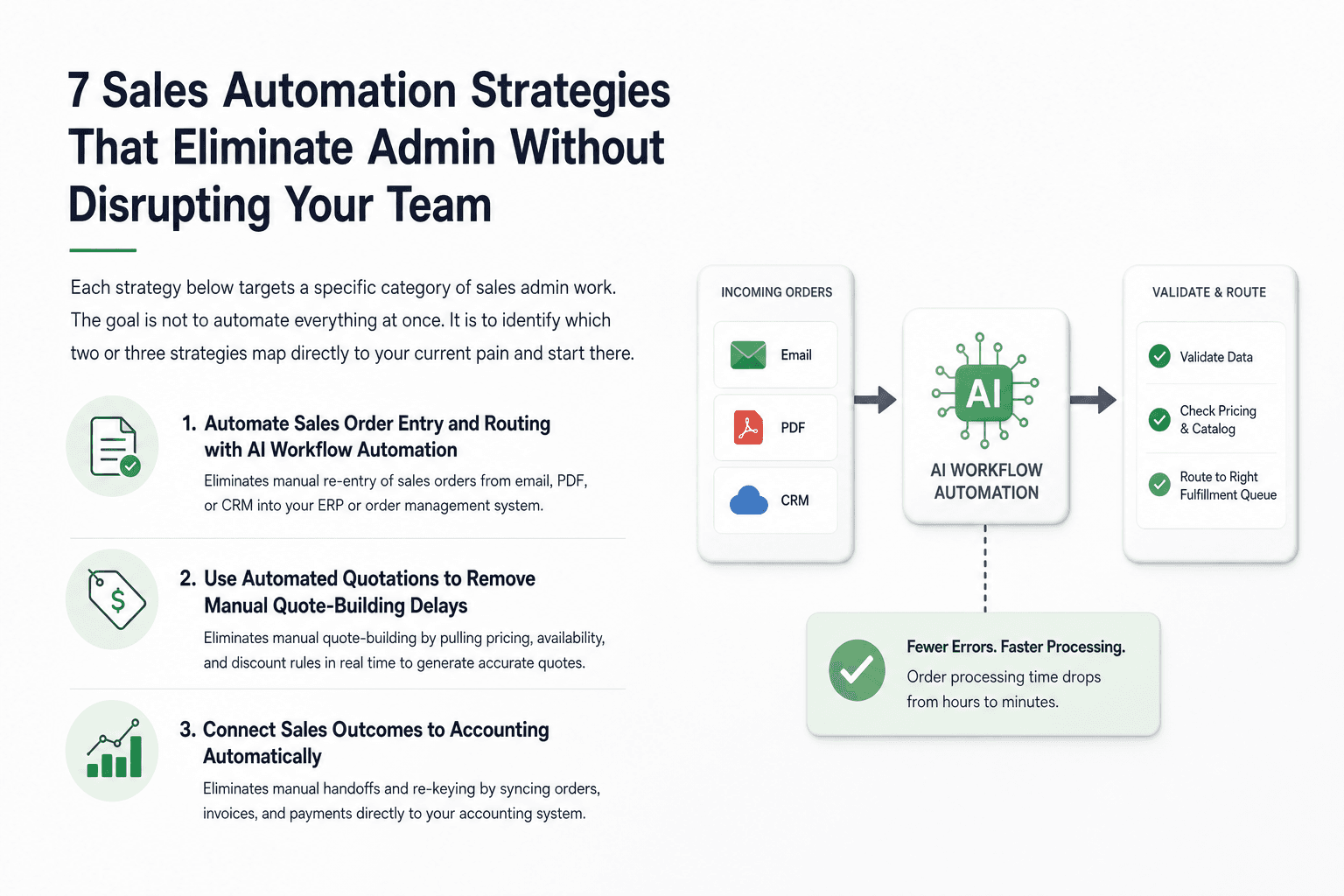
7 Sales Automation Strategies That Eliminate Admin Without Disrupting Your Team
Each strategy below targets a specific category of sales admin work. The goal is not to automate everything at once. It is to identify which two or three strategies map directly to your current pain and start there.
Strategy 1: Automate Sales Order Entry and Routing with AI Workflow Automation
The admin task eliminated: Manual re-entry of sales orders from email, PDF, or CRM into your ERP or order management system.
AI workflow automation reads incoming order data from any format, extracts the relevant fields, validates them against your product catalog and pricing rules, and routes the order to the right fulfillment queue. Errors trigger an exception flag rather than a silent failure.
Your ops team stops re-keying data and starts reviewing exceptions. Order processing time drops from hours to minutes.
Strategy 2: Use Automated Quotations to Remove Manual Quote-Building Delays
The admin task eliminated: Sales reps manually building quotes by pulling pricing, availability, and discount rules from multiple systems.
Automated quotations pull current pricing, stock availability, and approved discount tiers in real time to generate accurate quotes without human assembly. Quote turnaround moves from same-day or next-day to minutes.
For supply chain managers, this also means quotes reflect actual inventory positions, not outdated spreadsheets.
Strategy 3: Connect Sales Outcomes to Accounts Receivable Automation for Faster Cash Collection
The admin task eliminated: Finance teams manually triggering invoices and payment follow-ups after deals close.
Accounts receivable automation connects the closed-won signal in your CRM directly to invoice generation, delivery, and payment reminder sequences. No one needs to monitor the CRM to know when to send an invoice.
AP and AR teams gain visibility into payment status without chasing sales reps for deal updates.
Strategy 4: Apply Sales Order Automation to Sync Orders Directly into Your ERP
The admin task eliminated: Double-entry between your sales platform and your ERP, a classic source of version mismatch and downstream fulfillment errors.
Sales order automation creates a direct, validated sync between your order management layer and your ERP. Order-to-cash (o2c) automation closes the gap between the sale and the financial record without a human intermediary.
ERP records stay current in real time, which means finance, operations, and fulfillment are all working from the same data.
Strategy 5: Automate Follow-Up Sequences and CRM Updates Using AI Agents
The admin task eliminated: Sales reps manually logging call notes, updating deal stages, and scheduling follow-up tasks after every customer interaction.
AI agents monitor deal activity, update CRM fields based on email and calendar signals, and trigger follow-up sequences based on deal stage rules. Reps stop spending 30 to 45 minutes a day on CRM hygiene.
Coordinating these agents across CRM updates, ERP sync, and AR triggers requires a platform that understands the full process context, not just individual task triggers. Predflow builds AI agents around your specific end-to-end sales workflow, handling exceptions and edge cases reliably so your team is not manually patching gaps between disconnected tools.
Strategy 6: Use Procure-to-Pay Automation to Close the Loop Between Sales Commitments and Procurement
The admin task eliminated: Procurement teams manually creating purchase orders in response to sales commitments, often days after the sale.
Procure-to-pay automation detects when a sales order requires procurement action and generates the corresponding purchase request automatically. The handoff between sales and procurement becomes a system event, not an email chain.
This eliminates the lag between customer commitment and supplier order, which is where supply chain managers lose the most time and margin.
Strategy 7: Implement Reconciliation Automation to Eliminate End-of-Month Manual Matching
The admin task eliminated: Finance teams spending days at month-end manually matching sales orders, invoices, and payments across systems.
Reconciliation automation continuously matches transactions in the background, flagging discrepancies as they appear rather than surfacing them in a batch at month-end. Finance teams review exceptions instead of performing the matching themselves.
Month-end close accelerates, audit trails are cleaner, and the error rate from manual matching drops significantly.
What Sales Automation Actually Requires to Work Reliably at Scale
Seeing seven strategies in a list makes automation look simpler than it is. The strategies are sound. The challenge is the implementation layer: messy data, legacy systems, and real-world exceptions that no tool handles automatically.
Human Oversight and Exception Handling: Where Most Automations Break Down
The most common mistake in automation deployments is treating them as set-and-forget. An automation that runs without monitoring will eventually encounter an input it was not built for, and without a defined escalation path, it either fails silently or routes bad data downstream.
Every automation you deploy needs a defined exception condition, a flag that surfaces to a human reviewer, and a resolution path. This is not a weakness in the automation. It is the design feature that makes it trustworthy.
Before going live with any of the seven strategies, verify the following:
Data quality: Are the source fields clean and consistently formatted?
Exception path: What happens when the automation encounters an unrecognized input?
Integration checkpoints: Does the receiving system confirm the data was accepted correctly?
Audit trail: Can finance or ops trace every automated transaction back to its source?
Rollback plan: Can you disable the automation quickly without breaking the process entirely?
Integrating AI Automation with Existing ERP, CRM, and AP Systems
Artificial intelligence automation does not replace your existing systems. It works between them. The integration layer is where most projects slow down, especially when legacy ERP systems have limited API access or when CRM data quality is inconsistent.
Map your integration points before you configure any automation. Identify which systems are the source of truth for each data type, and build your automations around those records rather than creating new data stores that drift out of sync.
Measuring Whether Your Sales Automation Is Actually Working
AP automation ROI and broader workflow automation ROI require defined baselines. Before deployment, measure the current time cost of each manual task you are automating. After deployment, track error rates, processing time, and exception volume monthly.
If exception rates are climbing, your process map has gaps. If processing time is not improving, the integration layer has a bottleneck. Measurement is not optional. It is the feedback loop that makes automation improve over time.
How to Choose the Right Sales Automation Platform for Your Operation
With dozens of workflow automation platforms available, from enterprise suites to lightweight tools positioned as an n8n alternative, the evaluation criteria matter more than the vendor comparison.
Key Criteria: Process Context Awareness vs. Simple Task Triggers
Simple task trigger tools connect Point A to Point B when a condition is met. They work for linear, low-exception workflows. They break when your process has branching logic, approval chains, or data inconsistencies.
Process context-aware platforms understand the full workflow, not just the individual step. They handle conditional logic, maintain state across multi-step processes, and surface exceptions with enough context for a human to resolve them quickly. For operations leaders running complex sales cycles, this distinction determines whether the automation holds up at scale.
Red Flags to Avoid When Evaluating Business Automation Software
Avoid any business automation software vendor that cannot show you how exception handling works in their platform before you sign. If the answer is "you configure that yourself," you are taking on the engineering burden that the platform should carry.
Also avoid platforms that require dedicated developer resources to maintain integrations. Operations and finance managers should be able to monitor and adjust automations without filing an IT ticket every time a field name changes in your CRM.
Questions to Ask Any Automation Vendor Before Signing a Contract
Before committing to any workflow automation platform or automation agency, ask these questions directly:
How does your platform handle an input it was not trained on?
Can you show us an example of exception escalation in a sales workflow?
What does your integration maintenance process look like when our ERP updates?
Do you map our process before configuring any tools, or do you start with the tool?
What does the audit trail look like for finance and compliance review?
The answers reveal whether the vendor is selling a product or building a solution around your process.
Frequently Asked Questions
What is sales automation and how does it work in practice?
Sales automation uses software and AI agents to handle repetitive, rule-based tasks in your sales process without manual input. It works by connecting your existing systems, such as CRM, ERP, and invoicing tools, and routing data between them based on defined rules and conditions. When a deal closes, for example, an automation can simultaneously update your CRM, generate an invoice, create a purchase order, and trigger a follow-up sequence.
Which sales admin tasks should be automated first?
Start with the tasks that repeat most frequently and have the clearest rule-based logic: CRM data entry, sales order creation, invoice generation, and follow-up scheduling. These have high volume, low decision complexity, and measurable time costs, which makes them the fastest to implement and the easiest to measure.
How does AI automation differ from traditional RPA in a sales context?
Traditional RPA (robotic process automation) follows fixed scripts and breaks when the underlying interface changes. AI automation in sales uses machine learning and natural language processing to interpret variable inputs, such as unstructured emails or non-standard order formats, and adapt to changes without requiring a full rebuild. AI and RPA are increasingly combined in intelligent automation platforms.
Can small or mid-sized operations realistically implement sales automation without a large IT team?
Yes. Modern business automation platforms are designed for operations and finance teams, not developers. The key requirement is clear process documentation. If you can map your workflow inputs, outputs, and exceptions, most platforms handle the technical configuration. Starting with one high-impact automation rather than a full deployment also reduces implementation risk significantly.
How long does it typically take to see ROI from sales process automation?
For high-volume tasks like order entry and invoice processing, measurable time savings appear within the first 30 to 60 days of a stable deployment. Broader ROI from reduced errors and faster cash collection builds over the following two to three months as the automation handles edge cases more consistently and your team trusts the process enough to stop manually double-checking every output.
Start With the Bottleneck That Costs You the Most
If you recognized three or more of the admin bottlenecks described in this article, you already have enough signal to act. You do not need to wait for a larger digital transformation initiative or a new budget cycle.
The choice is straightforward: continue absorbing the cost of manual admin in the form of slower order cycles, delayed cash collection, and stretched operations teams, or start with one high-impact automation from the seven strategies above and build from there. Automation built around your process holds up. Automation bolted onto an unmapped workflow does not.
If you want to see how Predflow maps your sales workflow and identifies which automations will have the highest immediate impact, request a process assessment. No commitment, just clarity on where to start.
Bring 20 NetSuite bills to a 30-minute teardown
We will walk your actual invoices through capture, 3-way match and posting on the call, and tell you which steps an agent can take over. No prep beyond the PDFs.
FAQ
Frequently asked questions
What exactly is an AI agent
An AI agent is an autonomous system designed to handle specific business tasks end-to-end. Unlike simple chatbots, AI agents can reason, take actions, integrate with tools, and follow defined workflows.