AI AGENTS
Business Automation Tools: How Operations Teams Eliminate Manual Work Without Losing Control
Discover how business automation tools help operations teams cut manual work, connect systems, and stay in control without adding complexity.

Sanya Shah
Co-founder, Predflow

Operations teams running modern companies are still manually copying data between systems, chasing approvals over email, and rebuilding the same reports every week. The bottleneck is not a lack of software. Most teams already have too many tools. The real problem is a lack of connected, context-aware automation that actually maps to how work gets done.
Automating a broken process just makes the errors happen faster. That lesson surfaces repeatedly when teams rush to deploy business automation tools without first documenting what the process actually looks like in practice.
By the end of this guide, you will know which automation categories map to your highest-cost manual processes, which automation model fits your process complexity, and how to evaluate tools without falling into the platform lock-in trap.
Why Most Business Automation Tools Fail Ops Teams Before They Start
Failed automation rollouts share a common pattern. The team picks a tool, configures it around assumptions, and discovers two months later that the real process looks nothing like what was built.
The Tools-First Trap: Automating a Broken Process Faster
Buying software before mapping the process is the single most common reason automation projects stall. When the underlying workflow is inconsistent or unclear, automation does not fix it. It converts a broken manual process into a broken digital one that runs at higher speed and is harder to debug.
The business process automation platforms market is full of capable tools. The problem is not the tools. The problem is deploying them before anyone has documented handoff points, exception conditions, or the informal steps people add to make the official process actually work.
Identify your biggest weekly time drain before you look at a single product demo. That is where automation has the highest return, and it is also where undocumented process variation is most likely to surface.
What Process Visibility Actually Requires Before You Touch a Tool
Process visibility means documenting every step, every handoff, and every exception path before any automation workflow is configured. This is not a documentation exercise. It is a risk assessment.
You need to know which steps require human judgment, where errors currently occur, and which downstream systems depend on each output. An rpa process built on incomplete process knowledge will handle the happy path and fail silently on everything else.
What is workflow automation? Workflow automation is the use of software to execute recurring business tasks based on predefined rules, removing manual handoffs and reducing human error across connected systems.
Company mapping at this stage means listing every system involved, every team that touches the process, and every data format in play. That map becomes your automation specification.
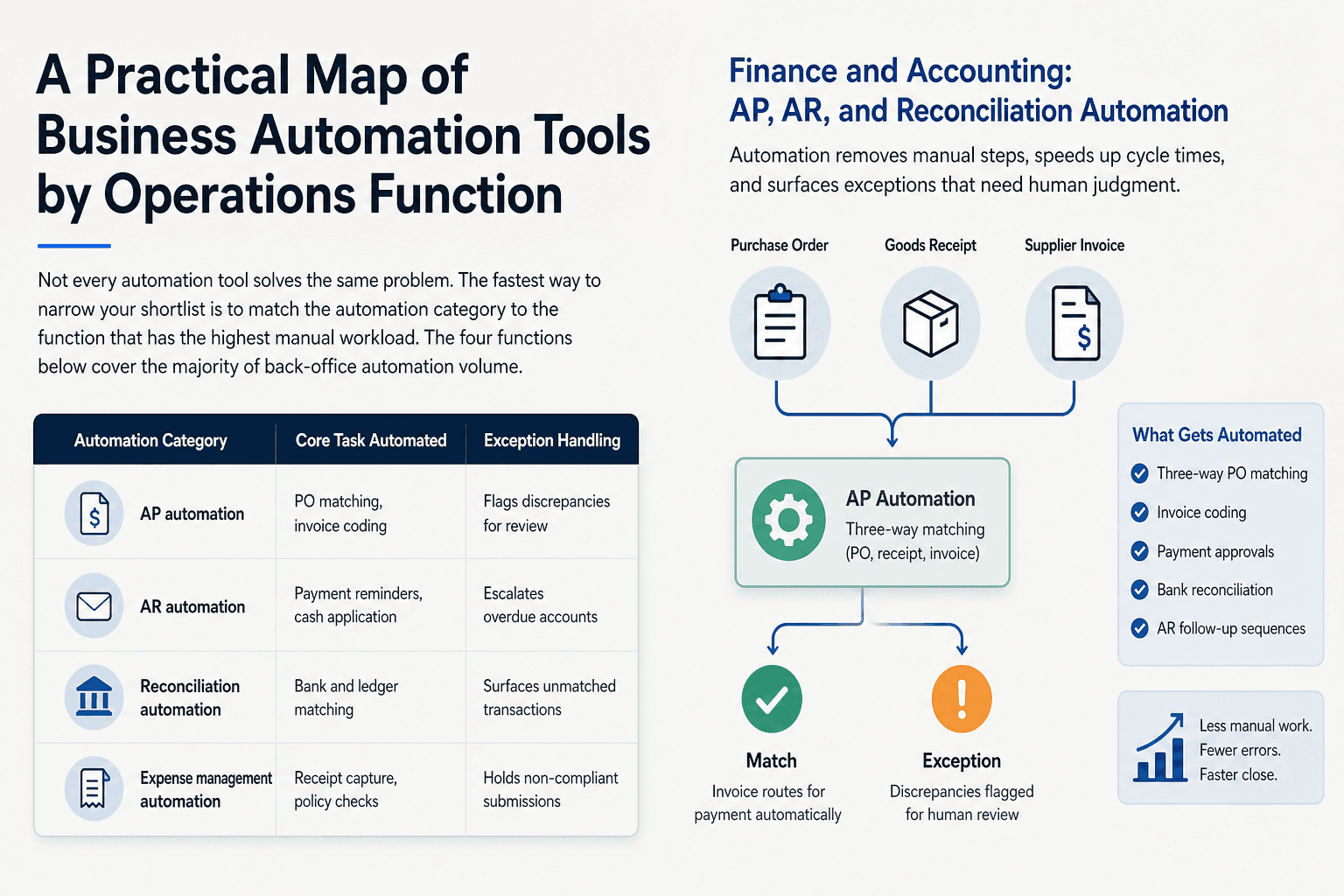
A Practical Map of Business Automation Tools by Operations Function
Not every automation tool solves the same problem. The fastest way to narrow your shortlist is to match the automation category to the function that has the highest manual workload. The four functions below cover the majority of back-office automation volume.
Finance and Accounting: AP, AR, and Reconciliation Automation
What gets automated: Three-way purchase order matching, invoice coding, payment approvals, bank reconciliation, and accounts receivable follow-up sequences.
Accounts payable automation solutions remove the manual step of matching invoices to purchase orders and receipts. When all three align, the invoice routes for payment without human intervention. Exceptions, such as price discrepancies or missing PO numbers, get flagged for review rather than sitting in an inbox.
Automate reconciliation removes the end-of-month scramble. Accounting automation tools pull transaction data from multiple systems, match records automatically, and surface only the unmatched items that require a human decision.
Automation Category | Core Task Automated | Exception Handling |
|---|---|---|
AP automation | PO matching, invoice coding | Flags discrepancies for review |
AR automation | Payment reminders, cash application | Escalates overdue accounts |
Reconciliation automation | Bank and ledger matching | Surfaces unmatched transactions |
Expense management automation | Receipt capture, policy checks | Holds non-compliant submissions |
AP automation ROI is most visible in invoice processing time and error rates. Teams processing high invoice volumes see the clearest gains first.
HR and People Operations: From Onboarding to Payroll
What gets automated: Offer letter generation, new-hire document collection, system provisioning requests, benefits enrollment reminders, and offboarding checklists.
HR automation software handles the repetitive document generation and routing that consumes HR coordinator time. When a new hire is confirmed, an hr automation tool can trigger a sequence: generate the offer letter, send it for e-signature, create the onboarding checklist, and notify IT for system access, all without a human initiating each step.
Human resources automation software also covers ongoing HR process automation tasks such as timesheet reminders, policy acknowledgment tracking, and performance review scheduling. Automated hr does not replace HR judgment. It removes the administrative load that prevents HR teams from doing higher-value work.
Supply Chain and Procurement: Purchase-to-Pay and Order Fulfillment
What gets automated: Purchase requisition routing, supplier confirmation, goods receipt matching, sales order creation, and shipment status updates.
Supply chain management automation connects procurement requests to supplier systems and internal ERP records without manual re-entry. Procure to pay automation covers the full cycle from purchase request through invoice payment, removing the handoffs that typically require emails between procurement, finance, and operations.
Automated supply chain tools flag delivery exceptions, trigger reorder rules, and route discrepancy resolutions automatically. O2c automation handles the order-to-cash sequence: sales order entry, fulfillment confirmation, invoice generation, and payment matching.
Procurement automation software reduces cycle time most significantly in high-volume, repeat-purchase scenarios where the approval rules are consistent.
Back-Office and Document Processing: Invoices, Approvals, and Data Entry
What gets automated: Invoice data extraction, approval routing, contract metadata capture, form processing, and data migration between systems.
Document processing automation uses AI-based extraction to pull structured data from unstructured documents, invoices, contracts, and forms, and route it into the correct system fields. Automated document processing removes the manual re-keying step that introduces most data entry errors.
Invoice automation tools handle both inbound supplier invoices and outbound customer invoices. ERP automation connects document processing outputs directly to ERP records, eliminating duplicate entry across systems.
RPA, AI Workflow Automation, and Intelligent Automation: Which Model Fits Your Process
Choosing the wrong automation model is as costly as choosing the wrong tool. Rules-based automation applied to a judgment-heavy process will break. AI automation applied to a simple, structured task is unnecessary overhead. The selection framework below matches model to process type.
What RPA Does Well and Where It Breaks
RPA, robotic process automation, excels at high-volume, rule-based tasks involving structured data and stable interfaces. Logging into a system, extracting a table, and pasting values into another system is a textbook rpa process. What is rpa in practice? It is software that mimics the mouse-and-keyboard actions a human would take, executed at scale and without breaks.
RPA in automation projects delivers fast results when the process does not change and the data is clean. It breaks when document formats vary, when systems update their interfaces, or when a step requires interpreting context rather than following a fixed rule.
RPA | AI Workflow Automation | Intelligent Automation | |
|---|---|---|---|
Best-fit process | Structured, repetitive, rule-based | Semi-structured, variable inputs | Complex, judgment-dependent |
Handles exceptions? | No. Fails or stops | Partially, with confidence thresholds | Yes, with human oversight loops |
Requires structured data? | Yes | No | No |
Typical ops use case | Data entry, screen scraping | Invoice extraction, email triage | End-to-end process orchestration |
Where AI Workflow Automation and Agentic Process Automation Take Over
AI workflow automation handles processes where inputs vary in format or content. Extracting line items from invoices that arrive in different layouts, classifying support requests by type, or drafting responses based on document context all require AI, not rules.
Agentic process automation extends this further. Agentic systems take multi-step actions across tools, make intermediate decisions based on context, and escalate to a human only when confidence is low or a genuine exception occurs. AI in rpa combines the execution layer of traditional RPA with the contextual judgment of AI models.
The Intelligent Automation Stack: When You Need All Three Working Together
Intelligent automation layers RPA execution, AI-based interpretation, and process orchestration into a single workflow. This is appropriate for end-to-end processes that span multiple systems, include unstructured inputs, and require exception handling that cannot be pre-scripted.
This is the gap Predflow is built for. Rather than applying a tool and hoping the process fits, Predflow starts by mapping the process in full, then builds AI agents that handle the context-dependent decisions rules-based systems cannot. Human oversight and continuous improvement are built into every workflow, not added after the fact.
How to Evaluate Business Automation Tools Without Getting Locked Into the Wrong Platform
A vendor demo shows the best-case path. Your job during evaluation is to stress-test the edge cases. The questions below apply to any business automation software category.
Five Questions to Ask Before You Sign Any Automation Contract
What happens when an exception occurs? If the answer is "it stops and someone gets an email," the workflow automation platform has no real exception handling. You need to know how errors are flagged, who handles them, and how the system resumes.
How do you diagnose a failed run? Process visibility and debugging are where most platforms under-deliver. Ask for a live demonstration of how a failed workflow is traced, not a slide about logging features.
Which systems does this connect to natively, and how are the others handled? Fragmented tool coordination is the most common scaling problem. An automation workflow that requires a separate middleware layer for every integration adds failure points and maintenance overhead.
What does re-configuration cost when a source system changes? Platforms with deep ERP automation or SAP business process management integrations sometimes require vendor involvement to update connections. This cost is rarely in the initial contract.
Can you speak to an operations team that uses this at our process volume? Vendor references for ops teams differ from general enterprise references. Ask specifically for AP, HR, or supply chain use cases.
Integration Depth vs. Integration Breadth: What Actually Matters for Your Stack
A platform advertising 500 integrations is less useful than one with deep, tested connections to the five systems your team uses every day. Workflow automation tools that integrate broadly but shallowly often break when field mappings change or API versions update.
Office automation tools and collaborative communication tools that sit at the edge of your process (notifications, task creation, document storage) are less critical than the core system integrations that carry transaction data. Prioritize depth over count.
Scalability Signals: Can the Platform Grow Without Forcing You to Re-Architect
When automation compounds across every process in a company, the volume of workflows, data, and exception handling grows significantly. A workflow automation platform that handles one process cleanly does not automatically handle fifty.
Ask vendors how their business automation platform handles concurrent workflow execution, how role-based access scales as teams grow, and whether adding new processes requires re-architecting existing ones. N8n alternatives and open-source workflow automation services can offer flexibility but require engineering capacity to maintain at scale.
Building Your First Business Automation Workflow: A Step-by-Step Approach for Operations Teams
Knowing which tool category fits your process is not enough. The sequence in which you build matters as much as what you build.
Step 1 — Select the Right First Process (Hint: It Is Not the Flashiest One)
Choose a process that is high-volume, rule-based, and fully within one team's control. AP invoice matching is a strong starting point for finance teams. It is repetitive, the rules are clear (does the invoice match the PO and receipt?), and the time savings are measurable from day one.
The temptation is to start with the most complex process because it feels like the biggest win. That is the wrong move. Complexity multiplies implementation risk. A clean first automation builds the team's confidence and creates a working template.
Step 2 — Map the Current State Before You Configure Anything
Document every step a human currently takes, including the informal ones. For an AP workflow, this means: who receives the invoice, how is it entered, who checks the PO, who approves, who initiates payment, and where do errors currently get caught.
This map will reveal the exception paths that never appear in the official process documentation. New-hire onboarding packet generation, for example, often has a hidden step where HR chases a hiring manager for a start date confirmation. That step needs to be built into the automation, not assumed away.
Step 3 — Define Exception Handling and Human Oversight Touchpoints
Every automated workflow needs explicit rules for what happens when the expected condition is not met. For purchase automation or PO approval routing, this means specifying which discrepancy types require a manager decision and which can be resolved automatically against a tolerance rule.
This is the step most teams skip. The result is an automation that runs cleanly for weeks and then produces a silent error that nobody catches until a supplier escalates. Build the exception paths before go-live, not after.
Step 4 — Pilot, Measure, and Iterate Before Full Rollout
Run the automation on a subset of transactions for two to four weeks. Measure processing time, error rate, and exception volume. Compare against the pre-automation baseline.
A large share of small business owners consistently report wanting to spend less time managing cash flow. Finance process automation delivers that, but only if the pilot catches the edge cases that did not appear in the mapping phase. Service management automation and sales order automation follow the same pattern. Pilot first, scale second.
Frequently Asked Questions
What is the difference between RPA and AI automation for business processes?
RPA (robotic process automation) follows fixed rules to execute structured, repetitive tasks on stable systems. AI automation handles variable inputs, unstructured data, and context-dependent decisions that rules cannot anticipate. RPA breaks when inputs change format or rules do not cover an exception. AI workflow automation adapts to variation, making it the better fit for document-heavy or judgment-intensive processes.
Which business automation tools are best for accounts payable teams?
AP teams get the most value from accounts payable automation solutions that handle three-way PO matching, invoice data extraction, and exception routing. The priority capabilities are automated document processing for invoice capture, an accounts payable automation system that connects to the existing ERP, and clear exception flagging that routes discrepancies to the right approver without stopping the workflow entirely.
How long does it take to implement a business automation workflow?
A single, well-scoped workflow (such as AP invoice matching or new-hire document generation) can be live in four to eight weeks when the process is documented before configuration begins. Complex, multi-system workflows take longer. The primary variable is process clarity, not tool capability. Poorly documented processes extend implementation timelines more than any technical factor.
Can small businesses afford business automation software, or is it only for enterprise?
Business automation software is available across a wide range of price points, including tools designed specifically for smaller teams. The ROI calculation is straightforward: if a process consumes significant staff hours per week, automation pays for itself quickly. Manufacturing software for small business and HR automation tools are now available at subscription tiers accessible to teams with fewer than 50 employees.
What processes should operations teams automate first?
Start with the process that combines high transaction volume, clear rules, and measurable output. AP invoice matching, purchase order routing, new-hire document generation, and bank reconciliation all meet this criteria. Avoid starting with processes that require significant human judgment or that cross multiple departments with conflicting approval rules. Clean, high-volume, and rule-consistent is the profile that delivers the fastest visible return.
The Decision Is Simpler Than It Looks
You now have the framework to identify your highest-cost manual process, match it to the right automation model, and evaluate any business automation tool against criteria that actually reflect your operational reality.
The only remaining choice is whether you map one process this week or continue researching. Manual labor costs compound. Every week a team spends on repetitive handoffs is a week the gap between your current capacity and the scale you need grows wider. Headcount is a ceiling. Automation removes it.
If you want to move from framework to action, Predflow offers a process mapping session where your highest-priority workflow gets mapped and scoped with you directly. It is a working session, not a sales call.
Bring 20 NetSuite bills to a 30-minute teardown
We will walk your actual invoices through capture, 3-way match and posting on the call, and tell you which steps an agent can take over. No prep beyond the PDFs.
FAQ
Frequently asked questions
What exactly is an AI agent
An AI agent is an autonomous system designed to handle specific business tasks end-to-end. Unlike simple chatbots, AI agents can reason, take actions, integrate with tools, and follow defined workflows.