Backoffice Ops
Quotation Processing Automation: RFQ-to-Quote Explained
How quotation processing automation turns an inbound RFQ into a priced quote without manual re-keying, and what it takes to run it on your own pricing.

Denisha R
Product Manager, Predflow

A production line stalls while a procurement team waits three to five days for vendor quotes. The vendors aren't slow, the process is. Manual handoffs between email inboxes, ERP systems, and spreadsheets are the actual bottleneck, not response time from suppliers.
Common quoting failures compound the damage: miscalculations from outdated rate sheets, slow responses that lose potential suppliers, and documents that don't reflect current pricing, all creating rework loops before an order ever gets placed.
This article explains exactly what automated quotations are, where they break the delay cycle, and what separates implementations that deliver results from those that stall inside a pilot.
What Automated Quotations Actually Means (Beyond the Buzzword)
Automated quotations is not a feature inside your ERP's price lookup module. It is a process architecture that replaces human-mediated handoffs, between request receipt, pricing logic, vendor comparison, and quote generation, with connected, rule-driven, and AI-assisted steps that run without waiting for someone to open an email.
Automated quotations defined: A procurement trigger, an RFQ from a buyer, a reorder signal from an ERP, or a portal submission, initiates a connected workflow that extracts request data, applies pricing rules and vendor databases, and produces an approved or review-ready quote document. No manual touchpoints are required between trigger and output.
The core process: from RFQ trigger to approved quote without manual touchpoints
The process begins when a request for quotation enters the system, through email, a supplier portal, or directly from an ERP procurement module. Automated quotations software parses that request, identifies line items, quantities, and required delivery windows, then matches those parameters against vendor pricing databases and contract terms.
The output is a structured quote, not a draft that someone still needs to populate.
What gets automated versus what stays human
Data extraction, pricing lookup, vendor ranking, and document generation are fully automated. Human judgment stays where it belongs: approving quotes above defined thresholds, resolving exceptions where no vendor match exists, and signing off on non-standard terms.
This is the critical distinction between procurement automation software and a simple price-lookup tool. The workflow automation handles volume; humans handle judgment calls.
How automated quotations fit inside broader procure-to-pay automation
Automated quotations sit at the front of the procure-to-pay automation chain. Once a quote is approved, the same workflow can trigger purchase order generation, vendor confirmation, and invoice matching downstream.
Treating quoting as an isolated tool misses the compounding value. When it connects to the full procure-to-pay process, each automated step removes a downstream manual task.
Where Manual Quoting Breaks Procurement (The Real Delay Drivers)
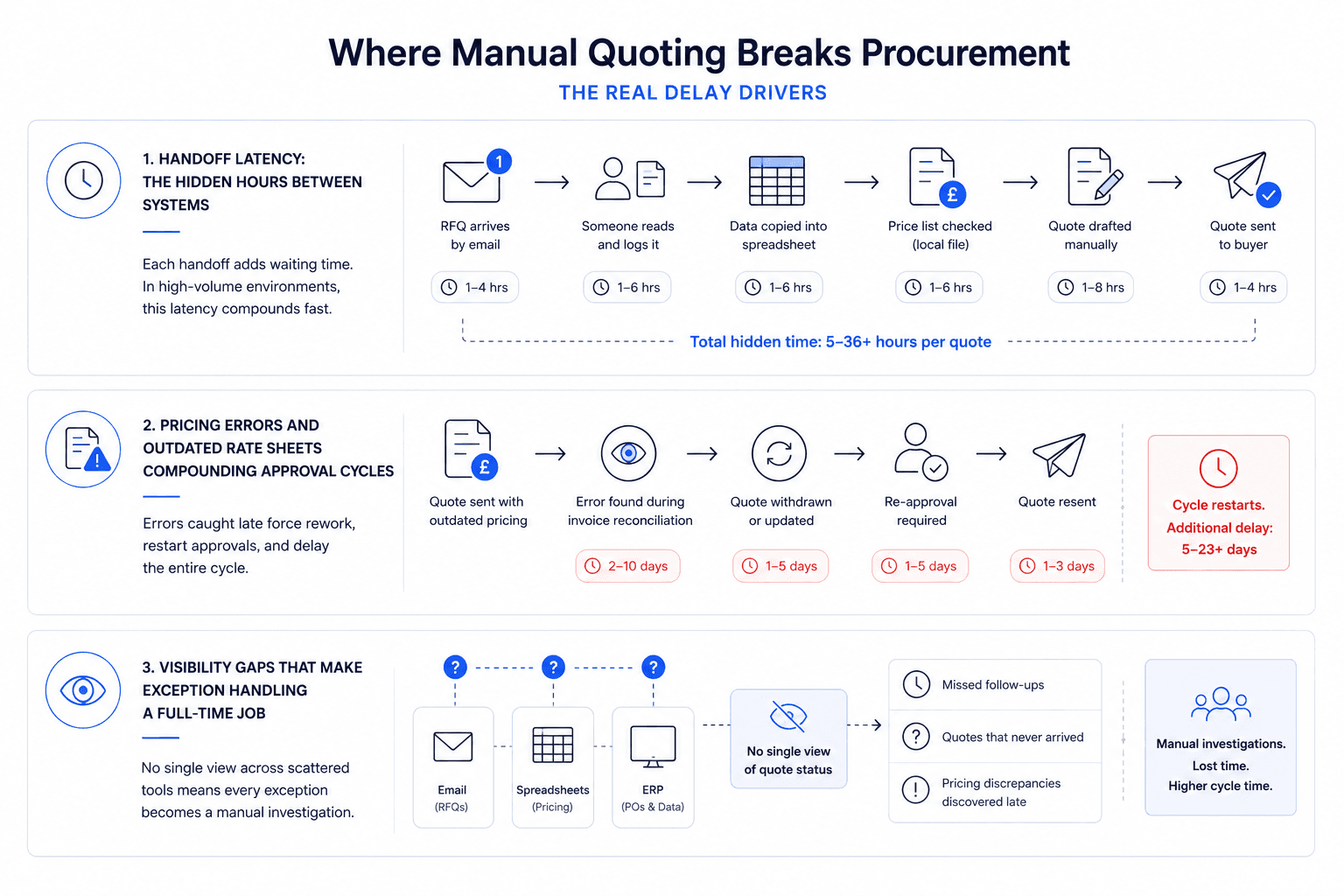
Manual quoting does not fail at the point of sending a quote. It fails at every handoff before that, and most teams don't measure those gaps because the delays are spread across inboxes, spreadsheets, and systems that don't talk to each other.
Handoff latency: the hidden hours between systems
An RFQ arrives by email. Someone reads it, copies the data into a spreadsheet, checks a price list saved locally, and drafts a response manually. Each of those steps involves a human waiting for the previous one to finish.
In high-volume environments, this latency compounds fast. Operations teams running accounts payable automation solutions frequently find that the quote stage alone accounts for the majority of their procurement cycle time, not vendor response or approval.
Pricing errors and outdated rate sheets compounding approval cycles
Miscalculations from outdated pricing data create a specific failure mode: the quote goes out, the error is caught at invoice reconciliation, and the cycle restarts. Document processing automation addresses this by pulling pricing from a live database rather than a file someone last updated manually.
Industry data from CNC manufacturing benchmarks shows that many contract manufacturers process high volumes of small and medium batch enquiries with order-to-request ratios well below 30 percent, meaning the majority of quoting effort produces no order. When the cost per quote is high because the process is manual, that conversion gap becomes a direct operational cost.
Visibility gaps that make exception handling a full-time job
When quoting runs across email, spreadsheets, and ERP modules that don't share data, there is no single view of where any RFQ sits. A missed follow-up, a quote that never arrived, or a pricing discrepancy discovered late, each becomes a manual investigation.
Supply chain management automation eliminates most of these gaps. But without visibility into the quoting stage, the rest of the automated supply chain still breaks at the front door.
How Automated Quotations Work: The End-to-End Process Flow
Understanding the mechanics matters because it determines where implementation will hit friction in your specific environment. The sequence below reflects the implementation logic that logistics and procurement teams use when deploying quote automation at scale.
Step 1: Ingest and parse: capturing RFQ data from email, portal, or ERP
The system monitors configured inbound channels: email, web portal, EDI feed, or ERP procurement module.
When an RFQ arrives, automated document processing extracts structured data: item codes, quantities, required delivery dates, and buyer specifications.
Unstructured formats such as PDFs, scanned documents, or non-standard emails are handled through AI parsing that maps fields to the system's data schema.
Step 2: Rules and AI: applying pricing logic, vendor databases, and approval thresholds
The workflow automation engine applies pricing rules: contracted rates, volume discounts, lead-time adjustments, and margin floors.
AI in automation handles exceptions, such as items without exact matches, new vendors, or requests outside standard parameters, by flagging them rather than generating an incorrect quote.
Vendor ranking logic scores options against price, availability, and historical performance.
Step 3: Output and handoff: generating quote documents and routing for human review
The system generates a formatted quote document, a PDF, ERP record, or portal submission, populated with all verified data.
Quotes within approved thresholds are routed directly for sending. Quotes above threshold or flagged for exceptions route to a human reviewer.
Sales order automation or purchase order triggers can fire automatically once a quote is accepted.
Where human oversight stays in the loop
Agentic process automation handles the volume, but approval thresholds keep human decision-makers in control of high-value or non-standard quotes. Tracking KPIs such as response time, quote accuracy rate, and exception volume tells teams whether the automation is performing or drifting.
Automated Quotations Inside a Wider AI Automation Stack
Quoting automation that operates as a standalone tool creates a new silo. The procurement delay just moves downstream to the next manual handoff: purchase order creation, vendor acknowledgment, or invoice matching.
Connecting quotations to procure-to-pay and O2C automation
Procure-to-pay automation covers the full cycle from supplier selection through invoice approval. Automated quotations feed into that cycle at the trigger point, before a PO exists.
On the revenue side, O2C automation connects approved quotes to sales order creation, reducing the gap between customer acceptance and order fulfillment. Accounts receivable automation then closes the downstream loop. Building these connections from the start prevents the problem of automating one stage while leaving manual handoffs on either side.
Why context-aware agents outperform rule-only RPA in exception handling
RPA in automation executes defined rules reliably. When a request falls outside those rules, such as a new vendor, an unusual specification, or a pricing conflict, standard rpa process flows fail silently or require manual intervention to restart.
AI and robotic process automation address this by adding a reasoning layer. The agent understands the context of the exception, why it occurred, what data is missing, and what the appropriate escalation path is, rather than stopping and waiting for a human to debug the failure.
Process mapping first: why starting with workflows beats starting with tools
Teams that select a tool before mapping their process automate the wrong steps. The manual handoffs that create the most delay are rarely the obvious ones; they're often the informal ones: the Slack message asking for a price check, the spreadsheet maintained by one person, the approval email chain.
This is the approach Predflow takes, mapping the full quotation-to-payment workflow before selecting or building any automation tools. Predflow's AI agents are designed to understand the context of each step, handle edge cases that rule-based RPA drops, and keep human oversight built into every approval threshold, so teams gain speed without losing control. For procurement and AP teams dealing with high exception volumes, that distinction between rigid rules and context-aware handling is where most automation projects succeed or fail.
What Automated Quotations Delivers in Measurable Terms
The business case for automated quotations rests on mechanisms, not promises. Each outcome below connects to a specific failure point the automation removes.
Response time: from days to hours without adding headcount
Manual quoting cycles measured in days compress to hours when ingestion, pricing lookup, and document generation run without human handoffs. Operations teams implementing procurement automation report that quote response time is typically the first and most visible improvement, because the delay was always in the process, not the people.
Error reduction: removing the pricing and data-entry failure points
Automated quotations pull pricing from live databases, not locally saved rate sheets. This removes the specific failure mode where outdated pricing creates invoice reconciliation problems downstream, a direct driver of accounts payable automation system rework cycles.
Scalability: handling volume spikes without proportional cost increases
When order-to-request ratios run below 30 percent on high-volume small and medium RFQs, the cost of quoting each request manually becomes a significant operational drag. Automated quotations process each request at near-zero marginal cost, so volume spikes don't require temporary headcount or queue backlogs.
AP automation ROI signals to track in the first 90 days
Track these in the first 90 days to validate the business case:
Quote cycle time: time from RFQ receipt to quote sent
Exception rate: percentage of quotes requiring human intervention
Pricing error rate: quotes requiring correction before or after acceptance
Cost per quote: total quoting labor cost divided by quotes processed
AP automation ROI becomes visible fastest in cost-per-quote and cycle time, because both are measurable from day one.
How to Evaluate Whether Your Workflow Is Ready for Automated Quotations
Readiness is not a technology question, it is a process question. The teams that implement procurement automation fastest are the ones who can describe their current quoting steps clearly before they select any tool.
Three signals your quoting process is costing more than it should
First, your team spends time on data re-entry, copying RFQ details from one system into another. Second, pricing errors surface at invoice reconciliation rather than at the quote stage. Third, quote response time varies significantly depending on who handles the request.
Each of these signals points to a specific automation opportunity, not a general inefficiency.
The data and system prerequisites that determine implementation speed
Automated quotations require structured vendor pricing data, defined approval thresholds, and at least one inbound channel to monitor. Teams with pricing data scattered across individual files or approval rules that exist only informally will spend the first phase of implementation cleaning data, not deploying automation.
Assess your data state before evaluating any business process automation platforms.
A four-question readiness check before selecting any automation tool
Can you describe your current quoting steps in order, from RFQ receipt to quote sent? If no, map the process first; automation of an unmapped workflow replicates the problems.
Is your vendor pricing data stored in a single, structured source? If no, consolidation is the first task, not tool selection.
Do you have defined approval thresholds for quote values? If no, establish these before any workflow automation tool is configured.
Do you know your current average quote cycle time? If no, you cannot measure improvement, and cannot build an internal business case.
Frequently Asked Questions
What is the difference between automated quotations and a standard ERP quote module?
An ERP quote module stores pricing and generates documents, but still requires a human to initiate, populate, and route each quote. Automated quotations connects the entire process, from inbound RFQ detection through pricing logic, document generation, and approval routing, without manual steps between those stages. The distinction is end-to-end workflow automation versus a tool that assists a manual process.
How long does it take to implement automated quotations in a procurement workflow?
Implementation time depends on data readiness and integration complexity. Teams with structured pricing data and defined approval rules can have basic automated quotation workflows running in weeks. Teams with fragmented data or informal approval processes typically spend the first phase on process mapping and data consolidation before automation configuration begins.
Can automated quotations handle custom or complex RFQs, or only standard items?
Standard, high-volume RFQs are automated fully. Complex or non-standard requests, such as custom specifications, new vendors, or items outside contracted pricing, are flagged for human review rather than processed automatically. The system handles volume while routing genuine exceptions to the people equipped to resolve them.
What happens when an automated quotation system encounters an edge case it cannot resolve?
A well-configured system flags the exception, captures what data it has, and routes the incomplete quote to a human reviewer with context about why it stalled. Rule-only RPA systems stop and wait. Context-aware AI agents categorize the exception and escalate with enough information for the reviewer to resolve it quickly.
How do automated quotations connect to accounts payable automation downstream?
An accepted quote can trigger purchase order generation, which then flows into vendor acknowledgment and invoice matching within an accounts payable automation system. When quote data is structured and captured accurately at the front of the cycle, it eliminates the re-entry and reconciliation errors that create rework in AP. The quoting stage sets the data quality for everything downstream.
Conclusion
You now have a working definition of automated quotations, a clear map of where manual quoting creates delay, and a framework to assess whether your process is ready to automate. The mechanics are straightforward. The implementation risk is almost never the technology, it is the unmapped process underneath it.
The barrier most operations leaders hit at this stage is not knowing which step to automate first. That is a process mapping problem, not a technology selection problem. Choosing a tool before answering the four readiness questions above is the most common reason procurement automation pilots stall.
If your team is losing hours each week to manual quoting handoffs, the starting point is mapping the process, not selecting a tool. See how Predflow approaches procurement workflow automation. Book a process review to identify your highest-impact automation opportunity.
Bring 20 NetSuite bills to a 30-minute teardown
We will walk your actual invoices through capture, 3-way match and posting on the call, and tell you which steps an agent can take over. No prep beyond the PDFs.
FAQ
Frequently asked questions
What exactly is an AI agent
An AI agent is an autonomous system designed to handle specific business tasks end-to-end. Unlike simple chatbots, AI agents can reason, take actions, integrate with tools, and follow defined workflows.