Business Ops
SAP Inventory Management: How It Works [2026 Guide]
SAP showed stock on hand. The warehouse agreed. The line still stopped. What SAP inventory management actually requires to work, module by module.

Gautam Borad
Founder, Predflow

A production line stops mid-shift. The warehouse shows stock on hand. SAP shows the same. But somewhere between the goods receipt posted three days ago and the transfer order that never completed, the material is sitting in a staging area nobody was watching. The data existed. The process did not.
This is the core tension in SAP inventory management: the system records every movement, but the gaps between movements still depend on people, emails, and manual checks to hold together. Understanding exactly how SAP manages inventory — and where human touchpoints remain — is what separates teams that react to stock problems from teams that prevent them.
This article covers how SAP inventory management works, what it tracks, where it creates operational gaps even in well-configured environments, and what practical steps operations leaders can take to close those gaps without a full reimplementation.
What SAP Inventory Management Actually Does
The Core Definition in Plain Language
SAP inventory management is the component within SAP's Materials Management module that records, tracks, and values every movement of stock across a business — from the moment goods arrive at a warehouse dock to the moment they leave for production or delivery. It gives operations teams a real-time view of what stock exists, where it is, and what it is worth at any point in time. It sits inside the broader SAP ERP ecosystem, connecting procurement, production, and finance into a single data layer.
Where It Lives Inside SAP: MM Module and S/4HANA
SAP inventory management lives inside the MM module, which stands for Materials Management. This is one of the core SAP ERP modules covering procurement, goods movements, and stock valuation. In SAP S/4HANA, the same capabilities exist but run on the HANA in-memory database, which means faster reporting and tighter integration with other modules like finance and production planning. The architecture of systems applications and products in data processing has always been built around integration, and inventory management is one of the clearest examples of that design in practice.
What It Tracks: Goods Movements, Stock Types, and Valuation
SAP inventory management tracks stock across several categories: unrestricted use stock, stock in quality inspection, blocked stock, and stock in transit. Every movement between these categories is recorded as a goods movement with a document trail. Valuation happens automatically at the time of posting, so stock values in the system always reflect current quantities and the costing method assigned to the material. This is what makes material management in SAP foundational to both operations and finance reporting.
How SAP Inventory Management Works Step by Step
The process flow in SAP inventory management follows the physical movement of goods. Each step generates a system document, updates stock quantities, and triggers downstream processes. Understanding this sequence is where operations leaders start to see where their process holds and where it breaks.
Goods Receipt: How SAP Records Incoming Stock
When a delivery arrives, the warehouse team posts a goods receipt against a purchase order. In SAP, this is typically done through transaction MIGO. The system matches the incoming quantity to the open purchase order, updates stock quantities in the relevant storage location, and creates an accounting document that credits the goods receipt clearing account. This single posting connects procurement, inventory, and finance simultaneously. The accuracy of this step depends heavily on the Material Master record being complete, including purchasing, accounting, and MRP views.
One practitioner insight that holds up across large multi-plant environments is this: clean Material Master data is the single biggest driver of fewer errors and smoother operations. Skipping key views during material master setup, such as the Purchasing, Accounting, or MRP views, is where process gaps begin. Those gaps do not show up at configuration time. They surface weeks later as posting errors, valuation problems, or inventory reconciliation issues.
Storage Location Management and Batch Tracking
After goods receipt, stock sits in a storage location within a plant. SAP manages stock at the plant and storage location level by default. For industries where tracking at the batch level matters, batch management in SAP MM allows the system to record additional attributes like expiry date, supplier lot number, or production date alongside each inventory movement. This is particularly relevant in pharmaceutical, food, and chemical environments where regulatory compliance requires traceability at the batch level.
Goods Issue and Transfer Orders in the Warehouse
When materials move from storage to production or to a customer, a goods issue is posted. This reduces stock quantity and creates a corresponding accounting entry. Transfer orders handle internal stock movements between storage locations within the same plant. Each of these steps generates a material document that serves as the audit trail for every change in stock quantity or location.
Real-Time Stock Valuation and Accounting Integration
Every goods movement in SAP inventory management posts a corresponding financial document. This is the SAP ERP integration between MM and FI, the financial accounting module. Stock values update in real time, which means the balance sheet reflects current inventory values without manual journal entries. This integration is one of the clearest examples of SAP's end-to-end business process design.
Key SAP Inventory Management Features Operations Teams Rely On
Real-Time Stock Visibility Across Plants and Warehouses
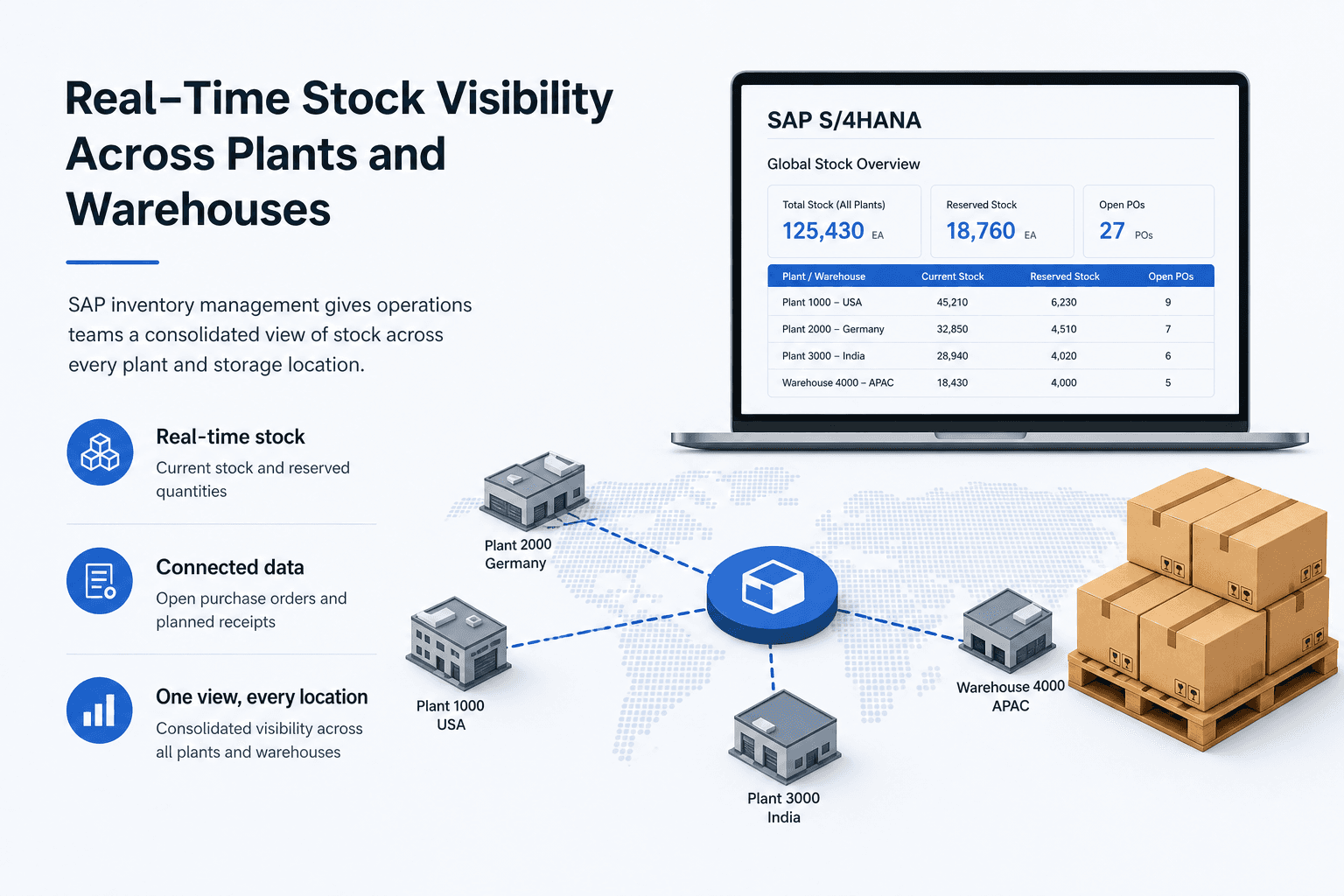
SAP inventory management gives operations teams a consolidated view of stock across every plant and storage location in the system. Managers can query current stock, reserved quantities, and open purchase orders from a single transaction. In SAP S/4HANA, this visibility extends to real-time analytics without needing a separate reporting layer. For organizations running SAP software for supply chain management across multiple sites, this consolidated view replaces the manual stock roll-ups that previously consumed analyst time.
Demand Planning and MRP Integration
Demand planning in SAP connects inventory data directly to Materials Requirements Planning. MRP reads current stock levels, open purchase orders, planned production orders, and sales demand to calculate net requirements. When stock falls below a reorder point, MRP can generate purchase requisitions automatically. This closes the loop between what is in the warehouse and what procurement needs to act on, without manual intervention between the two.
Procurement and Purchase Order Linkage
Every goods receipt in SAP inventory management references a purchase order. This linkage means every incoming stock movement is tied to an approved procurement document, a supplier, a price, and delivery terms. The SAP procurement module uses this connection to track delivery performance, manage open quantities, and trigger three-way matching during invoice processing. The SAP S/4HANA sourcing and procurement layer extends this further with embedded analytics and supplier collaboration tools.
Inventory Reporting and Audit Trails
SAP provides native inventory reports covering stock overviews, goods movement history, slow-moving stock, and inventory aging. These reports support SAP auditing requirements and give finance teams the data they need for period-end closing. In practice, many teams still export this data to spreadsheets for further analysis or to layer in data from other systems. That export step is where the process becomes manual and where reporting accuracy starts to drift. This is not a limitation unique to any organization. It reflects that SAP is a transaction system, not a reporting layer, and most environments need something additional to bridge that gap.
Where SAP Inventory Management Still Creates Manual Work
SAP is a transaction system built to record what happens. It is not a workflow orchestration layer built to manage what should happen next. That distinction is where operational manual work originates, even in well-configured SAP environments.
Cross-System Data Handoffs That SAP Doesn't Automate by Default
Most organizations run SAP alongside other platforms: a warehouse management system, a supplier portal, a finance tool, or a customer service platform. SAP integration between these systems is possible but rarely automatic out of the box. Without a dedicated integration layer, data moves between systems through file exports, scheduled batch jobs, or manual re-entry. Each handoff introduces a delay and a potential error. SAP integration services and middleware platforms address this, but the coordination work between them often remains a manual oversight task.
Exception Handling: When Goods Receipts Don't Match Purchase Orders
A goods receipt posts for 95 units. The purchase order was for 100. SAP flags the variance, but what happens next is a manual process. Someone in procurement emails the supplier. The warehouse team checks the delivery note. Finance holds the invoice. The SAP AP automation and SAP invoice processing automation capabilities in S/4HANA handle the matching logic, but they do not manage the resolution workflow when a mismatch occurs. That resolution still travels through email, phone calls, and manual follow-up.
This is exactly the workflow pattern Predflow's AI agents are built for. Rather than replacing SAP, Predflow maps the exception process first, then deploys agents that monitor for mismatches, route them to the right person with context already attached, and log resolution steps back into SAP. Your team handles exceptions in minutes instead of days, without changing how SAP itself is configured.
Reconciliation Work That Falls Between SAP and Finance Teams
Period-end inventory reconciliation is one of the most time-consuming manual processes in operations. Finance needs stock values to match the general ledger. Operations needs to explain variances. When valuation class or plant-specific data was left blank during material master setup, variances compound over months before anyone traces them back to a configuration gap. Leaving these fields incomplete during setup is a common mistake that turns a five-minute configuration fix into a multi-hour reconciliation exercise every period.
SAP Inventory Management Across Industries: What Changes and What Stays the Same
The core logic of SAP inventory management works the same across industries. Goods receipts, storage, and goods issues follow the same process. What changes is the configuration, the additional modules activated, and the data attributes tracked.
Discrete Manufacturing: Batch Tracking and BOM Integration
In discrete manufacturing in SAP, inventory management connects to bills of material and production orders. Stock is consumed from storage locations as production orders are released and confirmed. Batch tracking is activated where component traceability matters, for example in electronics or automotive supply chains. The SAP manufacturing modules handle the production planning side, but inventory management is the layer that records every material movement that production generates.
Process and Chemical Manufacturing: Shelf Life and Hazardous Material Handling
For process manufacturing and the chemical industry, SAP inventory management extends to shelf life management, where stock is flagged as expired and blocked automatically based on batch expiry dates. The SAP EHS module handles hazardous material classification, storage rules, and regulatory documentation. ERP software for chemical industry environments without these configurations creates compliance risk that shows up during audits, not during daily operations.
Distribution and Retail: Multi-Warehouse and Replenishment Logic
In distribution environments, inventory management must handle stock across dozens of warehouse locations with different replenishment rules. SAP manages this through storage location-level reorder points and MRP planning at the plant level. Multi-warehouse visibility and replenishment logic are available natively, though high-volume distribution environments often layer SAP Extended Warehouse Management on top for more granular slot and task management.
How to Get More Out of SAP Inventory Management Without a Full Reimplementation
Most operations leaders do not need a new system. They need to resolve a specific constraint in the system they already have.
Start With Material Master Data Quality
Material Master data quality is the foundation that every downstream process depends on. Incomplete records, missing valuation classes, blank plant-specific data, or inconsistent unit of measure conversions create errors that accumulate over months. One practical approach from experienced SAP environments: reactivate existing materials at new plant codes instead of creating duplicate records. This prevents the data fragmentation that makes reconciliation and reporting harder over time. Clean data is the prerequisite for everything else, including automation.
Map Your High-Friction Processes Before Adding Tools
Before activating additional SAP modules or integrating new tools, map where your team's time actually goes. Which handoffs generate the most email? Which exception types take the longest to resolve? Which reports require manual cleanup before finance will accept them? The answers identify your highest-return improvement opportunities. SAP best practices consistently point to process mapping before tool selection as the step most organizations skip.
Where Automation Agents Extend SAP Without Disrupting It
Automation works best on processes that are well-understood and repeatable but too high-volume or too time-sensitive for manual handling. Exception routing, reconciliation triggers, and cross-system data handoffs fit this profile. The most effective approach mirrors how experienced SAP implementation teams work: map the process end to end, identify the decision points, then apply automation at the handoffs where human coordination currently slows everything down. AI agent platforms that follow this methodology extend SAP's reach without requiring a reimplementation or disrupting existing workflows.
Frequently Asked Questions
What is the difference between SAP inventory management and SAP warehouse management?
SAP inventory management tracks stock quantities, values, and goods movements at the plant and storage location level. SAP Warehouse Management, or SAP WM and its successor Extended Warehouse Management, manages the physical movement of goods within a warehouse, including bin locations, picking strategies, and transfer orders at the bin level. Inventory management tells you what stock you have and where. Warehouse management tells you exactly where inside the warehouse it is and how to move it efficiently.
Which SAP module handles inventory management?
Inventory management is part of the MM module, which stands for Materials Management. Within MM, inventory management handles goods receipts, goods issues, transfer postings, and stock valuation. It connects directly to the FI module for accounting integration and to the PP module for production planning and consumption.
Does SAP inventory management work with SAP S/4HANA?
Yes. SAP inventory management is fully supported in SAP S/4HANA, where it runs on the HANA in-memory database. S/4HANA modernizes the underlying data model, which improves query performance and enables real-time reporting without separate data aggregation. The core business processes remain the same as in SAP ECC, though the user interface and some configuration paths differ.
How does SAP handle stock discrepancies and inventory reconciliation?
SAP flags discrepancies through its goods movement document trail, and physical inventory processes allow teams to count and adjust stock quantities with system documentation. When a goods receipt does not match a purchase order, SAP holds the difference as an open item in the GR/IR clearing account. Reconciling that account requires matching the pending quantities, which either resolves automatically when the invoice or delivery is corrected, or requires manual intervention when a supplier dispute or configuration error is involved.
Can SAP inventory management be automated?
The goods movement posting, MRP run, and valuation update steps within SAP are already largely automated. What requires automation support is the workflow layer around exceptions: mismatched goods receipts, blocked invoices, reconciliation triggers, and cross-system data transfers. These are the handoffs that SAP does not manage on its own, and they are the processes where workflow automation and AI agents deliver the clearest reduction in manual effort.
Conclusion
SAP inventory management gives your organization an accurate, real-time record of every stock movement and value. If that foundation is configured correctly and your Material Master data is clean, your next constraint is almost certainly a process gap, not a data gap.
Consider which situation describes your team right now. If you are still implementing or cleaning up SAP data, the priority is getting the foundation right before adding any automation layer. If SAP is running but manual exceptions and cross-system handoffs are consuming team time, that is a workflow problem, not an SAP problem, and it has a different solution. If you are looking to scale inventory operations without hiring additional staff, automation at the handoff points is where the leverage is.
If manual exceptions and cross-system handoffs are where your team loses time, see how Predflow maps and automates those exact workflows inside your existing SAP environment — without a reimplementation.
Bring 20 NetSuite bills to a 30-minute teardown
We will walk your actual invoices through capture, 3-way match and posting on the call, and tell you which steps an agent can take over. No prep beyond the PDFs.
FAQ
Frequently asked questions
What exactly is an AI agent
An AI agent is an autonomous system designed to handle specific business tasks end-to-end. Unlike simple chatbots, AI agents can reason, take actions, integrate with tools, and follow defined workflows.