Backoffice Ops
How to Use Office Automation to Cut Back-Office Work
A vendor calls about a late payment. The team didn't miss it — the process did. Here's how office automation closes those gaps before they cost you.
Khusbu Adav
Product, Predflow

A purchase order sits unprocessed for three days. Not because the finance team missed it, but because the procurement system logged it and the AP system never received the signal. Someone discovers the gap on a Tuesday afternoon when a vendor calls about a late payment. The team is not slow. The process is broken.
This scenario repeats across finance, HR, and supply chain teams every week. The root cause is almost always the same: manual handoffs between systems that do not talk to each other. The most expensive automation mistake is not picking the wrong tool. It is automating a process that was already broken, which produces broken results faster.
This guide gives you a step-by-step method to identify which back-office work to automate first, how to sequence it, and what to watch for so the automation holds under real operating conditions.
What Office Automation Actually Means for Back-Office Teams
Office automation is not a software category. It is the replacement of manual coordination between steps in a business process with system-driven execution. For back-office teams, that means fewer emails chasing approvals, fewer spreadsheets reconciling data across platforms, and fewer handoffs that fall through the gap between departments.
Most definitions focus on individual task automation. That misses the real problem. A task automated in isolation still requires a human to pass the output to the next step. Genuine office automation connects steps into a continuous flow.
The difference between automating a task and automating a process
Automating a task means a single action runs without human input. Automating a process means the entire sequence from trigger to outcome runs without manual handoffs.
Workflow automation platforms manage that sequence. Business process automation services go further by handling exceptions and escalations within the same flow. The distinction matters because task automation creates new coordination work at every boundary between steps.
Which back-office functions qualify first: AP, AR, HR, procurement, reconciliation
Not every function is equally ready. The best candidates share two traits: high transaction volume and a predictable decision structure.
Accounts payable: Invoice arrives, gets matched to a purchase order, routed for approval, and paid. Every step follows a rule.
Accounts receivable: Customer order triggers invoice generation, delivery confirmation, and payment follow-up. The sequence is clear.
HR onboarding: New hire triggers document collection, system access provisioning, and compliance verification. Each step depends on the previous one completing.
Procurement: Purchase request flows to approval, vendor selection, and purchase order issuance. Rules govern each gate.
Reconciliation: Transaction data from two or more systems gets compared, matched, and flagged. This is high-volume and highly repetitive.
These functions share a workflow structure that business process automation platforms are built to handle. Start here before expanding into less structured processes.
Map Your Processes Before Touching Any Office Automation Tool
The most common reason automation projects fail is not a technical problem. It is a design problem that existed before any tool was selected. Teams rush to install workflow automation tools and discover, three months later, that the automation is faithfully executing a flawed process at scale.
Process mapping is the risk-reduction step, not the slow step.
How to identify repetitive manual handoffs costing the most time
Start by asking your team to list every step in a process where they wait for someone else or copy data from one system into another. Each of those points is a manual handoff. Count how many times that handoff happens per week and how long each one takes.
The highest-cost handoffs share a pattern: they are predictable, they happen frequently, and the person doing them applies the same judgment every time. That pattern is an automation readiness signal.
Process Name | Manual Steps | Automation Readiness Signal |
|---|---|---|
Invoice approval | 3-system data entry + email routing | Same rules applied every time |
Employee onboarding | Document collection via email | Fixed sequence, predictable inputs |
Month-end reconciliation | Cross-referencing two exports | Rule-based matching logic |
Purchase order creation | Form fill + manager email approval | Approval threshold is a defined rule |
Three questions to ask before selecting any automation tool
Before evaluating any automation workflow platform, answer these three questions for each process you plan to automate.
First: Is this process documented? If the steps exist only in someone's head, automation will encode that person's habits, not a reliable process.
Second: Does every step have a clear trigger and a clear output? If a step's outcome depends on interpretation or context that varies by situation, it needs a different solution before automation touches it.
Third: What happens when something goes wrong? If there is no defined escalation path, automation will either fail silently or generate errors no one knows how to handle.
Why automating a broken process produces broken results faster
A broken process executed manually fails slowly. The same process automated fails at volume, immediately, and often without a clear audit trail. Automation does not fix bad logic. It accelerates it.
Map the process completely. Fix the logic gaps. Then automate.
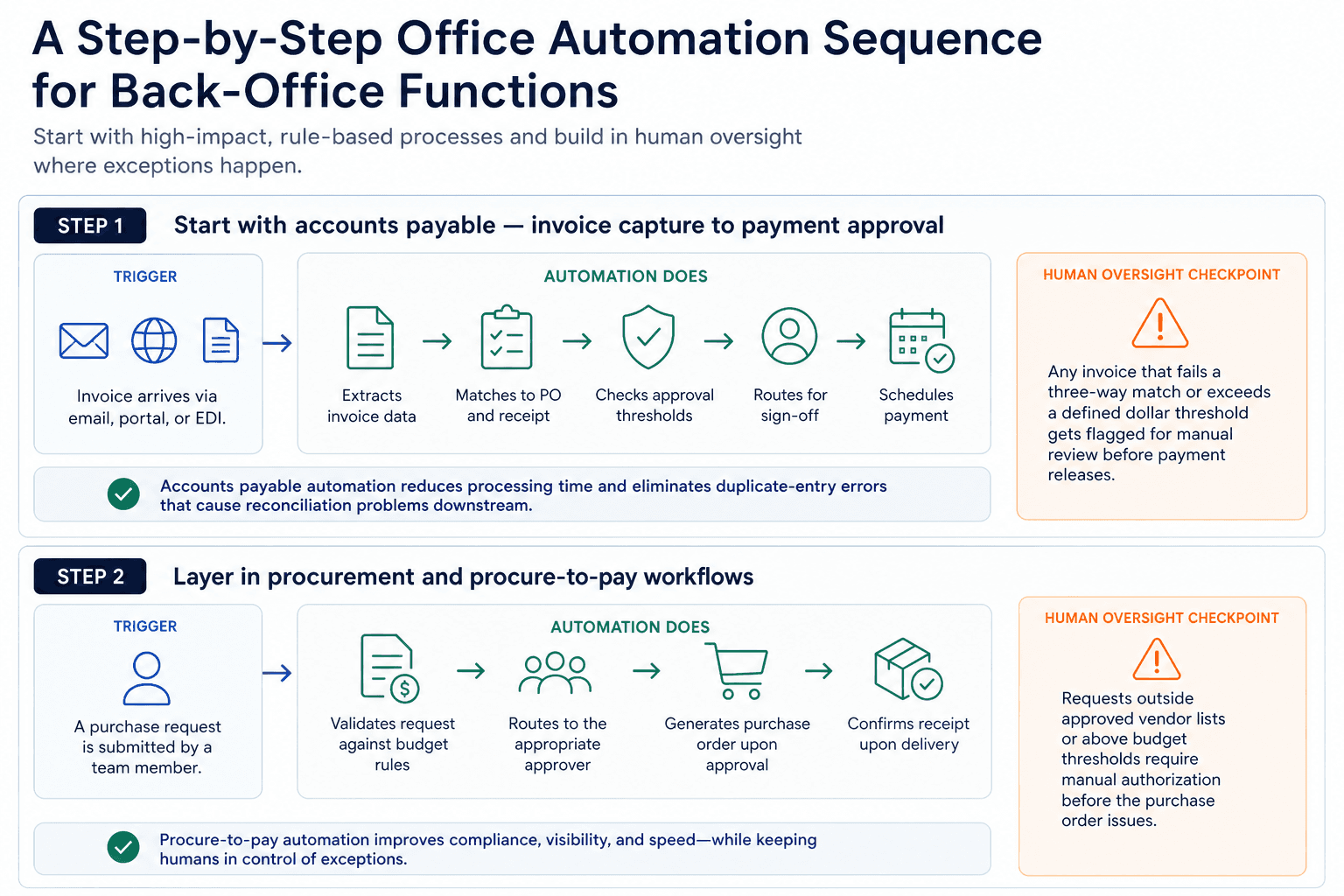
A Step-by-Step Office Automation Sequence for Back-Office Functions
Sequencing matters as much as selection. Starting with the highest-visibility process is not always the right move. Start with the process that has the clearest rules, the highest transaction volume, and the most immediate cost attached to manual errors.
Step 1: Start with accounts payable — invoice capture to payment approval
Trigger: Invoice arrives via email, portal, or EDI.
Automation does: Extracts invoice data, matches it to the corresponding purchase order and receipt, checks approval thresholds, routes for sign-off, and schedules payment.
Human oversight checkpoint: Any invoice that fails a three-way match or exceeds a defined dollar threshold gets flagged for manual review before payment releases.
Accounts payable automation solutions reduce processing time and eliminate the duplicate-entry errors that cause reconciliation problems downstream. The key is building the exception queue from the start, not as an afterthought.
Step 2: Layer in procurement and procure-to-pay workflows
Trigger: A purchase request is submitted by a team member.
Automation does: Validates the request against budget rules, routes to the appropriate approver, generates a purchase order upon approval, and confirms receipt upon delivery.
Human oversight checkpoint: Requests outside approved vendor lists or above budget thresholds require manual authorization before the purchase order issues.
Procure-to-pay automation closes the loop between procurement and AP, eliminating the gap where purchase orders get created but invoices never match because the PO data was entered differently in each system. Steps 1 and 2 succeed only when the automation understands process context, not just data fields. Predflow is built specifically for this: its AI agents handle the edge cases that rule-based tools drop, such as partial invoice matches or vendor exceptions, without requiring your team to rebuild logic from scratch each time a new scenario appears.
Step 3: Automate HR onboarding and document processing
Trigger: A new hire record is created in the HR system.
Automation does: Sends document requests, collects completed forms, provisions system access based on role, and updates compliance records when each step completes.
Human oversight checkpoint: Documents that arrive incomplete or fail verification checks are flagged for HR review before access is granted.
Automated document processing removes the coordination overhead from HR teams without removing human judgment from decisions that require it. Giving employees access to the information they need to move through onboarding without chasing emails is one of the clearest wins office automation delivers.
Step 4: Close the loop with reconciliation and reporting automation
Trigger: End-of-period or real-time transaction data is available across systems.
Automation does: Pulls transaction records from all relevant systems, applies matching rules, identifies discrepancies, and generates a reconciliation report with exceptions flagged.
Human oversight checkpoint: Unmatched transactions above a defined threshold require review before the period closes.
Reconciliation automation eliminates the hours teams spend exporting and comparing spreadsheets. It also makes the exception rate a trackable metric, which creates the feedback loop needed for continuous improvement.
How AI and RPA Work Together Inside Office Automation
AI automation in office workflows combines two distinct capabilities: rule-based process execution and context-aware decision-making. RPA (robotic process automation) handles the structured, repetitive steps. AI fills the gaps where data is unstructured, rules are incomplete, or a judgment call is required. Together, they handle the full range of what back-office processes actually contain.
This distinction answers a question operations leaders face constantly: which technology handles which part of the process?
What RPA handles well: structured, rule-based repetition
RPA follows defined rules across predictable data. It logs into systems, extracts fields, moves data between platforms, and triggers actions based on if-then logic.
It works well when the inputs are consistent, the rules are clear, and the process does not change. Invoice data extraction from a standard template is an RPA task. So is routing an approved purchase order to a vendor portal.
RPA breaks down when the input is inconsistent, such as a scanned invoice with missing fields, or when the decision requires context that a rule cannot fully capture.
Where AI fills the gaps: unstructured data, exceptions, and decisions
AI handles what RPA cannot. It reads unstructured documents, interprets context, classifies ambiguous inputs, and makes decisions that depend on patterns rather than fixed rules.
When a vendor sends an invoice in a non-standard format, AI extracts the relevant fields. When a purchase order matches to multiple possible invoices, AI applies contextual logic to select the correct match. When an anomaly appears in a reconciliation run, AI flags it with an explanation rather than just an error code.
Agentic process automation takes this further by allowing AI agents to manage multi-step decisions across connected systems without requiring a human to coordinate each transition.
Intelligent automation: what happens when both run together
Intelligent automation is what happens when RPA and AI operate within the same workflow. RPA executes the structured steps at speed. AI handles the exceptions, interprets the unstructured inputs, and feeds clean data back into the RPA layer.
Enterprise automation has moved beyond task scheduling into strategic orchestration that spans systems, data pipelines, and AI-driven execution. For back-office teams, that means the combination of RPA and AI is now the operational standard, not an advanced option.
The Four Office Automation Mistakes That Stall Real Progress
Most automation rollouts do not fail because the technology did not work. They fail because the implementation design had a flaw that was visible before the first automation ran.
Mistake 1: Choosing the tool before mapping the process
What it looks like: A team evaluates business automation software, selects a platform, and starts building automations before documenting how the process currently runs.
Corrective action: Spend one week mapping the current process end-to-end, including every exception and manual workaround. The process map defines the automation requirements. The tool selection follows from that.
Mistake 2: Building automations with no error handling or human escalation path
What it looks like: An automated invoice processing workflow runs without exceptions handling, so when a vendor sends an invoice with a missing line item, the system either fails silently or rejects the invoice without notifying anyone.
Corrective action: Build a human review queue for every exception category before the automation goes live. For AP workflows, that means flagging invoices above a defined threshold or those that fail a three-way match for manual review before any payment action runs.
Mistake 3: Siloing automation by department instead of end-to-end
What it looks like: The AP team automates invoice capture. The procurement team automates purchase orders. Neither system communicates with the other, so the handoff between them remains manual.
Corrective action: Map the full process from purchase request to payment before automating any single step. Business rules that govern the handoff between departments, such as whether a PO exists before an invoice is accepted, need to be encoded at the boundary, not within either department's system alone.
Mistake 4: Measuring activity instead of outcomes
What it looks like: The team reports that the automation processed 500 invoices last month, but no one tracks how many required manual intervention, how long each took, or what the error rate was.
Corrective action: Define outcome metrics before go-live. Activity counts tell you the automation ran. Outcome metrics tell you whether it worked.
How to Measure Whether Your Office Automation Is Working
Visibility is the gap that makes automation hard to improve. Teams implement workflow automation and then measure the wrong things, or nothing at all, which makes it impossible to know when to intervene.
Baseline metrics to capture before you automate anything
Before the first automation runs, record four numbers for each process: how long the average transaction takes end-to-end, what percentage of transactions require manual intervention, what it costs to process one transaction, and how often errors occur.
These baselines are the comparison point. Without them, ROI from office automation is a claim with no evidence.
Four KPIs that reflect actual back-office efficiency gains
Cycle time per invoice: The time from invoice receipt to payment approval. This measures AP automation directly.
Exception rate: The percentage of transactions flagged for manual review. A high exception rate signals that the automation rules need refinement. A declining exception rate signals that the system is learning and the process is stabilizing.
Straight-through processing percentage: The share of transactions that complete end-to-end without human intervention. This is the primary efficiency KPI for any back-office automation.
Cost per transaction: Total processing cost divided by transaction volume. This ties directly to AP automation ROI and scales with volume, making it the clearest measure of whether automation is paying for itself.
When to intervene, retrain, or rebuild an automation
Review these four KPIs monthly. If cycle time increases, the automation has likely encountered a new input type it cannot handle. If the exception rate rises, the rules need updating. If straight-through processing drops below the baseline trend, the workflow logic needs review.
Monthly review is the minimum cadence. Automation is not a set-and-forget system. It is a process that improves when it is actively managed.
Frequently Asked Questions
What is office automation and how does it apply to back-office teams?
Office automation replaces manual coordination between process steps with system-driven execution. For back-office teams, it means invoices get processed, documents get routed, and data gets reconciled without requiring a person to move information between systems at each step.
What is the difference between RPA and AI automation?
RPA executes structured, rule-based tasks across predictable data, such as extracting fields from a standard invoice or routing an approved form. AI handles unstructured inputs, exceptions, and context-dependent decisions. In practice, most back-office automation requires both: RPA for speed and consistency, AI for judgment and edge cases.
Which back-office process should I automate first?
Start with accounts payable. It has high transaction volume, clear rules, and a direct cost attached to errors and delays. Once AP is running with minimal exceptions, layer in procure-to-pay workflows to close the gap between procurement and payment.
How long does it take to see ROI from office automation?
AP automation typically shows measurable cycle time reduction within the first 60 to 90 days of a properly mapped implementation. The clearest signal is straight-through processing rate: when it crosses 70 percent, the automation is covering the majority of volume without manual intervention.
Can small or mid-sized businesses implement office automation without a large IT team?
Yes, provided the implementation starts with process mapping rather than platform selection. Modern business automation platforms are designed to integrate with existing tools without requiring custom development. The constraint is rarely technical. It is having a clear enough process map that the automation can be configured accurately from the start.
Conclusion
Two paths are in front of you. The first is to keep patching manual handoffs. Add a step here, send a follow-up email there, build another spreadsheet to reconcile what two systems cannot agree on. That path has a cost ceiling and a scale ceiling. Every new transaction volume increase requires more people doing the same manual work.
The second path starts with one process, mapped properly, automated with exception handling built in from the beginning. From there, each additional function adds to a system that runs continuously, flags what needs human attention, and handles the rest without interruption. The first two or three processes running without manual intervention free up enough team bandwidth to make the next round of improvements possible.
Office automation fails when it starts with tools. It succeeds when it starts with process clarity.
If you are ready to identify which process to automate first, Predflow offers a free process audit that maps your current back-office workflows and surfaces where automation will have the highest immediate impact. Request yours at predflow.com.
FAQ
Frequently asked questions
What exactly is an AI agent
An AI agent is an autonomous system designed to handle specific business tasks end-to-end. Unlike simple chatbots, AI agents can reason, take actions, integrate with tools, and follow defined workflows.