AI AGENTS
Enterprise AI for Supply Chain and Back-Office: Tools and Use Cases
Your tools aren't broken — the gaps between them are. Here's how enterprise AI actually reduces manual work in supply chain and back-office without replacing your existing systems.

Gautam Borad
Founder, Predflow

A finance manager at month-end is toggling between three systems: an ERP, a procurement portal, and a supplier email thread. She is trying to reconcile purchase orders manually while the supply chain team waits on an approval sitting in someone's inbox. Nothing is technically broken. The tools exist. The problem is the gaps between them.
This is where enterprise AI creates real value, and where most implementations fail to reach. Most enterprises now have access to AI tools, but very few have embedded them into the workflows where manual handoffs are costing real money and real time. The pattern behind most AI failures is not technical. It is a planning failure: unclear goals, no process documentation, and tools deployed before workflows are understood.
This article maps exactly where enterprise AI creates measurable value in supply chain and back-office operations, which tool categories handle which jobs, and what separates implementations that scale from those that stall.
Why Back-Office and Supply Chain Teams Are the Right Starting Point for Enterprise AI
Back-office and supply chain functions hold the highest concentration of repetitive, rule-based work in most enterprises. That makes them the fastest path to measurable AI ROI, not because they are simple, but because the inputs, rules, and expected outputs are already defined.
The Hidden Cost of Manual Handoffs Between Systems
Every time a task moves from one system to another without automation, two things happen: time is lost and errors are introduced. An invoice that touches an email inbox, a shared spreadsheet, and an ERP before it gets approved is not a workflow. It is a series of manual steps held together by individual attention.
Enterprise software solutions exist across these functions, but they rarely talk to each other by default. The cost is not just the time per transaction. It is the delay, the error rate, and the management overhead required to keep the process from breaking.
Where Repetitive Work Concentrates in Operations and Finance
Accounts payable, purchase order matching, inventory reconciliation, and compliance logging are all high-frequency, high-volume processes. Each follows defined rules most of the time. The exceptions are where human judgment is genuinely needed.
AI governance frameworks built by enterprise teams emphasize that AI observability, specifically tracking which workflows were triggered and which data was accessed, creates the audit trail that makes these functions safe to automate. That design logic applies directly to operations and finance work. The goal is not to remove humans. It is to stop humans from doing work that a well-designed system can handle reliably.
The question is not whether to automate these functions. It is which workflows to prioritize and in what sequence. That starts with mapping.
Map the Process Before Picking Enterprise AI Tools
Choosing a tool before documenting the workflow is the single most common reason enterprise AI projects stall. Process visibility comes first. Tool selection follows.
How to Identify Which Workflows Are Ready to Automate
A workflow is ready to automate when it is high-frequency, follows consistent rules at least 80% of the time, and has a measurable cost when delayed or done incorrectly. Use this three-column framework to prioritize:
Workflow Name | Frequency and Volume | Error Rate or Delay Cost |
|---|---|---|
Invoice matching | Daily, 200+ per month | 3-day average delay per exception |
PO approval routing | Weekly, varies by vendor | Approval lag blocks procurement |
Expense categorization | Weekly, per employee | Manual review adds 2 days to close |
Inventory reorder triggers | Continuous | Stockouts cost per SKU per day |
Score workflows by combining frequency with cost of failure. The highest scorers go first.
Business Process Mapping Examples for AP, Procurement, and Fulfillment
In accounts payable, a standard process map shows: invoice received, matched to PO, routed for approval, payment scheduled. The automation candidates are steps one, two, and four. Step three needs human judgment when the match fails.
In procurement, the map shows: requisition raised, supplier selected, PO issued, goods received, invoice matched. AI handles PO creation from approved templates, supplier communication, and three-way matching. Exceptions go to a buyer.
These business process mapping examples reveal something consistent: AI handles the straight-through transactions. Humans handle edge cases. The mapping tells you exactly where the boundary sits.
The Mistake of Starting With Tools Instead of Workflows
Starting with a tool forces the workflow to fit the software. Starting with the workflow lets you specify what the tool must do. AI failures are planning failures. Buying a platform before knowing which process it will run is the same mistake as deploying automation without success criteria.
Document the process first. Then select the tool that fits the documented steps, integrations, and exception rules.
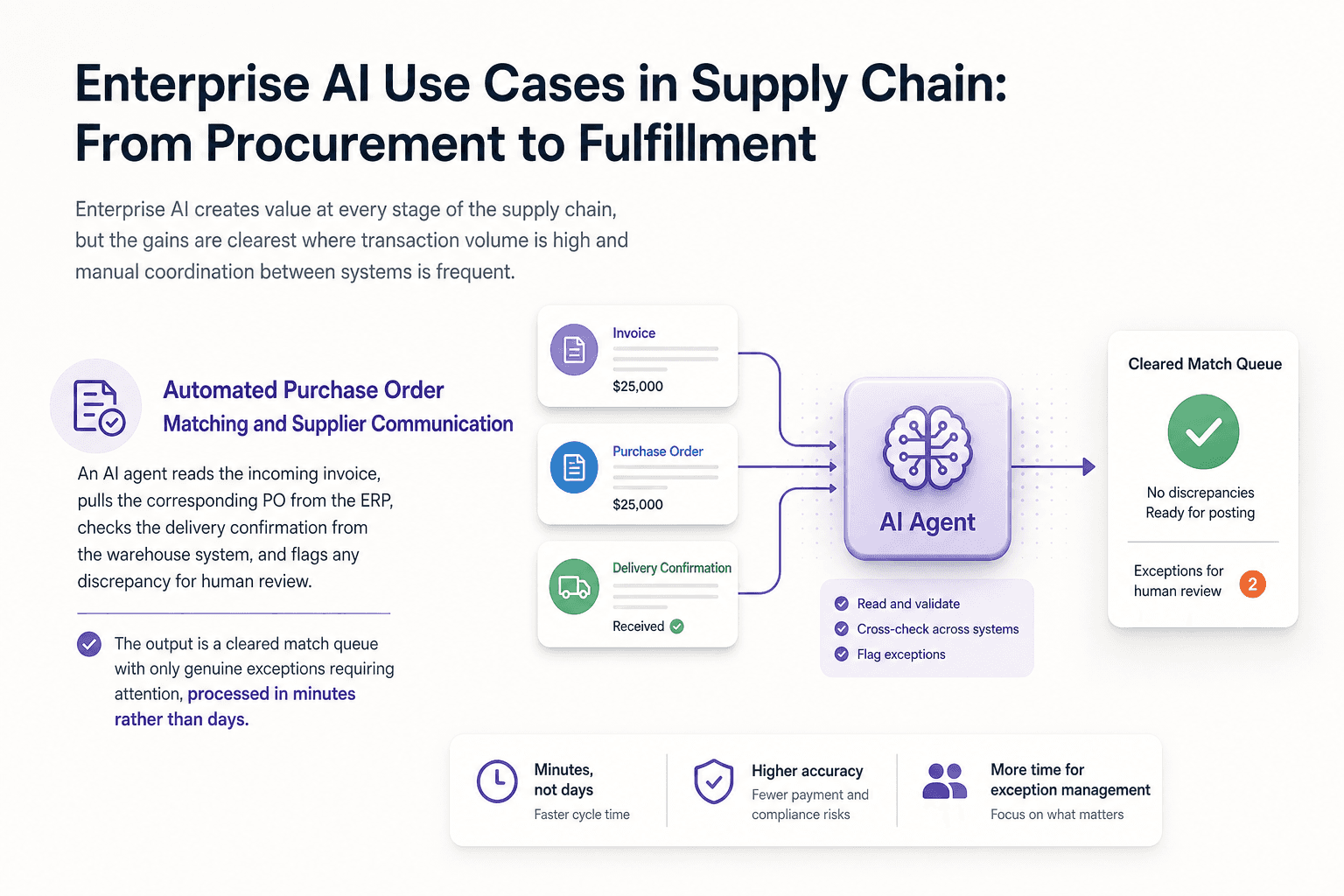
Enterprise AI Use Cases in Supply Chain: From Procurement to Fulfillment
Enterprise AI creates value at every stage of the supply chain, but the gains are clearest where transaction volume is high and manual coordination between systems is frequent.
Automated Purchase Order Matching and Supplier Communication
Teams currently match POs, invoices, and delivery confirmations manually across separate systems, spending hours per week on three-way matching alone. An AI agent reads the incoming invoice, pulls the corresponding PO from the ERP, checks the delivery confirmation from the warehouse system, and flags any discrepancy for human review. The output is a cleared match queue with only genuine exceptions requiring attention, processed in minutes rather than days.
Inventory Forecasting and Demand Signal Processing
Demand planners currently pull sales data, seasonality curves, and supplier lead times from separate systems and combine them manually in spreadsheets. AI agents ingest signals from multiple data sources continuously, apply forecast logic, and generate reorder recommendations with confidence scores. The measurable output is a reduction in both stockouts and overstock positions, without adding headcount to the planning function.
Freight and Logistics Exception Handling
Logistics coordinators spend significant time chasing shipment status updates, rebooking delayed freight, and notifying downstream teams of changes. An AI agent monitors real-time tracking data, identifies exceptions against expected milestones, triggers automated carrier communication for standard delays, and escalates to a coordinator only when a decision requires human judgment. The result is faster exception resolution and fewer missed delivery windows.
Procurement Software Integrated With AI Agents
Modern procurement software handles structured transactions well. The gap is unstructured communication: supplier emails, contract clause variations, and non-standard invoices. AI agents bridge that gap by reading unstructured inputs, mapping them to structured fields in the procurement system, and flagging ambiguity for a buyer to resolve. Integrated software solutions that connect procurement platforms to AI agents reduce manual data entry and improve data quality at the same time.
Enterprise AI Use Cases in Back-Office: Finance, HR, and Compliance
Enterprise AI can automate invoice matching, expense categorization, compliance audit logging, software license tracking, and accounts payable routing. The highest-ROI starting points for most finance teams are invoice matching, expense categorization, and compliance audit logging.
Invoice Management and Accounts Payable Automation
AP teams currently receive invoices across email, PDF, and supplier portals, rekey data into the ERP, and manually route approvals. An AI agent extracts invoice data using document recognition, validates it against the PO and contract terms, routes it through the correct approval path, and schedules payment. Exceptions like duplicate invoices or missing PO references are flagged to a human reviewer with context attached.
Most point tools automate one step in this chain, typically data extraction. Predflow takes a different approach: its agents cover the full invoice-to-payment workflow, handling edge cases like duplicate invoices or missing PO references and routing them to a human reviewer with the relevant context already pulled together. That end-to-end coverage is what produces a measurable reduction in processing time rather than just a faster first step.
Expense Management Software Enhanced by AI Agents
Finance teams currently review expense reports line by line to catch policy violations and miscategorizations. AI agents read submitted receipts, apply policy rules automatically, flag out-of-policy items with a specific reason, and route only flagged reports for human review. Travel and expense management software integrated with AI agents reduces the review burden and produces cleaner data for month-end close.
Compliance Monitoring and Audit Trail Generation
Compliance teams currently pull activity logs manually from multiple systems to prepare for audits. AI agents run continuous monitoring against defined compliance rules, generate structured audit logs in real time, and surface anomalies as they occur rather than at quarter-end. Auditing software tools enhanced by AI agents reduce the time between an event and its detection.
Software License Management and IT Asset Tracking
IT teams currently audit software licenses manually, often at renewal time, and discover shelfware or compliance gaps too late. AI agents monitor software usage data continuously, compare it against active license counts, and flag over-provisioned or unused licenses for review. IT asset management software connected to an AI layer turns a reactive annual audit into a continuous monitoring process.
Comparing Enterprise AI Approaches: Point Tools vs. Agent Platforms vs. Custom Builds
Three implementation paths exist for enterprise AI. Each suits a different operational maturity level and IT capacity.
Dimension | Point Tools | Agent Platforms | Custom Builds |
|---|---|---|---|
Deployment Speed | Fast (weeks) | Moderate (1-3 months) | Slow (6+ months) |
Integration Complexity | Low, single system | Moderate, multi-system | High, bespoke |
Edge Case Handling | Limited | Strong, configurable | Highest, if built well |
Human Oversight Capability | Basic alerts | Built-in escalation paths | Custom-designed |
Total Cost of Ownership | Low upfront, scales poorly | Predictable per-workflow | High, ongoing |
Point Automation Tools: Fast to Deploy, Limited in Scope
Point tools automate one task well: extracting invoice data, categorizing expenses, or sending a status notification. They are low-risk for a first automation win. The limitation is that they stop at the edge of their function. The next step in the workflow still requires a human to pick it up and move it forward.
Enterprise Agent Platforms: End-to-End Workflow Coverage
Agent platforms connect multiple steps, systems, and decision points into a single automated workflow. They handle exceptions within defined parameters and escalate outside them. The enterprises embedding AI across workflows rather than running isolated experiments are the ones building scalable operations without proportionally growing headcount. This is the industrialization shift in enterprise AI: execution across systems, not experimentation in isolation.
Custom Software Solutions: Highest Fit, Highest Overhead
Custom builds make sense when a process has no market equivalent and the volume justifies the investment. They offer the best workflow fit but carry the highest build and maintenance overhead. Most enterprises that start with custom builds underestimate the ongoing cost of keeping the system current as processes change.
Use point tools for fast wins on a single workflow. Use agent platforms when you need cross-system automation at scale. Use custom builds when your process has no market solution and volume makes the investment defensible.
What to Look for When Evaluating Enterprise AI for Operations
Buying enterprise AI on a feature list is how teams end up with tools that automate the easy part and stall on everything else. Four evaluation criteria separate platforms that fit real operations from those that look good in demos.
1. Process Mapping Capability Before Deployment
Ask every vendor: how do you document the current workflow before building the automation? Vendors that skip this step are deploying to a process they do not understand. Good implementations start with a process map, not a feature tour. Business system software that cannot adapt to your documented workflow will require your workflow to adapt to it instead.
2. Human Oversight and Escalation Design
Over-automating critical processes without human oversight is one of the most damaging implementation mistakes in enterprise AI. Every workflow automation must have a defined escalation path: when the AI cannot resolve an exception within its parameters, a human must receive the task with context attached, not just a notification that something failed.
3. Integration With Existing Enterprise Software
Enterprise AI does not replace existing systems. It connects them. Verify that the platform integrates with your ERP, procurement software, expense management software, and any other core system in the workflow. Accounting software integration and data handoffs between systems must be seamless in both directions, not just at ingestion.
4. Monitoring, Audit Trails, and Continuous Improvement
AI observability is non-negotiable for enterprise teams. The platform must log which workflows were triggered, which data was accessed, and which decisions were made. This creates the audit trail required for compliance and gives operations teams the visibility to identify where the automation breaks down and improve it over time. Automated reporting tools and APM application performance monitoring built into the platform reduce the effort of ongoing oversight.
Frequently Asked Questions
What is enterprise AI and how is it different from regular AI software?
Enterprise AI refers to AI systems designed to operate within business workflows, connect to existing enterprise software, handle exceptions reliably, and meet security and compliance requirements. Unlike consumer AI tools, enterprise AI is built around specific business processes, integrates with existing systems, and includes human oversight and audit capabilities.
Which back-office processes are easiest to automate with AI first?
Invoice matching, expense categorization, and compliance audit logging are the fastest wins for most finance teams. They are high-volume, rule-based, and have a measurable cost when delayed. These processes also have clear exception rules, which makes it straightforward to define when an AI agent should escalate to a human reviewer.
How long does it typically take to see ROI from enterprise AI in supply chain?
ROI timelines depend on the complexity of the workflow and the quality of the process mapping done before deployment. Simple, high-volume workflows like PO matching or inventory reorder triggers produce measurable time savings within the first few months. Cross-system workflows with more exception types take longer to tune but produce larger efficiency gains once stable.
What are the biggest risks of implementing enterprise AI in back-office operations?
The main risks are over-automation without human oversight, poor integration with existing systems, and launching without clear success criteria. AI implementations that skip process mapping before deployment create automation that handles the easy transactions but fails silently on exceptions. Building in escalation paths and audit trails from the start prevents most of these failure modes.
Do we need to replace our existing enterprise software to use AI agents?
No. AI agents are designed to work with existing enterprise software, not replace it. They connect to your ERP, procurement platform, expense system, and other tools through integrations, reading data from them and writing back results. The value is in the coordination between systems, not in replacing the systems themselves.
Conclusion
You now have the framework. Process mapping comes before tool selection. Supply chain and back-office functions are the right starting points. The comparison table gives you a clear decision path between point tools, agent platforms, and custom builds. The evaluation checklist tells you what to verify before committing to any vendor.
Where you go next depends on where you are right now. If your workflows are not yet documented, that is the first step. If they are documented but you have not selected a platform, apply the comparison table to your top two or three candidates. If you are in active vendor evaluation, run every option against the four-criteria checklist.
The enterprises that will scale operations without adding headcount proportionally are not the ones running AI experiments in isolation. They are the ones embedding AI across workflows, with process clarity, human oversight, and real integration between systems.
If you are ready to automate a specific workflow end-to-end, not just a single step, see how Predflow builds agents that handle the full process, including edge cases and human escalations. See our case studies to understand how these workflows are implemented in practice.
Bring 20 NetSuite bills to a 30-minute teardown
We will walk your actual invoices through capture, 3-way match and posting on the call, and tell you which steps an agent can take over. No prep beyond the PDFs.
FAQ
Frequently asked questions
What exactly is an AI agent
An AI agent is an autonomous system designed to handle specific business tasks end-to-end. Unlike simple chatbots, AI agents can reason, take actions, integrate with tools, and follow defined workflows.