Finance
How to Use Parsing to Automate Invoice Processing
Learn how parsing transforms raw invoice data into structured fields your ERP can use, cutting errors and closing books faster. Stop re-keying, start automating.

Denisha R
Product, Predflow

An AP team re-keying invoice data from PDFs into an ERP for three hours every day is not an efficiency problem. It is a parsing problem. The real cost shows up at month-end: mismatched totals, duplicate entries, and a frantic reconciliation sprint that eats into close cycles. The villain is not invoice volume. It is the absence of structured parsing that converts raw invoice data into fields your systems can actually use.
Parsing is the step that makes every downstream automation possible. Without it, OCR gives you text on a screen. With it, you get vendor name, invoice number, line items, and due date routed directly into your ERP, approval queue, and audit log. This guide walks you through exactly how to build that pipeline, step by step.
What Parsing Actually Does Inside an Invoice Workflow
Most AP teams assume that scanning a PDF and extracting text is enough to automate invoice processing. It is not. Parsing is the layer that sits between raw text and structured data your systems can use.
Parsing, in the context of invoice automation, is the process of reading raw document content and identifying specific data fields by their meaning and position, then outputting those fields in a structured format that downstream systems can process without human intervention.
Parsing vs. OCR: Why Reading Text Is Not Enough
OCR converts a scanned image into machine-readable text. That is a necessary first step, but it produces a flat string of characters. Parsing takes that string and answers the question: which part is the vendor name, which is the total amount, and which is the payment due date?
Without parsing, your team still has to read the OCR output and manually place values into the right fields. That is where the three-hour daily loop comes from.
How an NLP Parser Identifies Fields Like Vendor, Amount, and Due Date
An NLP parser applies natural language processing techniques to understand the context surrounding each value. Tokenization in NLP breaks the document into units, then the parser applies rules or learned patterns to label each token. A value preceded by "Invoice Total:" in a known vendor template gets tagged as the total amount field, even if the formatting varies slightly across versions.
This is information retrieval applied to a business document. The parser retrieves specific data points from an unstructured source and maps them to a defined schema.
Structured vs. Unstructured Invoice Formats
Structured invoices follow a fixed template, like EDI files or invoices from enterprise vendors with consistent layouts. Unstructured invoices arrive as free-form PDFs, email attachments, or scanned paper documents with no predictable field positions.
Most AP teams receive both. A parsing pipeline must handle each format type differently, which is why choosing the right approach matters before you buy any tool.
The Four Invoice Data Problems Parsing Solves
Manual invoice processing fails in four specific ways. Each one has a direct fix when parsing is implemented correctly.
Pain Point | How Parsing Fixes It |
|---|---|
Inconsistent vendor formats across PDF, email, and EDI | Parsing normalizes each format into a single output schema regardless of source |
Missing or ambiguous line items that stall approvals | Parsing flags incomplete fields before the invoice enters the approval queue |
No audit trail when data moves between systems | Parsed output logs every extracted field with a timestamp and source document reference |
Scaling invoice volume without adding headcount | Parsing runs at the same speed and accuracy whether you process 50 or 5,000 invoices per month |
Inconsistent Vendor Formats Across PDF, Email, and EDI
A vendor in Germany formats their invoice differently than a supplier in Singapore. Requiring your team to manually normalize those differences is a process design failure, not a staffing gap. Parsing handles format variability at the extraction layer so the rest of your workflow never sees it.
Missing or Ambiguous Line Items That Stall Approvals
An invoice missing a PO number or with an ambiguous line item description does not fail gracefully in a manual process. It sits in someone's inbox. Parsing identifies missing required fields at intake and routes the exception immediately, cutting approval delays.
No Audit Trail When Data Moves Between Systems
Information retrieval systems need to log what was retrieved, when, and from where. Parsing creates that record automatically. Every extracted field carries a reference back to the source document, which satisfies audit requirements without additional manual logging.
Scaling Invoice Volume Without Adding Headcount
When invoice volume grows, manual processing scales linearly with headcount. Parsing scales with compute. The same pipeline that handles 200 invoices a month handles 2,000 without a structural change.
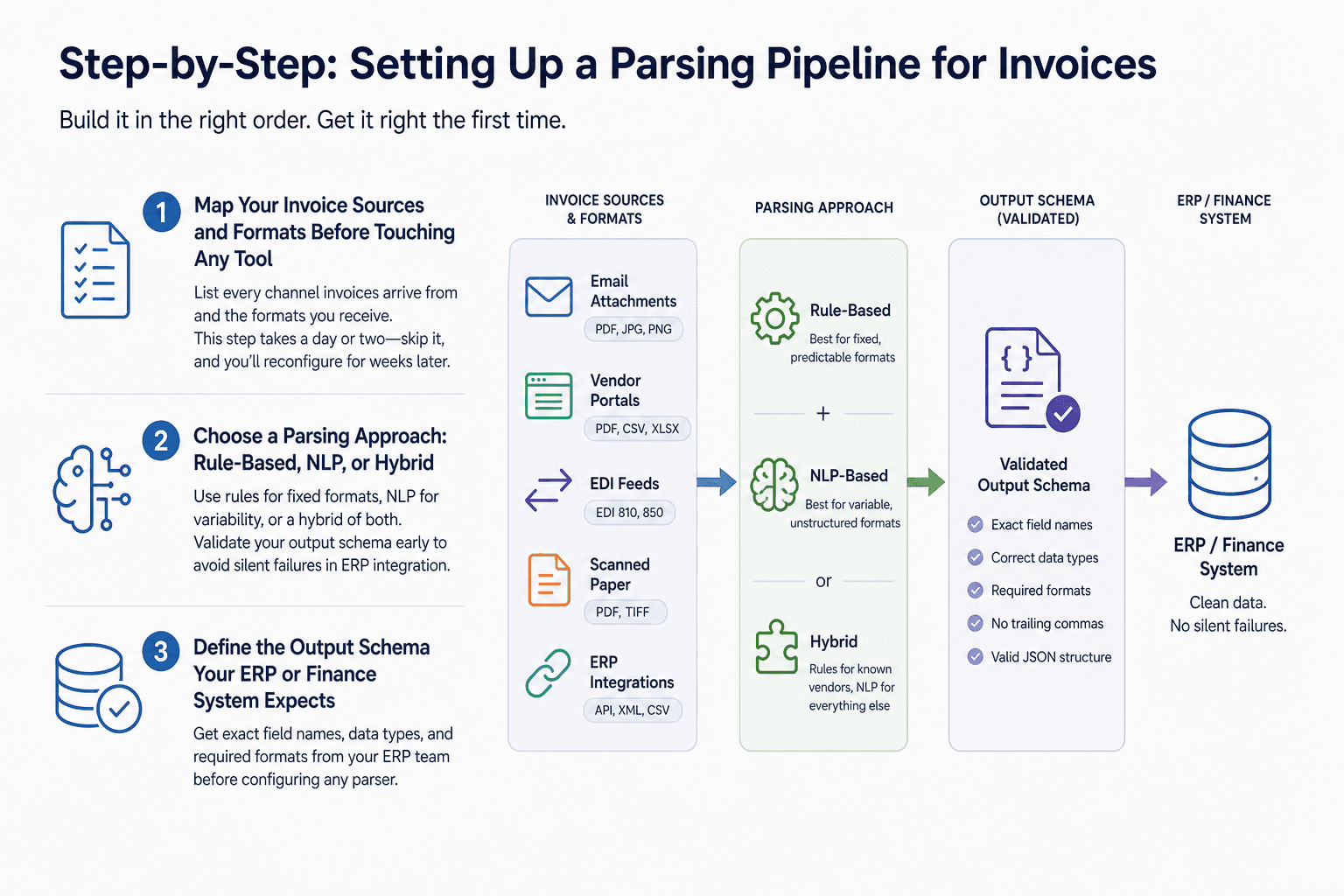
Step-by-Step: Setting Up a Parsing Pipeline for Invoices
Building a parsing pipeline in the wrong order is the most common reason implementations stall. Follow this sequence exactly.
Step 1 — Map Your Invoice Sources and Formats Before Touching Any Tool
List every channel through which invoices arrive: email attachments, vendor portals, EDI feeds, scanned paper, and direct ERP integrations. For each channel, document the format types you receive and the fields you need to extract.
This step takes a day or two. Teams that skip it spend weeks reconfiguring their parser after go-live when it encounters a format they forgot to account for.
Step 2 — Choose a Parsing Approach: Rule-Based, NLP, or Hybrid
Rule-based parsers work well when your invoice formats are fixed and predictable. NLP-based parsers handle variability by learning patterns from examples. A hybrid approach uses rules for known vendors and NLP for everything else.
When defining your output schema, validate the structure before connecting it to any downstream system. Common problems like trailing commas, mismatched brackets, and invalid characters in JSON output will cause silent failures in your ERP integration. Build schema validation into the pipeline from the start, not as an afterthought.
Step 3 — Define the Output Schema Your ERP or Finance System Expects
Before configuring any parser, get the exact field names, data types, and required formats from your ERP team. If your ERP expects "invoice_date" in ISO 8601 format and your parser outputs "Date: 12/05/25," every record will either fail or require manual correction downstream.
Document the schema as a formal spec and treat it as a dependency, not an assumption.
Step 4 — Handle Edge Cases and Exceptions Without Manual Fallback
This is where most rule-based parsers break down. A missing PO number, a multi-currency invoice, a non-standard layout from a new vendor: these are not edge cases to fix later. They are the reason manual processing persists in the first place.
Platforms like Predflow map your process first, then build the agent around your actual edge cases rather than generic templates. That means the agent knows to flag a missing PO number and route it to the right approver instead of silently failing or dropping the invoice into an unmonitored queue.
Step 5 — Connect Parsed Data to Downstream Approval and Payment Workflows
Once parsed data is validated against your output schema, it should flow automatically into your approval workflow, ERP, and payment system. Define the trigger for each transition: a fully matched invoice moves to auto-approval, a flagged exception routes to the relevant approver, and a rejected record returns to the vendor with a specific reason.
No manual handoff at any point in this chain. If a human touch is required, it should be a deliberate decision, not a default.
How to Choose the Right Parsing Tools for Invoice Automation
The right tool depends on your invoice volume, format variability, and where parsing sits within your broader workflow.
Rule-Based Parsers: Best for Fixed, Predictable Formats
Rule-based parsers use predefined templates to extract fields from known layouts. They are fast to implement and easy to audit. The limitation is brittleness: a minor layout change from a vendor breaks the rule, and someone has to fix it manually.
Use rule-based parsing when your top vendors send consistent, high-volume invoices in formats that rarely change.
NLP and ML-Based Parsers: Best for High-Volume Variability
An NLP parser learns field positions and labels from training examples rather than hard-coded rules. This makes it far more adaptable to new vendors and format variations. The trade-off is that it requires training data and ongoing monitoring to catch parser drift over time.
This approach suits teams processing invoices from a large, diverse supplier base where template maintenance is already a burden.
End-to-End AI Agent Platforms: Best When Parsing Is One Step in a Larger Workflow
When invoice processing connects to procurement, three-way matching, contract management, or payment scheduling, parsing alone is not enough. You need the extracted data to flow through conditional logic, approval routing, and exception handling without manual coordination between tools.
AI agent platforms treat parsing as one step in a fully automated end-to-end process, rather than a standalone extraction tool that hands off to manual steps.
What to Ask Any Vendor Before Committing
Ask these four questions: How does the tool handle invoice formats it has never seen before? Where does data go when a field fails validation? What does the audit log capture and for how long? Can the parser be retrained without vendor involvement?
The answers reveal whether the tool is built for your operational reality or for a demo environment.
Scenario | Recommended Approach | Watch Out For |
|---|---|---|
Fewer than 200 invoices/month with consistent templates | Rule-based parser | Template maintenance when vendors update layouts |
200 to 2,000 invoices/month with mixed formats | NLP or ML-based parser | Training data requirements and parser drift over time |
Invoices embedded in a larger procurement or approval workflow | End-to-end AI agent platform | Vendors who lead with parsing tools before mapping your process |
Measuring Whether Your Parsing Automation Is Actually Working
A parsing pipeline that silently misreads fields is worse than no automation at all, because the errors compound before anyone catches them. These metrics give you visibility from day one.
The Five Metrics AP Teams Should Track From Day One
Straight-through processing rate: the percentage of invoices that complete the full workflow without human intervention. A healthy baseline is above 80% within 90 days of go-live.
Exception rate by vendor: the percentage of invoices from each vendor that trigger a flag. A vendor with a consistently high exception rate signals a format or data quality issue to resolve at the source.
Average time from invoice receipt to approval: this should drop measurably after parsing is in place. A multi-day average becoming same-day is a clear signal the pipeline is working.
Data field accuracy rate: the percentage of extracted fields that match the source document exactly. Target above 98% for high-confidence automation.
Cost per invoice processed: combine labor, tool cost, and exception handling time. This is your primary ROI metric for internal reporting.
Setting Up Logging and Monitoring to Catch Parser Drift
Logging and monitoring is not optional in a production parsing pipeline. Every extraction event should log the source document, the fields extracted, the confidence score if applicable, and any exceptions triggered.
Review exception logs weekly in the first three months. Parser drift, where accuracy degrades gradually as vendor formats shift, is easiest to catch and correct early.
When to Retrain or Reconfigure Your Parser
Retrain when your exception rate by vendor rises above your established baseline without a clear one-time cause. Reconfigure when a vendor changes their invoice template or when you add a new invoice source channel.
Set a calendar review every quarter. This keeps your pipeline accurate without waiting for a visible failure to prompt action.
Frequently Asked Questions
What is parsing in the context of invoice processing?
Parsing in invoice processing is the automated extraction of specific data fields, such as vendor name, invoice date, line items, and total amount, from raw invoice documents into a structured format that ERP and finance systems can process directly. It goes beyond OCR by interpreting the meaning and position of each value, not just reading the text. Without parsing, extracted text still requires manual sorting before it becomes usable data.
What is the difference between OCR and NLP parsing for invoices?
OCR converts a scanned or digital document into machine-readable text. NLP parsing applies natural language processing to that text to identify and label specific fields by their context and meaning. OCR tells you what the document says. NLP parsing tells you what each part of the document means and where it belongs in your data schema.
Can parsing handle invoices that arrive as email attachments in different formats?
Yes, provided the pipeline includes an intake layer that routes each attachment type to the correct parser. PDFs, image files, and embedded text documents each require different pre-processing before field extraction. A well-built pipeline handles this routing automatically and flags any attachment type it cannot process rather than dropping it silently.
How long does it take to set up invoice parsing automation?
Setup time depends on the number of invoice formats in scope and the complexity of your downstream systems. A focused implementation covering your top ten vendors with consistent formats can be live in four to six weeks. A broader rollout covering diverse supplier bases and complex approval workflows typically runs three to four months, including testing and exception handling refinement.
What happens when the parser encounters an invoice format it has not seen before?
A rule-based parser will fail or produce incomplete output and should route the invoice to an exception queue for manual review. An NLP-based parser will attempt to extract fields using learned patterns, with lower confidence scores on unfamiliar layouts. The critical design requirement is that neither failure mode should result in a silent error. Every unrecognized format must trigger a visible alert and a defined fallback action.
Conclusion
Manual invoice processing is not a staffing problem. It is a parsing problem. The teams that successfully automate their AP workflows share one common starting point: they map their process in detail before selecting any tool. They know their invoice sources, their format variability, their output schema requirements, and their exception scenarios before the first line of configuration is written.
That foundation is what separates a parsing pipeline that runs reliably at 2,000 invoices a month from one that stalls at 200. Once it is in place, AP staff move from data entry to exception review, approval oversight, and vendor relationship management. The work becomes higher-value because the routine extraction is handled without intervention.
If you are ready to map your invoice workflow and build a parsing pipeline that handles your specific edge cases, request a workflow assessment from Predflow. The team will show you exactly where automation fits before recommending any technology.
Bring 20 NetSuite bills to a 30-minute teardown
We will walk your actual invoices through capture, 3-way match and posting on the call, and tell you which steps an agent can take over. No prep beyond the PDFs.
FAQ
Frequently asked questions
What exactly is an AI agent
An AI agent is an autonomous system designed to handle specific business tasks end-to-end. Unlike simple chatbots, AI agents can reason, take actions, integrate with tools, and follow defined workflows.