Finance
Order-to-Cash Automation: Streamlining the Full Cycle
Automating invoicing is a start—but if your team still spends hours matching remittances and chasing disputes, you haven't solved the real problem. Here's how full-cycle o2c automation actually works.

Sanya Shah
Co-founder, Predflow

Your finance team automated invoicing two years ago. It helped. But someone still spends three hours every Friday manually matching remittances, chasing disputed invoices over email, and forwarding order confirmations between systems. That gap exists because o2c automation is rarely treated as a full-cycle problem. Most implementations stop at invoicing, leaving collections, disputes, and cash application to manual workarounds that quietly drain time and delay cash.
This article breaks down each stage of the order-to-cash cycle, identifies exactly where rule-based tools hit their ceiling, and walks through what full-cycle automation looks like in practice. If you are evaluating whether to extend your current setup or rebuild it around AI-driven workflows, this is the roadmap you need.
What O2C Automation Actually Covers (and What It Doesn't)
Most teams think they have automated their order-to-cash process because invoices go out automatically. They have automated one stage. The full cycle has eight, and the later ones are where cash flow problems actually live.
The eight stages: order capture to cash application
Stage | Commonly Automated? |
|---|---|
Order Capture | Yes. ERP rules and web forms handle most structured inputs. |
Credit Check | Partially. Automated for standard customers; manual review remains for edge cases. |
Order Fulfillment | Partially. ERP-triggered, but exceptions often require manual intervention. |
Shipping and Delivery | Partially. Tracking is automated; delivery confirmations are often manual. |
Invoicing | Yes. Most teams have this covered via ERP or billing software. |
Collections | Rarely. Follow-ups are usually manual emails and spreadsheet tracking. |
Dispute Management | Almost never. Still handled through email threads and phone calls. |
Cash Application | Rarely. Remittance matching is frequently done by hand. |
Where most teams draw the automation line — and why that creates downstream problems
The automation cutoff almost always falls after invoicing. Everything from collections onward runs on manual effort, which creates a compounding problem: delayed follow-ups push out payment dates, unresolved disputes age into write-offs, and cash application backlogs distort your accounts receivable automation picture.
The result is a cycle where the structured work is fast and the human work is the bottleneck. Sales order automation feeds a pipeline that stalls at the collection stage. Fixing that requires rethinking what is actually in scope for workflow automation.
Why Rule-Based Automation Stalls in the Middle of the O2C Cycle
RPA and rules-based tools are genuinely useful for structured, stable processes. Order entry, invoice generation, payment matching on clean data: these are tasks where automation in accounting delivers reliable results. The problem starts when the process hits something a rule cannot resolve.
The exception problem: when a workflow hits an email, a dispute, or a remittance PDF
A customer replies to a payment reminder with a question about line-item pricing. A remittance arrives as a scanned PDF with no structured data. A dispute lands in a shared inbox with no reference number. Each of these is a routine O2C event. None of them can be handled by a rule-based bot.
This is the pattern that has played out repeatedly across finance teams: an RPA deployment covers 70% of the cycle, then stalls the moment it encounters unstructured data or a two-way customer conversation. The remaining work still falls to a human, often with no clear handoff process. The result is that the automation creates new coordination overhead rather than reducing it.
RPA in automation works well when inputs are clean and consistent. In the O2C cycle, collections and dispute management generate the highest volume of unstructured exceptions. That is where rpa robotic process automation reaches its hard limit.
RPA fragility under process change and system updates
Rules-based bots are brittle. When a customer portal changes its layout, when your ERP updates a field name, or when your team adjusts a billing format, the bot breaks. Maintaining rpa process scripts across a changing environment requires ongoing IT involvement, which is why in-house automation initiatives often consume IT resources for months without delivering the nuanced control teams expected.
This is not an argument against RPA. It is an argument for being clear-eyed about where it fits. Structured, stable stages benefit from it. The exception-heavy back half of the O2C cycle needs a different approach.
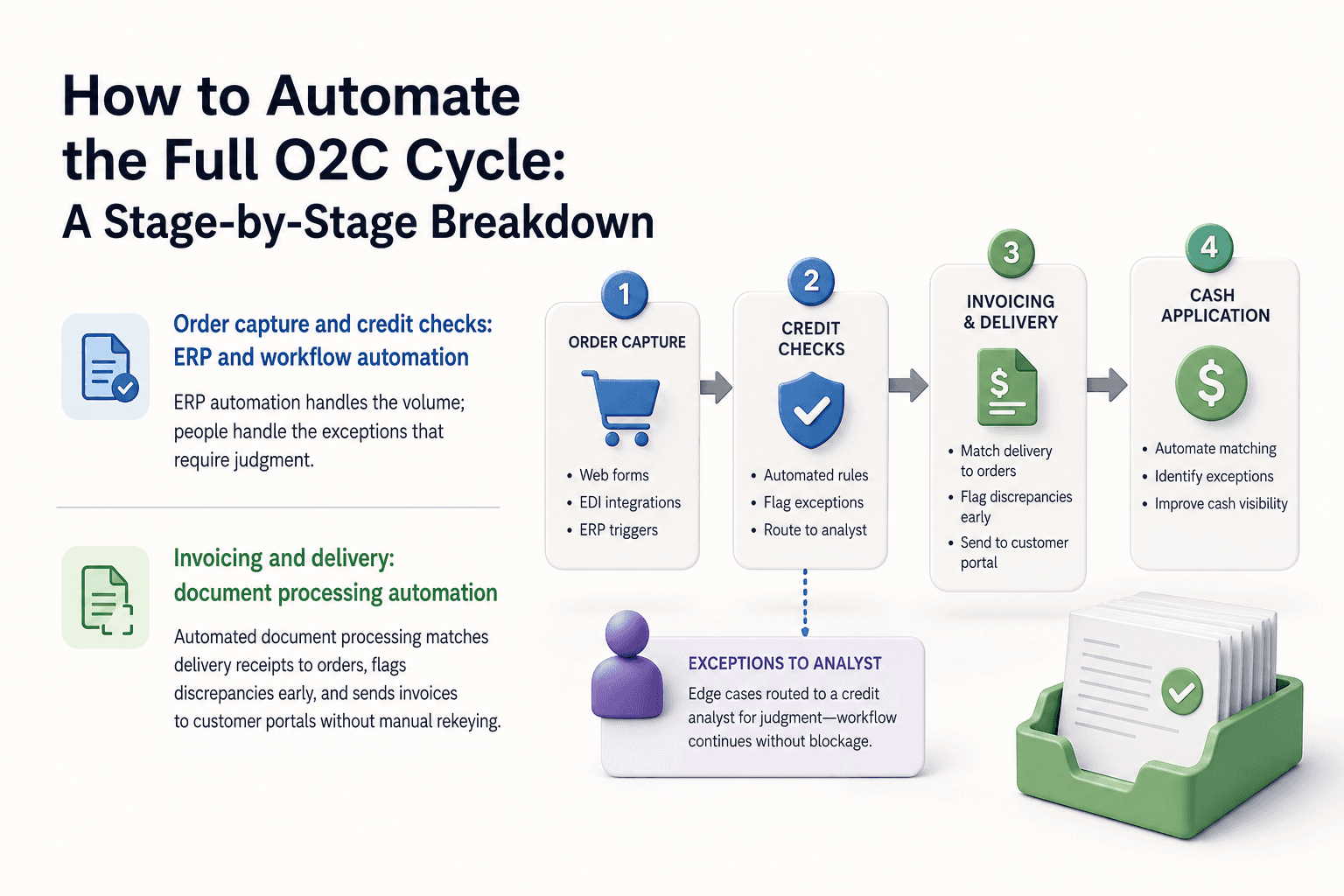
How to Automate the Full O2C Cycle: A Stage-by-Stage Breakdown
Full-cycle o2c automation requires two distinct layers: structured automation for rule-driven stages, and AI-driven automation for the work that involves judgment, conversation, and unstructured data.
Order capture and credit checks: ERP and workflow automation
Order capture is the most straightforward stage to automate. Web forms, EDI integrations, and ERP triggers handle structured inputs reliably. Credit checks can be automated against predefined rules for standard customers, with flagging logic that routes edge cases to a credit analyst rather than blocking the workflow entirely.
The goal at this stage is not zero human involvement. It is making sure the human only touches the genuinely ambiguous cases. Erp automation handles the volume; people handle the exceptions that require judgment.
Invoicing and delivery: document processing automation
Invoice generation from fulfilled orders is well within reach of standard workflow automation tools. Where teams lose time is in delivery confirmation and dispute prevention. Automated document processing can match delivery receipts to orders, flag discrepancies before they become disputes, and push invoice data to customer portals without manual rekeying.
Document processing automation is effective here because the inputs, while varied in format, follow predictable structures. A well-configured system handles the majority of cases without intervention.
Collections follow-up: AI agents handling two-way conversations
Collections is where the gap between structured automation and full-cycle automation becomes concrete. Sending a payment reminder is easy to automate. Handling the reply is not, at least not with rule-based tools.
AI agents change this. They handle the full two-way conversation: inbound billing queries, replies to reminders, and disputes. A customer who replies asking why their invoice is higher than expected gets a substantive, context-aware response, not a bounce to a shared inbox. This is a concrete capability shift, not a future promise. Accounts receivable automation that stops at reminder dispatch leaves the most time-consuming work untouched.
Dispute resolution and cash application: where AI reaches further than RPA
Dispute resolution requires reading context, accessing order history, and often negotiating a resolution. RPA cannot do this. AI agents can handle the initial triage, gather the relevant data, communicate with the customer, and escalate only the cases that require human approval.
Cash application is similarly complex. Remittances arrive in inconsistent formats, partial payments need to be matched to multiple invoices, and deductions require validation. Intelligent automation built on AI handles the parsing and matching work that previously required a skilled AR analyst. Reconciliation automation at this stage directly reduces days sales outstanding, which is the number that ultimately reflects O2C health.
What a Well-Designed O2C Automation Implementation Looks Like
The teams that get the most from O2C automation share one habit: they map the process before they select a tool. The teams that struggle reverse that order.
Start with process mapping, not tool selection
Before evaluating any platform, document what actually happens in your current cycle. Not the intended process. The actual one, including the workarounds, the email threads, the manual steps that exist because a system does not talk to another.
This step surfaces the exceptions that will break your automation if you do not plan for them. It also shows you which stages have the highest manual volume, so you can prioritize where automation delivers the fastest return.
This is the approach platforms like Predflow take. Agents are built after the process is mapped end-to-end, which is why they handle edge cases reliably rather than breaking on exceptions.
Integration points: ERP, CRM, and accounts receivable systems
O2C automation does not replace your existing systems. It connects them. Your ERP holds order and fulfillment data. Your CRM holds customer context. Your AR system holds invoice and payment history. A workflow automation platform needs to read from and write to all three without creating new data silos.
Integration is where implementation timelines extend and expectations diverge. Build integration requirements into your project scope from the start, not as a follow-on. Business process automation platforms that offer pre-built connectors to common ERP and CRM systems reduce this friction considerably.
Building human oversight into the automated workflow
Not every exception should be resolved autonomously. A disputed invoice above a material threshold should route to a credit manager for review. A customer requesting a contract amendment should go to account management, not an AI agent. These escalation paths need to be designed into the workflow before go-live.
The practical rule: if the resolution has financial or relationship consequences beyond a defined threshold, a human reviews it. If it follows a pattern the system has seen before and the stakes are routine, the agent resolves it. This distinction keeps automation running at volume while protecting against the cases where judgment matters.
Measuring O2C Automation ROI: The Metrics That Actually Matter
Building a business case for O2C automation requires moving beyond activity metrics. Invoices sent per day is not the number your CFO cares about.
Days Sales Outstanding and cash conversion cycle
Days Sales Outstanding (DSO): The average number of days between invoice issue and payment receipt. This is the primary indicator of O2C health. Teams that automate collections follow-up and dispute resolution typically report meaningful reductions in DSO within the first two quarters.
Cash Conversion Cycle (CCC): A broader measure that includes inventory and payables. Improving DSO through accounts receivable automation directly shortens CCC, which frees working capital.
Exception rate and straight-through processing rate
Exception Rate: The percentage of transactions that require manual intervention. Pre-automation, this is the number that reveals where your process is breaking. Post-automation, a rising exception rate signals a process change that the automation has not been updated to handle.
Straight-Through Processing (STP) Rate: The inverse: the percentage of transactions that complete without any human touch. A rising STP rate is the clearest signal that automation is working as intended.
Cost per invoice and headcount-to-revenue ratio
Cost Per Invoice: Total cost of processing one invoice end-to-end, including labor, system costs, and error correction. Ap automation roi calculations typically start here.
Headcount-to-Revenue Ratio: Tracks whether the finance team is scaling with revenue or holding flat as the business grows. Full-cycle automation should allow revenue to grow without a proportional increase in AR and collections headcount.
Common O2C Automation Mistakes That Stall Progress
Automating a broken process without fixing it first. Teams often replicate existing manual workflows directly into automation tools, locking in the inefficiencies. Map and clean the process before automating it.
Choosing a tool before mapping the workflow. Tool-first selection means the automation is built around the software's defaults rather than the actual process. The result is a workflow automation platform that handles the easy cases and fails on everything else. Define the workflow first, then evaluate tools against it.
Treating collections and dispute management as out of scope. This is the most common mistake and the most costly. These stages have the highest exception volume and the most direct impact on cash flow. Leaving them manual is leaving the most valuable automation gains on the table. Business process automation services that include these stages deliver proportionally higher returns.
Not building in escalation paths for human review. Automation without oversight creates liability. In-house implementations that skip this step often produce workflows that resolve cases they should not, eroding trust in the system quickly. Design human review checkpoints before launch, not after the first incident.
Frequently Asked Questions
What is O2C automation and how is it different from accounts receivable automation?
O2C automation covers the entire cycle from order capture to cash application, including order management, fulfillment, invoicing, collections, disputes, and reconciliation. Accounts receivable automation is a subset that focuses on the invoicing-to-payment portion. O2C automation is broader and addresses the upstream causes of AR problems, not just the symptoms.
Can AI agents handle customer disputes and billing queries automatically?
Yes. AI agents can manage the full two-way conversation: reading inbound billing queries, accessing invoice and order history, and responding with context. They can resolve routine disputes autonomously and escalate cases above a defined threshold or complexity level to a human reviewer.
How long does it take to implement a full O2C automation workflow?
Timeline depends on the complexity of your existing systems and the number of integration points. Implementations that start with process mapping and prioritize one or two high-volume stages first move faster than attempts to automate the full cycle at once. A phased approach typically delivers initial results within weeks rather than months.
What systems does O2C automation need to integrate with?
At minimum: your ERP for order and fulfillment data, your billing or invoicing system, your CRM for customer context, and your AR platform for payment tracking. Some implementations also connect to customer portals, logistics systems, and banking feeds for cash application.
Is O2C automation suitable for mid-sized businesses or only enterprise?
Full-cycle O2C automation is increasingly accessible to mid-sized businesses. The key requirement is not company size but process volume. If your team is processing a high enough volume of invoices and collections interactions that manual handling creates a consistent backlog, the ROI case for automation holds regardless of company size.
Conclusion
The decision you are now facing is not whether to automate O2C. It is whether to extend what you have or commit to a full-cycle approach. If your biggest cash flow drag is slow collections or unresolved disputes, adding another invoicing tool will not move the number. If your exception volume is low and your cycle is mostly clean, your current partial automation may be adequate.
The practical next step is an audit. Map every O2C stage, identify which ones still require manual handling, and rank them by exception volume. The stage with the most unresolved exceptions is where full-cycle automation delivers the fastest return.
If you want to map your current O2C process and identify where AI agents can take over the exception-heavy work, Predflow can walk you through a process audit. It is a low-commitment starting point, not a sales pitch.
Bring 20 NetSuite bills to a 30-minute teardown
We will walk your actual invoices through capture, 3-way match and posting on the call, and tell you which steps an agent can take over. No prep beyond the PDFs.
FAQ
Frequently asked questions
What exactly is an AI agent
An AI agent is an autonomous system designed to handle specific business tasks end-to-end. Unlike simple chatbots, AI agents can reason, take actions, integrate with tools, and follow defined workflows.