AI AGENTS
Invoice OCR Software Compared: Rossum vs Nanonets vs More
Not all invoice OCR tools survive real AP workflows. Compare top options by accuracy, layout flexibility, and exception handling to find what actually works.

Sanya Shah
Co-founder at Predflow AI
![Editorial illustration for AI Voice Bots: How They Work and How to Build One [2026]](https://framerusercontent.com/images/GT1X03AhUAcBMNYYxIxiKhanOE.png?width=1536&height=1024)
The demo looked great. Ninety-four percent accuracy, clean extractions, every field mapped correctly. Then the team went live and hit their first batch of real vendor invoices. Custom layouts, handwritten annotations, multi-currency totals, and PDFs scanned sideways at 150 DPI. Accuracy dropped, exceptions piled up, and the AP team was back to manual review within two weeks.
This is not an unusual story. Finance teams consistently report that OCR accuracy problems surface after go-live, not during vendor demos. The test invoices are always clean. Yours rarely are.
This comparison is built around that reality. Instead of checking feature boxes, it tests each tool against the failure modes that matter: non-standard layouts, integration depth with real ERP systems, and what happens when extraction breaks. If you are evaluating invoice OCR tools for a real AP workflow, this gives you a defensible shortlist, not a marketing summary.
What Invoice OCR Actually Does Inside an AP Workflow
Invoice OCR is the technology that converts a scanned or image-based invoice into structured, machine-readable data. It identifies key fields such as vendor name, invoice number, line items, tax amounts, and totals, then passes that data downstream into your accounting or ERP system. Without it, someone types that data by hand.
From pixel to structured data: the extraction pipeline
OCR invoice processing starts with image preprocessing. The software corrects rotation, improves contrast, and removes background noise before any text recognition begins. Poor document quality at this stage is the single most common cause of downstream extraction errors, and most tools handle it differently.
After preprocessing, the engine runs character recognition across the document. Basic OCR stops here and hands off a flat text string. AI-assisted tools go further: they interpret document structure, identify field boundaries, and assign confidence scores to each extracted value.
The final step is data handoff. Structured fields are validated against rules or prior vendor data, then pushed to the connected system. This is where ocr invoice processing either becomes a workflow asset or a new source of manual work.
Where basic OCR ends and intelligent document processing begins
Basic OCR reads text. Intelligent document processing understands context. A basic engine extracts the number "1,200" from a page. An IDP system knows that "1,200" is a line-item unit price on row three, not a total, because it has mapped the document's spatial layout.
Invoice scanning OCR technology built on AI uses machine learning to handle vendor-specific formats without manual template creation. That distinction matters when you have 400 active vendors, each sending invoices that look slightly different.
Document processing workflow automation then takes the structured output and routes it: to an approval queue, directly into SAP, or to a human reviewer if confidence scores fall below threshold.
The fields that matter most: vendor ID, line items, tax, and totals
Vendor ID and PO number matching drive three-way matching accuracy. If these fields are misread, your entire matching process breaks. Line items are the hardest to extract reliably because they vary in length, use inconsistent column spacing, and sometimes wrap across pages.
Tax fields fail most often on international invoices with VAT, GST, or withholding formats that differ by country. Totals are comparatively easy to extract but easy to validate incorrectly when subtotals, discounts, and tax are presented in non-standard order.
Any invoice data extraction software worth evaluating should be tested specifically on these four field types with your actual vendor invoice samples, not the tool's demo documents.
The 5 Invoice OCR Tools Worth Comparing in 2025
Each tool below targets a different team profile. Read the one-line description first, then check the comparison table to see if the tool fits your stack before reading further.
Rossum: built for high-volume AP with validation rules
Rossum is purpose-built for accounts payable teams processing large invoice volumes. Its strength is in configurable validation rules that catch mismatches before data reaches your ERP. It handles multi-layout vendor invoices better than most and includes a built-in review interface for exception queues.
Setup requires some configuration time, but the payoff is a system that learns from corrections and improves field accuracy over time. Best fit for mid-market to enterprise AP teams with a defined validation workflow.
Nanonets: flexible extraction with low-code training
Nanonets lets non-technical teams train custom extraction models without writing code. You upload sample invoices, label the fields you need, and the model adapts. This flexibility makes it appealing for teams with varied vendor formats or unusual document types.
OCR invoice automation with Nanonets is faster to deploy than enterprise platforms, but accuracy on edge cases depends heavily on training data quality. Small AP teams with a mix of standard and non-standard invoices get good value here.
UiPath Document Understanding: OCR inside RPA pipelines
UiPath Document Understanding is not a standalone OCR tool. It is an OCR invoice system embedded inside UiPath's broader RPA platform. Teams already running UiPath automation can add document extraction without switching vendors.
Recent improvements in AI Center have reduced the training samples needed for niche document formats. However, the tool requires RPA expertise to configure and maintain. It is not the right choice if your team does not already have RPA infrastructure in place.
LlamaParse + LlamaExtract: developer-first extraction with cost routing
LlamaParse is a developer-oriented document parsing tool that recently added Cost Optimizer Mode. This routes simpler invoice pages to lighter, cheaper models and reserves heavier vision models for dense tables and complex layouts. For teams where invoice OCR cost is a growing concern, this routing logic is a meaningful differentiator.
Paired with LlamaExtract, teams can now add context-aware field extraction with confidence scores, making it easier to build verification gates for invoice totals and vendor IDs. This combination suits engineering teams building custom AP pipelines, not out-of-the-box AP buyers.
Hyperscience: enterprise intake with human-in-the-loop review
Hyperscience is built for enterprise document intake at scale, with human-in-the-loop review built into the core product design rather than bolted on. It handles mixed document types across a single intake pipeline and routes low-confidence extractions to human reviewers automatically.
The platform fits large organizations with complex document environments, not teams looking for a quick invoice OCR deployment. Pricing and implementation scope reflect that positioning.
Tool | Best For | Pricing Model | Integration Depth | Edge Case Handling |
|---|---|---|---|---|
Rossum | High-volume AP teams | Per page / subscription | Strong ERP connectors | Handles well |
Nanonets | Flexible, low-code teams | Per page / tier | API-first, mid-depth | Partial |
UiPath Doc Understanding | Existing RPA users | License-based | Deep via RPA | Partial |
LlamaParse + LlamaExtract | Developer-built pipelines | Usage-based | Custom integration | Handles well |
Hyperscience | Enterprise intake | Enterprise contract | Strong, custom | Handles well |
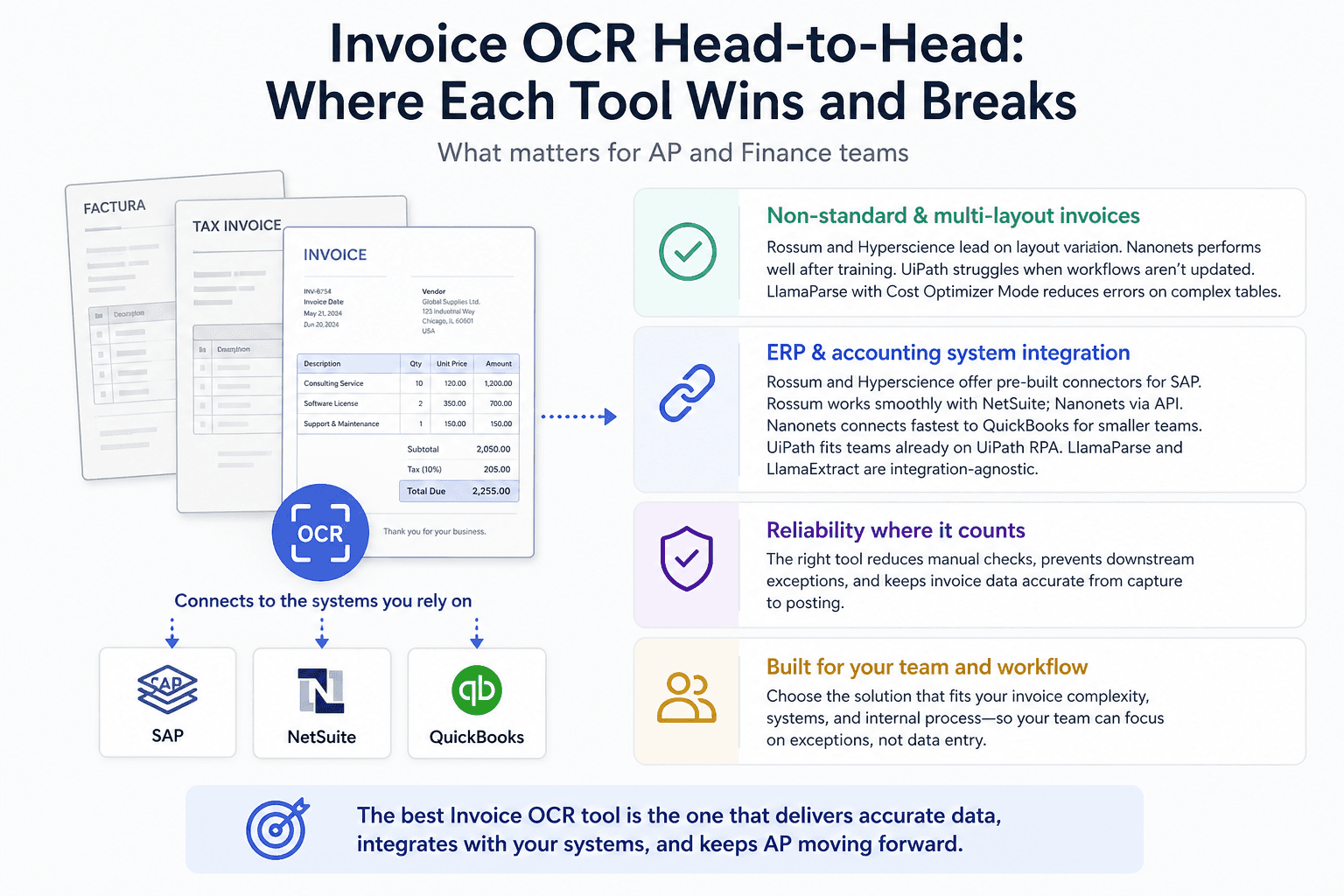
Invoice OCR Head-to-Head: Where Each Tool Wins and Breaks
Non-standard and multi-layout vendor invoices
Rossum performs consistently on non-standard layouts because it uses spatial field mapping rather than fixed templates. Nanonets handles layout variation well after training, but thin training sets produce inconsistent results on new vendor formats.
UiPath Document Understanding struggles with layout variation when the underlying RPA workflow is not updated to match. If a vendor changes their invoice design, the extraction breaks quietly until someone catches it in a downstream exception. LlamaParse with Cost Optimizer Mode handles layout complexity by routing dense documents to more capable models, which reduces errors on complex tables. Hyperscience is strongest here for mixed-format enterprise environments.
ERP and accounting system integration: SAP, NetSuite, QuickBooks
SAP invoice management OCR integration is most reliable with Rossum and Hyperscience, both of which offer pre-built connectors. NetSuite invoice OCR works cleanly with Rossum and can be configured with Nanonets via API, though Nanonets requires more setup effort.
QuickBooks OCR invoice integration is where Nanonets has an edge for smaller teams. It connects faster and requires less technical overhead than enterprise tools. UiPath handles SAP and NetSuite integration well for teams that already run those processes inside UiPath RPA pipelines, but it adds complexity for teams without that context.
LlamaParse and LlamaExtract are integration-agnostic. They output structured data that developers route to any system, but there is no native connector. You build the integration yourself.
Exception handling and human review queues
This is where most invoice OCR tools reveal their real limitations. Every tool flags exceptions. The difference is what happens next.
Rossum routes flagged invoices to a review queue with field-level highlighting, which speeds up human correction. Hyperscience does the same at higher volume with more granular routing rules. Nanonets flags low-confidence extractions but offers less structure around the human review step.
UiPath routes exceptions back into the RPA workflow, which requires the workflow to be built correctly from the start. When it is not, exceptions accumulate without clear resolution paths.
If your team spends more time managing exceptions than processing invoices, that signals a workflow problem, not just an OCR accuracy problem. Predflow takes a process-mapping-first approach, building AI agents that understand the full context of your AP workflow rather than just the extraction step, so exceptions are handled in-line rather than routed to a human queue by default.
Accuracy under pressure: handwritten fields and annotated PDFs
Handwritten content is a documented weakness across all five tools. No current commercial invoice OCR tool handles handwritten fields reliably at scale. The difference is in how each tool fails.
Rossum and Hyperscience flag handwritten fields for human review rather than guessing, which is the correct behavior. Nanonets may attempt extraction and return a low-confidence result that looks plausible but is wrong. UiPath's performance on handwritten or heavily annotated invoices degrades significantly and is noted as a limitation in the tool's own documentation. LlamaParse routes these pages to its heavier vision model, which improves results but does not eliminate errors.
Mini Scorecard
Dimension | Rossum | Nanonets | UiPath | LlamaParse | Hyperscience |
|---|---|---|---|---|---|
Non-standard layouts | Handles Well | Partial | Partial | Handles Well | Handles Well |
ERP/accounting integration | Handles Well | Partial | Handles Well | Breaks Here | Handles Well |
Exception handling | Handles Well | Partial | Partial | Breaks Here | Handles Well |
Handwritten / annotated PDFs | Partial | Partial | Breaks Here | Partial | Partial |
How to Choose the Right Invoice OCR Tool for Your Team Size and Stack
Small AP teams: prioritize setup speed and QuickBooks fit
Small AP teams do not have time for long implementation projects. The priority is a tool that connects to QuickBooks quickly, extracts the most common fields accurately, and flags exceptions clearly without requiring a dedicated administrator to maintain it.
Nanonets fits this profile best. Setup is measured in days rather than weeks, the training interface is accessible to non-technical users, and QuickBooks integration is straightforward. Accuracy improves as the model sees more of your specific vendor invoices over time.
Rossum is a reasonable second choice if your invoice volume is higher and you need more structured validation rules from the start.
Choose this if: you process fewer than 500 invoices per month, run QuickBooks, and need to be operational quickly without engineering support.
Mid-market teams: balance accuracy, ERP depth, and exception volume
Mid-market teams typically run NetSuite or SAP, process hundreds to low thousands of invoices monthly, and have at least one person responsible for managing exceptions. At this scale, setup time is acceptable if the accuracy and integration depth justify it.
Rossum is the strongest fit here. Its validation rules reduce exception volume over time, its ERP connectors are mature, and the review interface supports a structured human-in-the-loop process. Teams already invested in UiPath RPA infrastructure can add Document Understanding without adding a new vendor, provided they have the RPA expertise to maintain it.
The risk at mid-market scale is underestimating exception volume after go-live. Invoice formats change, new vendors are onboarded, and edge cases accumulate. Build that expectation into your evaluation criteria.
Choose this if: you process 500 to 5,000 invoices monthly, need reliable NetSuite or SAP integration, and can commit two to four weeks to initial setup and training.
Enterprise and high-volume: when you need more than an OCR tool
At enterprise scale, the bottleneck is rarely extraction accuracy on clean documents. It is the volume of exceptions, the number of systems involved, and the cost of maintaining a point solution that breaks when something upstream changes.
Hyperscience handles enterprise document intake well and is built for this environment. LlamaParse with LlamaExtract suits engineering teams building custom pipelines where cost routing and confidence scoring need to be embedded in proprietary workflows.
But for organizations where exceptions require cross-system context, where approvals span departments, or where the AP process connects to procurement, receiving, and payment in ways an OCR tool cannot see, a point OCR solution is insufficient. The problem is not extraction. It is end-to-end workflow orchestration.
Choose this if: you process more than 5,000 invoices monthly, operate across multiple ERP systems or business units, and need automation that spans the full AP cycle rather than the extraction step alone.
Frequently Asked Questions
What is the most accurate invoice OCR software for accounts payable?
Rossum and Hyperscience consistently rank highest for AP accuracy on structured invoices because both use spatial field mapping and validation rules rather than template matching. Accuracy on non-standard or handwritten invoices is lower across all tools. The most accurate tool for your team depends on your specific vendor mix and document quality.
Can invoice OCR tools handle handwritten or non-standard invoice formats?
Handwritten fields remain a documented limitation for all current invoice OCR tools. The better platforms flag low-confidence handwritten extractions for human review rather than guessing. Non-standard layouts are handled better by tools that use AI-based spatial mapping, such as Rossum and LlamaParse, compared to template-dependent engines.
How does invoice OCR integrate with SAP, NetSuite, or QuickBooks?
SAP and NetSuite integration is most mature with Rossum and Hyperscience, which offer pre-built connectors. QuickBooks integration is fastest with Nanonets for small teams. UiPath integrates with SAP and NetSuite through RPA workflows. LlamaParse outputs structured data via API and requires custom integration with any ERP system.
What is the difference between invoice OCR and intelligent document processing?
Invoice OCR extracts text from a document image. Intelligent document processing adds AI-driven field identification, layout understanding, confidence scoring, and workflow routing on top of that extraction. IDP handles documents it has never seen before without a pre-built template. OCR alone cannot do that reliably.
How much does invoice OCR software typically cost for a mid-sized team?
Pricing varies significantly by volume and vendor. Per-page pricing models typically range from a few cents to over ten cents per page depending on the tool and complexity. Subscription tiers for mid-market teams commonly fall between a few hundred and a few thousand dollars per month. Enterprise contracts for Hyperscience or full UiPath licensing are priced separately and require direct vendor quotes.
Conclusion
If your main problem is extraction accuracy on clean, structured invoices, a point OCR tool from this list will solve it. Rossum for mid-market AP, Nanonets for small teams, Hyperscience for enterprise intake. Pick based on your ERP, your volume, and your tolerance for setup time.
If your problem is exception volume that keeps growing, systems that do not talk to each other, or an AP process that cannot scale without adding headcount, you are not solving an OCR problem. You are solving a workflow problem. An OCR tool captures the data. It does not fix what happens after extraction breaks.
Switching tools carries real cost in time, training, and integration work. Start with a scoped pilot on your highest-exception vendor segment before committing to a platform.
If your AP workflow has more exceptions than your current tool can handle, see how Predflow maps and automates the full process, not just the extraction step. Book a 30-minute workflow review.
Bring 20 NetSuite bills to a 30-minute teardown
We will walk your actual invoices through capture, 3-way match and posting on the call, and tell you which steps an agent can take over. No prep beyond the PDFs.
FAQ
Frequently asked questions
What exactly is an AI agent
An AI agent is an autonomous system designed to handle specific business tasks end-to-end. Unlike simple chatbots, AI agents can reason, take actions, integrate with tools, and follow defined workflows.