Finance
7 Invoice Management System Features Supply Chains Actually Need
One mismatched PO line can stall supplier payments for days — multiply that across hundreds of weekly invoices and the cost adds up fast. Here are 7 invoice management system features supply chains actually need to fix that.

Gautam Borad
Founder, Predflow

A single mismatched PO line can stall a supplier payment for three days. The AP team sends emails, the procurement lead checks the receiving log, and someone eventually resolves it manually. Multiply that across hundreds of invoices per week and the operational cost becomes significant. Nearly half of all invoices are still processed manually, making errors and delays the default rather than the exception.
The problem is not that teams are working slowly. It is that the tools underneath them were not built for supply chain complexity. An invoice management system that works for a simple B2B billing operation will not hold up under multi-vendor, multi-PO environments where exceptions are routine, not rare.
This article identifies seven features that directly eliminate the bottlenecks AP and operations teams actually face. Use them as evaluation criteria against any vendor's feature list.
What Makes an Invoice Management System Worth the Switch
Most invoice management systems are built for straightforward billing. They handle payment tracking and basic approvals well. Supply chain operations need something different.
Why generic billing software falls short for supply chains
Standard billing system software was designed for simpler B2B software environments where invoice volume is moderate and exceptions are infrequent. Supply chains deal with partial deliveries, multi-line POs, quantity variances, and vendors submitting invoices in different formats. Generic tools create manual workarounds the moment complexity appears.
The three operational criteria that actually matter
Before evaluating any feature, test your current or prospective system against these three criteria:
Criteria | What to look for | Red flag |
|---|---|---|
Integration depth | Bidirectional sync with ERP and procurement tools | Data exports only, no live connection |
Exception handling | Classifies and routes exceptions automatically | Rejects mismatches without context |
Auditability | Immutable, timestamped logs accessible without IT | Audit data requires a support ticket |
A system that fails on any one of these will create manual work at exactly the moments when your team is already under pressure. Common invoicing mistakes including duplicate payments and missing information tend to cluster around the gaps these criteria expose.
Feature 1: Automated Three-Way Matching That Flags Exceptions, Not Just Mismatches
Three-way matching is the highest-leverage automation in any invoice management system for supply chains. It compares the invoice, the purchase order, and the goods receipt to confirm all three align before payment proceeds.
How three-way matching eliminates the most common AP bottleneck
Most payment delays originate at the matching stage. An invoice arrives, something does not align with the PO or the receiving record, and the whole process stalls while someone figures out why. Automating three-way matching removes the human from that first-pass comparison entirely. The system checks the numbers, identifies what does not match, and decides what happens next.
The first step toward efficient invoice management is automating this comparison. Every hour the match sits unresolved is an hour closer to a late payment penalty or a strained supplier relationship.
Exception routing vs. exception dumping: what the difference costs you
Here is where most systems fail in practice. They automate the detection but not the response. A quantity variance gets flagged and dumped into a generic exception queue where it waits for whoever gets to it first.
A better system classifies the exception type and routes it with context. A quantity variance routes to the procurement lead with the original PO and the receiving record attached. A pricing discrepancy routes to the finance manager with the vendor contract reference. The difference between routing with context and dumping without it is measured in days of resolution time per invoice.
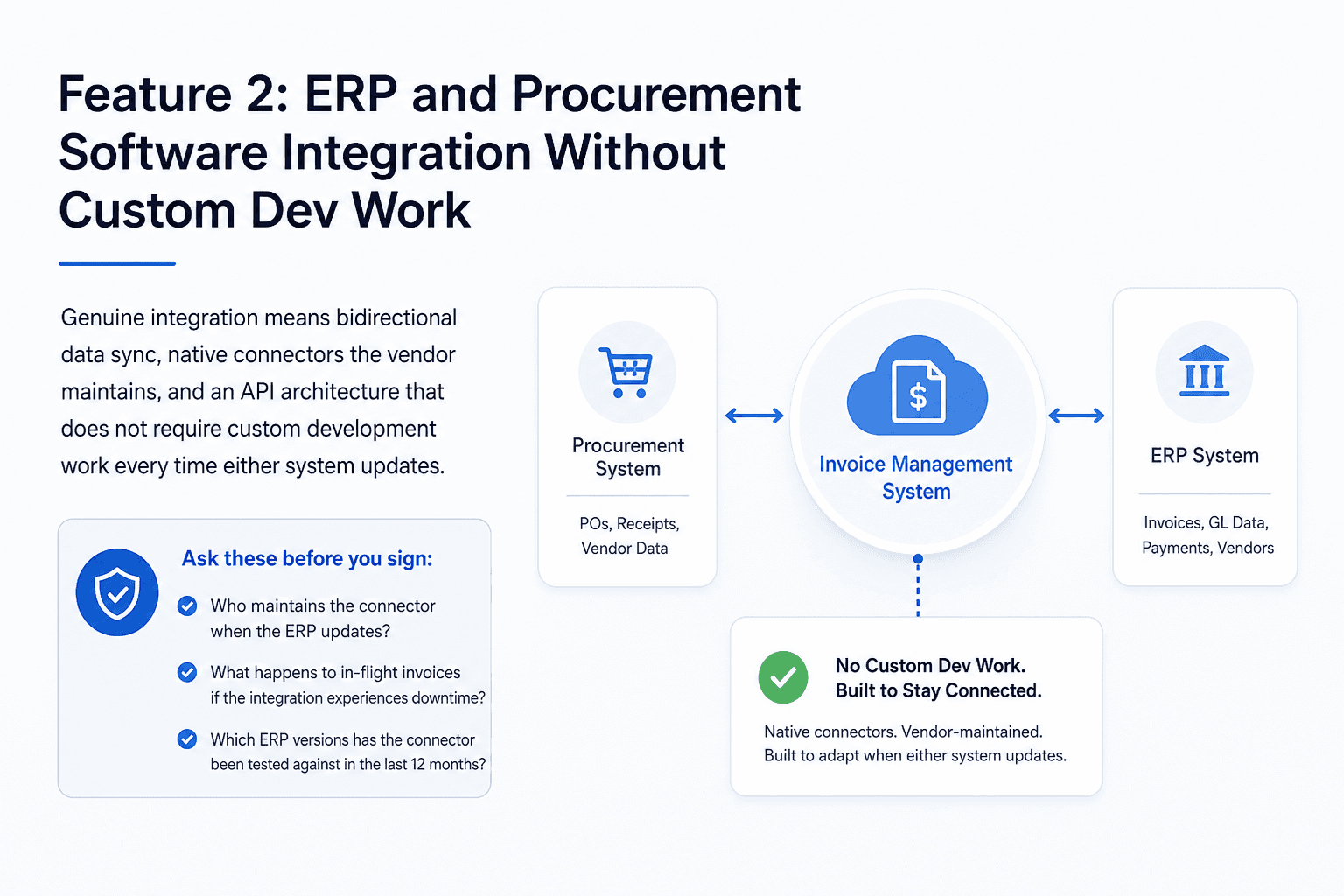
Feature 2: ERP and Procurement Software Integration Without Custom Dev Work
Fragmented tools are one of the most consistent sources of manual work in AP operations. An invoice management system that does not connect cleanly to your ERP forces someone to move data by hand, and manual data movement means errors.
What 'integration' actually means in vendor sales decks vs. real deployments
Vendors use "integration" to mean several different things. Some mean a CSV export you can upload to your ERP. Some mean a pre-built connector that works on the current ERP version but breaks on the next update. Genuine integration means bidirectional data sync, native connectors that the vendor maintains, and an API architecture that does not require custom development work every time either system updates.
A recent requirement shift for ERP systems connected to G-Invoicing illustrates exactly why integration architecture matters. Systems using proprietary-only connectors found themselves facing significant technical debt when the API standard changed. Integration that looks stable today can become a liability when either side of the connection updates its requirements.
Questions to ask before signing any invoice software contract
Push vendors on three specific points during evaluation. Ask whether their connector is maintained on their side or yours when the ERP updates. Ask what happens to in-flight invoices if the integration experiences downtime. Ask for a list of ERP versions the connector has been tested against in the last 12 months. Vague answers to these questions are a reliable signal that integration is not a core architectural feature for that vendor.
Feature 3: Invoice Management System Visibility That Surfaces Process Bottlenecks
Knowing that an invoice is pending is not the same as knowing why it is pending. Most AP dashboards show status. Few show where time is actually being lost.
Status tracking vs. process intelligence: why the distinction matters
An AP manager sees an invoice marked "pending approval" for 11 days. The system tells them where the invoice is in the workflow. It does not tell them whether it is stuck because the department head has not opened it, because a PO amendment is being processed, or because it got buried in an email thread outside the system entirely. That distinction determines the right action, and without it, the manager sends a follow-up email and waits.
Process intelligence means the system tracks time at each stage, flags anomalies, and surfaces where queues are forming. That data makes bottlenecks visible before they become escalations.
What good AP visibility looks like in a supply chain context
Good visibility in a supply chain context answers specific questions: Which approval stage has the longest average time? Which vendor invoice types generate the most exceptions? Which cost centers are consistently late on approvals? These are operational questions, not just status questions.
This is why platforms like Predflow start with process mapping rather than feature deployment. The visibility layer is structural, built into how the workflow is designed, not added as a reporting module afterward. When evaluating any vendor, ask whether their analytics reflect actual process performance or just transaction status.
Feature 4: Configurable Approval Workflows That Match How Your Team Actually Works
Rigid approval chains do not fail loudly. They fail quietly, when team members build workarounds that route around the system entirely.
Why rigid approval chains create shadow workarounds
When an approval workflow does not reflect real organizational structure, people adapt. A department head who is traveling approves invoices over the phone and asks someone to click confirm. An urgent vendor payment gets manually processed outside the system because the configured route takes five days. These workarounds defeat the purpose of automation and make the audit trail unreliable.
Conditional routing logic: the feature most demo videos skip
Configurable does not mean complex. It means the system can reflect how your operation actually makes decisions. Two concrete examples show what this looks like in practice.
First: invoices over $50,000 automatically route to the CFO for approval before the department head receives them, regardless of which cost center the invoice belongs to. Second: invoices from vendors added to the system in the last 90 days trigger a compliance check step before entering the standard approval chain. Neither of these rules is unusual in a supply chain environment. Most systems either cannot support them without IT involvement or require an expensive configuration project to implement them.
When evaluating a workflow builder, ask whether a non-technical AP manager can create and modify these rules independently. If the answer requires a support ticket, the workflow is not genuinely configurable.
Feature 5: Vendor Portal and Communication Tools That Reduce Inbound Queries
AP teams in supply chain operations spend a significant share of their time answering the same question from vendors: where is my payment? A vendor portal is a direct response to that cost.
How vendor portals reduce the AP team's inbound query load
A self-service portal gives vendors real-time visibility into invoice status, payment timelines, and any exception details without requiring them to contact your team. The AP team stops being the communication channel and the tool becomes it instead.
The math is straightforward. An AP team of four people, each spending 25% of their time on vendor status emails, is spending one full FTE equivalent on communication alone. A portal that deflects 60% of those queries returns roughly half an FTE in recovered capacity. That capacity either reduces the need to hire as volume grows, or it allows the team to focus on the exceptions that actually require judgment.
Minimum viable portal features for supply chain vendors
A portal that only shows "invoice received" is not enough to deflect queries. Vendors need to see the specific stage the invoice is at, the reason for any hold, the expected payment date, and the point of contact for disputes. Without those details, vendors call anyway. The portal must answer the follow-up questions, not just the first one.
Feature 6: Audit Trail and Compliance Logging Built Into the Invoice Management System
Audit readiness is not a concern until it is the only concern. Finance teams that discover their audit trail is incomplete during an actual audit face a problem that no software feature added after the fact can fix.
What auditors actually ask for and whether your system can answer
A realistic audit scenario in a supply chain context: a supplier disputes a payment deduction and the finance team has 48 hours to produce the original PO, the goods receipt confirmation, the matching decision log, and the complete approval chain with timestamps. That is four separate records that must align chronologically and show exactly what happened at each step.
The question is not whether your system stores this data. It is whether a finance team member can retrieve all of it within an hour, without filing a support ticket.
Compliance logging vs. activity logs: the difference under scrutiny
Activity logs record that something happened. Compliance logging records what happened, who authorized it, what system state triggered it, and whether any manual override occurred. The distinction matters most when a payment was processed outside the normal workflow, which is exactly the scenario auditors focus on. Systems where audit logging is an add-on rather than a core architectural feature tend to have gaps in the manual override record, which is the record you need most.
Feature 7: Scalable Automation That Grows Invoice Volume Without Growing Headcount
The question that determines whether an invoice management system is genuinely scalable is not how many invoices it can process. It is how it handles the invoices that fall outside the standard workflow.
Task automation vs. process automation: why the distinction determines your hiring plan
Task automation removes individual manual steps. A system that automatically extracts invoice data from a PDF is doing task automation. Process automation handles the entire sequence, including the exceptions, the edge cases, and the decisions that sit between the standard steps. The difference determines your hiring plan as volume grows.
A system that automates the standard 80% of invoices but routes every exception to a human has only partially solved the problem. As invoice volume doubles, exception volume doubles too, and the team grows to keep pace.
How to stress-test a vendor's scalability claims before you buy
Ask vendors what percentage of non-standard invoices their system resolves without human intervention. Ask to see examples of exception classification logic. Systems that use AI-powered predictive analytics and autonomous exception handling can classify a partially received shipment invoice, identify the variance type, and route it with context attached, without a team member touching it.
With close to half of all invoices still being processed manually across the industry, the teams that scale without adding headcount are the ones whose systems handle the non-standard cases, not just the easy ones. That capability is the real measure of whether an invoice management system can serve a growing supply chain operation.
Frequently Asked Questions
What is an invoice management system and how does it work in a supply chain context?
An invoice management system is software that automates the receipt, processing, matching, approval, and payment of invoices. In a supply chain context, it connects to procurement and ERP systems to match invoices against purchase orders and goods receipts, route exceptions, and maintain a complete audit trail across multiple vendors and cost centers.
How does an invoice management system reduce manual AP workload?
It removes human involvement from the steps that do not require judgment: data extraction, three-way matching, routing to the correct approver, and status updates to vendors. This frees AP staff to focus on exceptions that genuinely need review rather than processing every invoice individually.
What is three-way matching and why does it matter for invoice processing?
Three-way matching compares the supplier invoice, the purchase order, and the goods receipt record to confirm all three align before payment is released. It matters because discrepancies between these three documents are the most common source of payment delays and duplicate payments in supply chain AP operations.
Can an invoice management system integrate with existing ERP software?
Most modern systems offer ERP integration, but the quality varies significantly. Look for bidirectional data sync, native connectors maintained by the vendor, and an API architecture that does not require custom development work when either system updates. Ask specifically which ERP versions the connector has been tested against recently.
How do I know if my current invoicing process needs an automated system?
If your team is manually resolving exceptions, cannot answer a vendor status question without checking multiple systems, or cannot produce a complete approval trail without IT support, the process has outgrown its current tools. The better diagnostic is to calculate how much time per week is spent on tasks that a system could handle without human input.
Conclusion
The decision about whether to upgrade an invoice management system is usually already made by the time a team starts evaluating vendors. The real question is which of these seven features are missing and what that gap is costing per quarter in staff time, late payment penalties, and audit risk.
If the team is manually resolving exceptions that a system should classify automatically, if vendor status queries are consuming hours per week, or if producing an audit trail requires IT involvement, those are not process maturity problems. They are system capability problems with measurable costs.
If you are evaluating how AI-driven process automation could handle your invoice workflows end-to-end, including exception handling and ERP integration, see how Predflow approaches workflow automation built around your actual process.
Bring 20 NetSuite bills to a 30-minute teardown
We will walk your actual invoices through capture, 3-way match and posting on the call, and tell you which steps an agent can take over. No prep beyond the PDFs.
FAQ
Frequently asked questions
What exactly is an AI agent
An AI agent is an autonomous system designed to handle specific business tasks end-to-end. Unlike simple chatbots, AI agents can reason, take actions, integrate with tools, and follow defined workflows.