AI AGENTS
How to Build an Automation Workflow for Back-Office Teams
Build an automation workflow that eliminates manual data entry and approval bottlenecks. A practical guide for back-office teams ready for real results.

Gautam Borad
Founder, Predflow

Every Monday morning, somewhere in finance, a manager opens three browser tabs, two email threads, and a spreadsheet to chase the same invoice that got stuck between approval and posting, again. The invoice data was entered manually into the ERP, then re-keyed into the AP system, then copied into a status tracker. Three systems. One data point. Zero automation.
This is not a technology problem. It is a process design problem, and buying software before fixing the design is the most common reason automation projects fail. As one industry analysis of failed implementations found, rushing into automation without thorough process analysis consistently produces solutions that do not align with organizational objectives or how people actually work.
This guide gives back-office teams a structured, process-first method for building automation workflows that hold up in production. You will learn what to map before you touch any tool, which automation approach fits your function, and how to avoid the failure patterns that send teams back to square one.
What Is an Automation Workflow and Why Back-Office Teams Get It Wrong
Most back-office teams do not have a workflow automation problem. They have a tool-selection problem dressed up as one.
Workflow automation defined: process orchestration vs. task shortcuts
An automation workflow is a configured sequence of triggers, logic rules, and actions that moves work across systems and people without manual handoffs, end to end, not step by step.
Task automation handles one action in isolation: auto-sending a payment confirmation email, for example. Workflow automation, what is sometimes called business process automation, orchestrates the entire sequence: invoice received, data extracted, matched to PO, routed for approval, posted to ERP, payment scheduled. The distinction matters because task shortcuts create islands of automation that still require humans to bridge the gaps between them.
The three failure patterns most back-office teams repeat
Pattern 1: Automating a broken process. If the approval chain has three redundant sign-offs because no one removed them, automation will execute those redundant sign-offs at machine speed.
Pattern 2: Connecting tools before mapping the process. Teams pick a workflow automation platform, then reverse-engineer their process to fit the tool's template. The result is automation shaped around what the tool can do, not what the business needs.
Pattern 3: No exception path. Most automation guides show the happy path. Real back-office processes have vendor disputes, missing PO numbers, and duplicate invoices. A workflow with no exception routing simply stops, and no one knows why.
Why tools-first thinking stalls implementation
Business process automation platforms are genuinely useful, but they are configuration environments, not process consultants. Choosing a tool before defining the process forces teams to revisit their workflow design within months. The most reliable automation projects start with a documented current state, identify the decision points, then select tools that can support the required logic. In that order.
Map Your Back-Office Process Before You Automate Anything
Skipping process mapping is the single most reliable predictor of a failed automation build. Teams that skip it consistently rebuild their workflows within six months, because the first version automated assumptions, not reality.
How to document current-state handoffs and exception paths
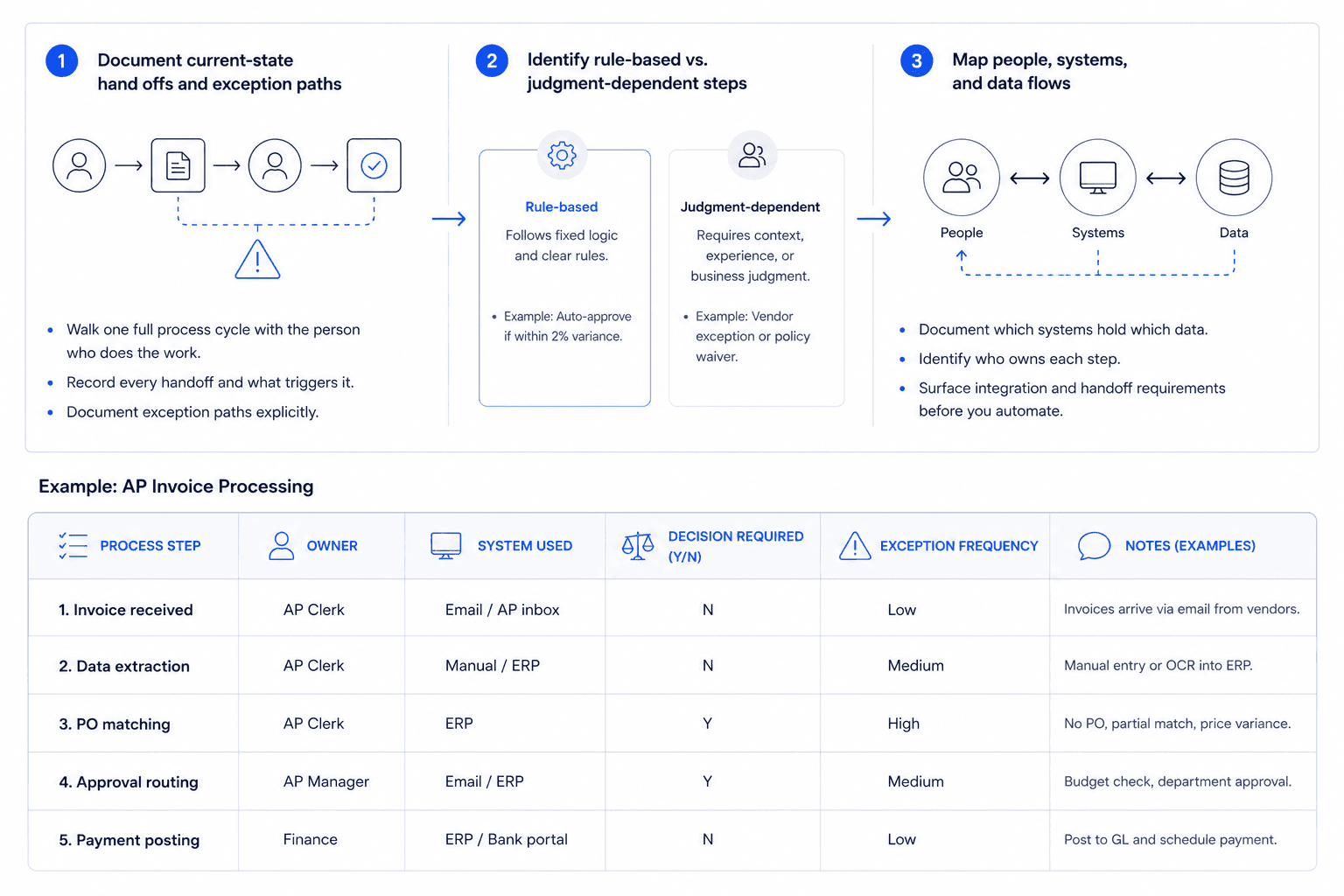
Start by walking one full process cycle with the person who actually does the work, not the manager who designed it. Record every handoff: when does work leave one person's queue and enter another's? What triggers that handoff, a status change, an email, a calendar reminder?
Document exception paths explicitly. For every decision point, ask: "What happens when this is wrong or missing?" In AP, that means: what happens when an invoice arrives with no PO number? Who handles it, using what system, and how long does it take? Workflow automation best practices define these as the guidelines that connect business tools to real process behavior.
Identifying which steps are rule-based vs. judgment-dependent
Rule-based steps follow a fixed logic: if the invoice amount matches the PO within 2%, approve automatically. These are strong candidates for automation regardless of tool choice.
Judgment-dependent steps require context: a vendor relationship, a budget constraint, a policy exception. These steps need human-in-the-loop design, not removal from the process. Misclassifying a judgment step as rule-based is how automation creates compliance risk.
Company mapping: connecting people, systems, and data flows
Before selecting any automation approach, document which systems hold which data and which teams own each step. This is sometimes called company mapping, a structured view of people, systems, and data flows that makes integration requirements visible before implementation.
Use this table as your starting framework. AP invoice processing is used here as the worked example:
Process Step | Owner | System Used | Decision Required (Y/N) | Exception Frequency |
|---|---|---|---|---|
Invoice received | AP Clerk | Email / AP inbox | N | Low |
Data extraction | AP Clerk | Manual / ERP | N | Medium |
PO matching | AP Clerk | ERP | Y | High |
Approval routing | AP Manager | Email / ERP | Y | Medium |
Payment posting | Finance | ERP / Bank portal | N | Low |
Fill this table for every process you plan to automate. It will immediately surface where exceptions cluster and where human judgment is genuinely required.
Which Automation Workflow Approach Fits Your Back-Office Function
Choosing the wrong automation approach wastes time even when the tool works correctly. RPA running on a process that needs AI judgment will break every time an exception appears. An AI agent applied to a simple, structured data entry task is over-engineered and harder to maintain.
RPA vs. AI workflow automation: which handles which tasks
RPA (robotic process automation) executes fixed rules on structured data. It works well for tasks where inputs are consistent, logic is binary, and the source system does not change often. Data entry from a PDF into an ERP field is a classic RPA use case.
AI workflow automation handles variability: unstructured inputs, contextual decisions, and multi-step reasoning. Where RPA follows a script, AI workflow automation reads context. Extracting line items from invoices in ten different formats, then matching them against a purchase order with partial data, is an AI task, not an RPA task.
The practical question is not which technology is better, it is which step you are trying to automate.
Finance automation: AP, AR, reconciliation, and expense management
AP automation handles the highest exception volume of any back-office function. Invoice capture, three-way matching, approval routing, and payment scheduling can all be automated, but only the capture and posting steps are clean enough for pure RPA. Matching and routing need rule logic with exception escalation built in.
Accounts receivable automation follows the same pattern: cash application and remittance matching are rule-based; dispute resolution is judgment-dependent. Reconciliation automation and expense management automation both follow this split. Map the steps first, then assign the right approach to each.
HR and procurement automation: where AI agents outperform scripted bots
HR process automation handles high document variability: offer letters, onboarding forms, policy acknowledgments, payroll inputs, across different employee types and jurisdictions. RPA breaks when document formats change or data is missing. Human resources automation software built on AI handles these variations without manual intervention.
Procurement automation software and procure-to-pay automation face similar challenges: vendor data inconsistencies, partial POs, and contract terms that require interpretation. Supply chain management automation that relies purely on scripted bots fails at the edges: vendor exceptions, delivery discrepancies, and substitution requests all require contextual handling.
When agentic process automation is the right next step
As of early 2026, AI agents crossed from "interesting" to "standard expectation" in workflow automation, and back-office teams that treat agentic automation as a future consideration are already behind their peer organizations.
Agentic process automation is the right choice when your workflow crosses multiple systems, involves exceptions that RPA cannot handle, and requires judgment calls that follow identifiable patterns, even if those patterns are complex. An agent does not just execute steps; it evaluates context, handles edge cases, and escalates only when genuinely necessary.
This is the gap Predflow is built to close. Its AI agents start with process mapping, then handle exception-heavy, cross-system workflows that scripted bots break on, with human oversight built in for the judgment calls your team still needs to own. If your AP or procurement workflows are generating constant manual exceptions, a Predflow workflow assessment shows exactly where an agent would take over.
Build Your Automation Workflow in Five Structured Steps
The process mapping work is done. Now the build begins. These five steps apply across AP, HR, supply chain, and operations; the examples rotate to show breadth.
1. Scope one high-frequency, low-exception process to automate first.
Pick the process your team runs most often with the fewest edge cases. In AP, this is straight-through invoice processing: invoices that arrive with a valid PO, match within tolerance, and need no manual approval. Starting here gives you a working automation in weeks, not months, and creates visible proof before you tackle harder processes. Avoid starting with your most complex workflow; the goal of step one is a working production deployment, not a perfect automation.
2. Choose your automation layer: trigger, logic, action, and notification.
Every automation workflow has four functional layers. The trigger is what starts the workflow (invoice received, form submitted, file uploaded). The logic is the decision engine (does the amount match? is the vendor approved?). The action is what happens next (post to ERP, route for approval, send payment). The notification tells the right person what happened or what needs attention. Define all four layers in writing before configuring anything. In HR onboarding, the trigger is a signed offer letter, the logic checks completeness, the action creates system accounts, and the notification alerts IT and the manager.
3. Configure integrations between your existing business systems.
Back-office automation almost always spans two or more systems: an ERP, an email platform, a procurement tool, a payment processor. Map the data fields that need to pass between systems and confirm API availability before build. In supply chain, a purchase order in your procurement tool needs to connect to your ERP inventory module and your vendor communication channel. Integration failures are the most common reason automations run correctly in testing but break in production.
4. Define exception routing and human-in-the-loop checkpoints.
This is the step most teams skip, and the reason most automations fail within three months. The common mistakes research is direct: overlooking human-centric design in automation consistently leads to workflows that do not serve actual users. For every decision point in your workflow, define what happens when the answer is neither clearly yes nor clearly no. In AP, a three-way match failure should route to the AP clerk with the specific mismatch flagged, not disappear into an error log. Human-in-the-loop checkpoints are not automation failures; they are designed escalation paths.
5. Test, measure, and iterate before expanding scope.
Run the automated workflow in parallel with the manual process for two weeks. Compare outputs. Track where the automation took a different path than a human would and determine whether that difference was correct. Only expand automation scope, adding more process steps, more document types, more business units, after the first scope runs cleanly for thirty days. In HR, that means automated onboarding for one employee type before extending to contractors, part-time staff, or international hires.
How to Measure Whether Your Automation Workflow Is Actually Working
A workflow that runs without errors is not the same as a workflow that improves the business. These five metrics tell you which one you have.
The five metrics back-office teams should track from day one
Cycle time per transaction: Time from trigger to completion. For AP, this is invoice receipt to payment posting. If automation is working, this number drops and stays low. If it fluctuates, your exception handling has gaps.
Exception rate: Percentage of transactions routed to a human. A high exception rate signals that your rule logic does not match reality. Target exception rates vary by process, but a rising rate after go-live means the workflow needs redesign, not more exceptions handled manually.
Cost per transaction: Total process cost divided by transaction volume. AP automation ROI is most clearly visible here: when cycle time falls and headcount stays flat while volume grows, cost per transaction falls directly. This is the metric AP leadership uses to justify automation investment.
Error rate post-automation: Duplicate payments, incorrect postings, missed approvals. Automation should reduce errors; if it does not, the logic layer has a flaw.
Team hours recovered: Hours per week no longer spent on manual processing. Track this separately from headcount; recovered hours fund higher-value work, not necessarily headcount reduction.
Reading exception rates: what high exceptions signal about your workflow design
An exception rate above 20% in a process you believed was rule-based means one of two things: the rules are wrong, or the input data is inconsistent. Both are fixable, but fixing them requires going back to the process map, not adjusting the automation configuration.
When to expand automation scope vs. when to fix the current workflow
Expand scope when cycle time is stable, exception rate is below your target, and error rate is at or below the manual baseline. Fix the current workflow when any one of those three metrics is moving in the wrong direction after thirty days of production use. Expanding automation onto a broken foundation compounds the problem.
Frequently Asked Questions
What is the difference between RPA and AI workflow automation for back-office teams?
RPA executes fixed, rule-based steps on structured data; it follows a script and breaks when inputs vary. AI workflow automation handles variability: unstructured documents, contextual decisions, and multi-step reasoning across systems. For back-office teams, RPA fits clean data entry tasks; AI workflow automation fits anything involving exceptions, document variety, or judgment-dependent routing.
How long does it take to build and deploy an automation workflow?
A well-scoped, single-process automation, such as straight-through AP invoice processing, can reach production in four to eight weeks when process mapping is completed first. Complex, cross-system workflows with high exception rates take longer. Teams that skip process mapping and start with tool configuration typically spend more total time because they rebuild the workflow after the first version fails in production.
Which back-office process should I automate first?
Start with the process your team runs most frequently that has the lowest exception rate. In most back-office environments, that is invoice processing for approved vendors with existing POs, or employee onboarding for a single employee type. High frequency means the time savings are immediate. Low exceptions means the first build succeeds without major redesign.
What tools do I need to build an automation workflow without a developer?
Most back-office teams start with a combination of their existing ERP or HRIS, a workflow automation platform with visual configuration, and an integration layer to connect systems via API. The specific tools matter less than whether they support the four layers, trigger, logic, action, and notification, your process requires. A developer becomes necessary when custom integrations, complex data transformations, or proprietary system connections are involved.
How do I handle exceptions and edge cases in an automated workflow?
Define exception paths before you build the automation, not after. For every decision point, specify what happens when the answer is unclear: which human receives the exception, what information they see, and what their response options are. Exceptions routed to a clear owner with full context are resolved in minutes. Exceptions that disappear into an error log become the backlog your team discovers on Monday morning.
Is agentic process automation the same as traditional RPA?
No. Traditional RPA follows a fixed script and requires human intervention when inputs deviate from the expected format. Agentic process automation uses AI agents that evaluate context, adapt to variation, and handle multi-step reasoning across systems. Agentic automation is suited to complex, cross-system workflows with high exception rates. RPA is suited to structured, repetitive tasks with consistent inputs. Many mature automation programs use both: RPA for the clean steps, agents for the exceptions.
Conclusion
You now have the core framework: what automation workflow actually means, how to map your process before selecting tools, which approach fits your function, a five-step build sequence, and the metrics to know if it is working.
The only remaining decision is whether to start a pilot this quarter or wait for a larger transformation initiative. Waiting rarely improves the conditions; it just delays the twelve months of learning you need before scaling. The technology is not the hard part. Choosing the right first process and designing exception handling honestly are the hard parts. Both are decisions you can make this week.
That finance manager from the introduction, chasing invoice approvals across three systems, already has a high-frequency, low-exception process to start with. So do you.
If you want to skip the trial-and-error on process mapping, Predflow's team will map your highest-impact back-office workflow and show you exactly what an AI agent would automate, before you commit to anything. Book a free workflow assessment.
Bring 20 NetSuite bills to a 30-minute teardown
We will walk your actual invoices through capture, 3-way match and posting on the call, and tell you which steps an agent can take over. No prep beyond the PDFs.
FAQ
Frequently asked questions
What exactly is an AI agent
An AI agent is an autonomous system designed to handle specific business tasks end-to-end. Unlike simple chatbots, AI agents can reason, take actions, integrate with tools, and follow defined workflows.