Supply Chain
Automation in Supply Chain: Use Cases, Tools, and ROI Metrics
Your competitor just cut procure-to-pay processing time by 70% using automation. Here are the exact use cases, tools, and ROI metrics showing how they did it.

Sanya Shah
Co-founder at Predflow

Your AP team is manually keying invoice data. PO approvals are chasing each other across email threads. Month-end reconciliation takes three people and a week. Meanwhile, a competitor has automated the same procure-to-pay cycle end-to-end and cut processing time by 70%.
The gap is not technology access. It is clarity about where automation actually delivers measurable returns versus where it creates new problems. Businesses that have stumbled with automation often made the same mistake: they automated the process as-is, without fixing the underlying workflow first.
This article maps the exact supply chain use cases where automation produces real ROI, the tool categories built for each layer, a repeatable framework for calculating payback period, and the failure modes that kill automation pilots before they scale.
What Is Workflow Automation in a Supply Chain Context?
Workflow automation in supply chain means replacing manual handoffs, data entry, and approval routing with software-triggered actions that execute based on defined rules, document inputs, or AI-driven decisions. It is not one technology. It is a stack of four distinct layers, each suited to different task types.
Workflow automation handles structured, rule-based sequences: if a PO is approved, trigger a vendor notification and log it in the ERP.
RPA (Robotic Process Automation) uses software bots to mimic human actions inside existing interfaces: reading invoice PDFs, copying values into ERP fields, and submitting forms without changing the underlying system.
AI automation adds pattern recognition and judgment: extracting data from unstructured documents, classifying exceptions, or routing anomalies to the right team member.
Agentic process automation is the newest layer. AI agents execute multi-step workflows autonomously, adapting to new inputs, coordinating across systems, and escalating only when a decision requires human judgment.
Layer | What it handles | What triggers it | Human oversight needed |
|---|---|---|---|
Workflow automation | Sequential, rule-based tasks | Events, approvals, schedules | Low: exception alerts only |
RPA | UI-level data entry and extraction | Triggers from rules or schedules | Medium: bot failures need monitoring |
AI automation | Unstructured data, classification | Document inputs, API calls | Medium: model confidence thresholds |
Agentic process automation | End-to-end multi-step workflows | Goals or outcomes, not just rules | Low-to-medium: human-in-the-loop for edge cases |
Workflow automation vs. RPA vs. AI automation: the practical difference
RPA is the right tool when the task is repetitive, the interface is stable, and the data is structured. AI automation is the right tool when documents vary in format, language differs across suppliers, or classification requires context. Workflow automation is the connective layer that sequences both.
The practical distinction matters at budget time. An RPA bot costs less to deploy but breaks when formats change. An AI automation layer handles variance but requires more setup. Knowing which layer a task needs prevents over-engineering simple problems and under-equipping complex ones.
Where agentic process automation fits in 2025 supply chains
Agentic process automation handles the workflows that fall apart between systems: a freight invoice arrives in a non-standard format, needs to be matched against three POs across two ERPs, flagged for a currency variance, and routed for approval before a payment deadline. No single rule-based bot handles all four steps reliably.
AI agents execute that sequence end-to-end, track state across steps, and escalate only the currency variance to a human. This is where supply chain teams are seeing the largest efficiency gains in complex, document-heavy operations.
6 High-ROI Automation Use Cases Across the Supply Chain
Each use case below names the manual task eliminated, the automation mechanism, and a concrete ROI signal. These are the starting points with the clearest payback across Finance and Operations teams.
1. Procure-to-pay automation: from PO creation to payment without manual handoffs
Manual task replaced: Manually creating POs from approved requisitions, emailing vendors, chasing acknowledgments, and keying receipt confirmations into the ERP.
Automation mechanism: Procure-to-pay automation connects requisition approval to PO generation, vendor notification, goods receipt matching, and payment scheduling in a single automated workflow.
ROI signal: Organizations implementing procure-to-pay automation report 60 to 80 percent reductions in PO processing time and significant cuts to maverick spend through enforced approval paths.
2. Accounts payable automation: invoice capture, matching, and approval routing
Manual task replaced: AP teams manually opening, reading, and re-entering invoice data, then routing paper or PDF invoices to approvers via email.
Automation mechanism: Accounts payable automation uses AI-based capture to extract invoice fields, match against POs and receipts, and push exceptions to the right approver automatically.
ROI signal: AP automation ROI benchmarks consistently show a cost-per-invoice reduction from $15 to $20 manually processed down to $2 to $4 with full automation. Approval cycle time drops from days to hours.
3. Invoice reconciliation: automated three-way match and exception handling
Manual task replaced: Finance staff manually comparing invoices, purchase orders, and goods receipts line by line, then investigating discrepancies.
Automation mechanism: Reconciliation automation performs three-way matching at the line level, flags discrepancies above a set tolerance, and routes only genuine exceptions to a human reviewer.
ROI signal: Automated reconciliation cuts exception investigation time by 50 to 70 percent by surfacing only real discrepancies rather than asking staff to check every record.
4. Sales order automation and O2C cycle compression
Manual task replaced: Sales ops teams manually processing incoming orders from email, EDI, or portals, keying them into the ERP, and sending order confirmations.
Automation mechanism: Sales order automation extracts order data from any incoming format, validates against inventory and credit rules, and creates confirmed orders in the ERP without human entry.
ROI signal: O2C automation reduces order-to-ship cycle time by 40 to 60 percent, directly improving cash conversion and reducing customer escalations from delayed order confirmation.
5. Automated document processing for freight, customs, and compliance
Manual task replaced: Logistics and compliance teams manually reviewing bills of lading, customs declarations, and certificates of origin for accuracy before submission.
Automation mechanism: Document processing automation uses AI extraction to read variable-format freight and customs documents, validate required fields, and flag missing or inconsistent data before filing.
ROI signal: Automated document processing reduces customs clearance preparation time by 50 to 65 percent and cuts document error rates that trigger costly re-submissions or delays.
6. HR process automation: onboarding, offboarding, and payroll triggers
Manual task replaced: HR teams manually creating system access requests, coordinating onboarding checklists across IT and Finance, and triggering payroll changes after status updates.
Automation mechanism: HR automation software listens for status changes in the HRIS and triggers downstream actions: system provisioning, benefits enrollment, payroll record updates, and equipment requests, all without manual coordination.
ROI signal: HR process automation cuts new hire time-to-productivity by reducing onboarding admin from multiple days to hours, while eliminating access provisioning errors that create compliance exposure.
Formal process documentation is a prerequisite for all six use cases. Automation experts consistently identify clear, written process descriptions as essential for RPA and AI agents to function reliably, to allow stakeholder communication, and to support ongoing maintenance and improvement.
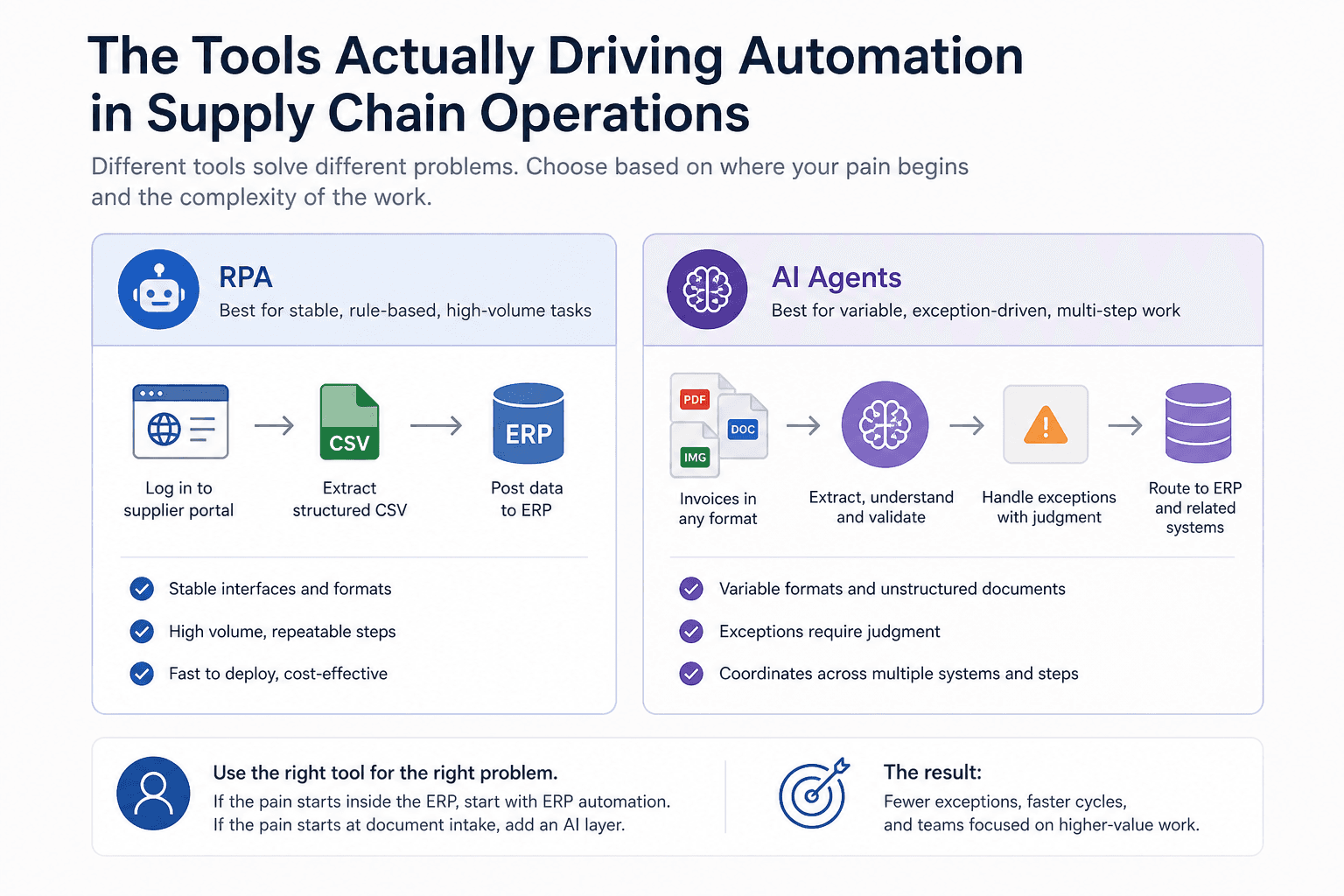
The Tools Actually Driving Automation in Supply Chain Operations
The tool landscape is wide enough to create decision paralysis. The four categories below map to distinct functional needs. Knowing which gap you are filling prevents buying a platform that solves the wrong problem.
ERP automation and SAP business process management integrations
ERP automation extends what your existing system already does. SAP business process management, for example, lets teams automate approval workflows, vendor master updates, and financial period-close tasks without building outside the ERP. The limitation: ERP-native automation works well for structured, in-system tasks but struggles with unstructured external documents like supplier invoices in variable formats.
If your main pain is inside the ERP, start here. If your pain starts at the document intake stage before data reaches the ERP, you need an additional layer.
RPA and AI agent platforms: when each fits supply chain tasks
Use RPA for stable, rule-based, high-volume tasks where the interface and data format do not change: logging into a supplier portal daily, extracting a structured CSV, and posting to the ERP. RPA is cost-effective and fast to deploy in these scenarios.
Use AI agents when documents vary in format, exceptions require judgment, or multiple systems need coordinated context across steps. AI agents handle the freight invoice that arrives in a new format from a new supplier, extract the right fields anyway, and route the currency variance exception intelligently.
The distinction matters for supply chain specifically because supplier document formats are rarely standardized. Adaptive automation and AI-driven decision making are no longer optional for teams processing documents from dozens of supplier sources. Platforms like Predflow take a process-mapping-first approach: agents are built around your actual workflow logic, not bolted onto existing tools, which means exceptions that would break a standard RPA bot get handled automatically, with human oversight built in for edge cases that genuinely need a decision.
Workflow orchestration and automation platforms (including n8n alternatives)
Workflow orchestration platforms sequence tasks across multiple tools without requiring custom code for every integration. Teams evaluating n8n alternatives often need stronger enterprise security, managed hosting, or native AI agent capabilities beyond what open-source orchestration provides. The right choice depends on whether your team has developer resources to maintain the platform or needs a managed solution.
Procurement and AP-specific automation software
Procurement automation software focuses on the source-to-pay cycle: vendor onboarding, contract management, PO management, and spend analytics. AP-specific tools narrow further to invoice capture, matching, and payment. These purpose-built tools integrate faster than general platforms but may require middleware to connect with your ERP or TMS.
How to Measure Automation ROI Before You Commit to a Platform
The most common mistake in automation investment decisions is measuring only tool licensing cost while ignoring the full cost of the manual process being replaced. A platform that costs $50,000 per year is a clear win if the manual process it replaces costs $200,000 in labor, error rework, and late payment penalties. Without the baseline, the comparison is meaningless.
Step 1: Baseline the true cost of your current manual process
Count fully loaded labor hours per week on the target process, multiply by burdened hourly rate, and add error rework time and any downstream costs from errors. For AP teams, include late payment penalties and the cost of invoice disputes. Most teams find the real manual process cost is 2 to 3 times higher than the visible labor cost alone.
Step 2: Estimate post-automation operating cost and error reduction
Post-automation cost includes tool licensing, implementation, and ongoing maintenance. Error rates for automated processes typically fall to 1 to 3 percent from 5 to 10 percent for manual processes on high-volume tasks. Factor in the labor cost of reviewing only the exceptions your automation flags, not the full volume.
Step 3: Calculate payback period using AP automation ROI as a worked example
Cost category | Before automation | After automation |
|---|---|---|
Labor hours (monthly) | 160 hours at $35/hr = $5,600 | 20 hours at $35/hr = $700 |
Error rework cost (monthly) | $1,200 | $150 |
Tool licensing (monthly) | $0 | $1,500 |
Total monthly cost | $6,800 | $2,350 |
Monthly saving: $4,450. Payback period on a $15,000 implementation: under four months.
Replace the placeholder figures with your team's actual numbers. The structure holds regardless of process or team size.
5 Automation Mistakes Supply Chain Teams Make (and How to Avoid Them)
Most automation pilots that fail do not fail because the technology is wrong. They fail because the process entering the automation was already broken, or the team treated deployment as the endpoint rather than the starting point.
Automating a broken process instead of fixing it first
Your AP team receives 200 invoices per day in six different formats with inconsistent PO reference fields. Automating the matching step before standardizing the intake format means your bot breaks on 30 percent of documents from day one. Fix the intake process, enforce a PO reference requirement with suppliers, and then automate. Automating chaos produces automated chaos, faster.
Choosing a tool before mapping the workflow
A team buys an AP automation platform before documenting every variant of their invoice approval path. The platform handles the standard three-way match cleanly. But 20 percent of invoices go through a separate approval path for non-PO spend, and the tool was not configured for it. Map every exception path before selecting tools. The tool should fit the workflow, not the other way around.
Ignoring edge cases until they break production
Automation expectations often collide with reality when an edge case surfaces at volume. A supplier submits an invoice with a partial shipment credit note attached. The bot was not built for it. It fails silently. No one notices until the payment run is wrong. Build exception detection and human escalation paths before go-live, not as a post-launch patch.
Treating go-live as the finish line
Automation is never finished at launch. Supplier formats change. ERP fields are updated. Approval hierarchies shift. Teams that treat go-live as completion find their automation degrading within six months as the real world diverges from the configuration. Build a review cadence from the start. Schedule monthly checks on exception rates and bot failure logs as a standing operational task.
Frequently Asked Questions
What is the difference between RPA and AI automation in supply chain?
RPA executes rule-based, repetitive tasks using structured data and stable interfaces, such as copying invoice fields from a PDF into an ERP. AI automation handles unstructured data, variable document formats, and tasks requiring classification or judgment. In supply chain, RPA works for high-volume tasks with consistent inputs, while AI automation handles supplier document variance, exception routing, and cross-system coordination.
How long does it take to see ROI from accounts payable automation?
Most organizations reach payback on AP automation within three to six months when starting from a fully manual process. The key variables are current invoice volume, fully loaded labor cost per invoice, and implementation complexity. The ROI calculation accelerates when error rework costs and late payment penalties are included in the baseline, not just labor hours.
What processes should a supply chain team automate first?
Start with the highest-volume, most repetitive process where errors have a direct cost consequence. AP invoice matching, PO creation from approved requisitions, and sales order entry are the most common first automations because they combine high frequency, measurable error rates, and clear downstream cost from delays or mistakes.
Can automation handle supplier exceptions and edge cases without human input?
AI agents can handle many edge cases autonomously, such as matching partial shipments or rerouting invoices with missing PO references. But genuine exceptions requiring a business judgment call, such as approving a price variance above a threshold, should always route to a human. Well-designed automation systems flag these automatically rather than failing silently or making assumptions.
What is procure-to-pay automation and what does it include?
Procure-to-pay automation covers the full cycle from purchase requisition through supplier payment: requisition approval, PO generation, vendor communication, goods receipt confirmation, invoice matching, and payment scheduling. Each step is triggered automatically based on the previous step's completion, eliminating manual handoffs between Procurement, Finance, and the ERP system.
Conclusion
You now have the use cases with the clearest ROI, the four tool categories and when each applies, a repeatable three-step payback calculation, and the four failure modes that sink pilots before they scale. The one remaining variable is your current process maturity.
Here is a simple self-assessment: if your team spends more than five hours per week on manual invoice matching or PO follow-up chasing, you are already past the break-even point for automation investment. That time cost compounds every month you delay.
Automation compounds in the other direction too. The capacity freed by the first automated process funds the next one. Teams that automate AP gain the bandwidth to automate O2C. Teams that automate O2C gain bandwidth for procurement. The first process is the hardest. Every subsequent one is faster to justify and faster to implement.
If you are mapping your first automation workflow, Predflow offers a process audit session. Start with your highest-volume manual process and see exactly where an AI agent would take over. Book a process audit.
Bring 20 NetSuite bills to a 30-minute teardown
We will walk your actual invoices through capture, 3-way match and posting on the call, and tell you which steps an agent can take over. No prep beyond the PDFs.
FAQ
Frequently asked questions
What exactly is an AI agent
An AI agent is an autonomous system designed to handle specific business tasks end-to-end. Unlike simple chatbots, AI agents can reason, take actions, integrate with tools, and follow defined workflows.