AI AGENTS
The Best n8n Alternatives for Supply Chain and Finance Teams
When an n8n workflow fails silently in production, the cost isn't a bug report — it's duplicate payments and supplier escalations. Here are the alternatives built to handle what n8n can't.

Gautam Borad
Founder, Predflow

A finance team builds an n8n workflow to match incoming invoices against purchase orders. It works flawlessly in testing. Then it hits production, and the first batch of invoices with non-standard vendor formats passes through silently without matching. No alert fires. No one notices for three days. By then, duplicate payments are queued and a supplier escalation is already in progress.
This is not a rare edge case. Workflows that break on messy real-world data are a documented pattern in n8n deployments, particularly when the process touches invoice reconciliation, supplier payments, or procurement handoffs. n8n is a capable tool for technical users who can maintain complex workflow logic. But finance and supply chain teams running accounts payable automation or procurement workflows need something that handles exceptions without requiring an engineer on standby.
This article compares the most practical n8n alternatives for teams who need reliable, end-to-end workflow automation without the maintenance overhead.
Why n8n Falls Short for Finance and Supply Chain Workflows
n8n is not a bad tool. For the right team, it is genuinely powerful. The problem is fit. Finance and supply chain workflows have specific demands that expose n8n’s weaknesses fast.
Where n8n excels: API-level automation for technical teams
n8n handles deterministic, API-level workflow automation well. If you have a developer who can build and maintain logic, configure error paths, and test against edge-case data, n8n gives you flexibility and cost efficiency. Its execution-based billing also makes it cheaper than step-based platforms for complex but infrequent jobs.
For teams with that technical depth, n8n is a legitimate choice. The tool is not the problem. The gap between what the tool requires and what most back-office teams have is.
Where it breaks down: edge cases, silent failures, and no-code gaps in back-office workflows
Finance and supply chain workflows are not clean. Invoices arrive in non-standard formats. POs miss receipt confirmations. Supplier emails require judgment calls. n8n requires deliberate configuration of every error path, and without it, failures are silent.
One consistent review finding puts it plainly: n8n is “worth it if you can code,” but it is not designed for teams who lack dedicated developers to maintain workflow logic. Back-office managers running business process automation platforms do not want to debug JSON mapping at 9pm because a vendor changed their invoice template.
The five most common failure categories in n8n deployments are data handling errors, missing error handling, testing gaps, credential mistakes, and performance design errors. All five require technical intervention to fix. That is the real cost of n8n for finance teams.
How to Choose an n8n Alternative: The Right Filter for Back-Office Teams
Before comparing tools, you need a filter. Most automation tool comparisons focus on integration count and pricing tiers. Neither matters as much as these three criteria for AP, procurement, and supply chain automation.
Process complexity: can it handle conditional logic and document exceptions?
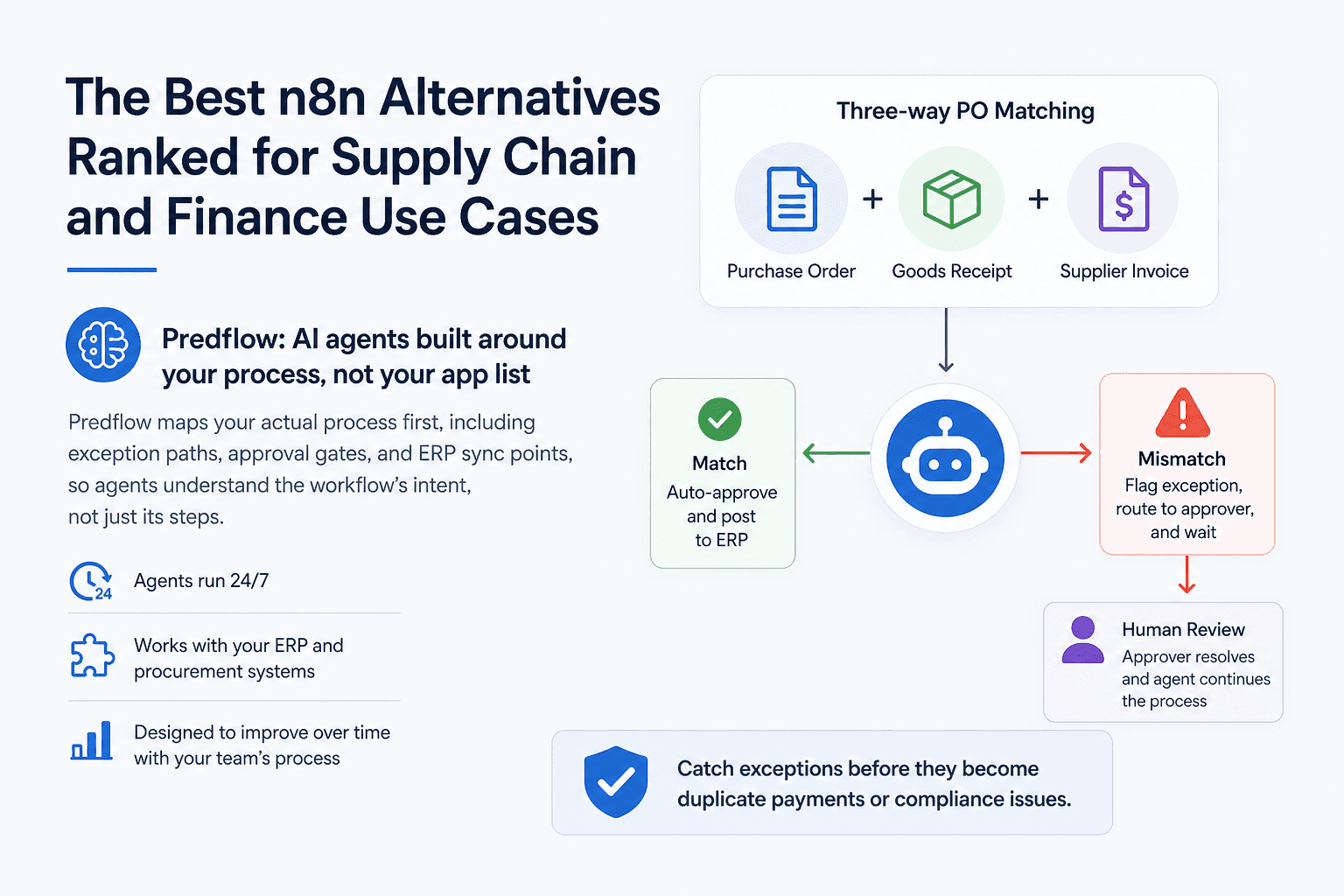
Not all automation handles branching logic equally. A workflow that routes a standard three-way PO match is simple. A workflow that handles a partial receipt, a price discrepancy, and a vendor credit note in the same transaction is not. The tool you choose must handle conditional paths and document exceptions without manual workarounds.
Agentic process automation goes further than rule-based logic. It handles variability that rules cannot anticipate. For exception-heavy processes, that distinction matters more than the number of app connectors a platform advertises.
Human oversight: where does a human step in when the automation hits an edge case?
Any automation running near financial transactions needs a clear escalation path. The question is not whether exceptions happen. They will. The question is whether your tool flags them, routes them to the right person, and waits for approval before proceeding.
Tools that lack built-in human-in-the-loop capability force teams to build oversight mechanisms themselves. That adds maintenance overhead and creates gaps. For intelligent automation in finance contexts, oversight should be a feature, not an afterthought.
Integration depth vs. breadth: ERP, AP systems, and procurement tools matter more than app count
A platform with 8,000 integrations is only useful if those integrations include your ERP, your AP system, and your procurement tools at the depth you need. Shallow connectors that sync only basic fields create data gaps that break downstream workflows.
Prioritize depth over breadth. A platform with 200 deep, well-maintained integrations into SAP, NetSuite, or Oracle will serve a supply chain team better than one with thousands of shallow connections to consumer apps.
Quick evaluation checklist:
Process complexity: Does it handle conditional logic and document exceptions natively?
Human oversight: Does it have built-in escalation and approval routing?
Integration depth: Does it connect deeply with your ERP, AP, and procurement stack?
The Best n8n Alternatives Ranked for Supply Chain and Finance Use Cases
Each tool below is evaluated specifically for AP automation, procurement workflows, supply chain handoffs, and back-office operations. The format is consistent: positioning, best fit, strengths, and a plain-language limitation.
Different team profiles have different needs. The tools below serve those profiles well.
Make (formerly Integromat): visual workflow builder for moderate complexity
Best for: Operations teams that need more logic than Zapier allows but do not have heavy ERP dependencies.
Make’s visual canvas makes complex data routing readable. You can build workflows that handle automated quotations, expense routing, or multi-step approval chains without writing code. Its data transformation capabilities are stronger than most no-code tools at this price point.
Make handles moderate-complexity workflows reliably. Where it stretches thin is document processing automation at scale and deep ERP integration. It is not designed to handle unstructured data from supplier emails or invoices in varying formats.
Limitation: Exception handling requires manual configuration. Edge cases in AP or procurement workflows will need a developer to address properly.
Workato: enterprise iPaaS for teams with IT support
Best for: Mid-to-large enterprises with IT resources and deep ERP automation needs, including SAP business process management compatibility.
Workato is purpose-built for enterprise-grade workflow automation. It connects deeply with ERP systems, handles complex business process automation platforms, and supports two-way data sync across procurement, finance, and HR stacks. Its recipe-based approach allows non-developers to configure workflows, but IT involvement is still needed for maintenance and governance.
For supply chain management automation or accounts payable automation systems at scale, Workato’s integration depth is a genuine differentiator. Procure-to-pay automation across SAP or NetSuite environments is a realistic use case without heavy custom development.
Limitation: Pricing is enterprise-tier. Small and mid-market teams without IT support will find the learning curve and cost difficult to justify.
Microsoft Power Automate: best if you already live in the Microsoft ecosystem
Best for: Finance and operations teams running on Microsoft 365, Dynamics, or Azure who want accounting automation and HR automation software integrations without buying a separate platform.
Power Automate is the natural choice if your team already uses Microsoft tools. It connects directly into Excel, SharePoint, Teams, Dynamics 365, and Azure, enabling accounting automation workflows without leaving the Microsoft environment. For HR process automation or expense management automation inside Microsoft 365, it is hard to beat on convenience.
Desktop flows extend its reach into legacy applications through RPA, which matters for teams with older procurement or ERP interfaces.
Limitation: Outside the Microsoft ecosystem, its integration depth drops sharply. If your stack includes non-Microsoft ERPs or procurement tools, you will hit connector gaps quickly.
UiPath: desktop RPA for UI-heavy legacy system tasks
Best for: Teams running legacy ERP or procurement systems with no API access, where automating the user interface is the only viable option.
UiPath is the leading RPA platform for rpa process automation involving desktop applications. If your procurement or finance team enters data manually into a system that has no API or modern integration layer, UiPath can replicate those keystrokes and screen interactions reliably at scale. Its document processing automation capabilities have also improved, covering invoice extraction and automated document processing workflows.
UiPath fits well in environments where rpa robotic process automation is the only practical path because the underlying system cannot be changed.
Limitation: RPA bots are fragile when the UI changes. A software update to your ERP can break automations overnight, and maintenance can become a continuous engineering task.
Which n8n Alternative Fits Your Team’s Workflow Maturity?
The right tool depends on where your team is today, not where you plan to be in three years.
Small operations team, minimal IT support: start here
Recommended: Make
If your team is small, has no dedicated developer, and needs to automate moderate-complexity workflows like expense routing, order notifications, or vendor onboarding steps, Make gives you the most capability without requiring engineering support. Start with one workflow, validate it, then expand.
Mid-market finance or supply chain with ERP dependencies: these two fit best
Recommended: Workato
If your team runs on SAP, NetSuite, or Oracle and needs reliable procure-to-pay automation, accounts receivable automation, or invoice reconciliation across systems, you need integration depth. Workato fits if you have IT support available to maintain the integration logic.
Enterprise back-office with complex exception handling and compliance needs: this is your lane
Recommended: UiPath
Enterprise finance and supply chain environments combine legacy systems, complex approval hierarchies, and strict compliance requirements. UiPath covers legacy UI automation where APIs do not exist, making it well suited for judgment-heavy processes with frequent exceptions and real financial consequences.
The shared requirement at this level: human oversight must be built into the automation, not bolted on afterward.
What Is Workflow Automation and How Do These Tools Differ from RPA?
Workflow automation connects systems and triggers actions based on predefined rules or events. RPA mimics human interactions on a desktop interface to operate software that lacks API access. Both are distinct from AI agents, which reason about context and handle variability that fixed rules cannot anticipate.
Workflow automation vs. RPA: which one does your process actually need?
Workflow automation handles trigger-based process chains. An invoice arrives, it is parsed, routed for approval, and synced to your ERP. Each step fires based on a condition. This is the category that tools like Make, Workato, and Power Automate operate in.
RPA in automation handles screen interactions. If your ERP has no API and the only way to enter a PO is to click through a legacy interface, RPA replicates those clicks. UiPath is built for this. The trade-off is brittleness. Any UI change can break the bot.
The practical question: does your system have an API? If yes, workflow automation is simpler and more stable. If no, RPA may be your only option.
Where AI agents fit: beyond rules-based automation
AI and robotic process automation are increasingly converging, but AI agents operate differently from both. Rpa artificial intelligence combinations handle structured, repeatable tasks. AI agents handle tasks that require judgment, like reading a supplier email to determine whether a delivery dispute needs escalation or a simple acknowledgment.
For back-office processes where exceptions are frequent, documents arrive in varying formats, and decisions depend on context, agentic process automation is the relevant category. This is where automation ai moves from following rules to understanding intent. For supply chain and finance teams, that distinction determines whether automation reduces manual work or simply moves it.
Frequently Asked Questions
Is n8n good for non-technical finance or supply chain teams?
n8n works well for teams with developer support who can build and maintain workflow logic. Without that resource, silent failures in production are a real risk, particularly in invoice reconciliation or supplier payment workflows where errors have direct financial consequences. Teams without technical support are better served by tools with built-in error handling and human escalation paths.
What is the easiest n8n alternative for accounts payable automation?
Make is the easiest entry point for teams with moderate complexity and no IT support. For teams that need deeper AP automation with ERP integration and exception handling, Workato is a more appropriate fit if you have internal IT resources.
How is an AI agent different from a workflow automation tool like n8n?
Workflow automation tools like n8n follow predefined rules and trigger actions based on conditions. AI agents reason about context, handle variability in data formats, and make judgment calls on tasks that rules cannot anticipate. For processes like invoice matching or supplier communication where inputs are unpredictable, AI agents handle edge cases that rule-based tools cannot.
Can these n8n alternatives integrate with ERP systems like SAP or NetSuite?
Yes, but depth varies. Workato offers deep ERP integration suited for procure-to-pay and accounts payable automation workflows. Power Automate integrates well with Microsoft Dynamics. Make and UiPath have ERP connectors but with varying depth depending on the specific system and use case.
What should I automate first in my supply chain or finance workflow?
Start with the process that consumes the most manual time and has clear, repeatable steps. Invoice matching, PO creation from approved requisitions, and payment status updates are common starting points. Automate one process end-to-end before expanding. Partial automation that still requires manual handoffs between steps does not deliver the time savings teams expect.
Conclusion
The decision comes down to one fork: do you need a flexible connector platform you can configure yourself, or do you need automation that understands your process and handles exceptions reliably without ongoing maintenance?
If you have developer resources and want full control over your workflow logic, Make, Workato, or Power Automate will serve you well depending on your ecosystem. If your team is spending real hours every week on exceptions that automation should handle, invoices with non-standard formats, POs without matching receipts, supplier communications that require a judgment call, then a rules-based platform will move the manual work, not eliminate it.
If your team is spending hours on exceptions that automation should handle, see how Predflow maps and automates your specific workflow. No generic demo. Just your process.
Bring 20 NetSuite bills to a 30-minute teardown
We will walk your actual invoices through capture, 3-way match and posting on the call, and tell you which steps an agent can take over. No prep beyond the PDFs.
FAQ
Frequently asked questions
What exactly is an AI agent
An AI agent is an autonomous system designed to handle specific business tasks end-to-end. Unlike simple chatbots, AI agents can reason, take actions, integrate with tools, and follow defined workflows.