


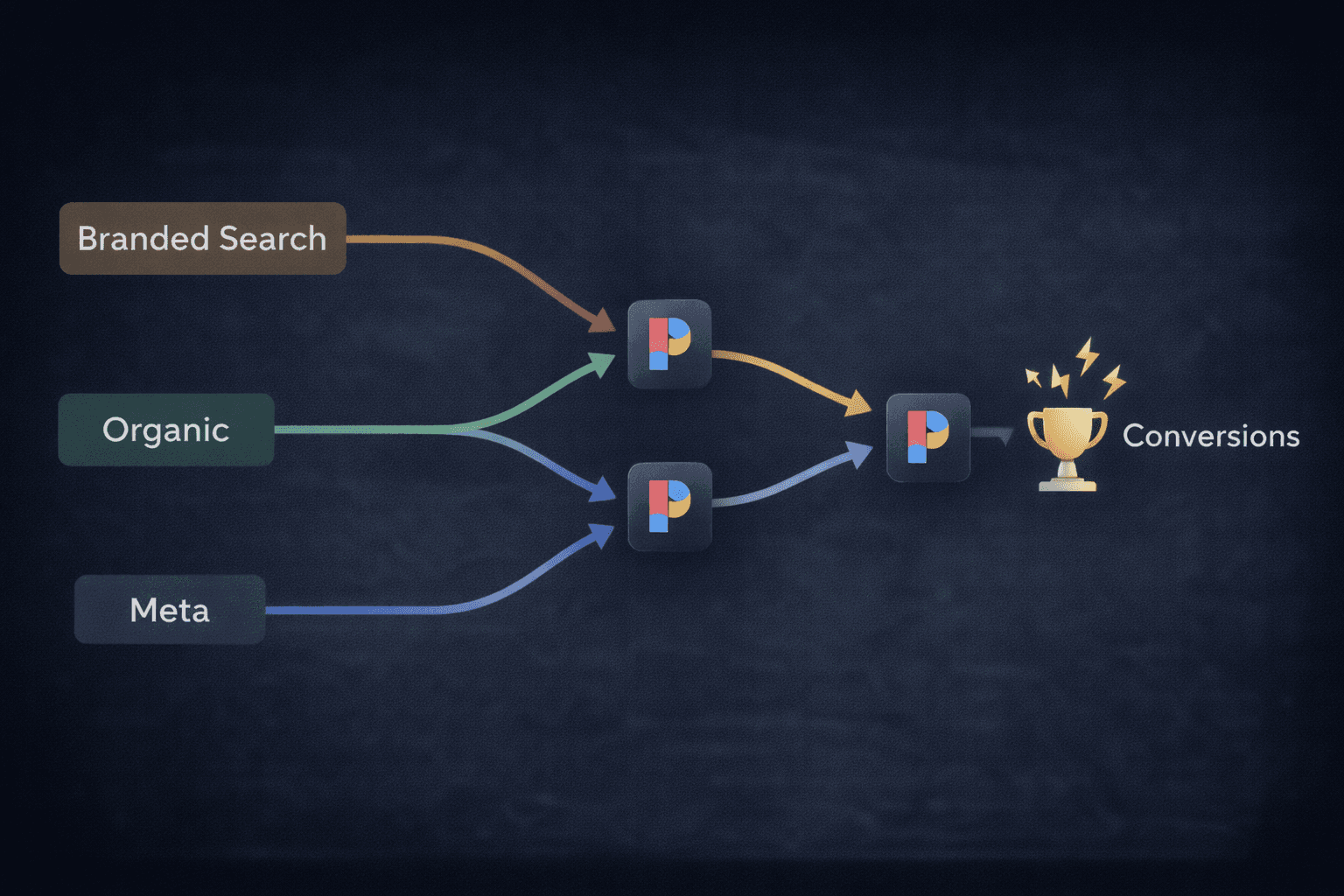
You add Performance Max to your Google Ads account. ROAS goes up. Google tells you PMax is performing brilliantly. You increase the budget.
Then you notice something. Total Shopify orders haven't moved. Your branded Search campaign traffic is down. Blended ROAS across Meta and Google looks unchanged or worse.
What happened is not mysterious. Performance Max is one of the most aggressive attribution claimants in digital advertising. It is not necessarily driving more conversions. In many cases, it is taking credit for conversions your other campaigns, your organic search, and your direct traffic were already earning.
This is not a fringe complaint from a few frustrated advertisers. An Optmyzr study across 503 accounts found that 91.45% had keyword overlap between Search and PMax campaigns. In those overlap cases, Search campaigns won on conversion performance nearly twice as often. The conversions PMax reported were largely not incremental. They were conversions that would have happened anyway.
This article explains exactly what is happening, how to detect it, and what to do about it.
How PMax Inflates Its Own Numbers
Performance Max runs across every Google surface simultaneously: Search, Shopping, YouTube, Display, Discover, Gmail, and Maps. The campaign type was designed to maximise conversions across all of these placements using Google's AI to allocate budget and target users.
The problem is what it optimises toward.
PMax is built to find the cheapest conversions available in your account. Branded search queries — people typing your brand name directly into Google — convert at extremely high rates and low CPCs because the person searching already knows you and wants to buy from you. These are also conversions that would almost certainly have happened regardless of whether you showed a paid ad.
PMax gravitates toward these queries. The algorithm sees high conversion rates and cheap clicks and allocates budget accordingly. Your branded Search campaign loses impressions. Google counts those conversions as PMax wins. Your ROAS figure goes up because you are now paying for traffic that used to be free or lower-cost. Total orders stay flat.
This is the core of the cannibalization problem. PMax is not growing your business. It is paying for demand that already existed.
Three Ways PMax Distorts Your Attribution Data
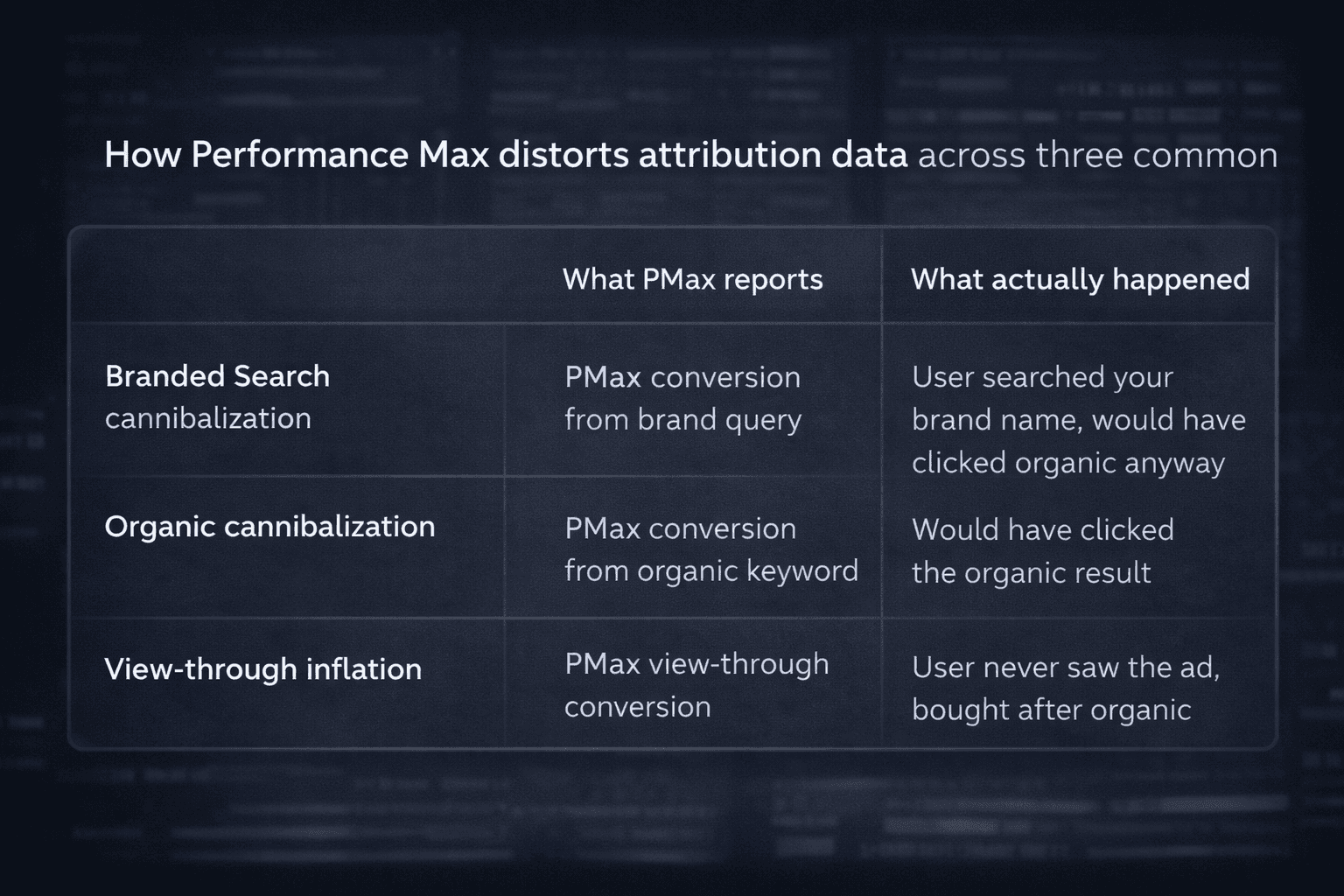
It takes credit from your branded Search campaigns
When both a branded Search campaign and a PMax campaign are live, PMax should theoretically lose the auction when the user's search query exactly matches a keyword in your Search campaign. Google says so explicitly.
In practice, the Optmyzr research found this prioritisation fails regularly. If your branded Search campaign has budget constraints, narrow geographic targeting, or any other setting that makes it ineligible to serve, PMax fills the gap and claims the conversion. The result is branded Search impressions and clicks drop while PMax conversions go up. Your reporting looks like PMax is performing. What actually happened is PMax paid for traffic your existing campaign was already earning.
It cannibalizes organic traffic
A branded PMax campaign without proper exclusions will also bid on queries where your organic listing would have appeared. One documented case found that a single unchecked branded PMax campaign paid for an estimated $500,000 in traffic that would have arrived organically for free. Organic impressions dropped 12% and organic clicks fell 33%.
When PMax shows a Shopping carousel for your most-searched branded terms, it can push your organic listing below the fold entirely. You are now paying for the same customer who would have found you for nothing.
It creates view-through attribution inflation
Across PMax's Display and YouTube placements, a significant portion of conversions are view-through: the user saw your ad but never clicked it. By default, Google counts these as PMax conversions if the user later purchased within the attribution window, even if they converted through a completely different channel.
When 70-80% of PMax's reported conversions are view-through, you are not looking at a campaign that is driving purchases. You are looking at a campaign that is taking credit for purchases other channels drove.
How to Tell If PMax Is Actually Cannibalizing You
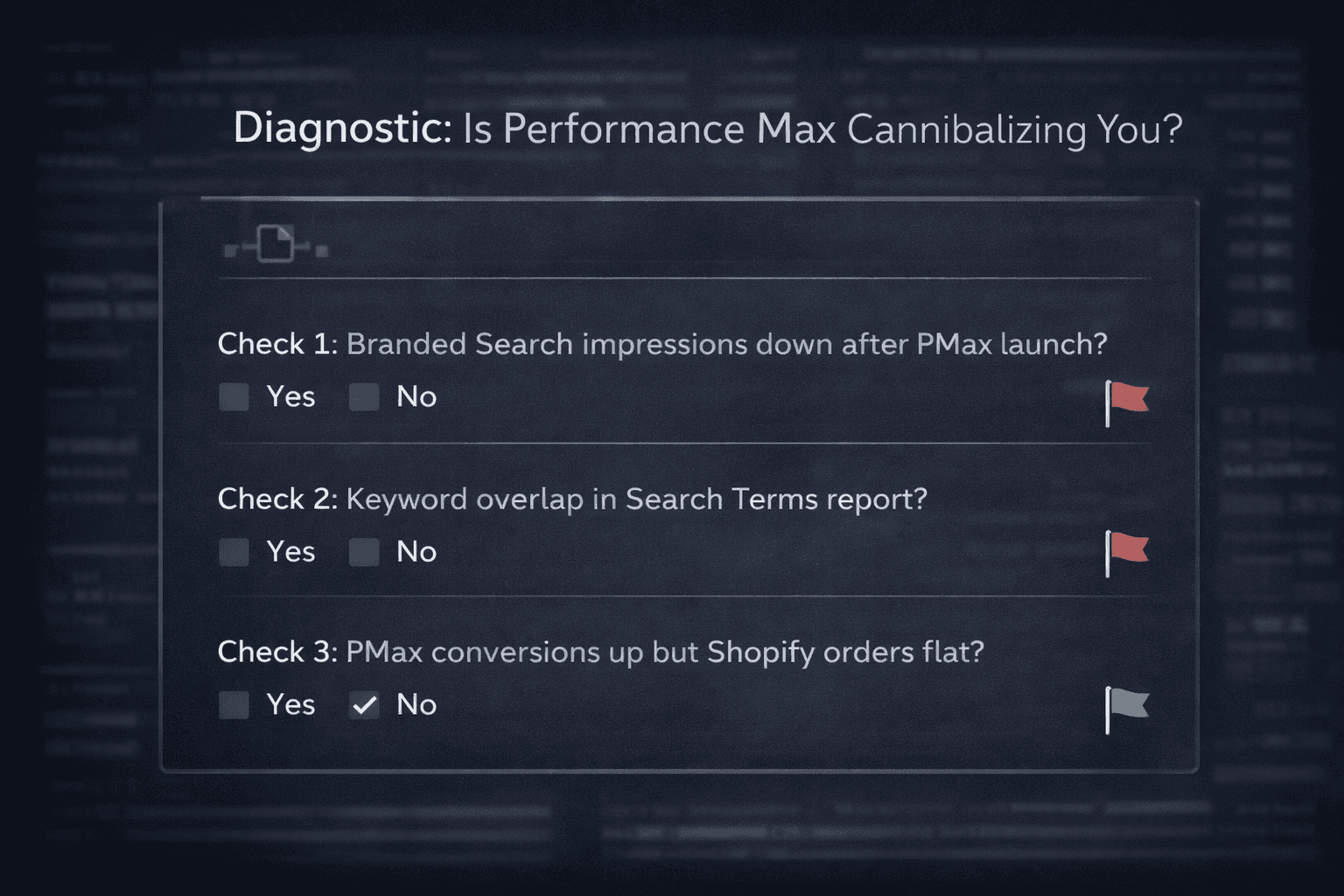
Before changing anything in your account, run these three checks.
Check 1: Compare branded Search volume before and after PMax launch
Pull your branded Search campaign's impression share, clicks, and conversions for the 30 days before and after you launched PMax. If branded Search performance dropped when PMax launched, you have cannibalization. This is the fastest diagnostic.
Check 2: Look for keyword overlap in the Search Terms report
Google introduced Search Term insights for PMax in 2025. Go to Reports, then Predefined Reports, then Search Terms. Cross-reference the queries appearing in PMax against the keywords in your Search campaigns. If the same queries appear in both, PMax is competing with — and often winning over — your own campaigns. According to the Optmyzr research, more than half of all Search campaigns showed this overlap.
Check 3: Compare total conversions against Shopify actual orders
This is the bluntest test and the most revealing. If PMax conversion numbers went up when you added the campaign but your Shopify order count did not move proportionally, PMax is claiming credit for existing demand, not generating new demand. For a proper cross-channel tracking setup that reconciles platform numbers against actual revenue, this comparison should be a monthly habit regardless of what campaigns you are running.
What to Actually Do About It
Add brand exclusions immediately
If you have not already done this, it is the single highest-impact fix. In your PMax campaign settings, add a brand exclusion list covering your brand name and close variants. This prevents PMax from showing on branded queries and forces those searches back to your dedicated branded Search campaign or your organic listing.
Google representatives have confirmed this can be done at the campaign level. If you cannot find the option in your account interface, your Google rep can apply it manually.
Cover your high-intent keywords in Search as exact match
Google's own guidance states that if a user's query exactly matches a keyword in your Search campaign, the Search campaign should win the auction over PMax. The operational implication is that your highest-value, highest-intent queries need to be covered in Search campaigns as exact match keywords. Do not rely on broad or phrase match here — those match types are more likely to lose to PMax.
Switch view-through conversions to click-through only for PMax measurement
In your PMax conversion settings, consider tracking only click-through conversions rather than the default which includes view-through. This will reduce reported PMax conversion numbers but give you a much more honest picture of what the campaign is actually driving versus what it is simply associating itself with.
Run an incrementality test before scaling
Before increasing PMax budget, run a proper incrementality test. Pause PMax for two weeks and watch what happens to total Shopify orders. If orders stay flat or improve, PMax was not driving incremental revenue. If orders drop meaningfully, PMax was contributing genuine demand. Most D2C teams skip this test and make budget decisions on PMax's self-reported ROAS, which is almost always overstated.
Separate your product campaigns by margin and intent
Rather than running one blanket PMax campaign across your full product catalogue, create separate asset groups or separate PMax campaigns for high-margin products, new customer acquisition objectives, and retargeting. This gives you more control over where budget flows and makes it easier to spot which part of PMax is actually contributing versus claiming credit.
The Deeper Problem: You Need a Number You Can Trust
The specific fixes above will reduce cannibalization and give PMax a better chance of driving genuine incremental revenue. But they will not fully solve the attribution problem on their own.
The reason PMax's inflated numbers go undetected for so long is that most D2C performance teams do not have a neutral reconciliation layer. They see PMax ROAS in Google Ads. They see Meta ROAS in Meta Ads Manager. They see Shopify revenue in their dashboard. Three numbers, and often none of them match each other or add up to the same total.
When your ROAS drops unexpectedly or when a campaign appears to be performing brilliantly while business results stay flat, the gap between platform-reported numbers and actual revenue is almost always where the answer lives.
Predflow's anomaly detection monitors your cross-channel performance and flags when platform-reported conversions are diverging significantly from actual Shopify revenue — which is often the first signal that PMax cannibalization is happening before you notice it in campaign metrics. And the ad intelligence layer gives you a view of which campaigns and channels are genuinely driving revenue versus which are taking credit for demand that existed without them.
The Bottom Line on PMax
Performance Max is not a bad campaign type. For D2C brands with clean product feeds, strong conversion tracking, and proper exclusions set up, it can genuinely find new customers and drive incremental revenue.
The problem is the default setup. Out of the box, without brand exclusions, without exact match keyword coverage in Search, and without an incrementality mindset, PMax will almost always inflate its own numbers at the expense of your other campaigns and your organic traffic.
Run the diagnostics. Add the exclusions. And before you trust the ROAS number Google shows you, check it against what Shopify actually reports.
Those two numbers should be telling the same story. If they are not, now you know why.
Improve Ad performance with Predflow
Diagnose performance drops, creative fatigue, and attribution shifts