Supply Chain
Finance Ops: Manual vs. Automated Workflows for Supply Chain Teams
An invoice sat unread for 11 days — and it cost more than just a late fee. Here's what broken finance ops really looks like, and how automation fixes it at the source.

Khushbu Adav
Product at Predflow

A vendor invoice sits in a supply chain manager's email inbox for 11 days. No one flagged it. No one followed up. By the time it reaches accounts payable, the early payment discount has expired, a late penalty has been applied, and the shipment it was tied to is already delayed. This is not a one-off mistake. It is what broken finance ops looks like at ground level.
Manual finance workflows were designed for predictable, lower-volume environments. Supply chain teams operate in the opposite conditions: high invoice volumes, multiple vendors, tight payment windows, and data spread across procurement, logistics, and AP systems. The mismatch creates compounding delays that get worse as the business grows.
This article gives you a direct comparison between manual and automated finance ops workflows, with specific attention to where automation delivers real gains and where it still needs human judgment.
What Finance Ops Actually Means for Supply Chain Teams
Finance ops is not just accounts payable. For supply chain teams, it is the full cycle of receiving, validating, approving, and reconciling invoices and payments across every vendor, carrier, and procurement channel your business touches.
The Core Finance Ops Loop in Supply Chain
The finance ops loop starts when an invoice arrives, whether by email, EDI, or supplier portal. It moves through data extraction, PO matching, approval routing, payment execution, and finally reconciliation against your general ledger. Each handoff is a potential failure point.
In a standard business context, this loop might involve a handful of vendor types and a consistent invoice format. In supply chain, the loop runs across freight invoices, raw material POs, third-party logistics bills, and customs documentation, all at the same time.
Why Supply Chain Finance Ops Is Harder Than Standard AP
Multiple vendors means multiple invoice formats, payment terms, and dispute behaviors. A three-way PO match that is straightforward in a simple AP workflow becomes complicated when a shipment arrives in partial quantities, the PO spans multiple warehouses, and the freight cost is billed separately by a third carrier.
Payment windows in supply chain are frequently short. Missing a net-10 or net-15 term does not just cost a penalty. It damages the vendor relationship and can affect supply priority. Finance ops in this environment requires speed and accuracy together, which manual processes cannot consistently deliver at scale.
How Manual Finance Ops Workflows Break Down at Scale
The struggle your team feels with invoice backlogs and month-end scrambles is not a staffing problem. It is a process architecture problem. Manual workflows have structural failure points that multiply as invoice volume grows.
The Hidden Cost of Email-Based Approval Chains
Email approval chains have no inherent tracking. An invoice forwarded to a category manager for approval sits in their inbox with no visibility to AP, no escalation trigger, and no audit trail. If that person is traveling or out sick, the invoice waits.
When invoice volume is low, this is manageable. When your team is processing hundreds of invoices per week across dozens of vendors, email-based routing creates a permanent backlog. The invoice that triggered a late payment penalty at the top of this article followed exactly this path.
Spreadsheet Reconciliation: Where Errors Compound
Spreadsheet-based reconciliation requires manual data entry from multiple source documents: the invoice, the PO, the receiving record, and the payment record. Each manual entry step introduces the possibility of a miskeyed amount, a wrong vendor code, or a miscategorized line item.
These errors do not stay isolated. A misclassification in one month carries into the next period's reporting. By the time a discrepancy surfaces during a finance audit, tracing it back to the original entry is time-consuming and, in some cases, impossible without the original paper trail.
Visibility Gaps That Derail Month-End Close
Without a centralized system tracking invoice status in real time, finance teams spend the last days of each month chasing approvals, reconciling discrepancies, and manually verifying payment status. This is reactive work that consumes time that should go toward analysis.
Common manual workflow failure points:
Failure Point | Consequence |
|---|---|
Invoice lost in email inbox | Late payment penalty, damaged vendor relationship |
Missing PO documentation | Invoice held, shipment delayed |
Manual data entry error | Misclassified spend, audit finding |
No approval status visibility | Month-end close delayed |
Duplicate invoice submission | Overpayment, reconciliation rework |
Each of these failures is predictable. They are built into the manual process, not caused by individual mistakes.
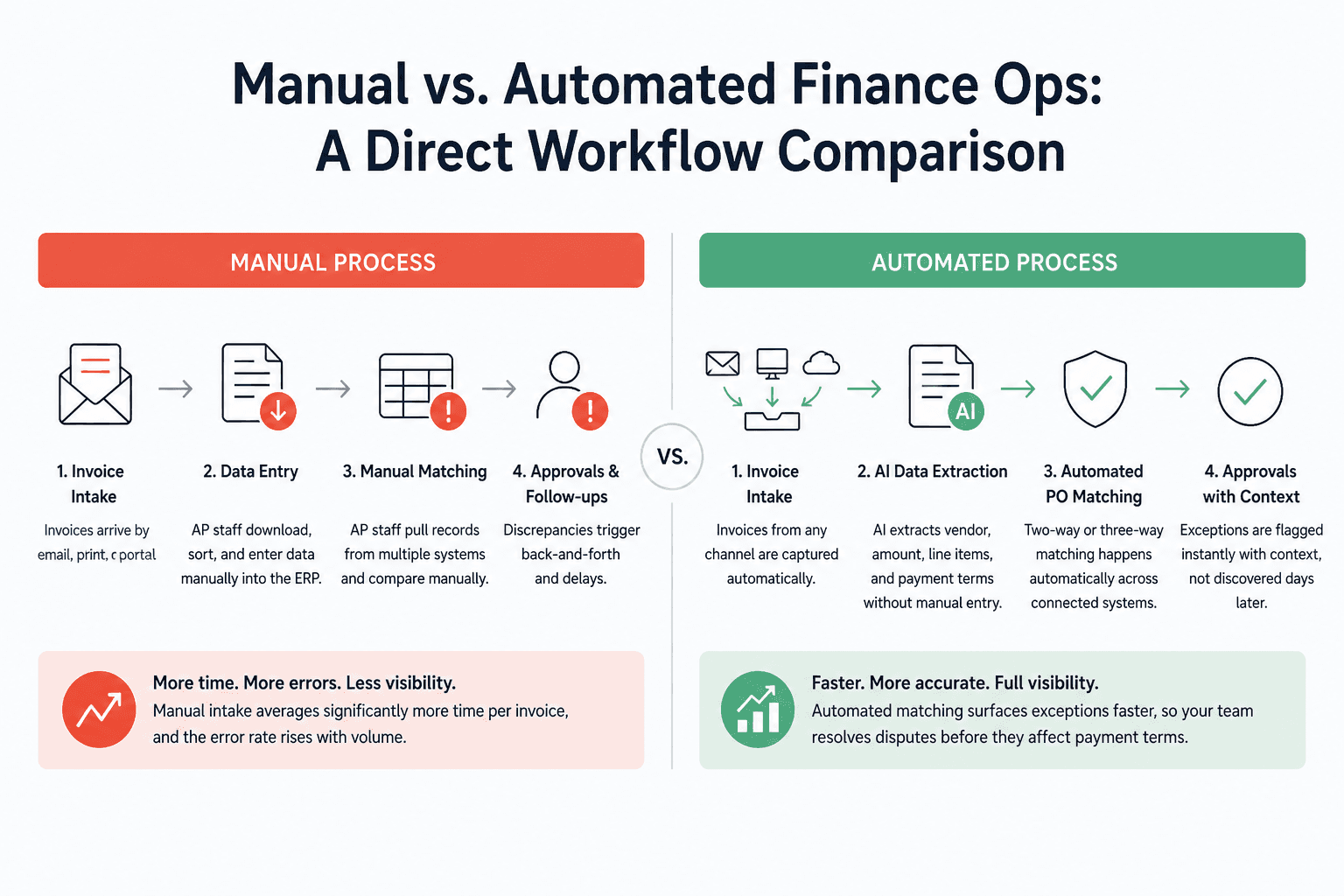
Manual vs. Automated Finance Ops: A Direct Workflow Comparison
The value of invoice automation is not that it eliminates all work. It is that it removes the slowest, most error-prone steps and gives your team visibility they do not have today. Here is how each stage compares.
Invoice Intake and Data Extraction
Workflow Stage | Manual Process | Automated Process |
|---|---|---|
Invoice Intake | Invoices arrive by email, print, or portal. AP staff download, sort, and enter data manually into the ERP. | Invoices from any channel are captured automatically. AI extracts vendor, amount, line items, and payment terms without manual entry. |
Manual intake averages significantly more time per invoice than automated extraction, and the error rate rises with volume. Invoice automation removes the data entry step entirely for standard invoice formats.
PO Matching and Validation
Workflow Stage | Manual Process | Automated Process |
|---|---|---|
PO Matching | AP staff pull the PO from one system, the receiving record from another, and manually compare against the invoice. Discrepancies require back-and-forth with procurement. | The system performs two-way or three-way matching automatically across connected systems. Discrepancies are flagged instantly with context, not discovered days later. |
Automated matching does not just save time. It surfaces exceptions faster, so your team resolves disputes before they affect payment terms.
Approval Routing and Exception Handling
Workflow Stage | Manual Process | Automated Process |
|---|---|---|
Approval Routing | Invoices are forwarded by email based on category or amount threshold. No escalation logic. Approvers have no shared visibility. | Routing rules are applied automatically by vendor type, amount, or cost center. Escalation triggers fire if an approval is not completed within a defined window. |
Automated routing turns approval from a passive process into an active one. Approvers receive structured requests with the matching data already attached. They approve or flag, not hunt for information.
Reconciliation and Audit Trail
Workflow Stage | Manual Process | Automated Process |
|---|---|---|
Reconciliation | AP staff manually match payment records to invoices and GL codes. Month-end close requires pulling reports from multiple systems. | Payments are automatically reconciled against invoices and GL entries. Every action is timestamped and logged, creating a complete audit trail without extra effort. |
The audit trail difference matters beyond compliance. When a dispute arises with a vendor, an automated system can surface the full invoice history in seconds. Manual systems require staff to reconstruct it.
What AI Invoice Automation Actually Handles (And What It Still Misses)
The most common reason supply chain teams hesitate on AI invoice automation is a fair one: "We've heard it breaks down on anything unusual." That concern is grounded in real limitations. Understanding them precisely is what separates a successful implementation from a failed one.
Where AI Performs Reliably in Invoice Workflows
AI invoice automation performs consistently on structured, high-volume workflows. Standard vendor invoices with consistent formats, clear line items, and matched POs are where the technology earns its ROI fastest. Automated extraction, validation, and routing at this tier frees your AP team to focus on the 15 to 20 percent of invoices that genuinely require judgment.
Automated systems also handle rule-based exceptions reliably. If an invoice amount exceeds a PO by a defined tolerance, the system flags it and routes it to the right approver. That logic runs 24 hours a day without a reminder, a follow-up email, or a missed notification.
Edge Cases That Still Require Human Judgment
Unstructured PDFs from smaller vendors, partial shipment invoices where the received quantity does not match the PO, multi-currency purchase orders with fluctuating exchange rates, and vendor disputes requiring commercial negotiation all sit outside what most automation handles reliably without human input.
These are not reasons to avoid automation. They are reasons to build a workflow that pairs automation for the routine work with clear escalation paths for the exceptions. Teams that try to automate everything at once, including edge cases, create systems that fail noisily and lose stakeholder trust quickly.
The Process-First Approach to Automation Readiness
The direction finance operations is heading is toward real-time intelligence, not just faster data entry. ERP systems are shifting from transactional backends to active intelligence layers that flag problems before they become delays. AI invoice automation fits inside that shift when it is designed around your actual process, not a generic template.
This is where the difference between automation tools becomes visible. Platforms like Predflow are built around process mapping before deployment. The AI agent is trained on your specific invoice workflow, including the edge cases your team currently handles manually, before going live. Rather than fitting your process into a prebuilt template, Predflow agents understand context, escalate intelligently, and improve over time with human feedback. For teams whose invoice exceptions are the main barrier to automation adoption, that approach directly addresses the reliability gap. You can see a real example of this in the invoice-to-GRN automation case study.
How to Decide Which Finance Ops Workflows to Automate First
Most supply chain finance teams cannot automate everything in a single project. Prioritization determines whether your first automation delivers visible ROI or creates a long debugging cycle that kills internal momentum.
Score Your Workflows: Volume, Repetition, and Exception Rate
Use this four-criteria scoring approach to rank your finance ops workflows before committing to an automation project.
Criterion | Score 1 | Score 2 | Score 3 |
|---|---|---|---|
Monthly invoice volume | Under 100 | 100 to 500 | Over 500 |
Manual time per invoice | Under 5 minutes | 5 to 15 minutes | Over 15 minutes |
Exception frequency | Over 30% of invoices | 10 to 30% | Under 10% |
Number of systems involved | 1 | 2 to 3 | 4 or more |
Score each workflow. Those scoring 10 or above across the four criteria are your first automation candidates. Those scoring below 6, particularly due to high exception rates, belong in a later phase or require a human-assisted design.
Quick-Win Targets vs. Complex Workflows to Phase In Later
Standard vendor invoices with consistent formats and clear PO matches are the fastest path to measurable ROI in finance ops automation. Freight and logistics invoices with consistent carrier formats come next, particularly when volume is high and manual processing creates visible delays.
Complex workflows, including vendor dispute resolution, multi-currency reconciliation, and invoices tied to milestone-based contracts, belong in a later phase. Automating these without established exception-handling logic creates more problems than it solves. Phase them in after your team has confidence in the core automation and after you have clean data on how often exceptions actually occur.
Frequently Asked Questions
What is finance ops in a supply chain context?
Finance ops in a supply chain context is the end-to-end process of receiving, validating, approving, and reconciling invoices and payments across vendors, procurement, and logistics partners. It covers every step from invoice intake through payment execution and GL reconciliation, and it is more complex than standard AP because of multi-vendor formats, PO matching requirements, and short payment windows.
How long does it take to implement invoice automation?
Implementation timelines depend on the complexity of your existing systems and invoice types. Simple, structured invoice workflows with clean ERP data can go live in four to eight weeks. More complex implementations involving multiple systems, custom PO matching rules, or high exception rates typically take three to six months, especially when proper process mapping is done before deployment.
Can AI invoice automation handle invoices from multiple vendors in different formats?
AI invoice automation handles structured formats from high-volume vendors reliably. For vendors with inconsistent or unstructured invoice formats, the system extracts what it can and routes exceptions to a human reviewer rather than processing them automatically. The accuracy improves over time as the system processes more invoices from each vendor and receives correction feedback.
What is the difference between RPA and AI invoice automation?
RPA follows fixed rules to replicate manual steps, such as copying data from a PDF into an ERP field. It breaks when the input format changes. AI invoice automation uses machine learning to extract and interpret data from variable formats, match it against POs, and apply routing logic. AI handles variation; RPA does not.
How do we measure ROI on finance ops automation?
Start with four metrics: average cost per invoice before and after automation, time from invoice receipt to payment approval, error rate as a percentage of total invoices processed, and staff hours recovered per month. Track these for the first 90 days post-implementation. ROI becomes visible fastest in high-volume, low-exception workflows where manual processing time was the primary constraint.
Conclusion
You now have a clear picture of where manual finance ops workflows fail, where automation delivers reliable gains, and where human judgment still belongs in the process. The decision in front of you is not whether to automate. It is where to start and how to phase it.
Teams that keep patching manual workflows with more headcount or more spreadsheet tabs will keep hitting the same ceiling. The ceiling does not rise with effort. Teams that start by mapping their highest-volume, lowest-exception workflows and automate those first build compounding efficiency gains. Each phase frees capacity for the next one.
See how Predflow maps and automates your invoice workflow without ripping out your existing systems. Request a process audit.
Bring 20 NetSuite bills to a 30-minute teardown
We will walk your actual invoices through capture, 3-way match and posting on the call, and tell you which steps an agent can take over. No prep beyond the PDFs.
FAQ
Frequently asked questions
What exactly is an AI agent
An AI agent is an autonomous system designed to handle specific business tasks end-to-end. Unlike simple chatbots, AI agents can reason, take actions, integrate with tools, and follow defined workflows.