AI AGENTS
Enterprise AI Agents: The Controls, Integrations and Governance Required Before Production
Deploy enterprise AI agents without the chaos. Learn the controls, integrations, and governance frameworks you need before going live. Avoid costly mistakes.

Sanya Shah
Co-founder at Predflow

A finance team deploys an enterprise AI agent that passes every test in staging. On day three in production, it starts misrouting invoices. No alert fires. No audit trail exists. No one defined who owns the output when it goes wrong. By the time someone notices, three weeks of exceptions have piled up with no rollback path.
This is not a model failure. It is a deployment failure. And it happens more than most teams want to admit.
The gap between a working proof-of-concept and a production-safe agent is not about model quality. It is about accountability structures, integration readiness, and monitoring that were never built. Leading enterprise teams now use significantly more AI capability per person than average firms, but the largest gaps are appearing in agentic workflows specifically, where the failure consequences are hardest to reverse.
This guide gives supply chain, finance, and operations leaders the exact governance checkpoints, integration requirements, and oversight controls to clear before any enterprise AI agent touches a live workflow.
Why Most Enterprise AI Deployments Break in Production
The difference between a demo and a production deployment is not the model. It is everything around the model. Three failure patterns account for the majority of enterprise AI breakdowns after go-live.
The accountability gap: who owns the agent's output?
When an agent makes a decision and no human was in the loop, the question becomes: whose problem is it to fix? In most deployments, no one has answered that question before launch.
This is not a technical problem. It is an organizational one. Without a designated owner for each agent output, exceptions get ignored, errors compound, and the agent continues acting on bad data with no one authorized to pause it.
Clear ownership structures are the foundation for every other governance effort. Without them, monitoring alerts have no one to receive them and compliance logs have no one reviewing them.
Data integration mismatches that surface only under real load
In testing, data is clean and consistent. In production, invoice formats change mid-month, ERP fields get updated without notice, and edge cases arrive that no one anticipated. Agents trained on structured test data hit these variations and either fail silently or produce outputs that look valid but are wrong.
The mismatch rarely surfaces in unit tests. It surfaces when a real vendor submits an invoice in a format the agent has never seen, and the agent maps it to the wrong purchase order without flagging an exception.
Why 91% of deployed models drift within days of going live
Production data diverges from training data almost immediately. Real-world inputs carry noise, inconsistency, and variation that staging environments do not replicate. The result is model drift, where the agent's accuracy degrades as conditions shift away from what it was built to handle.
This is the operations leader's core visibility problem. The agent appears to be running. Transactions are processing. But the accuracy of those transactions is quietly declining, and without process-level monitoring, there is no signal until the damage is already done. The rest of this guide is about closing that gap before it opens.
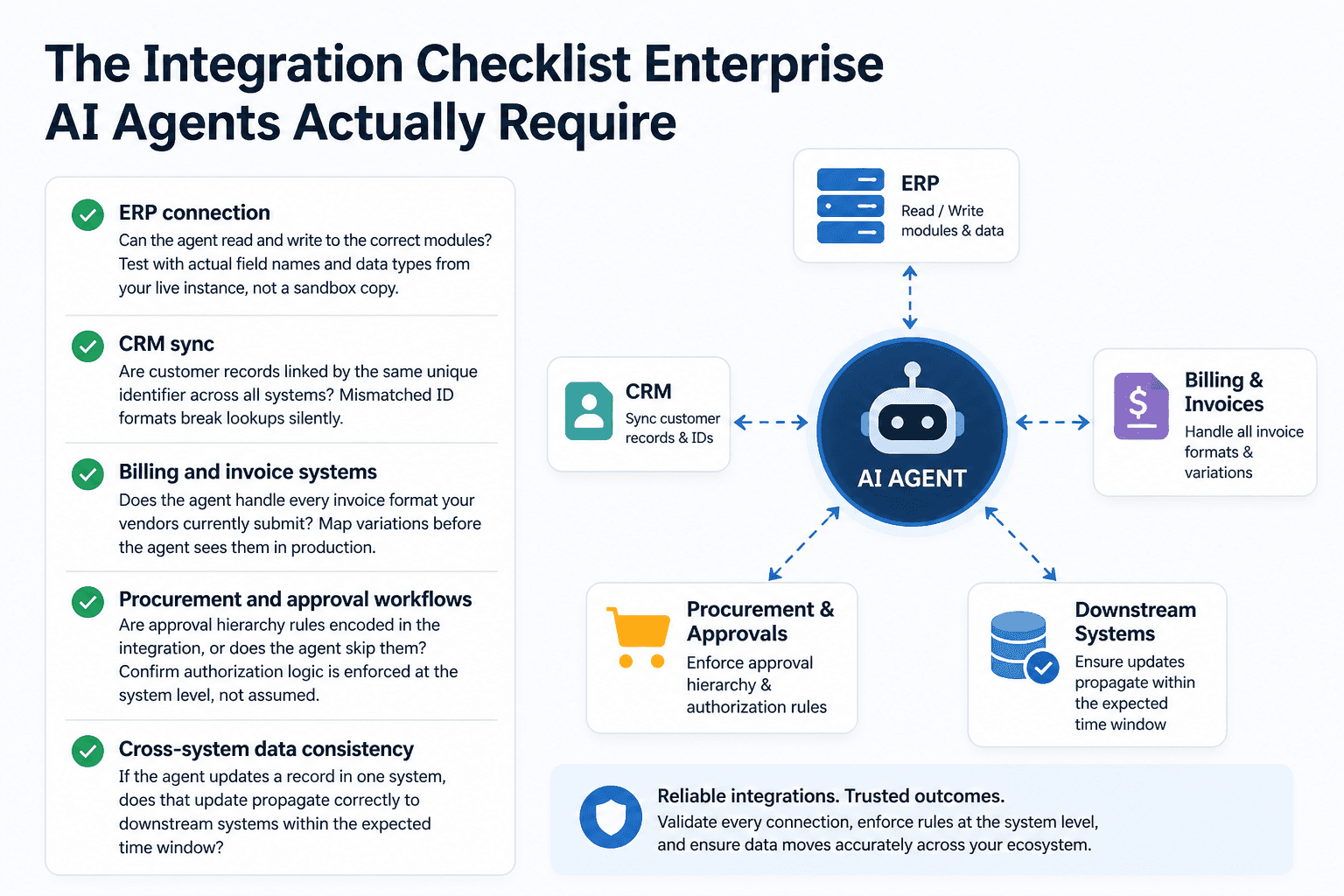
The Integration Checklist Enterprise AI Agents Actually Require
Many enterprises launch AI initiatives without mapping the exact systems the agent must touch. The agent then hits a live integration point it was never tested against and fails in a way that is difficult to trace. Here is what must be confirmed before any agent touches production data.
ERP, CRM, and billing system handoff points to validate
Every system the agent reads from or writes to is a potential failure point. The handoff between systems is where data gets dropped, duplicated, or misformatted.
Before go-live, confirm each of the following:
ERP connection: Can the agent read and write to the correct modules? Test with actual field names and data types from your live instance, not a sandbox copy.
CRM sync: Are customer records linked by the same unique identifier across all systems? Mismatched ID formats break lookups silently.
Billing and invoice systems: Does the agent handle every invoice format your vendors currently submit? Map variations before the agent sees them in production.
Procurement and approval workflows: Are approval hierarchy rules encoded in the integration, or does the agent skip them? Confirm authorization logic is enforced at the system level, not assumed.
Cross-system data consistency: If the agent updates a record in one system, does that update propagate correctly to downstream systems within the expected time window?
Authentication, API rate limits, and fallback routing
Authentication failures and rate limit breaches are the most common causes of agents stopping mid-process. They are also the easiest to prevent with pre-launch testing.
Check these before sign-off:
API credentials: Are service account tokens scoped to the minimum permissions needed? Over-permissioned agents are a security liability.
Rate limits: What is the maximum API call volume each connected system allows per minute and per day? Run load tests against those limits before go-live.
Fallback routing: If a downstream system is unavailable, does the agent queue the task, fail gracefully, or stop processing entirely? Define this behavior explicitly and test it.
Token refresh logic: Do authentication tokens expire during long-running workflows? Confirm refresh logic is handled automatically, not manually.
Mapping data formats before the agent touches live records
Invoice formats change. Field names get updated. New suppliers submit data in formats no one anticipated. When no one has mapped these variations in advance, the agent processes them incorrectly and nothing flags it as an error.
Before production, document every data format variation the agent is likely to encounter. Build format normalization into the pipeline before the agent's decision logic runs. Then establish a process for updating that mapping when new variations arrive, because they will.
This step is where most teams cut corners. The investment is low. The failure cost is high.
Enterprise AI Governance: The Ownership and Guardrail Framework
An enterprise AI governance framework is the set of rules, ownership structures, and technical controls that determine who authorizes an agent to act, what it is allowed to do, and how every action is recorded. Without it, compliance becomes a manual audit exercise after the fact.
Assigning model ownership and cross-functional accountability
Every production agent needs a named owner in each function it touches. This is not a committee. It is a specific person responsible for the agent's outputs in their domain.
A workable structure uses a RACI model: one person is Responsible for monitoring the agent's outputs, one is Accountable for decisions when exceptions occur, specific teams are Consulted when the agent encounters a case outside its parameters, and stakeholders are Informed through regular reporting.
Governance boards from enterprise architects and compliance leads consistently show that accountability gaps cause more production failures than technical issues. The RACI does not need to be complex. It needs to exist before the agent goes live, not after something breaks.
Input and output guardrails: what they are and how to specify them
Guardrails are the technical constraints that prevent an agent from acting on inputs it was not designed to handle or producing outputs that violate business rules.
Input guardrails filter what enters the agent: malformed records, out-of-range values, unauthorized data sources, and requests that fall outside the agent's defined scope. Specify these as explicit rejection conditions, not assumptions.
Output guardrails validate what the agent produces before it acts: transaction amounts above a threshold require human approval, changes to master data records require a secondary check, and flagged exceptions route to a human reviewer rather than auto-resolving.
Predflow builds these guardrails into the process mapping stage before any agent is built. Human oversight and exception routing are part of the architecture, not added after deployment. For teams evaluating platforms, this is what governance built in looks like: audit checkpoints at the process level, not attached to the model as an afterthought.
Audit trails and compliance logging for regulated workflows
In any regulated environment, the agent must produce a record of every action it takes: what input it received, what decision it made, what it changed, and when. This is not optional for finance or supply chain workflows.
The audit trail must be tamper-evident, time-stamped, and queryable. It should capture exceptions and manual overrides alongside automated actions. If a regulator or internal auditor asks why a specific invoice was routed a specific way, the answer must be available in seconds, not hours.
Define the logging requirements before selecting a platform. Retrofitting audit trail infrastructure after go-live is expensive and often incomplete.
Monitoring and Oversight Controls for Enterprise AI Agents in Production
The most common blind spot in production enterprise AI deployments is not knowing when an agent has silently stopped processing. Transactions look like they are flowing. No error fires. But the agent has been queuing exceptions without resolution for days. Monitoring closes that gap.
The four metrics every enterprise AI agent must report in real time
Set these up on day one. Do not wait for stabilization.
Task completion rate. Measurement: percentage of initiated tasks reaching a successful end state. Failure threshold: a drop of more than 5% from the baseline established in staging. Action: pause the agent and inspect the exception queue before resuming.
Exception rate. Measurement: percentage of tasks flagged for human review rather than auto-resolved. Failure threshold: exception rate exceeds the pre-defined ceiling set during process mapping. Action: route exceptions to the designated owner immediately and review for pattern.
Processing latency. Measurement: time from task intake to task completion. Failure threshold: average latency exceeds the SLA defined in the integration agreement by more than 20%. Action: check upstream API response times and downstream system availability.
Data match accuracy. Measurement: percentage of agent outputs that match expected values against a sampled validation set. Failure threshold: accuracy drops below the threshold agreed with the process owner. Action: trigger a model review and check for data format changes in source systems.
These four metrics connect directly to the drift and accountability gaps covered in the opening section. If no one is watching them, the production failures described there are inevitable.
When to trigger human review versus let the agent proceed
Not every exception needs a human. Requiring human review on everything defeats the purpose of automation. Requiring it on nothing creates unacceptable risk.
Set human-in-the-loop triggers based on consequence, not frequency. Any action that modifies financial records above a defined value threshold requires approval. Any action on a record that has been flagged as disputed within the last 30 days requires approval. Any action the agent cannot match to a defined workflow pattern requires a human decision.
Automate the routing. The agent should identify that it has hit a trigger condition and hand off immediately, not attempt a resolution and flag it after the fact.
Connecting agent monitoring to existing IT management software
Agents should not require a separate monitoring dashboard that no one checks. Pipe agent metrics into the IT management and monitoring tools your operations team already uses.
Most modern agent platforms expose metrics via standard APIs. Connect task completion rate, exception rate, and latency to your existing alerting and reporting infrastructure. If your team already responds to alerts in a specific tool, that is where agent failures should surface.
The goal is zero new dashboards for the ops team. Monitoring that requires checking a separate system gets checked less often. Integrate it into what already exists.
Frequently Asked Questions
What is enterprise AI and how is it different from standard AI tools?
Enterprise AI refers to AI systems deployed within organizational workflows to automate decisions, process data, and coordinate actions across business systems at scale. Unlike standalone AI tools, enterprise AI agents integrate with ERP, CRM, billing, and procurement systems, operate under governance frameworks, and require audit trails, exception handling, and human oversight built into the deployment architecture.
What governance framework does an enterprise AI agent need before production?
An enterprise AI governance framework requires four components before go-live: a named owner for each agent output, defined RACI accountability across functions, input and output guardrails that prevent out-of-scope actions, and a tamper-evident audit trail for every transaction. These must exist before deployment, not after the first incident.
How do enterprise AI agents integrate with existing ERP and billing systems?
Integration requires mapping every data handoff point between the agent and connected systems, confirming API authentication and rate limits, testing fallback routing when systems are unavailable, and normalizing all data format variations before the agent's decision logic runs. Skipping the format mapping step is the most common cause of silent production failures in finance workflows.
What are the biggest risks of deploying AI agents in enterprise workflows?
The three primary risks are accountability gaps (no defined owner for agent outputs), data integration mismatches (agents encountering formats or edge cases not present in testing), and model drift (accuracy degrading as production data diverges from training data). All three are preventable with pre-deployment governance and monitoring.
How do you monitor an enterprise AI agent after deployment?
Monitor four metrics in real time from day one: task completion rate, exception rate, processing latency, and data match accuracy. Define failure thresholds and automated response actions for each metric. Connect agent monitoring to existing IT management tools so alerts reach the team that can act on them.
What does human-in-the-loop mean for enterprise AI automation?
Human-in-the-loop means the agent automatically routes specific decision types to a human reviewer rather than resolving them autonomously. Triggers are based on consequence: high-value transactions, disputed records, and any action outside the agent's defined workflow parameters. The handoff is automated. The decision is human.
Conclusion
You now have four checkboxes that determine whether an enterprise AI agent is production-ready: accountability ownership, integration mapping, technical guardrails, and real-time monitoring. If all four are in place, the deployment has a foundation. If any one is missing, that gap is where the silent failure modes from the opening of this article will appear.
The choice is straightforward. Run the governance and integration checklist before the agent touches live workflows, or inherit the debugging and damage-control work after it fails.
If you are evaluating platforms and want to see what this looks like applied to a real finance workflow, see what production access looked like at Plum and how the process mapping stage resolved the integration and accountability gaps before any automation ran.
See how Predflow maps your workflows before building agents. Request a process review to get a low-commitment diagnostic of where your current processes are and are not ready for agent deployment.
Bring 20 NetSuite bills to a 30-minute teardown
We will walk your actual invoices through capture, 3-way match and posting on the call, and tell you which steps an agent can take over. No prep beyond the PDFs.
FAQ
Frequently asked questions
What exactly is an AI agent
An AI agent is an autonomous system designed to handle specific business tasks end-to-end. Unlike simple chatbots, AI agents can reason, take actions, integrate with tools, and follow defined workflows.