Finance
AI Voice Bots: How They Work and How to Build One [2026]
Your team answered the same invoice question 40 times this week — AI voice bots can handle that without a human in the loop. Here's exactly how they work and how to build one.

Sanya Shah
Co-founder at Predflow
![Editorial illustration for AI Voice Bots: How They Work and How to Build One [2026]](https://framerusercontent.com/images/KYPzmLtcKv6oJ4U9MaYxLuMhHMI.png?width=1536&height=1024)
Your accounts payable team answered the same invoice status question 40 times this week. Each call pulled someone off real work for two to four minutes. Multiply that across a quarter and you have hundreds of hours spent on calls that a well-built AI voice bot could handle without a human in the loop.
The gap between what AI voice bots promise and what they actually deliver in back-office environments is real. Demos work because demo scripts are clean. Real calls are not. A caller asks about a disputed invoice, gets transferred, gets disconnected, and calls back angrier. That sequence is a process failure, not a technology failure.
By the end of this article, you will know exactly how AI voice bots process a conversation mechanically, where they break in real deployments, and how to build one that holds up when callers go off-script. This is written for operations and finance teams who need reliability, not novelty.
What AI Voice Bots Actually Do (Beyond the Sales Pitch)
Most vendor explanations skip the mechanics. That is a problem because if you do not understand how the stack works, you cannot spot where a specific vendor's implementation will fail your use case.
The four-layer stack: ASR, NLU, dialogue management, and TTS
Every AI voice bot, regardless of vendor, runs on four core layers. Here is how a single caller utterance moves through the system:
ASR (Automatic Speech Recognition): The caller speaks. ASR converts audio into raw text. Accuracy here depends heavily on audio quality, accents, and background noise.
NLU (Natural Language Understanding): The raw text is parsed for intent and entities. "I need to check on invoice 4471" becomes intent: invoice inquiry, entity: 4471.
Dialogue Management: The system decides what to do next. It checks conversation history, applies business rules, and triggers the right action or follow-up question.
TTS (Text-to-Speech): The system's response is converted back into spoken audio and delivered to the caller.
Each layer introduces potential failure. A noisy call degrades ASR output, which corrupts NLU input, which sends dialogue management down the wrong branch.
How context is carried across turns in a conversation
A single-turn bot treats every caller statement as isolated. That works for "press 1 for billing." It does not work when a caller says "yes, that one" referring to an invoice they named two turns ago.
Modern conversational AI maintains a session state that stores entities, confirmed facts, and unresolved questions across the entire call. Without this, callers repeat themselves. Repetition is the fastest way to destroy caller trust.
Where the bot ends and your existing systems begin
The bot itself does not hold data. It calls APIs or queries databases to fetch invoice status, order details, or account information. The quality of the bot's answer is limited by the quality and speed of those integrations.
If your ERP takes three seconds to respond, the caller hears three seconds of silence. Plan for this during design, not after go-live.
Where AI Voice Bots Break Down in Business Workflows
Understanding failure modes before you build saves significant rework. The three most common failures in back-office deployments follow a predictable pattern.
Failure mode 1: The bot misreads intent and creates downstream errors
Intent misclassification is the most common failure. A caller says "I want to cancel the order" but means "I want to change the delivery date." The bot routes to cancellation. The order gets flagged. A human has to unwind it.
This happens when intent models are trained on clean, controlled phrases rather than the messy, abbreviated language real callers use. Finance teams hear this constantly on AP inquiry lines.
Failure mode 2: Conversational design that works in demos but fails on real calls
Demo scripts are written by people who already know the right answer. Real callers interrupt, change direction mid-sentence, and give partial information. A bot designed only for the happy path breaks the moment a caller deviates.
Poor conversational design also means the bot does not know how to recover gracefully. It either loops the caller in a confusion spiral or transfers them with no context passed to the agent. Both outcomes damage caller trust.
Failure mode 3: No live connection to the systems that hold the answer
A bot that cannot query your ERP, accounting system, or order management platform in real time cannot give real answers. It can only give scripted ones. Callers asking about invoice disputes or shipment delays need live data, not canned responses.
Trust in voice automation is not given freely. Only a minority of consumers trust voice assistants by default. That trust is built through consistent, accurate answers. One bad interaction, especially one involving wrong financial information, resets it entirely.
These failures are not inevitable. They are the direct result of building in the wrong order: tool first, process second. The next section reverses that.
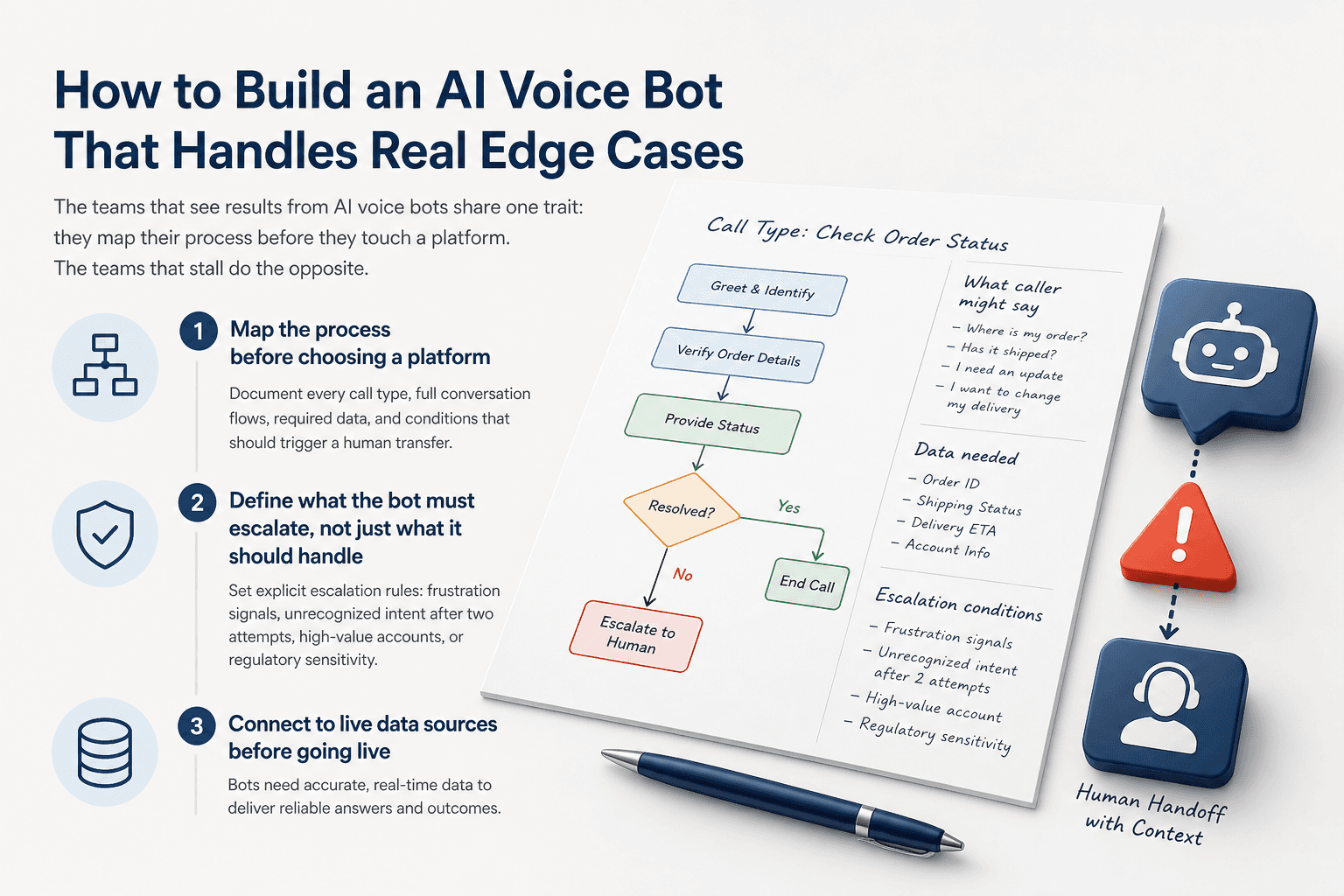
How to Build an AI Voice Bot That Handles Real Edge Cases
The teams that see results from AI voice bots share one trait: they map their process before they touch a platform. The teams that stall do the opposite.
Step 1: Map the process before choosing a platform
Document every call type you want the bot to handle. For each one, write out the full conversation flow including what the caller might say at each step, what data the bot needs to answer, and what conditions should trigger a human transfer.
This step takes longer than most teams expect. It also surfaces problems that would have destroyed the deployment later. Most teams skip it because it feels like delay. It is not. It is the build.
If you want to remove the guesswork from this stage, Predflow is built around exactly this principle. It starts with process mapping before any tool selection, and its agents are designed to handle edge cases and exceptions reliably with human oversight built into the workflow from the start, not added later.
Step 2: Define what the bot must escalate, not just what it should handle
Escalation logic is not a fallback. It is a core feature. Before go-live, define the exact conditions under which the bot hands off to a human: caller frustration signals, unrecognized intent after two attempts, high-value account flags, or regulatory sensitivity.
Write these rules explicitly. Do not leave them to the platform's default behavior.
Step 3: Connect to live data sources before going live
Every use case that involves a specific account, order, invoice, or shipment requires a live data connection. Build and test these integrations before any caller touches the system.
Test with dirty data, not clean test records. Real systems have formatting inconsistencies, missing fields, and edge cases that break API calls in ways test environments never show.
Step 4: Run adversarial testing with real call scenarios
Testing should happen throughout the build, not only at the end. Bring in colleagues who were not involved in the design and give them caller scenarios. They will find paths through the conversation that the design team did not anticipate.
Specifically test: callers who give partial information, callers who change their request mid-call, callers who give information in the wrong order, and callers who use internal jargon. These scenarios expose gaps that clean demo scripts never reveal.
Step 5: Build in a human oversight layer from day one
Every bot needs a feedback mechanism. Log calls where the bot failed to resolve the query. Review them weekly during the first 90 days. Use them to retrain intent models and fix conversational gaps.
A bot without oversight degrades quietly. Callers stop using it, staff start bypassing it, and no one knows why until the rollout is declared a failure six months in.
AI Voice Bots in Finance and Operations: What the Numbers Show
The business case for AI voice bots is clearest in environments with high call volume, repetitive query types, and measurable resolution outcomes. Finance and ops fit that description precisely.
Call recovery and revenue impact: a real deployment example
A dental practice was missing 19.2% of inbound calls despite having a call center backup in place. Those missed calls were costing real revenue. After deploying a voice AI system, more than $401,000 in paid services was recovered in a single quarter.
The mechanism was simple: the bot answered calls that previously went unanswered because agents were occupied. The revenue was not created by the bot. It was already there, being lost to missed pickups.
For AP and ops teams, the parallel is direct. Vendor calls about invoice status, order inquiries from logistics partners, and payment confirmation requests do not require a skilled finance employee to answer. They require accurate, real-time data delivered through a voice the caller trusts. Missed or poorly handled calls in these categories create payment delays, strained vendor relationships, and dispute backlogs.
Efficiency benchmarks across ops and finance teams
Deployments across industries have shown measurable improvements: 35% faster call handling times, 30% higher customer satisfaction scores, and up to 50% reduction in queue lengths and wait times. These figures reflect what happens when bots handle the repeatable queries and human agents handle the exceptions.
Which use cases reach ROI fastest in back-office environments
The fastest return comes from use cases where the query type is narrow, the required data is structured, and the volume is high. In finance and ops, that means AP inquiry lines, order status, payment confirmation, and delivery scheduling. Each of these involves a caller asking for one specific piece of information that lives in a system the bot can query.
Complex dispute resolution, contract negotiation, and compliance-sensitive conversations still require humans. The bot's job is to handle volume so those humans are available.
Choosing Between Building and Buying an AI Voice Bot
Most ops teams do not need to build from scratch. The real decision is which platform fits your process constraints, not which platform has the most features.
When building in-house makes sense (and when it usually doesn't)
Building in-house makes sense when your process involves proprietary logic that no vendor will support, your data cannot leave your infrastructure, or you have a technical team with NLU and telephony experience already on staff. Those conditions are rare in finance and ops environments.
For most teams, building in-house means six to twelve months of development before the first real call, followed by ongoing maintenance that competes with core business priorities.
What to look for in a platform: integration depth, escalation handling, and pricing transparency
Integration depth is the first filter. The platform must connect to your ERP, your telephony system, and your CRM without requiring a full engineering project to do so.
Escalation handling is the second. Ask specifically how the platform transfers a call mid-conversation while preserving context. If the answer is vague, the caller will experience the gap directly.
Pricing is the third. Per-seat or per-resolution pricing models, common in tools like Intercom, can escalate quickly as call volume grows. Build a total cost of ownership model before committing, not after.
Some teams exploring messaging-first automation start with tools like an AI chatbot for Telegram before moving to voice. That is a reasonable low-stakes entry point for testing intent models and conversational flows. The limitation is that text-based bots do not carry the same context signals, tone, and urgency cues that voice calls carry, so insights do not transfer perfectly.
Questions to ask any vendor before signing
Ask how the platform handles calls it cannot resolve. Ask for a real example of escalation logic in a back-office deployment. Ask what the average time-to-live is for a new use case. Ask what happens when an API integration fails mid-call.
Vendors who answer these questions concretely have built for real environments. Vendors who redirect to feature lists have not.
Frequently Asked Questions
What is an AI voice bot and how is it different from a regular IVR system?
An AI voice bot understands natural spoken language and carries context across a full conversation. A traditional IVR routes callers through fixed menu trees using keypad inputs or basic speech commands. AI voice bots can handle open-ended questions, adapt to what the caller says, and query live systems to deliver specific answers rather than scripted options.
How long does it take to deploy an AI voice bot for a finance or ops team?
A focused deployment covering one or two use cases, such as invoice status or order inquiry, can go live in four to eight weeks when the process is mapped in advance and integrations are scoped before development starts. Broader deployments covering multiple query types take longer. The biggest variable is how clearly the team has defined escalation rules and data access requirements before the build begins.
Can AI voice bots integrate with ERP and accounting systems like SAP or NetSuite?
Yes, provided the platform supports API-based integration and your ERP instance allows it. Most enterprise voice bot platforms connect via REST APIs. The integration itself is usually straightforward. The harder work is defining exactly which data fields the bot needs, what happens when a record is missing, and how errors are surfaced to the caller without creating confusion.
What happens when an AI voice bot can't answer a caller's question?
A well-designed bot transfers the call to a human agent with full context passed: what the caller asked, what the bot tried, and what data was retrieved. A poorly designed bot either loops the caller or transfers without context, forcing the caller to repeat everything. Escalation design is a critical build requirement, not an afterthought.
How much does an AI voice bot cost to build or license?
Costs vary widely. Licensing a platform typically runs from a few hundred to several thousand dollars per month depending on call volume and feature depth. Per-resolution pricing models can look inexpensive at low volume but scale unpredictably. Building in-house adds engineering costs, ongoing maintenance, and infrastructure. The total cost of ownership calculation should include integration, testing, and post-launch optimization, not just the license fee.
The Decision That Separates Deployments That Work from Ones That Stall
Most AI voice bot failures trace back to one decision made too early: choosing a platform before mapping the process. The platform becomes the constraint, and the process gets bent to fit it. That is why so many deployments work in demos and fail in production.
The single most important question to ask any vendor is whether they start with your process or with their toolset. That answer tells you more about deployment success than any feature comparison. Teams that automate repetitive voice interactions in 2026 without solving the process-mapping gap first will hit the same wall six months in, regardless of which platform they chose.
If you want to see how Predflow maps your process before recommending automation, request a workflow audit, not a demo. Map My Workflow with Predflow.
Bring 20 NetSuite bills to a 30-minute teardown
We will walk your actual invoices through capture, 3-way match and posting on the call, and tell you which steps an agent can take over. No prep beyond the PDFs.
FAQ
Frequently asked questions
What exactly is an AI agent
An AI agent is an autonomous system designed to handle specific business tasks end-to-end. Unlike simple chatbots, AI agents can reason, take actions, integrate with tools, and follow defined workflows.