Finance
What Are Technical Modules in SAP and How They Work Together
Your SAP system holds the data — so why is your team still moving it manually? Understanding technical modules in SAP is the first step to fixing that.

Khushbu Adav
Product, Predflow

Your SAP system has the data. Your team still moves it by hand.
Supply chain managers and AP leads report this constantly: purchase orders sit in one module, invoices queue in another, and someone on the team spends hours each week bridging the gap manually. The root cause is rarely a missing functional module. It is almost always an underbuilt technical layer that was never properly configured during implementation.
Teams often blame FI or MM for process breakdowns that are actually caused by misconfigured workflow or middleware components. This misdiagnosis sends teams chasing the wrong fix for months. Understanding technical modules in SAP is the prerequisite to finding where the process actually breaks and what it costs you every week.
What Are Technical Modules in SAP? A Plain-Language Definition
Technical modules in SAP are the infrastructure components that control how the system processes logic, routes work, connects to other applications, and keeps the entire landscape running. They do not store business transactions the way functional modules do. They determine whether those transactions move forward automatically or stall and wait for a human.
Technical vs. Functional Modules: The Core Distinction
Functional modules are what most SAP users interact with: MM for procurement, FI for finance, SD for sales, HCM for HR. Technical modules sit beneath them. They are the plumbing that makes functional modules behave as a connected system rather than isolated databases.
A functional module defines what data exists. A technical module defines what happens to that data next.
Why Technical Modules Are the Infrastructure, Not the Feature Set
Think of functional modules as the offices in a building and technical modules as the electrical wiring, elevator system, and communication network. The offices can be perfectly designed, but if the infrastructure is misconfigured, nothing moves between floors.
Core technical modules and what each one does:
SAP ABAP — The programming language used to build custom reports, enhancements, and business logic inside SAP
SAP Basis — The system administration layer that manages servers, users, transports, and system performance
SAP Business Technology Platform (BTP) — The modern cloud platform for integration, extension, and automation across SAP and non-SAP systems
SAP Workflow Management — The engine that routes approvals, triggers notifications, and orchestrates multi-step processes
SAP NetWeaver — The foundational technology stack that connects SAP application components and supports legacy integrations
These five components define the technical backbone of any SAP environment. When one is misconfigured or ignored, the effects appear in the functional modules your team uses every day.
The Core Technical Modules in SAP Every Operations Team Should Know
Choosing which technical modules to invest in depends on your business processes and where friction currently lives. What holds across every industry is that neglecting any of these five components creates compounding operational problems.
SAP ABAP: The Custom Logic Engine
ABAP is SAP's native programming language and the foundation of sap development across custom reports, user exits, and business logic enhancements. When standard SAP behavior does not match your process, ABAP is how you close that gap. When ABAP code is poorly maintained, reports break, interfaces fail silently, and finance teams lose trust in system outputs.
SAP Basis Administration: The System Foundation
SAP Basis is what keeps the entire landscape operational. It manages system performance, user authorizations, transport management between development and production environments, and database health. Basis is frequently called the nervous system of the SAP landscape because every application layer depends on it functioning correctly. When Basis is under-resourced, the symptoms look like random system slowdowns and failed background jobs that cascade into manual workarounds.
SAP Business Technology Platform (BTP): The Modern Integration Layer
SAP BTP architecture is the current answer to extending and integrating SAP with external systems. It supports sap integration services, API management, event-driven processes, and cloud-to-cloud connectivity. Organizations running S/4HANA rely on BTP to replace older middleware without rebuilding their core SAP configuration. Ignoring BTP means relying on point-to-point integrations that break every time a connected system updates.
SAP Workflow Management: The Process Orchestrator
SAP Workflow Management controls approval chains, escalation paths, and automated task routing inside SAP. It is the technical component that decides whether a purchase order approval reaches the right manager in two minutes or sits in a queue unnoticed for three days. Without a defined workflow strategy, teams build manual email-based approval processes that run parallel to SAP and create compliance gaps.
SAP Integration Suite: Connecting SAP to the Outside World
SAP Integration Suite is the primary tool for connecting SAP to third-party platforms, EDI systems, logistics providers, and cloud applications. It replaces older SAP PI/PO middleware for most modern implementations. When integration suite connections are misconfigured, data arrives in SAP incomplete or late, forcing teams to re-enter information that was already captured upstream.
Technical module reference table:
Module | Primary Role | Business Function Most Affected |
|---|---|---|
SAP ABAP | Custom logic and reports | Finance, Operations |
SAP Basis | System administration | All departments |
SAP BTP | Cloud integration and extension | Cross-functional |
SAP Workflow Management | Process routing and approvals | Procurement, HR, Finance |
SAP Integration Suite | External system connectivity | Supply Chain, AP, Logistics |
The right technical foundation varies by organization, but the business case for treating these as a priority rather than a background concern is consistent regardless of industry or size.
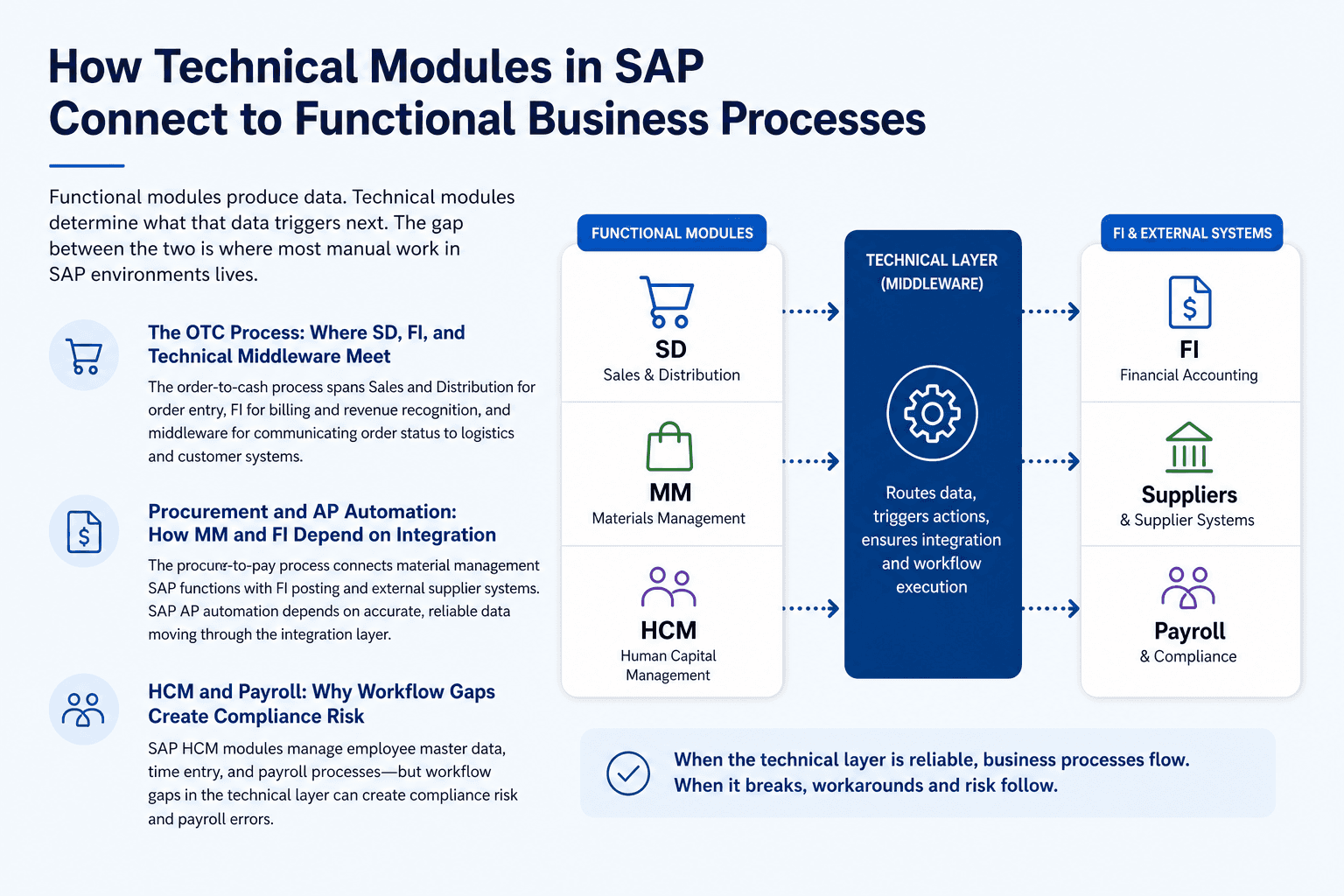
How Technical Modules in SAP Connect to Functional Business Processes
Functional modules produce data. Technical modules determine what that data triggers next. The gap between the two is where most manual work in SAP environments lives.
The OTC Process: Where SD, FI, and Technical Middleware Meet
The order-to-cash process spans Sales and Distribution for order entry, FI for billing and revenue recognition, and middleware for communicating order status to logistics and customer systems. Each handoff between modules depends on the technical layer executing correctly. When the integration layer between SD and FI is misconfigured, sales orders close correctly but billing documents require manual release instead of posting automatically.
Procurement and AP Automation: How MM and FI Depend on Integration
The procure-to-pay process connects material management SAP functions with FI posting and external supplier systems. SAP AP automation depends on invoice data arriving from suppliers in a structured format, matching against purchase orders in MM, and triggering payment runs in FI without manual review. SAP invoice processing automation fails not because FI is configured incorrectly but because the integration layer between the supplier portal and SAP is dropping or duplicating data. AP teams misattribute the failure to their finance configuration rather than the middleware handling the inbound connection.
HCM and Payroll: Why Workflow Gaps Create Compliance Risk
SAP HCM modules manage employee master data, time entry, and payroll processing. Each of these steps requires workflow routing to move approvals through HR, finance, and management without manual coordination. When workflow gaps exist in the HCM layer, payroll corrections queue for manual approval outside the system, creating audit trails that are incomplete by default. When the technical workflow layer between HCM and payroll is not configured to enforce approval sequences, organizations process payroll with unreviewed changes and discover the compliance exposure during audits rather than before.
Where SAP Technical Modules Break Down in Real Operations
The failure modes in SAP technical modules look like people problems from the outside. They present as team inefficiency, not system error. Recognizing the pattern is the first step to stopping it.
Workflow Bottlenecks That Look Like People Problems
Symptom: Approvals are slow, escalations happen by phone call, and managers complain about too many notifications. Root cause: SAP Workflow Management is configured with static approval paths that do not account for delegation, absence, or organizational changes. Operational cost: Every approval delay in procurement adds time to the purchase order cycle, pushing delivery dates and increasing expediting costs.
Integration Gaps That Create Duplicate Manual Entry
Symptom: Teams enter the same data in SAP and in a spreadsheet or a third-party system because "SAP doesn't always get it." Root cause: The SAP Integration Suite connection to the external system is either missing or unreliable, so teams have built a manual backup process. Operational cost: Duplicate entry multiplies error risk and consumes hours each week that cannot be reclaimed without fixing the technical source.
Monitoring Blind Spots That Kill Process Visibility
Symptom: A process fails silently overnight, and the team discovers the issue the next morning when downstream tasks have already stalled. Root cause: SAP monitoring is not configured to alert on failed background jobs, incomplete IDocs, or broken interface connections in real time. Operational cost: Hours of investigation to trace a failure that a properly configured monitoring layer would have flagged within minutes.
This is the gap Predflow's AI agent platform is built to close. Rather than adding another tool on top of SAP, Predflow maps your existing processes first, identifying exactly where technical module handoffs break down. It then deploys agents that handle edge cases, maintain human oversight checkpoints, and improve continuously without requiring your team to become integration specialists.
How to Evaluate Whether Your SAP Technical Module Setup Is Working
Most teams do not need a full SAP audit to know something is wrong. They need four direct questions that expose where their technical layer is failing.
Four Diagnostic Questions for Supply Chain and Finance Leaders
Teams that go live without a defined workflow monitoring strategy almost always end up running a parallel Excel process within six months. That shadow process is the clearest sign that the technical layer was left incomplete.
Ask your SAP team or implementation partner these questions:
Do we have real-time alerting for failed background jobs and broken interfaces? If the answer is no or "we check manually," your monitoring configuration is incomplete and your team is absorbing the cost of every silent failure.
Is every approval process in SAP enforced by Workflow Management, or do some approvals happen by email? Email approvals outside SAP indicate workflow gaps that create compliance exposure and prevent accurate process reporting.
How many active point-to-point integrations do we have that bypass Integration Suite? A high number signals technical debt that breaks during system upgrades and requires manual intervention when connected systems change.
Can we trace a failed transaction end-to-end from the triggering event to the error log without calling a developer? If tracing a failure requires specialist involvement every time, your technical monitoring and documentation layer is not functional for operational teams.
What Good SAP Technical Integration Actually Looks Like in Practice
A healthy SAP technical setup means background processes run and self-report their status. Approvals route automatically and escalate based on defined rules. Integrations confirm successful data delivery and alert when something fails. Developers are involved in enhancements, not daily firefighting. This is not an aspirational state. It is what properly configured technical modules in SAP deliver.
Frequently Asked Questions
What is the difference between technical and functional modules in SAP?
Technical modules in SAP manage system infrastructure, custom logic, process routing, and integrations. Functional modules manage business transactions like procurement, finance, and HR. Functional modules store what happened; technical modules determine what happens next and whether data moves between processes automatically or stalls for manual intervention.
Which technical modules in SAP are most important for supply chain operations?
SAP Integration Suite and SAP Workflow Management are the most directly relevant for supply chain teams. Integration Suite connects SAP to logistics providers, supplier portals, and EDI systems. Workflow Management controls approval routing for purchase orders, goods receipts, and invoice processing. SAP Basis underpins all of them.
Can SAP technical modules be automated without replacing the existing system?
Yes. Most automation improvements to SAP technical modules are achieved through configuration changes, BTP extensions, or AI agent layers built on top of the existing system. A full replacement is not required to close integration gaps or add real-time monitoring to existing workflow processes.
What does SAP Basis administration actually do for my business?
SAP Basis manages the underlying server environment, user access controls, system transports between development and production, and overall system performance. When Basis is well-managed, the system runs reliably and changes are deployed safely. When it is under-resourced, system performance degrades, security gaps appear, and changes to functional configuration carry higher risk.
How does SAP BTP differ from older SAP integration tools like PI/PO?
SAP PI/PO was an on-premise middleware product designed for message-based integration in older SAP landscapes. SAP BTP is a cloud-based platform that supports API-led integration, event streaming, and application development alongside connectivity. BTP is the current standard for new SAP integration projects and the path forward for organizations moving to S/4HANA.
Conclusion
You now have a clear picture: your SAP technical modules are either connecting your business processes or silently fragmenting them. The fragmentation is not obvious on the surface. It shows up as approval delays, duplicate entry, overnight failures discovered too late, and team hours spent doing work the system should handle.
Do you know which technical module is responsible for your team's biggest manual workaround right now? If the answer is uncertain, that uncertainty is itself the problem. Fixing technical module gaps is real work. But the alternative is scaling your headcount to absorb a system's incomplete configuration, and that cost compounds every quarter.
If you want to see where your SAP process handoffs are breaking down before investing in a fix, Predflow offers a process mapping session that identifies automation opportunities within your existing SAP environment, no rip-and-replace required. [Book a process review with Predflow]
Bring 20 NetSuite bills to a 30-minute teardown
We will walk your actual invoices through capture, 3-way match and posting on the call, and tell you which steps an agent can take over. No prep beyond the PDFs.
FAQ
Frequently asked questions
What exactly is an AI agent
An AI agent is an autonomous system designed to handle specific business tasks end-to-end. Unlike simple chatbots, AI agents can reason, take actions, integrate with tools, and follow defined workflows.