Backoffice Ops
What Is a SAP Application and How Do Back-Office Teams Use It
Owning a SAP application doesn't automatically mean your back-office processes are connected. Here's what it actually takes to close the gaps between modules.

Gautam Borad
Founder, Predflow

Before 9 AM, a typical AP analyst has already logged into three separate tools just to confirm whether a single purchase order has been received, matched, and approved. That friction is exactly what a SAP application is built to eliminate. SAP is the enterprise software most large and mid-sized organizations already own, yet owning it does not guarantee that your back-office processes are actually connected or automated. Many teams run SAP for years while still relying on spreadsheets, email threads, and manual data re-entry to fill the gaps between modules.
This article explains what a SAP application is at a practical level, which modules matter most for finance, supply chain, and operations teams, and where the system still leaves manual work behind even after a full implementation.
What a SAP Application Actually Is (Beyond the Marketing Definition)
A SAP application is a module within SAP's suite of integrated enterprise software, where each module manages a specific business function — finance, procurement, manufacturing, HR — and shares a single underlying database with the rest. SAP stands for systems applications and products in data processing, a name that reflects its original purpose: replacing disconnected departmental systems with one unified platform. Unlike standalone tools, a SAP application does not operate in isolation. When a purchase order is created in procurement, inventory levels update automatically, finance receives a liability entry, and the supplier record in vendor management reflects the transaction. That integration is what distinguishes SAP from a generic ERP or a point solution. The platform spans industries and functions, which is why the term "SAP application" refers to the specific module or product a team uses, not the entire suite.
Systems, Applications, and Products in Data Processing: What the Name Tells You
The full form, systems applications and products in data processing, signals the platform's design logic: it processes business data across systems and functions in a connected way. This is not a marketing phrase. It describes why a single master data record, like a vendor or a material, drives consistent behavior across procurement, accounts payable, and logistics simultaneously.
How SAP Differs from a Generic ERP or Standalone Business Tool
A standalone accounting tool records transactions. SAP erp modules enforce business rules, trigger downstream workflows, and maintain an audit trail across every function that touches the same record. The difference is operational depth, not just feature count. SAP software engineering embeds process logic directly into the platform rather than leaving teams to coordinate manually.
SAP S/4HANA vs. Legacy SAP ERP: The Architecture Shift Back-Office Teams Feel
SAP S/4HANA runs on an in-memory database that reduces processing time for large transaction volumes. Legacy SAP ERP relies on older table structures that require batch runs for reporting. For back-office teams, this means real-time inventory visibility and faster period-close cycles in S/4HANA versus overnight batch reports in the older architecture. The platform shift is real and the operational impact is measurable.
The SAP Modules Back-Office Teams Actually Work In Every Day
Each SAP module maps directly to a team's daily workflow. Understanding which module owns which process helps back-office managers identify where configuration gaps are creating manual work rather than accepting it as normal.
SAP FI and AP Automation: Where Finance Teams Spend Most of Their Time
Who uses it: Finance and Accounts Payable teams. SAP FI (Financial Accounting) handles the general ledger, period-close, and financial reporting. The sap fi introduction for most AP teams is through invoice processing, where sap invoice processing automation matches vendor invoices against purchase orders and goods receipts. The persistent manual pain point is exception handling: when a three-way match fails, the invoice falls out of automation and lands in a human queue with no clear resolution path.
Material Management and Inventory: How SAP MM Controls Stock and Procurement
Who uses it: Procurement and warehouse operations teams. Material management SAP, known as SAP MM, governs purchase orders, goods receipts, stock transfers, and vendor evaluation. SAP inventory management within MM gives warehouse teams real-time stock visibility. The manual pain point is batch management in SAP MM: tracking batch-specific stock levels, expiry dates, and quality status requires manual cross-referencing when batch records are not consistently maintained at goods receipt.
SAP HCM Modules and Workflow Management for Back-Office Operations
Who uses it: HR and back-office operations managers. SAP HCM modules cover personnel administration, payroll, time management, and organizational structure. SAP workflow management within HCM routes approvals, position changes, and compliance tasks automatically. The manual pain point is approval chains that span outside HCM: a headcount request that requires finance sign-off still breaks the workflow if the finance team uses a separate system.
SAP SCM and Demand Planning for Supply Chain Managers
Who uses it: Supply chain and planning teams. The SAP SCM module manages supply network planning, transportation, and demand forecasting. Demand planning in SAP translates historical sales data and forward orders into replenishment signals. The manual pain point is exception management: when a demand spike or supply disruption breaks the plan, supply chain managers still reconcile the deviation manually because the system flags it but does not resolve it.
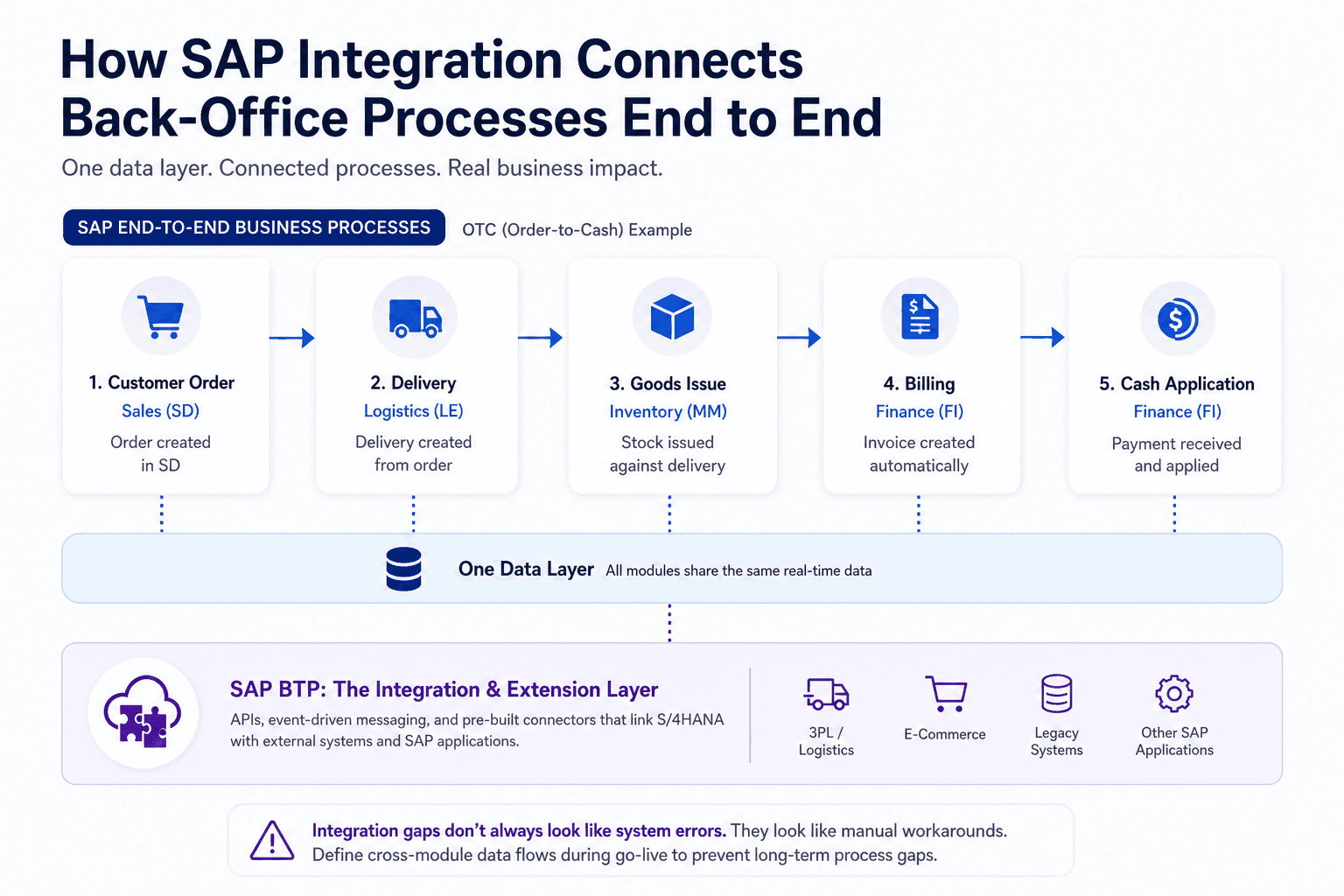
How SAP Integration Connects Back-Office Processes End to End
SAP's core strength is that its modules share one data layer. But shared data does not automatically mean connected processes, and the gaps appear exactly where teams assume integration is working.
SAP End-to-End Business Processes: OTC, Procure-to-Pay, and Beyond
SAP end-to-end business processes like the SAP OTC process (order-to-cash) and procure-to-pay span multiple modules by design. A customer order in SD triggers a delivery in logistics, a goods issue in inventory, and a billing document in FI. When each module is correctly configured, the handoff is automatic. When one module is under-configured, teams fill the gap manually, often without realizing the workaround is now a permanent fixture of their daily process.
SAP BTP Architecture: The Middleware Layer Most Teams Overlook
SAP BTP (Business Technology Platform) is the integration and extension layer that connects SAP applications to each other and to external systems. SAP BTP architecture provides APIs, event-driven messaging, and pre-built connectors that allow S/4HANA to exchange data with third-party logistics platforms, e-commerce systems, or legacy databases. Most back-office teams are unaware BTP exists because it operates below the interface they use daily. This invisibility becomes a problem when integration fails: teams see the symptom but not the source.
The risk of under-defining cross-module data flows during go-live is well documented. Improper blueprinting and scope definition is consistently identified as the most significant failure point in SAP implementations. Teams that skip rigorous process mapping during implementation embed manual workarounds into daily operations, and those workarounds rarely get removed after go-live.
Where SAP Integration Services Fall Short in Practice
SAP integration services handle many connection scenarios natively, but three situations regularly require custom development or third-party ETL tools. First, connecting SAP to non-SAP systems with no standard API requires custom ABAP development or an ETL layer to map and transform data fields. Second, real-time data synchronization between SAP and external warehouse management systems often demands middleware because batch file transfers introduce timing gaps. Third, SAP ariba contract management integrating with legacy procurement tools needs custom field mapping that the standard Ariba connector does not cover out of the box.
Where SAP Applications Leave Back-Office Teams Doing Manual Work
A fully implemented SAP application still leaves specific categories of work in human hands. Recognizing these as structural limitations, not configuration oversights, changes how teams approach the fix.
Exception Handling in SAP Procurement and Invoice Processing
When a three-way match fails in AP — because a quantity discrepancy exists between the purchase order, goods receipt, and vendor invoice — SAP routes the document to a manual review queue. The system identifies the exception but does not resolve it. An AP analyst must investigate the discrepancy, contact the vendor or warehouse, and manually update the document before posting. In high-volume environments, this queue grows faster than it is cleared.
Batch Management and Reporting Gaps in SAP Manufacturing
In discrete manufacturing in SAP, a batch recall flag requires cross-referencing batch records, quality inspection results, and goods movement history across multiple SAP transactions. None of this information appears on a single screen. A quality manager pulls three separate SAP reports, reconciles them manually, and then communicates findings outside the system. SAP monitoring tools flag the event; the investigation still happens largely in spreadsheets.
The Scaling Problem: Why More SAP Users Does Not Mean Less Manual Work
Adding SAP licenses expands access but does not reduce the manual steps embedded in current processes. A team that resolves fifty invoice exceptions per week manually will resolve five hundred manually if transaction volume increases tenfold. SAP business process automation tools help, but they require configuration effort and still struggle with edge cases that fall outside predefined rules.
Many teams respond to this by hiring additional staff or layering basic SAP automation tools on top of existing workflows. Neither approach addresses the root issue: the process itself contains exception paths that standard automation ignores.
Predflow takes a process-mapping-first approach. Before building any automation agent, it maps the exact workflow your SAP environment runs today, including the exception paths that standard automation ignores. The result is an AI agent that handles the edge cases your team currently resolves manually, without requiring you to rearchitect your SAP setup.
Practical Ways Back-Office Teams Get More Value from Their SAP Application
The goal is not to replace SAP. It is to close the distance between what SAP does natively and what your team's actual process requires.
SAP Best Practices for AP and Procurement Teams: Where to Automate First
SAP best practices for AP teams start with invoice processing automation for matched invoices and tolerance-based auto-approval for low-risk exceptions. Automating the straight-through portion, typically 60 to 80 percent of invoice volume, frees the AP team to focus on the genuine exceptions that require judgment. SAP S/4HANA sourcing and procurement includes built-in workflow tools that many teams have not activated. Reviewing your current configuration against SAP's published best practice templates is a low-cost first step before investing in additional tooling.
Using SAP Ariba and Concur to Close Supplier and Expense Management Gaps
SAP Ariba supplier management extends procurement beyond the core MM module, adding contract compliance, supplier performance tracking, and catalog management. SAP Ariba contract management automates contract milestone alerts and obligation tracking that the base SAP procurement module does not cover. SAP Concur solutions close the travel and expense gap, connecting employee spend directly to cost center accounting in FI. Both products integrate with S/4HANA through standard connectors, reducing the custom development burden.
SAP Cloud Solutions and New Technologies Worth Evaluating in 2025
The SAP ecosystem is actively expanding its AI and cloud integration capabilities. Strategic agreements between SAP, Microsoft, and IBM signal that AI-assisted business processes, including intelligent document processing, predictive demand planning, and cloud ERP private deployments, are moving from roadmap to production reality. For back-office teams, this means SAP cloud solutions and new SAP technologies like embedded AI in S/4HANA are worth evaluating now rather than treating as future-state features. The practical implication is that teams on older ERP versions face a widening capability gap the longer they defer migration.
Choosing the Right SAP Application Support and Implementation Path
Your support model determines whether SAP delivers on its integration promise or accumulates technical debt that the back-office absorbs as manual work.
SAP Implementation Partners vs. SAP Service Companies: What the Difference Costs You
SAP implementation partners are certified to deliver full SAP deployments, migrations, and major upgrades. SAP service companies typically provide ongoing application management, configuration support, and functional consulting after go-live. The cost difference is significant. Implementation partners carry higher day rates because they staff for project delivery. SAP service providers focused on application management are structured for sustained operational support at lower blended rates. Using an implementation partner for steady-state support is a common and expensive mismatch.
SAP Application Management Services: When Continuous Support Pays Off
SAP is not a system that runs itself after go-live. SAP basis administration, performance tuning, security patching, and functional configuration changes require continuous attention. SAP application management services pay off when the volume of ongoing change requests, user support tickets, and system monitoring tasks exceeds what an internal IT team can absorb. The threshold is lower than most organizations expect, particularly after a major S/4HANA migration when the system is still stabilizing.
What to Demand from Any SAP Consulting Services Engagement
Before signing with any SAP consulting services provider, ask three specific questions. First, can you show us a process blueprint document from a comparable engagement that includes exception handling paths, not just the happy-path workflow? Second, how do you handle post-go-live manual workarounds that your team introduced during implementation? Third, what is your escalation process when a configuration change in one module breaks a downstream process in another? These questions separate consultants who think in processes from those who think in transactions.
Frequently Asked Questions
What is a SAP application used for in business?
A SAP application manages a specific business function, such as finance, procurement, HR, or supply chain, within an integrated enterprise software suite. Because all SAP modules share a common database, a transaction in one area automatically updates related records across other functions, reducing duplicate data entry and improving process visibility.
What is the difference between SAP ERP and SAP S/4HANA?
SAP ERP is the legacy platform built on older database architecture, relying on batch processing for reporting and period-close. SAP S/4HANA runs on SAP's in-memory HANA database, enabling real-time reporting, faster transaction processing, and a simplified data model. For back-office teams, the practical difference shows up in reporting speed and the availability of embedded analytics.
Which SAP modules are most important for supply chain management?
The SAP SCM module handles network planning and transportation. SAP MM manages procurement and inventory. SAP IBP modules cover integrated business planning and demand forecasting. Together, these three areas form the backbone of end-to-end supply chain management in SAP, connecting supplier orders to warehouse stock to customer fulfillment.
How does SAP integration work between departments?
SAP integration works through a shared data layer where master data records, such as vendors, materials, and cost centers, are maintained once and referenced across all modules. SAP BTP architecture provides the middleware layer for connecting SAP applications to external systems. When integration is correctly configured, a goods receipt in the warehouse automatically triggers an invoice posting in finance without manual intervention.
Can small and mid-sized companies use SAP applications?
SAP offers SAP Business One (SAP B1) specifically for smaller organizations, with SAP B1 integration connecting to third-party tools and e-commerce platforms. Mid-sized companies often use SAP S/4HANA Cloud, a subscription-based deployment that reduces the infrastructure investment required by on-premise SAP. The platform scales, but smaller teams should evaluate whether the configuration and maintenance demands match their internal capacity.
What does a SAP technical consultant do during implementation?
A SAP technical consultant handles the development and configuration work that functional consultants specify but cannot build themselves. This includes custom ABAP development, SAP BTP administration, system landscape configuration, and transport management between development, quality, and production environments. They are the layer between the business process design and the working system.
Conclusion
You now know what a SAP application covers, how its modules map to your team's daily work, and where the platform structurally leaves manual steps in place. The real decision in front of your team is how to close those gaps. Adding headcount absorbs the work but raises cost proportionally. Deeper SAP configuration addresses some gaps but requires project investment and does not handle edge cases well. Layering intelligent automation on top of your existing SAP setup targets the specific exception paths that neither configuration nor headcount solves efficiently.
All three paths are legitimate. The cost and timeline implications differ significantly. Teams that close the gap between SAP's native capabilities and their actual process complexity are the ones that scale operations without scaling their headcount at the same rate.
If you want to see how Predflow maps your current SAP workflows and identifies the specific manual steps an AI agent can take over, request a process walkthrough — no implementation commitment required.
Bring 20 NetSuite bills to a 30-minute teardown
We will walk your actual invoices through capture, 3-way match and posting on the call, and tell you which steps an agent can take over. No prep beyond the PDFs.
FAQ
Frequently asked questions
What exactly is an AI agent
An AI agent is an autonomous system designed to handle specific business tasks end-to-end. Unlike simple chatbots, AI agents can reason, take actions, integrate with tools, and follow defined workflows.