AI AGENTS
How to Use a Recruiting Chatbot to Speed Up High-Volume Hiring
If your recruiters are spending their week sending the same screening questions and chasing no-shows, that's not recruiting—that's data entry. Here's how a recruiting chatbot fixes that at scale.
Sanya Shah
Co-founder, Predflow

Posting 50 warehouse roles means your recruiters are likely spending the majority of their week doing the same three things: sending screening questions, chasing no-shows, and manually updating pipeline stages. That is not recruiting. That is data entry with a phone attached.
A recruiting chatbot solves a specific problem: it removes the repetitive manual work that consumes recruiter time at volume. Not by replacing your team, but by handling the steps that do not require human judgment, so your recruiters can focus on the conversations that do.
This guide gives you a step-by-step method for deploying a recruiting chatbot that handles screening, scheduling, and candidate follow-up without adding headcount. Each step is built around your existing workflow, not a generic template.
What a Recruiting Chatbot Actually Does in a High-Volume Pipeline
Most hiring teams deploy a basic FAQ bot and wonder why it does not move candidates forward. The gap is in what the tool is actually doing. An effective recruiting chatbot is not a question-answering widget. It is an active participant in the hiring workflow, handling screening, scheduling, and follow-up automatically. That distinction separates a true ai powered recruitment platform from a chat window that collects dust.
Screening: asking knockout questions and scoring responses automatically
The chatbot presents role-specific questions to every applicant immediately after they apply. Responses are scored against your criteria and candidates are tagged as qualified, unqualified, or needs-review without a recruiter touching the conversation. This is the core of hr process automation at the top of the funnel.
Scheduling: syncing calendars and sending confirmations without recruiter input
Once a candidate clears screening, the chatbot offers available interview slots pulled directly from your team's calendar. The candidate books, gets a confirmation, and receives a reminder. Recruiters never send a single scheduling email. This alone can reclaim several hours per week in high-volume hiring cycles.
Follow-up: status updates and re-engagement messages at scale
Candidates who go silent after an application often do so because they hear nothing back. Automated hr follow-up messages, sent at set intervals, keep candidates warm and reduce drop-off without manual outreach. The chatbot handles status notifications at every stage, so no one falls through the cracks because a recruiter ran out of time.
Human recruiters still own the judgment calls: final interview decisions, offer conversations, and any question the bot flags as outside its scope. That clear boundary is what makes the ai hiring platform model work.
Step 1 — Map Your Hiring Process Before You Configure the Recruiting Chatbot
The most common failure in chatbot deployment is treating it as a tools-first decision. Teams buy the software, connect it to a job board, and watch it automate the wrong steps. Process mapping before configuration is not optional. It is the work that determines whether the chatbot saves time or creates new problems.
Identify the three to five steps where candidates most often drop off or go silent
Pull your current pipeline data and find where candidates stop responding or disappear. Common drop-off points include the period between application submission and first contact, after an interview is scheduled but before it happens, and after an offer is extended. These are your highest-priority automation targets.
Define which knockout criteria can be scored automatically versus which need human judgment
Not every screening question belongs in the chatbot. Shift availability, certifications, and geographic location can be scored automatically. Questions about career goals, culture fit, or complex experience require a recruiter. People management software and employee management system software can help you see which attributes actually predict success in the role before you write your question set.
Document the handoff point: when does the bot pass to a recruiter and what data travels with it
This is the most critical design decision in the entire deployment. The chatbot must route to a human recruiter the moment a candidate reaches a question the bot cannot score reliably. When that handoff happens, the recruiter needs full context: every response the candidate gave, the score assigned, and the reason for escalation. A clean handoff with complete data is what separates an ai hiring platform from a tool that creates extra work.
Think of the process as three columns: the process step, whether it is automatable, and what triggers the handoff to a human. Mapping this before configuration ensures the chatbot handles the right work and the recruiter handles the rest. Deploying automation on top of a broken or unmapped process scales the dysfunction, not the results. Hrms software features that support workflow visibility help here.
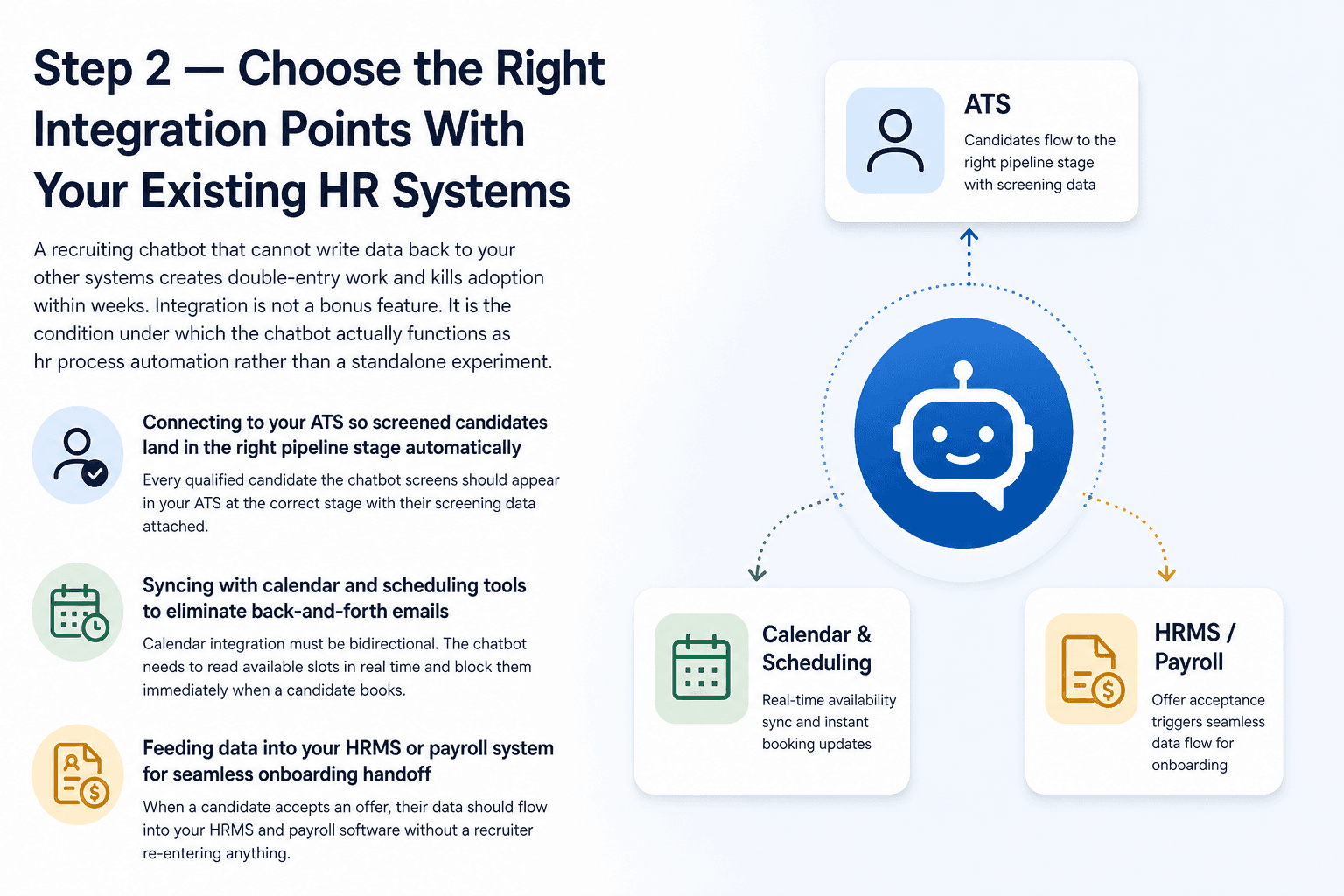
Step 2 — Choose the Right Integration Points With Your Existing HR Systems
A recruiting chatbot that cannot write data back to your other systems creates double-entry work and kills adoption within weeks. Integration is not a bonus feature. It is the condition under which the chatbot actually functions as hr process automation rather than a standalone experiment.
Connecting to your ATS so screened candidates land in the right pipeline stage automatically
Every qualified candidate the chatbot screens should appear in your ATS at the correct stage with their screening data attached. If recruiters have to manually move candidates or re-enter responses, the chatbot is saving time on one side and creating work on the other. Ask any vendor before signing whether their tool writes directly to your ATS or only exports CSV files.
Syncing with calendar and scheduling tools to eliminate back-and-forth emails
Calendar integration must be bidirectional. The chatbot needs to read available slots in real time and block them immediately when a candidate books. A one-way sync that reads but does not update creates double-booking and breaks candidate trust fast. Cloud based hr software environments and workday hrms software both support calendar API connections, but verify the specific integration scope before committing.
Feeding data into your HRMS or payroll system for seamless onboarding handoff
When a candidate accepts an offer, their data should flow into your hrms and payroll software without a recruiter re-entering anything. This is where hrms software examples often fall short. Many chatbot platforms stop at the ATS and leave the onboarding handoff manual.
Three questions to ask any vendor before signing a contract. First, does the integration write data back to the system or only pull from it? Second, what happens when the API connection breaks? Third, how long does a new integration take to configure if you change hr software tools later? The answers reveal whether the vendor treats integration as a core capability or an afterthought. Cloud based hr software with open API access makes this significantly easier.
Step 3 — Configure the Recruiting Chatbot for Your Specific Role Type
Buying the chatbot and mapping your process gets you to the starting line. Configuration is where the tool either works for your specific roles or produces a generic experience that candidates disengage from quickly.
Writing knockout questions that are specific, legal, and scorable
Every question in the chatbot must meet three criteria. It must be specific to the role, not generic. It must be legally permissible to ask. And the response must produce a clear score. "Are you available for rotating weekend shifts?" meets all three. "Tell me about yourself" meets none. Workforce software with built-in question libraries can help, but the criteria need to be yours, not defaults.
One compliance step that many teams skip: configure the chatbot to identify itself as AI at the start of every conversation. Disclosure requirements are expanding across multiple jurisdictions, and assuming candidates or employees do not need to know they are talking to a machine is an increasingly costly assumption. Build the disclosure into the opening message as a standard configuration step.
Setting tone and response style to match your employer brand
A logistics company hiring dock workers and a fintech hiring compliance analysts need different chatbot voices. The tone, response length, and vocabulary should match what candidates already see on your careers page. A mismatch between chatbot tone and brand creates friction before a candidate even reaches the screening questions. Hr crm software that tracks candidate experience data can flag when tone is causing drop-off.
Building escalation rules so edge cases reach a human without falling through the cracks
Every chatbot deployment encounters situations the configuration did not anticipate. A candidate asks about a medical accommodation. Another responds in a way the scoring model cannot categorize. Escalation rules determine what happens next. The rule must be specific: define the condition, the action, and the data that travels with the escalation. Vague escalation logic produces candidates who fall into a queue no one monitors.
Predflow is built around exactly this problem. Its AI agents are configured around your existing hiring workflow through a process-mapping step first, which means edge cases are identified during setup rather than discovered when a candidate disappears. Human oversight and continuous improvement are built into the agent design, so the system flags what it cannot handle instead of guessing.
How to Measure Whether Your Recruiting Chatbot Is Actually Saving Time
Deploying the chatbot without tracking outcomes leaves you unable to prove ROI to operations leadership or identify where the automation is underperforming. Three metrics give you the full picture.
Time-to-screen: hours from application to qualified status
Before deployment, most high-volume teams take 24 to 72 hours to move a candidate from application to qualified status, often longer during peak periods. After 60 days with a recruiting chatbot, that window should compress to under four hours for straightforward applications. The target is not zero delay. It is consistent, fast response regardless of application volume.
Recruiter hours reclaimed per week on repetitive tasks
Before deployment, ask each recruiter to log how much time they spend on screening emails, scheduling, and status updates. After deployment, compare. If the number has not dropped meaningfully, the chatbot is handling volume but not the right volume. This metric tells you whether configuration is working or needs adjustment.
Candidate drop-off rate at each automated touchpoint
Track where candidates stop engaging with the chatbot. If drop-off increases after deployment compared to your manual process, the cause is almost always a mismatch between chatbot tone and candidate expectations. The fix is in the conversation logs. Review the exchanges where candidates stopped responding and adjust the response style or question framing. This is a configuration problem, not a platform problem.
Recruiting Chatbot vs. Adding a Recruiter: Which Scales Better for High-Volume Roles
A recruiting chatbot outperforms adding a recruiter when your team is processing a high volume of structurally similar applications where most screening criteria can be scored without judgment. At that point, the chatbot handles unlimited simultaneous conversations at a fixed cost, while each additional recruiter adds fixed salary, benefits, and ramp time. The math shifts clearly toward automation at volume.
What a recruiter can do that a chatbot cannot — and vice versa
A recruiter reads tone, navigates nuance, and makes cultural fit judgments that no current ai recruitment platform can replicate reliably. A chatbot processes 500 applications in the time a recruiter reads 10. The capabilities are not competing. They are complementary when deployed correctly. Human resources automation works best when the automation handles volume and the human handles judgment.
The volume threshold where a chatbot pays for itself
The threshold varies by role and platform cost, but the directional logic is consistent. When the time a recruiter spends on screening and scheduling exceeds the time that same recruiter spends on interviews and offers, the balance is wrong. That imbalance is where a chatbot creates measurable ROI. For most operations and logistics teams, that threshold appears around 30 or more applications per open role per week.
When you still need both
Roles requiring significant relationship-building, nuanced cultural assessment, or executive-level judgment need a recruiter in the loop from the start. Automated hr handles the intake. The recruiter handles the relationship. For most high-volume back-office or operations hiring, that hybrid model is the right answer, not a full replacement in either direction.
Frequently Asked Questions
What is a recruiting chatbot and how does it work?
A recruiting chatbot is an AI tool that automates candidate interactions during the early stages of hiring. It screens applicants by asking structured questions, scores responses against your criteria, schedules interviews by syncing with your calendar, and sends follow-up messages automatically. The recruiter steps in once the chatbot has qualified a candidate or flagged a question it cannot handle.
Can a recruiting chatbot work with my existing HRMS software?
Most recruiting chatbots are built to integrate with common hrms software and ATS platforms through APIs. The key question is whether the integration writes data back to your system in real time or only pulls from it. Verify this before purchasing, especially if you operate in cloud based hr software environments like workday hrms software.
Is a recruiting chatbot legal to use for screening candidates?
Yes, but configuration matters. Knockout questions must comply with employment law in your jurisdiction. The chatbot must also identify itself as AI at the start of every conversation. Disclosure requirements are expanding, and skipping this step creates legal exposure. Treat AI disclosure as a mandatory configuration item, not an optional one.
How long does it take to set up a recruiting chatbot?
Basic configuration for a single role type typically takes one to three weeks, including integration testing. More complex deployments with multiple role types, custom escalation rules, and HRMS connections take longer. The process-mapping step described in this guide adds time upfront but prevents costly reconfiguration after launch.
What is the difference between a recruiting chatbot and a full AI recruitment platform?
A recruiting chatbot handles conversational interactions with candidates. A full ai recruitment platform combines the chatbot with screening scoring, interview scheduling, a talent CRM, reporting, and integration with your broader hr software tools. The chatbot is one component. The ai powered recruitment platform is the end-to-end system that those components feed into.
Make the Decision Based on Your Actual Volume
If your team is processing more than 30 applications per open role per week and recruiters are spending more than half their time on scheduling and status updates, a recruiting chatbot is no longer an experiment. It is the operational lever that lets you scale without adding headcount.
The real risk is not the technology. It is deploying automation before you have mapped your process. A chatbot configured around a broken or undocumented workflow automates the wrong steps and creates new bottlenecks. Teams that skip process mapping first are the ones abandoning their deployments after 90 days.
If you are ready to map your hiring workflow before automating it, explore how Predflow builds AI agents around your process, not the other way around.
FAQ
Frequently asked questions
What exactly is an AI agent
An AI agent is an autonomous system designed to handle specific business tasks end-to-end. Unlike simple chatbots, AI agents can reason, take actions, integrate with tools, and follow defined workflows.