Finance
n8n Agents for Back-Office Teams: 7 Workflow Use Cases
Finance teams lose hours every week to manual handoffs that software should handle. Here are 7 ways n8n agents are quietly fixing that.

Khushbu Adav
Product at Predflow

A finance manager spending four hours every Friday chasing invoice approvals across email, a shared drive, and an ERP system is not an edge case. It is a standard week for most back-office teams running manual handoff processes.
n8n agents promise to fix this. But most teams either build workflows that snap on the first unusual input, or they automate the wrong process entirely and wonder why nothing improved. The gap between a working automation and a production-ready agent is architecture thinking, not tool selection.
This article covers 7 concrete n8n agent use cases for back-office operations. Each one is scoped for finance, supply chain, HR ops, and operations teams. Read through and identify which process is costing your team the most hours each week. That is your starting point.
What n8n Agents Actually Do Differently From Standard Automations
Standard n8n workflows move data from point A to point B when a trigger fires. An n8n agent reasons about what to do next, uses tools to gather information, and adjusts its path based on what it finds. That distinction matters enormously for back-office processes where inputs are never perfectly clean.
Trigger-action workflows vs. agent decision loops
A standard workflow is brittle by design. It executes a fixed sequence and stops when something unexpected appears. An n8n agent runs a perception-reasoning-action loop: it reads the input, decides which tool to use, acts, checks the result, and continues until the task is complete or an escalation is needed.
For a supply chain or finance manager, this means the agent handles the 80% of normal cases and escalates the 20% of exceptions, rather than failing silently on anything outside the expected pattern.
How the AI Agent node in n8n uses tools and memory
The AI Agent node in n8n connects a language model to a set of tools: HTTP requests, database queries, document parsers, email senders, and more. The model decides which tools to call and in what order based on the task. Memory nodes let the agent retain context across steps within a session.
One critical architectural discipline for production use: set a max_iterations limit on the AI Agent node and pair it with a structured output parser that returns a clear completion signal. This prevents runaway execution loops, which are a real failure mode in back-office agents handling high volumes.
What "agentic" means for back-office processes
Standard Workflow | n8n Agent | Back-Office Impact |
|---|---|---|
Fixed trigger-action sequence | Dynamic tool selection per task | Handles incomplete or varied inputs |
Stops on unexpected input | Escalates or retries with new logic | Fewer broken processes at 2 a.m. |
No memory between steps | Retains session context | Consistent multi-step task handling |
One path through the process | Branches based on reasoning | Fewer manual interventions needed |
The difference between generative AI and agentic AI is action. Generative AI produces output. Agentic AI takes steps, checks results, and continues toward a goal. For back-office automation, that distinction is the difference between a draft and a completed process.
Use Case 1: Accounts Payable Invoice Processing With n8n Agents
An AP team processing hundreds of invoices a month manually touches each one multiple times: receiving it, extracting line items, checking it against a purchase order, flagging discrepancies, and routing it for approval. An n8n agent compresses that sequence into a single automated workflow with human review only where judgment is needed.
How the agent reads and parses incoming invoices
The agent monitors an email inbox or shared drive folder for incoming invoices. When a new file arrives, it uses a document parsing tool to extract structured data: vendor name, invoice number, line items, amounts, and due date. Parsing in NLP terms means converting unstructured document text into structured fields the rest of the workflow can act on.
The agent handles PDFs, scanned images with OCR, and email body invoices without requiring a fixed template format.
PO matching logic and exception flagging
Once data is extracted, the agent queries the ERP or procurement system for the matching purchase order. It compares line items and totals. If the invoice matches within the defined tolerance, it advances to approval routing. If it does not match, the agent creates an exception record with the specific discrepancy noted and routes it to the AP team for manual review.
This is the core ai agent workflow advantage: the agent does not just flag "mismatch." It documents what mismatched and by how much, giving the human reviewer everything they need to resolve it in one pass.
Human-in-the-loop approval routing
Matched invoices above a defined threshold get routed to the appropriate approver via Slack or email with a one-click approve or reject action. Below-threshold invoices can be auto-approved based on policy rules set by the team.
Illustrative scenario: A 3-person AP team processing 400 invoices a month manually spends roughly 10 to 15 minutes per invoice across extraction, matching, and routing. The agent handles first-pass extraction and PO matching for all 400. The team reviews exceptions and approves flagged items. Their active time drops to the cases that actually require judgment.
Use Case 2: Supplier Onboarding and Vendor Data Sync
Onboarding a new supplier involves collecting documents, validating compliance, updating the ERP, and notifying procurement, legal, and finance. Without automation, this process typically spans days and involves repeated follow-up emails from multiple people.
Document collection and validation across systems
The agent sends a structured intake form to the new vendor and monitors responses. As documents arrive, it checks each one against a compliance checklist: business registration, insurance certificates, tax forms, and banking details. Documents that pass move forward automatically. Missing or non-standard documents trigger a specific follow-up request, not a generic reminder.
This is where knowledge-based agents in artificial intelligence become practical: the agent knows what good looks like for each document type and routes exceptions to humans only when the gap is real. It is not academic theory. It is a checklist encoded as agent logic.
Syncing vendor data to ERP or procurement tools
Validated vendor data is written directly to the ERP or procurement platform via API. The agent maps incoming field formats to the target system's schema, handling minor format variations without breaking. This replaces a manual data-entry step that is both time-consuming and error-prone.
Agent orchestration across multiple systems, ERP, email, and document storage, is what makes this use case meaningful. A standard workflow would need a separate trigger for each system change. The agent manages the sequence as a single coordinated task.
Automated stakeholder notifications and audit trail
Once onboarding is complete, the agent notifies procurement, finance, and the relevant category manager. Every step is logged with timestamps and outcomes, creating an audit trail without manual documentation. When supplier onboarding has edge cases, incomplete documents or non-standard formats, the escalation path is built into the agent logic rather than relying on someone remembering to follow up.
Use Case 3: Automated Reporting and Data Aggregation Across Tools
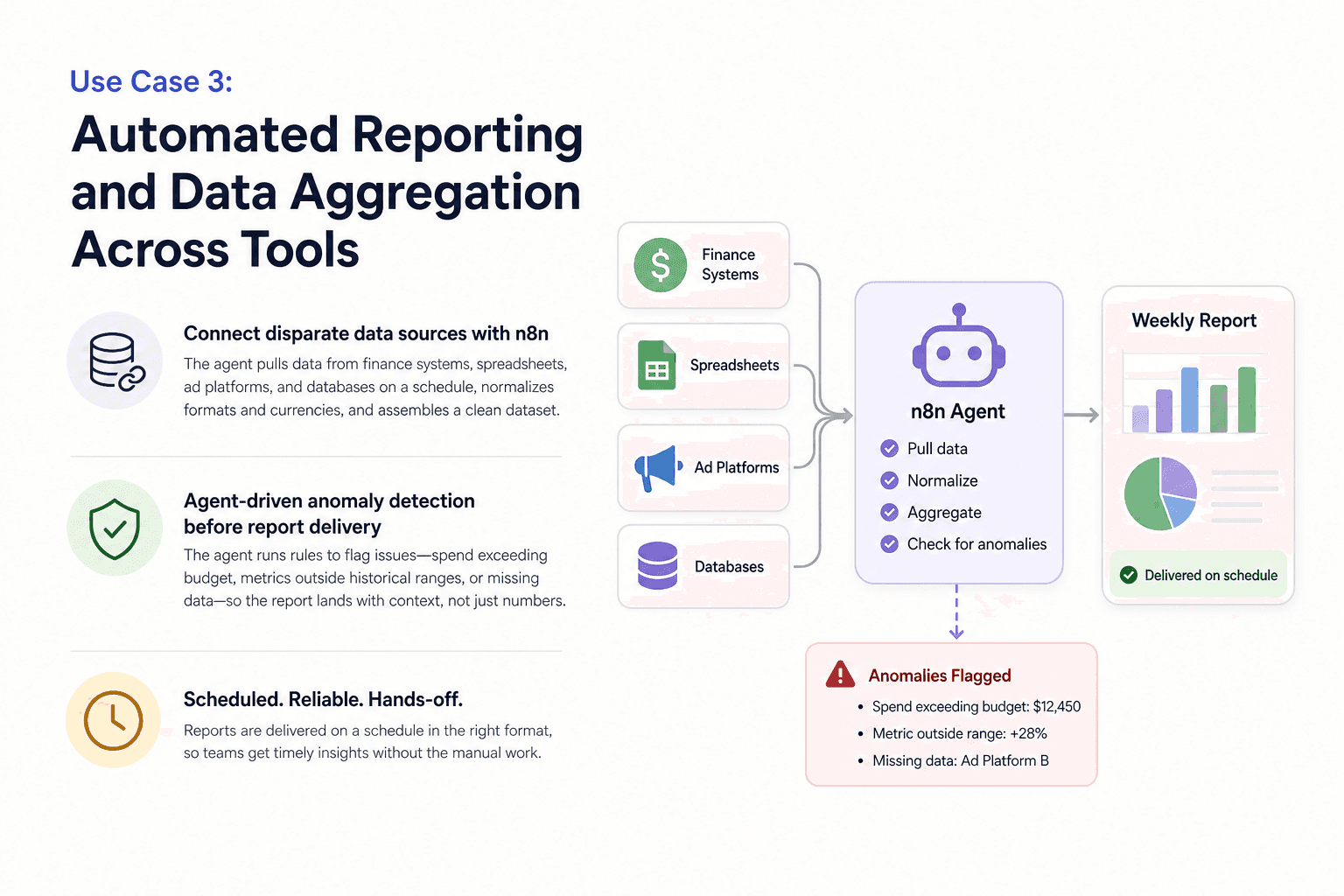
Weekly manual report-building is one of the highest-visibility, lowest-value tasks in any back-office operation. An n8n agent can pull data from multiple sources, normalize it, flag anomalies before the report is sent, and deliver formatted outputs on a schedule without manual assembly.
Connecting disparate data sources with n8n
The agent connects to finance systems, spreadsheets, ad platforms, and databases through n8n's native integrations and HTTP nodes. It pulls data on a defined schedule, normalizes field formats and currencies across sources, and assembles a clean dataset for reporting. No manual export, paste, or format correction is required.
The ai orchestration layer, meaning the agent coordinating multiple data pulls in the correct sequence, is what prevents the partial-data problem that plagues manual reports assembled under time pressure.
Agent-driven anomaly detection before report delivery
Before the report is distributed, the agent runs a set of rules against the aggregated data: spend exceeding budget, metrics outside historical ranges, missing data from expected sources. Anomalies are flagged with specific values and context. The report lands with a summary of what needs attention, not just raw numbers.
A common mistake when building these workflows is trying to do everything in one monolithic agent. Feed the agent minimal scope and expect reliable output. One agent that fails silently across ten data sources is worse than no automation at all.
If your reporting spans complex, interconnected processes where edge cases in the data regularly require judgment calls, Predflow builds agents that handle these situations reliably, starting from process mapping rather than tool configuration, so the agent understands the context behind your numbers, not just the numbers themselves.
Scheduling, formatting, and distributing outputs
Following the n8n best practice that each workflow should have one job and one owner, the data aggregation agent and the report distribution agent are separate workflows. The aggregation agent produces a clean dataset. The distribution agent formats it, applies branding if needed, and sends it to the right recipients via email or Slack. Keeping them separate means a formatting issue does not break data collection, and vice versa.
Use Case 4: HR Operations — Onboarding Task Coordination With n8n Agents
New employee onboarding involves IT provisioning, HRIS updates, document signing, and manager notifications, often coordinated across four or five different teams over several days. An n8n agent runs this sequence automatically from the moment a hire is confirmed in the HRIS.
Triggering onboarding sequences from HRIS events
When a new employee record is created or a hire status changes in the HRIS, the agent fires. It reads the role, department, location, and start date, then determines which onboarding tasks apply. Different roles trigger different tool-access sequences. The agent handles the logic that a manual coordinator would apply from a checklist.
Coordinating IT provisioning and tool access tasks
The agent sends provisioning requests to IT systems via API, creates accounts in required tools, and assigns licenses based on role templates. Each provisioning step is tracked. The agent checks completion status before advancing to the next step, rather than firing all requests simultaneously and hoping they all land.
This is custom ai agent logic: the agent does not just send requests. It monitors outcomes and adjusts the sequence based on what has actually completed.
Tracking completion and handling delayed or failed steps
Every critical workflow must have a defined failure path, not just a "stop on error" setting. If a provisioning request fails or a document signing link expires, the agent does not silently stall. It logs the failure, sends a specific alert to the responsible party with the exact step that failed, and retries based on a defined policy.
This addresses the process visibility pain point directly. The agent produces a real-time onboarding status log that any team member can check, replacing the spreadsheet-and-email coordination that typically obscures where a new hire's onboarding actually stands.
Use Case 5: Customer Support Ticket Triage and Escalation Routing
Tickets sitting unread, routed to the wrong team, or missing account context waste time for both the support team and the customer. An n8n agent handles first-pass triage before a human ever opens the ticket.
Classifying and prioritizing tickets with an LLM agent
The agent reads each incoming ticket, classifies it by category (billing, technical, account access, general inquiry) and urgency (urgent, standard, low), and assigns a priority score. LLM agents perform this classification accurately across varied language and phrasing without requiring strict keyword rules that break on real customer language.
Classification happens in seconds. The ticket arrives in the queue already labeled, prioritized, and sorted.
Enriching tickets with CRM and account context
The agent pulls the customer's account data from the CRM: plan type, open orders, recent interactions, and contract status. This context is attached to the ticket before it reaches a human agent. The support team opens a ticket and immediately has the account picture, not just the complaint.
Agentic RAG, retrieval-augmented generation with agent-driven retrieval, takes this further. The agent searches a knowledge base of past resolutions and product documentation to attach relevant prior solutions to the ticket. In one sentence: agentic RAG lets the agent pull specific knowledge on demand rather than relying only on what the language model already knows.
Escalation logic and human handoff triggers
Tickets flagged as urgent or matching defined escalation criteria (enterprise accounts, SLA breach risk, legal language) are routed immediately to a senior agent with a summary. Standard tickets go to the appropriate team queue. The routing logic is inspectable and adjustable by the ops team without engineering involvement.
Use Case 6: Finance Reconciliation and Spend Monitoring
Finance teams are cautious about automation touching transactions, and that caution is justified. An n8n agent designed for reconciliation does not change ledger entries. It surfaces discrepancies and categorizes exceptions for human review.
Pulling and normalizing transaction data across sources
The agent connects to bank feeds, expense management platforms, and the accounting system. It pulls transactions from each source, normalizes date formats, currency, and merchant name conventions, and prepares a unified transaction ledger for comparison. This normalization step alone eliminates hours of manual cleanup each week.
Discrepancy detection and auto-categorization logic
The agent compares the unified ledger against expected records. Unmatched transactions, duplicate entries, and amounts outside expected ranges are flagged with specific details. Uncoded expenses are auto-categorized based on vendor type and historical patterns, with a confidence indicator so the reviewer knows which categorizations need closer scrutiny.
This is where knowledge-based agent logic, encoding what normal looks like for each expense category, makes the difference between useful flagging and noise.
Daily exceptions report with human review gate
The agent produces a daily exceptions report and sends it to the finance lead. No ledger entry is changed until a human reviews and approves the flagged items. AI output is validated before any downstream action is triggered. This is the design principle that makes finance automation trustworthy: the agent handles classification and detection, humans make the final call on anything that touches the books.
Use Case 7: n8n Agents for Marketing Operations and Campaign Data Sync
Marketing ops teams supporting back-office functions spend significant time manually syncing ad platform data to CRMs, chasing budget overspend alerts, and routing qualified leads to sales. An n8n agent handles this data plumbing automatically.
Syncing ad platform data to CRM and reporting tools
The agent pulls campaign performance data from ad platforms on a defined schedule and writes standardized records to the CRM and reporting dashboard. Field mapping handles the format differences between platforms. The CRM stays current without manual exports or copy-paste updates, which is the primary source of data lag and error in most marketing ops workflows.
A marketing agent built for data sync is not a creative tool. It is infrastructure for keeping records consistent across systems.
Budget threshold alerts and anomaly notifications
The agent monitors spend against budget thresholds in real time. When a campaign crosses a defined percentage of its budget or shows a sharp performance drop, it sends an alert to the campaign manager with the specific values and the affected campaign. No more discovering overspend on Friday when it happened Tuesday.
This pairs naturally with the anomaly-detection reporting workflow from Use Case 3, keeping the two agents separate but connected through shared data outputs.
Lead routing and handoff to sales or SDR workflows
When a lead crosses a qualification threshold based on engagement data, the agent updates the CRM record, assigns it to the correct sales rep or territory queue, and triggers a notification. This use case pairs well with an AI SDR workflow that handles initial outreach sequencing after the handoff. The marketing ops agent closes the gap between campaign engagement and sales action without a manual review step in between.
How to Choose Which n8n Agent Use Case to Build First
Starting with the wrong use case is the most common reason n8n agent projects stall. The right first project is not the most ambitious one. It is the one where the process is already well-defined, the volume is high, and the cost of errors is visible.
Three criteria for picking your first agent workflow
Volume: How many times does this process run each week or month? Higher volume means faster payback and more data to catch edge cases early.
Error risk: What happens when it goes wrong? Processes where mistakes are reversible and visible are safer for a first agent build than those where errors compound silently.
Standardization: How consistent are the inputs? The more uniform the incoming data, the faster the agent reaches reliable output. Start with the most standardized process on your list.
When to start with sub-workflows instead of a full agent
If the process has more than six sequential steps or branches heavily on input type, build it as connected sub-workflows before adding an agent layer. Sub-workflows are easier to test, debug, and hand off to another team member. Add the reasoning layer once the plumbing is confirmed to work.
Mistakes that stall n8n agent projects before they launch
Avoid building the perfect workflow from day one. The difference between a working AI workflow and a production-ready one is architecture thinking, not completeness. Ship a scoped version of one use case, confirm it runs reliably on real inputs, and expand from there.
n8n Agent Use Case Prioritization Matrix
Use Case | Volume | Error Risk | Standardization |
|---|---|---|---|
1. Invoice Processing | High | Medium | High |
2. Supplier Onboarding | Medium | Medium | Medium |
3. Automated Reporting | High | Low | High |
4. HR Onboarding | Medium | Medium | Medium |
5. Ticket Triage | High | Low | Medium |
6. Finance Reconciliation | High | High | High |
7. Marketing Ops Sync | High | Low | High |
Start with high-volume, low-to-medium error risk, and high standardization. Use Cases 1, 3, 5, and 7 fit this profile for most back-office teams.
Frequently Asked Questions
What are n8n agents and how are they different from regular n8n workflows?
n8n agents use a language model to reason about which tools to call and in what order, rather than following a fixed sequence of steps. A standard n8n workflow runs a predetermined path and stops when something unexpected appears. An n8n agent evaluates its input, selects the appropriate tools, checks the result, and continues until the task is complete or an escalation is triggered.
Do n8n agents work with existing ERP and finance systems?
n8n connects to most ERP, accounting, and finance platforms through native integrations, REST APIs, and webhook triggers. The agent can read from and write to systems like SAP, NetSuite, QuickBooks, Xero, and others using HTTP nodes and credential-based authentication. Custom integrations are possible for systems that expose an API, even without a native n8n connector.
How do I make sure an n8n agent doesn't make costly mistakes in finance or HR processes?
The safest design keeps the agent in a detection and classification role, not an execution role, for high-risk processes. Human-in-the-loop gates require a human to approve before any consequential action, such as a ledger entry or a system access change, is taken. The n8n best practice is clear: AI output must be validated before any downstream action is triggered. Build this gate into the workflow from the start, not as an afterthought.
What types of AI agents can I build with n8n for back-office operations?
n8n supports several agent types relevant to back-office work: sequential agents that follow a defined task chain, reactive agents that respond to real-time triggers like incoming emails or HRIS events, and knowledge-based agents that pull from a structured knowledge base or document store to inform their decisions. Multi-agent architectures, where separate agents handle discrete parts of a larger process, are also supported through sub-workflow chaining.
Is n8n free to use for building AI agents?
n8n offers a self-hosted open-source version that is free to use, with no workflow or execution limits other than server capacity. The cloud-hosted version operates on a subscription model with tiered pricing based on execution volume and features. For back-office teams evaluating cost, the self-hosted option is a practical starting point for building and testing agents before committing to a managed plan.
Conclusion
If your team spends more than 10 hours a week on any one of the processes in this article, that process is your starting point. The decision from here is not whether to automate. It is whether to build it yourself or work with a platform that handles the harder parts.
n8n agents are well-suited to processes that are well-defined, high-volume, and have manageable edge cases. When workflows involve judgment-heavy exceptions, high-risk data, or deep integration across enterprise systems, teams benefit from working with a platform where process mapping and reliability are built in from the start, not configured after the fact.
If you're mapping out which processes to automate first and want a reliability-first approach that handles edge cases without breaking, explore how Predflow builds agents around your workflows, not the other way around.
Bring 20 NetSuite bills to a 30-minute teardown
We will walk your actual invoices through capture, 3-way match and posting on the call, and tell you which steps an agent can take over. No prep beyond the PDFs.
FAQ
Frequently asked questions
What exactly is an AI agent
An AI agent is an autonomous system designed to handle specific business tasks end-to-end. Unlike simple chatbots, AI agents can reason, take actions, integrate with tools, and follow defined workflows.