Supply Chain
7 ERP Software Features Supply Chain Teams Actually Need
Your ERP software should eliminate the chaos — not add to it. Here are 7 features supply chain teams actually need to stop firefighting and start operating.

Sanya Shah
Co-founder, Predflow

Your company has ERP software. You also have seventeen open email threads about a late purchase order, a spreadsheet tracking inventory across three warehouses, and a Slack channel where someone just asked "did the vendor confirm the revised delivery date?"
That is not an ERP failure. That is a feature gap problem. ERP was supposed to consolidate these handoffs. The reason it has not is that most supply chain teams implement ERP, then discover that the features they actually need were either misconfigured, missing, or buried under financial modules built for the accounting team.
Data migration is often the first casualty of a rushed ERP rollout. Clean, accurate data is the foundation that every feature below depends on. But even teams who migrate cleanly still hit walls because they did not know which capabilities to prioritize from the start.
This article identifies the seven ERP software features that directly address supply chain pain: manual handoffs, zero visibility, and the inability to scale without adding headcount. Knowing which features matter changes how you evaluate your current system and where to fill the gaps.
What ERP Software Actually Means for Supply Chain Teams
ERP as a process layer, not just a data store
ERP full form in software is Enterprise Resource Planning. The planning part matters more than most teams realize. ERP is not just a database that holds purchase orders and inventory counts. It is meant to be a process orchestration layer that connects procurement, inventory, finance, and logistics into a single operating flow.
The distinction matters because ERP system software is often evaluated on data storage and reporting features. Supply chain teams need to evaluate it on process continuity: does it move work forward automatically, or does it just record what happened after someone moved it manually?
Why most supply chain pain lives between systems, not inside them
Most ERP tools perform reasonably well inside their own modules. The failure point is the handoff between modules, or between ERP and adjacent systems. A purchase order approved in procurement should automatically update inventory expectations, trigger a payment event in AP, and notify the warehouse. When those connections are not configured, people fill the gap with email.
ERP software solutions that treat process continuity as a design principle, not an afterthought, eliminate that gap. The seven features below are the ones that build it.
Feature 1: Real-Time Inventory Visibility Across Locations
What real-time means versus end-of-day batch updates
A distributor oversells a SKU on Tuesday afternoon. Their ERP shows 200 units available. The actual count, confirmed by a warehouse scan at 11 PM, is 12 units. The midnight batch update catches the error after four customer orders have already been confirmed.
That is what batch inventory updates cost operationally. Real-time inventory visibility means stock levels reflect every pick, receipt, and adjustment as it happens, not at the end of the business day.
Multi-warehouse and multi-site inventory tracking requirements
ERP software for supply chain management must aggregate inventory across every location: multiple warehouses, retail sites, third-party logistics facilities, and in-transit stock. Each location should have its own location code, with transfers tracked as movements rather than adjustments.
Manufacturing ERP software adds another layer: raw materials, work-in-progress, and finished goods must all be visible in real time across production lines. Without that, production planners are working off yesterday's numbers and making scheduling decisions that compound into delays. Real-time inventory is the feature that everything else in the supply chain depends on.
Feature 2: Automated Purchase Order and Approval Workflows
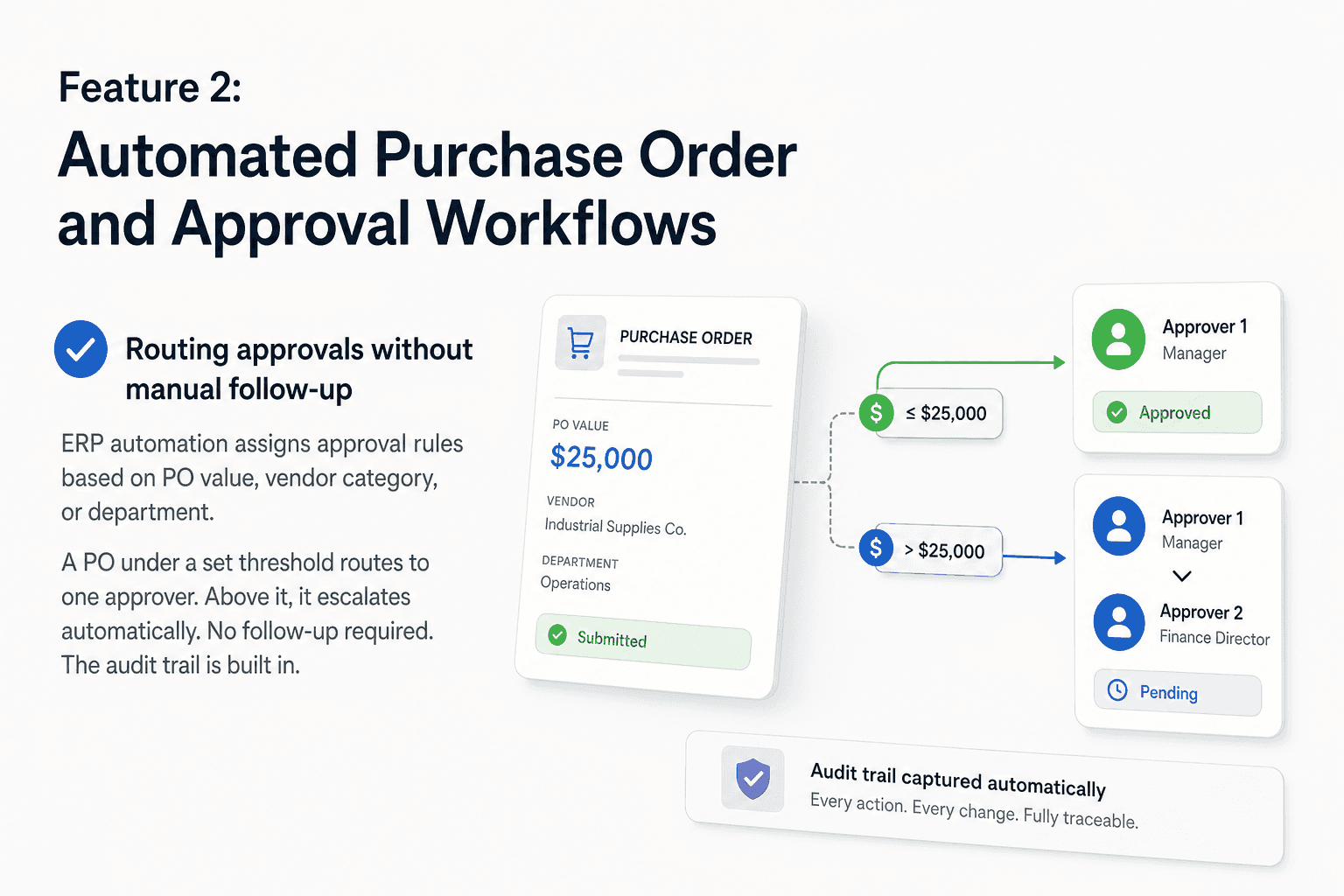
Routing approvals without manual follow-up
Manual PO approval is one of the most consistent pain points across supply chain and accounts payable teams. Someone creates a PO. It sits in a manager's inbox for two days. A reminder gets sent on Slack. The manager approves it, but by then the vendor's lead time has shifted.
ERP automation solves the routing problem by assigning approval rules based on PO value, vendor category, or department. A PO under a set threshold routes to one approver. Above it, it escalates automatically. No follow-up required. The audit trail is built in.
Handling exceptions: back-orders, quantity mismatches, vendor holds
Rule-based PO automation handles the standard path well. The breakdown happens at edge cases: a vendor is on hold, a quantity does not match the contract price, a back-order forces a partial fulfillment. Standard ERP rules either stop the workflow or push it to a human with no context.
This is where layered automation earns its value. Platforms like Predflow build AI agents that sit on top of your ERP, understand context across the PO lifecycle, and resolve exceptions without a human needing to intervene each time. The approach maps the process first, then automates it, so edge cases are accounted for from day one rather than discovered in production.
ERP vendors are increasingly recognizing that the core system alone cannot handle everything. The move toward best-of-breed add-ons and ecosystem interoperability reflects exactly this: organizations layer specialized automation on top of core ERP to cover the gaps that out-of-the-box functionality leaves open. Features of ERP software rarely include context-aware exception handling natively.
Feature 3: Supplier and Vendor Management with Performance Tracking
Vendor scorecards: what to track and why
A vendor contact database is not supplier management. Real supplier management inside ERP tracks on-time delivery rate, order fill rate, defect or return rate, and lead time variance. Those metrics need to be calculated from actual transaction data, not entered manually into a spreadsheet after the fact.
When the data lives in ERP, it updates with every receipt and every return. Supplier performance stops being a quarterly conversation and becomes a live signal that procurement teams can act on.
Connecting supplier performance to procurement decisions
Consider a food manufacturer whose ERP monitors supplier fill rates continuously. When a primary supplier's fill rate drops below 85% for three consecutive orders, the ERP automatically flags the record and triggers a secondary vendor order for the next replenishment cycle.
That response time is not possible with a spreadsheet. It requires supplier data and procurement workflows to be inside the same system. Cloud ERP software makes this particularly effective because the data is centralized regardless of where buyers and warehouse teams are operating.
Feature 4: Demand Forecasting and Production Planning Integration
Linking sales data to replenishment triggers automatically
The most common demand planning failure is not bad forecasting. It is a broken connection between sales data and inventory replenishment. Sales teams update their pipeline. Production teams do not see it until the weekly meeting. By then, a replenishment order is already late.
ERP software for supply chain management closes that gap by linking confirmed sales orders and forecast data directly to replenishment triggers. When projected demand crosses a reorder threshold, a purchase requisition fires automatically. The planner reviews it rather than creating it from scratch.
Where ERP forecasting hits limits in volatile demand environments
Process manufacturing ERP and food manufacturing ERP software handle stable, repeating demand patterns well. Where ERP forecasting struggles is in volatile environments: seasonal spikes, sudden promotional lifts, or supply disruptions that require rapid replan.
ERP platforms are evolving to embed AI agents that handle these scenarios more dynamically, using patterns across longer time horizons and external signals. If your demand environment shifts frequently, the right question for your ERP vendor is not whether forecasting exists, but whether it can adapt to demand signal changes within days rather than weeks.
Feature 5: End-to-End Order Tracking and Shipment Visibility
What carrier and 3PL integration actually requires
"Where is this order?" should never require a phone call to a carrier. ERP software supply chain teams can actually use must integrate with carriers and third-party logistics providers to capture shipment events automatically: picked up, in transit, out for delivery, delivered, exception.
That integration requires carrier API connections, event mapping, and status logic that writes back into the ERP order record. It is not a checkbox feature. It is a configuration requirement that many implementations skip because financial modules get prioritized during rollout.
Customer-facing order status: ERP's role in reducing inbound queries
When order status is visible inside ERP, customer service teams stop fielding "where is my order" calls manually. The data already exists. It just needs to be surfaced through a customer portal or automated status update.
This feature is frequently overlooked when teams evaluate ERP software examples or review the top 10 ERP software in world lists. Vendors lead with financial and procurement modules because those are the easiest to demonstrate. Logistics visibility requires integration work that only surfaces as a gap after go-live. ERP software in India and across other markets faces the same gap: the integration capabilities exist, but the implementation scope rarely includes them on day one.
Feature 6: Financial Integration That Closes the AP-to-PO Loop
Three-way match: what it is and why it must be automated
Three-way match is the reconciliation of three documents: the purchase order, the goods receipt, and the supplier invoice. When all three align, payment is approved. When they do not, it flags for review.
The problem is that most AP teams do this manually. They pull the PO from ERP, the receipt confirmation from the warehouse, and the invoice from email, then compare them in a spreadsheet. That process is the root cause of month-end reconciliation chaos, duplicate payments, and missed early-payment discounts.
Reconciliation without spreadsheets: what integrated AP looks like
ERP software design that integrates procurement, warehouse receipts, and accounts payable into a single data model makes three-way match automatic. When a goods receipt is posted, it matches against the open PO. When the invoice arrives, it matches against both. Discrepancies surface as exceptions, not as items buried in a 900-row spreadsheet.
Sage software solutions handle this use case as a mature example of what financial integration inside ERP looks like operationally. The point is not a specific vendor. The point is that this is a solved problem inside purpose-built ERP financial modules. If your team is still doing this in spreadsheets, the capability gap is in configuration or system fit, not in ERP software development progress.
Feature 7: Configurable Reporting Without IT Dependency
KPIs supply chain teams should be able to pull without IT
A supply chain manager who needs three days and an IT ticket to see on-time delivery performance by supplier is not getting value from their ERP. Configurable reporting means the operations team can build, modify, and schedule reports using their own access, without modifying the underlying data model.
The core supply chain KPIs that should require zero IT involvement include: fill rate by SKU, PO cycle time, inventory turnover, supplier lead time variance, and order-to-ship time. If any of those require a developer to pull, that is a reporting access problem, not a data problem.
When to use ERP reporting versus a separate BI layer
Cloud-based ERP software increasingly includes embedded reporting tools that cover standard supply chain KPIs. For most operational needs, that layer is sufficient.
A separate BI layer makes sense when teams need to blend ERP data with external sources: market data, customer behavior, or financials from multiple entities. If your team is requesting heavy IT customization just to see basic performance metrics, that is worth treating as a signal about system fit. Teams implementing ERP software in UAE, Dubai, or through ERP software companies in India often encounter this issue when ERP reporting modules are not configured for operational users during implementation. Tools like ERPNext offer configurable reporting frameworks that can reduce that dependency.
Which ERP Software Features Should You Prioritize First?
The most important features of ERP software for supply chain map directly to your most acute operational problem. These three paths help you sequence adoption.
If your biggest problem is visibility: start here
Start with real-time inventory and order tracking. These two features answer the questions your team asks most frequently and stop the manual status-checking that consumes operations time. Get inventory sync live and carrier integration configured before anything else.
If your biggest problem is manual handoffs: start here
Start with PO automation and AP integration. These two features eliminate the email chains, the Slack follow-ups, and the end-of-month reconciliation crunch. The three-way match and automated approval routing together cut the most labor-intensive manual steps in the procurement-to-payment cycle.
If your biggest problem is scaling without hiring: start here
Start with supplier performance tracking and configurable reporting. These features give your current team the signal clarity to make faster decisions without adding analysts or coordinators. ERP software examples across distribution and manufacturing consistently show that self-service reporting and automated supplier alerts are the features that extend team capacity furthest without increasing headcount.
FAQ
What is ERP software and how does it help supply chain management?
ERP software is an integrated platform that connects procurement, inventory, production, finance, and logistics into a single system. For supply chain teams, it eliminates the manual handoffs between separate tools by automating workflows and making data visible across the entire operation.
What are the most important features of ERP software for manufacturing?
Manufacturing ERP software should include real-time inventory tracking, demand forecasting connected to production planning, supplier performance management, and three-way match for accounts payable. The most critical feature is the one that addresses your current bottleneck, whether that is visibility, handoffs, or financial reconciliation.
How is cloud-based ERP software different from on-premise ERP?
Cloud-based ERP software is hosted on remote servers and accessed via browser, which means faster deployment, automatic updates, and lower upfront infrastructure costs. On-premise ERP is installed on company servers, giving teams more direct control over data and customization but requiring dedicated IT resources to maintain and upgrade.
Can ERP software replace a dedicated supply chain management system?
ERP can handle core supply chain functions, including procurement, inventory, and order management, but dedicated supply chain management systems often offer deeper carrier integration, advanced logistics optimization, and more granular warehouse management. Many organizations run both, using ERP as the process backbone and a specialized system for complex logistics execution.
What is the difference between ERP and CRM software?
ERP CRM software terms often appear together but refer to distinct systems. ERP manages internal operations: procurement, inventory, production, and finance. CRM manages external relationships: customer interactions, sales pipelines, and support history. Some ERP platforms include a CRM module, but the two serve different teams and different data purposes.
The Decision You Are Actually Facing
Knowing which features matter is the easy part. The harder question is whether your current ERP delivers them natively or whether gaps are being covered by workarounds your team has stopped noticing.
Most supply chain teams do not need a new ERP system. They need the one they have to work end-to-end. The right next step is an honest audit of where the process actually breaks: which handoffs are still manual, which exceptions still require human intervention, and which reports still require an IT ticket.
If your team is still handling handoffs, exceptions, or approvals manually on top of your ERP, Predflow can map those gaps and automate them without replacing your system. Book a process audit with the Predflow team to see where AI agents can close the loop.
Bring 20 NetSuite bills to a 30-minute teardown
We will walk your actual invoices through capture, 3-way match and posting on the call, and tell you which steps an agent can take over. No prep beyond the PDFs.
FAQ
Frequently asked questions
What exactly is an AI agent
An AI agent is an autonomous system designed to handle specific business tasks end-to-end. Unlike simple chatbots, AI agents can reason, take actions, integrate with tools, and follow defined workflows.