Supply Chain
7 Custom AI Agents for Supply Chain and Back-Office Teams
A supply chain manager spending three hours cross-referencing spreadsheets isn't a bad process—it's a solvable one. Here are 7 custom AI agents already cutting that work down to minutes.

Gautam Borad
Founder at Predflow

A supply chain manager spends three hours on a Tuesday cross-referencing purchase orders against invoices across an ERP, a supplier portal, and a shared spreadsheet while a shipment sits in a warehouse waiting for clearance. This is not an edge case. This is Tuesday.
The frustrating part is that the data already exists in those systems. The tools to move it automatically exist too. What most teams are missing is not software — it is software built around how their specific process actually works. That gap is exactly what custom AI agents are designed to close.
This article covers seven specific custom AI agents that supply chain and back-office teams are deploying now, a practical checklist to evaluate which ones fit your operation, and an honest look at where human oversight still belongs.
What Makes a Custom AI Agent Different from a Generic Automation Tool
Most automation tools work until reality disagrees with them. A rule-based workflow that handles standard invoices collapses the moment a vendor sends a PDF in a different format or splits one shipment across three line items. Custom AI agents handle that collapse differently — they are built to recognize the exception and respond to it, not freeze on it.
How AI agent architecture differs from static workflow automation
Static workflow automation follows fixed rules: if this, then that. AI agent architecture adds a layer of reasoning. The agent reads context, consults a knowledge base, decides what to do next, and executes across multiple systems without waiting for a human to intervene.
The distinction between agentic AI and generative AI matters here. Generative AI produces output — a draft, a summary, a response. Agentic AI acts. It takes steps, checks results, and adapts based on what it finds. A generative AI tool writes an email. An AI agent sends that email, logs the response, updates the CRM, and escalates if the supplier does not reply within 48 hours.
What "context-aware" actually means in a back-office setting
Context-awareness means the agent knows that invoice 4821 relates to PO 3109, that PO 3109 has a partial delivery logged in the WMS, and that the supplier's payment terms allow a 2% holdback on partial shipments. It uses that full picture to decide whether to approve, flag, or escalate — not just whether the numbers match.
Why edge cases are where generic tools fail and custom agents hold
Capability | Rule-Based Automation | Custom AI Agent |
|---|---|---|
Handling exceptions | Fails or stops the workflow | Recognizes the exception, routes it correctly |
Multi-system coordination | Limited to pre-mapped connections | Reads and acts across systems dynamically |
Learning from past runs | No adaptation over time | Improves routing decisions based on prior outcomes |
The most important design insight is that effective custom agents are not the most visually complex systems. The agents that perform best are built on the right underlying architecture for a specific workflow, not assembled to look impressive in a diagram.
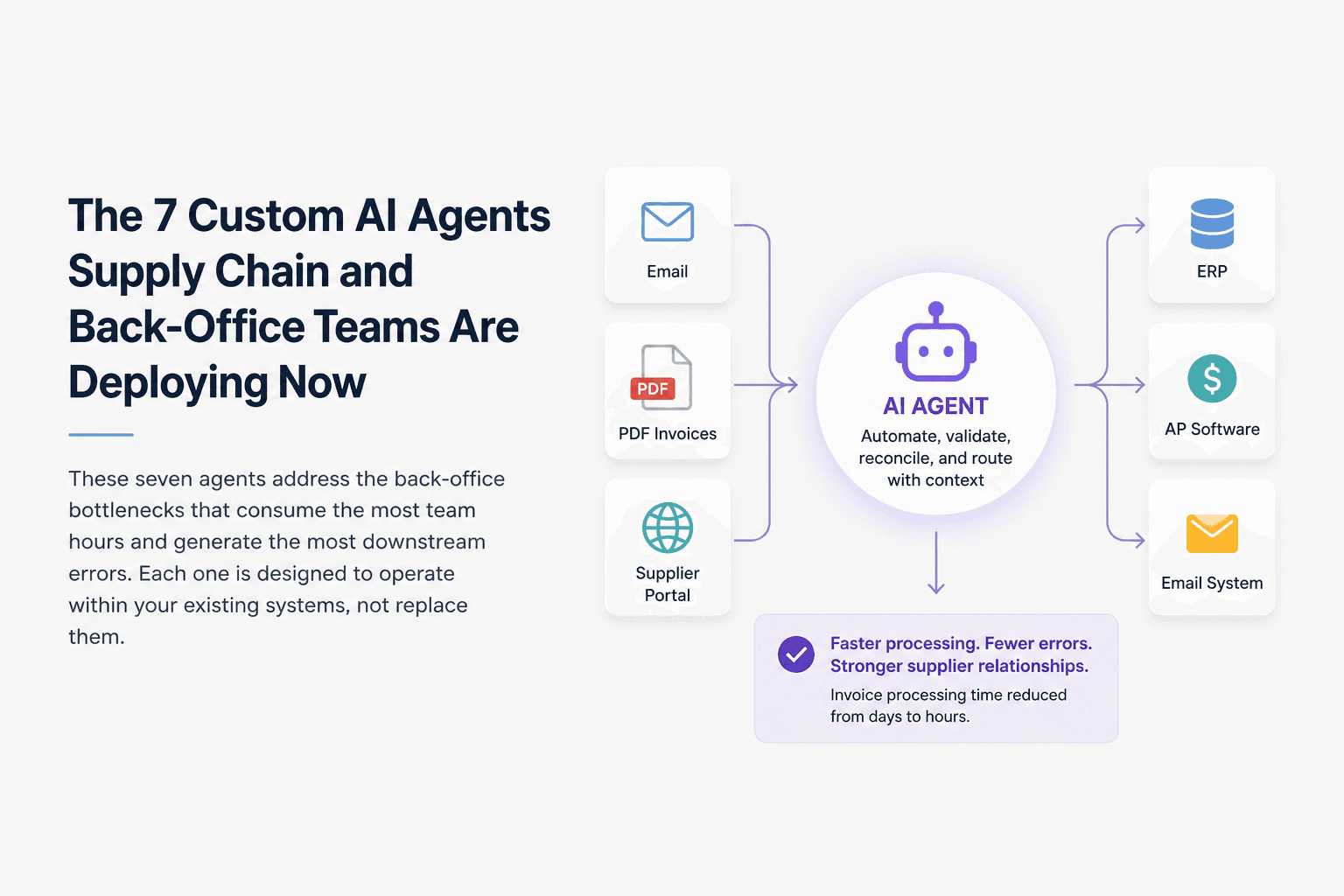
The 7 Custom AI Agents Supply Chain and Back-Office Teams Are Deploying Now
These seven agents address the back-office bottlenecks that consume the most team hours and generate the most downstream errors. Each one is designed to operate within your existing systems, not replace them.
1. Invoice Matching and Accounts Payable Agent
Accounts payable teams lose hours each week manually matching invoices to purchase orders and receipts across systems that do not talk to each other. This agent pulls invoice data from email, PDF, or supplier portal, matches it against the corresponding PO in the ERP, and flags discrepancies before they reach a human reviewer. It handles standard matches automatically and routes exceptions with the relevant context already attached. Teams running this agent typically reduce invoice processing time from days to hours. It connects to ERP platforms, accounts payable software, and email systems.
2. Purchase Order Reconciliation Agent
When a PO spans multiple deliveries or partial fulfillments, reconciliation becomes a manual puzzle that delays payments and strains supplier relationships. This agent tracks each PO line item across delivery receipts, WMS entries, and supplier confirmations, reconciling quantities and values in real time. When a discrepancy appears, it generates a structured summary with the gap, the likely cause, and a suggested resolution. Reconciliation cycles that previously took two to three business days are often completed within hours. It connects to ERP, WMS, and procurement platforms.
3. Supplier Communication and Follow-Up Agent
Chasing suppliers for delivery confirmations, revised ETAs, and missing documents is repetitive work that consumes coordinator time without adding analytical value. This agent monitors open POs and outstanding supplier commitments, sends structured follow-up messages at defined intervals, and logs responses directly into the relevant record. It escalates non-responses to a human after a configurable number of attempts. Teams using this agent recover several hours per week per coordinator previously spent on status emails. It connects to email, supplier portals, and ERP systems.
4. Inventory Discrepancy Detection Agent
A mismatch between what the system says is in stock and what is physically present can hold up fulfillment, distort demand planning, and trigger unnecessary reorders. This agent compares inventory records across the WMS, ERP, and fulfillment systems continuously, flags discrepancies above a defined threshold, and traces the most likely root cause — whether that is a receiving error, a unit-of-measure mismatch, or a timing lag. This is exactly the category where rule-based tools break most often, because the exceptions are varied and context-dependent.
Predflow builds agents like these starting from process mapping rather than tool selection, meaning the agent is designed around how your operation actually works, not forced into a generic template. Teams running Predflow find that edge-case handling and human escalation paths are built in from day one, not patched in after go-live.
This agent connects to WMS, ERP, and fulfillment management systems.
5. Freight and Shipment Status Agent
Operations teams spend hours each week logging into carrier portals, copying tracking updates into spreadsheets, and manually alerting stakeholders about delays. This agent monitors shipment status across carriers, parses update data, and pushes alerts into the relevant internal channel or system when a delay, exception, or delivery confirmation occurs. It eliminates the manual tracking loop entirely for standard shipments and surfaces only the exceptions that need human action. Teams typically reclaim four to six hours per week per operations coordinator. It connects to carrier APIs, TMS platforms, and internal communication tools.
6. Compliance and Documentation Agent
Keeping documentation current across suppliers, SKUs, and regulatory requirements is one of the most time-consuming and error-prone back-office tasks. This agent monitors document expiry dates, flags missing certifications, requests updated documentation from suppliers automatically, and logs receipt when documents arrive. Life sciences and highly regulated supply chains are already deploying agent-based systems for exactly this type of end-to-end compliance process, recognizing that accuracy and traceability require more than manual tracking. Teams using this agent reduce compliance-related delays and avoid the last-minute scrambles that hold up shipments or audits. It connects to supplier portals, document management systems, and ERP.
7. Back-Office Reporting and Escalation Agent
Finance and operations leaders need accurate reports, but producing them manually means someone is always pulling data instead of analyzing it. This agent runs scheduled data pulls across connected systems, assembles reports in a defined format, flags anomalies against defined thresholds, and escalates specific findings to the right person before the report is even opened. It replaces the manual reporting cycle with a continuous monitoring loop. Teams shift from reactive reporting to proactive exception management. It connects to ERP, BI tools, finance platforms, and communication systems.
How to Evaluate Which Custom AI Agents Your Team Actually Needs
Starting with a single, well-chosen agent produces faster results than deploying five agents at once. The most common mistake operations leaders make is selecting a platform before mapping the process. A well-designed agent built on a shallow process map will still produce poor outputs, just faster than a human would.
Map your highest-volume manual handoffs first
Look for processes where a person is regularly moving data between two systems, waiting for confirmation before proceeding, or chasing another team for input. These are the handoffs where an agent removes the most friction with the least disruption to existing workflows.
Score each candidate process on exception frequency and system count
Use this five-question checklist for any process you are considering:
Does this process happen more than 20 times per week?
Does it touch more than two systems?
Does it have clear success or failure criteria?
Do exceptions require human judgment more than 30% of the time?
Is the current cost measurable in hours or error rates?
If a process scores four or five yes answers, it is a strong candidate for a custom AI agent. Three or fewer suggests either that the process is too simple for an agent or too judgment-heavy to automate without significant human-in-the-loop design.
Start with one agent, measure, then expand
Pick the one process with the highest volume and the clearest success criteria. Run the agent for 30 to 60 days, measure what changes, and use that data to build the case for the next one. Teams that try to deploy a full multi-agent system before validating a single workflow typically encounter debugging problems that could have been avoided by starting smaller.
What Custom AI Agents Cannot Do — and Where Human Oversight Still Belongs
A well-built custom AI agent should make exceptions visible to humans, not invisible. The goal is not to remove judgment from back-office operations — it is to route judgment to the right person at the right moment with all the context already assembled.
Processes that require judgment calls agents should not make autonomously
Three specific scenarios require human oversight regardless of how capable the agent is. First, disputed invoices above a defined dollar threshold should always route to a human approver. The financial and relationship risk of an automated error at that level is too high. Second, supplier contract amendments involve legal and commercial considerations that an agent cannot evaluate reliably. Third, cross-border compliance decisions — especially those involving customs classifications, sanctions screening, or regulatory changes — require human accountability that cannot be delegated to an automated system.
How to design escalation paths that keep humans in control
Escalation paths should be explicit in the agent design, not added later. Each agent should have a defined condition for when it stops acting and surfaces a decision to a named human or team. Those conditions should be documented, tested, and visible to the people responsible for the process.
The difference between automating a task and automating accountability
An agent can complete a task. It cannot hold accountability for the outcome of a decision that carries regulatory, financial, or contractual consequences. Designing around this distinction is what separates a reliable agent deployment from one that creates liability. The agent does the work. The human owns the decision.
Frequently Asked Questions
What is a custom AI agent and how does it differ from a chatbot?
A custom AI agent is software designed to take actions across systems — retrieving data, making decisions, and completing multi-step tasks without continuous human input. A chatbot responds to input and generates text. An AI agent acts: it reads a purchase order, checks a WMS, identifies a discrepancy, and routes the exception to the right person before anyone asks it to.
How long does it take to deploy a custom AI agent for back-office operations?
Deployment timelines depend on process complexity and system integration requirements. A single-agent deployment focused on a well-mapped process — such as invoice matching — can go live in four to eight weeks. Multi-agent systems or processes with complex exception handling take longer. Starting with process mapping before build cuts deployment time significantly.
Can custom AI agents integrate with existing ERP or supply chain software?
Yes. Custom AI agents are built to connect with existing systems rather than replace them. Common integrations include ERP platforms, WMS tools, accounts payable software, carrier APIs, supplier portals, and communication systems. The integration scope is defined during the process mapping phase before any build begins.
What are the four core characteristics of an AI agent?
The four core characteristics are perception (the agent reads inputs from its environment), reasoning (it evaluates those inputs against goals or rules), action (it executes a step or decision), and learning (it improves based on outcomes over time). These four characteristics are what separate an AI agent from a simple automation script that only follows fixed instructions.
How much does it cost to build a custom AI agent for a supply chain team?
Cost depends on the number of systems involved, the complexity of the process, and the level of exception-handling required. A focused single-agent deployment costs less than a multi-agent orchestration system. The more useful number to calculate first is the current cost of the manual process in hours, error rates, and downstream delays. That figure determines whether the build investment makes financial sense before any vendor conversation begins.
What is agentic AI versus generative AI in a business context?
Generative AI produces content — text, summaries, drafts. Agentic AI acts on a goal across multiple steps and systems. In a back-office context, generative AI might draft a supplier email. An agentic AI system sends that email, monitors for a reply, logs the response, and escalates if the supplier misses a deadline. Agentic AI completes workflows. Generative AI produces outputs within them.
Conclusion
You now have seven agent types mapped to specific operational pain points, a five-question checklist to score any candidate process, and a clear picture of where human judgment still belongs. The next move is simpler than it might appear: identify one process — not seven — where eliminating manual handoffs would recover the most team hours this quarter.
The sequence matters. Start with process mapping, not platform selection. Teams that define the workflow, identify the exceptions, and document the escalation paths before selecting tools deploy faster and see measurable results sooner than those who start with a platform and work backward.
If you have a process in mind but are not sure whether it is the right fit for a custom AI agent, Predflow offers a free process assessment. We map the workflow, identify the edge cases, and show you exactly what an agent would handle before any build commitment. Get Your Free Process Assessment.
Bring 20 NetSuite bills to a 30-minute teardown
We will walk your actual invoices through capture, 3-way match and posting on the call, and tell you which steps an agent can take over. No prep beyond the PDFs.
FAQ
Frequently asked questions
What exactly is an AI agent
An AI agent is an autonomous system designed to handle specific business tasks end-to-end. Unlike simple chatbots, AI agents can reason, take actions, integrate with tools, and follow defined workflows.