Business Ops
Cloud-Based ERP Software: Features, Costs, and How to Compare
If closing month-end still means chasing data across three systems, the problem isn't your team—it's your tools. Here's how to compare cloud-based ERP software and find the one that actually fits how your ops runs.

Sanya Shah
Cofounder, Predflow

Closing a month-end report should not require a week of chasing data across three disconnected systems. For supply chain managers and ops leaders, that scenario is routine. Inventory lives in one tool, vendor invoices sit in another, and approval chains run through email. The result is manual handoffs, zero process visibility, and a growing realization that adding headcount will not fix what is fundamentally a systems problem.
Cloud-based ERP software is built to solve exactly this. But the market is crowded, and every vendor makes nearly identical claims about visibility, automation, and ROI. This article cuts through that. By the end, you will know which features actually matter for your operation, what realistic costs look like across tiers, and how to run a vendor comparison that does not waste three months of your team's time.
What Cloud-Based ERP Software Actually Does (Beyond the Buzzwords)
ERP Full Form in Software and Why the Definition Still Matters
ERP stands for Enterprise Resource Planning. In plain terms, it is a centralized software platform that connects your core business functions — finance, inventory, procurement, HR, and operations — into a single system with a shared database.
The definition matters because many tools marketed as ERP are actually just accounting software with supply chain modules bolted on. Knowing what a true ERP system software covers helps you spot that gap early, before you sign a contract.
The cloud ERP market has been growing steadily, with demand driven by businesses that need real-time data access and faster responses to changing conditions. That momentum is not hype. It reflects a genuine operational shift in how companies run their back offices.
On-Premise vs. Cloud ERP: The Operational Difference That Changes Everything
On-premise ERP sits on servers your team manages. Updates, security patches, and integrations are your IT department's problem. The upfront cost is high, and scaling means buying more hardware.
Cloud erp software runs on the vendor's infrastructure. You access it through a browser or app. Updates happen automatically, and you scale by adjusting your subscription tier. For ops teams without large IT resources, that difference is decisive.
The shift is not just about cost or convenience. Cloud deployment gives finance and supply chain teams real-time visibility into the same data, at the same time, without waiting for nightly batch exports. That alone changes how decisions get made.
Features of ERP Software That Separate Useful Tools from Expensive Ones
Core Features That Every Cloud ERP Should Include
Before you sit through a single demo, build a baseline checklist. Every cloud ERP worth evaluating should include:
Financial management: General ledger, accounts payable, accounts receivable, and multi-currency support
Inventory and warehouse management: Real-time stock levels, bin tracking, and reorder automation
Procurement: Purchase order creation, vendor management, and three-way matching
Reporting and dashboards: Configurable reports with live data, not scheduled exports
User roles and permissions: Granular access control by department or function
Audit trails: Full transaction history for compliance and internal review
Mobile access: Core functions accessible on mobile without losing data integrity
Integration APIs: Documented, stable APIs for connecting third-party tools
If a vendor cannot demonstrate all eight in a live environment, move on.
Supply Chain and Inventory Features Worth Paying For
For teams managing erp software for supply chain management, the baseline list is not enough. Look specifically for demand forecasting that pulls from actual sales history, multi-location inventory visibility across warehouses, and automated reorder triggers tied to supplier lead times.
ERP supply chain software should also support purchase order tracking end-to-end, from requisition to goods receipt. If your team is still reconciling PO statuses in a spreadsheet after ERP goes live, the tool has not solved your problem.
Batch and lot tracking matters for regulated industries. If your operation ships perishables, chemicals, or medical products, this is non-negotiable, not an add-on.
ERP CRM Software Integration: When It Adds Value and When It Doesn't
ERP crm software bundling sounds efficient. In practice, it works well when your sales cycle is tightly connected to your inventory or production schedule. A manufacturer that builds to order benefits from CRM and ERP sharing the same customer and product data.
For businesses where sales operates independently of operations, forcing CRM into the ERP creates complexity without payoff. You end up with a bloated system your sales team ignores and your ops team resents. Integrating a best-in-class CRM via API is often cleaner than buying a bundled platform that does both at 70 percent quality.
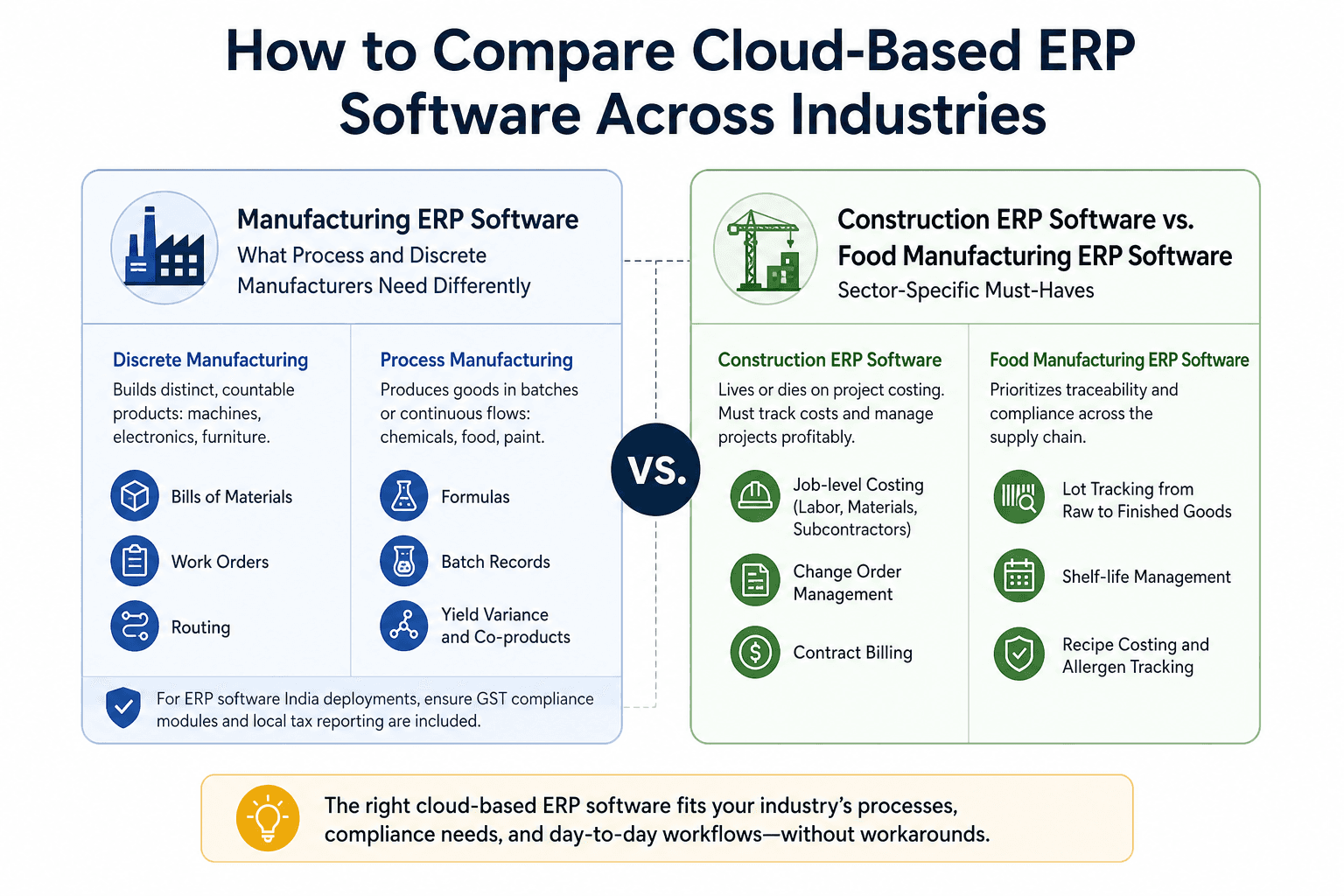
How to Compare Cloud-Based ERP Software Across Industries
Manufacturing ERP Software: What Process and Discrete Manufacturers Need Differently
Discrete manufacturers build distinct, countable products: machines, electronics, furniture. Process manufacturers produce goods in batches or continuous flows: chemicals, food, paint. These two models have fundamentally different ERP requirements.
Discrete manufacturing erp software must handle bills of materials, work orders, and routing. Process manufacturing erp must manage formulas, batch records, yield variance, and co-products. A system optimized for one will create real operational gaps for the other. When evaluating manufacturing erp software india deployments specifically, also check for GST compliance modules and local tax reporting, which are standard requirements that global vendors sometimes treat as add-ons.
Construction ERP Software vs. Food Manufacturing ERP Software: Sector-Specific Must-Haves
Construction erp software lives or dies on project costing. The system must track labor, materials, and subcontractor costs at the job level, not just the company level. Change order management and contract billing are equally critical. A generic ERP without these is a financial reporting tool, not a construction management platform.
Food manufacturing erp software has a different priority: traceability. Lot tracking from raw ingredient receipt through finished goods shipment is a regulatory requirement in most markets. Shelf-life management, recipe costing, and allergen tracking round out the must-have list. If a vendor cannot demonstrate a recall simulation in your demo, do not proceed.
Education ERP Software and Other Vertical Use Cases
Education erp software handles student records, fee management, timetabling, and faculty administration. The feature set shares almost nothing with manufacturing or construction ERP. Evaluating education ERP against a manufacturing checklist is a category error that wastes procurement time.
The same logic applies to erp software for chemical industry deployments, where regulatory compliance, MSDS documentation, and hazardous material tracking are baseline requirements. Always start your evaluation with the two or three functions that are unique to your industry. If the vendor cannot handle those, nothing else on their feature list matters.
Top ERP Software Examples and What They Actually Cost
Top 10 ERP Software in World: The Honest Short List
The leading cloud ERP platforms each have a distinct sweet spot:
Platform | Best Suited For |
|---|---|
SAP S/4HANA Cloud | Large enterprises with complex, multi-entity operations |
Oracle NetSuite | Mid-market companies needing strong financials and multi-currency |
Microsoft Dynamics 365 | Organizations already running on Microsoft infrastructure |
Sage software solutions | SMBs in manufacturing, construction, and distribution |
Odoo | Small to mid-size businesses wanting modular, lower-cost deployment |
Epicor | Mid-market discrete and process manufacturers |
Infor CloudSuite | Industry-specific deployments in healthcare, fashion, and food |
Acumatica | Growing businesses needing flexible user-based or consumption pricing |
IFS Cloud | Asset-heavy industries: aerospace, utilities, field service |
SYSPRO | Mid-market manufacturers and distributors |
No platform on this list is the right answer for every business. The question is whether the platform's core strength matches your primary operational complexity.
Sage Software Solutions, Regional Players, and the Case for ERP Software in India or UAE
Global platforms are not always the right fit for regional operations. ERP software in India deployments must account for GST, TDS, and multi-state tax structures. Platforms like Tally ERP and SAP Business One have strong local compliance coverage. Global vendors often require expensive customization for the same result.
ERP software in Dubai and the broader UAE market adds VAT compliance, Arabic language support, and multi-currency for AED transactions as baseline requirements. Erp software in dubai selections often lean toward SAP, Oracle, or regional players like Focus Softnet that have built compliance into the core product rather than layering it on top.
Where ERP Software Companies Hide the Real Cost
The subscription or license fee is the smallest part of what cloud ERP actually costs. Implementation services, data migration, user training, and customization work routinely run two to four times the annual software cost in year one.
Businesses that treat ERP selection as a feature comparison without budgeting for integration complexity and change management consistently overspend. Vendor lock-in through proprietary data formats and expensive export fees is a real risk. Before signing, ask specifically what it costs to get your data out if you decide to switch in three years. The answer tells you a great deal about how the erp software company views its relationship with customers.
Why Cloud-Based ERP Software Alone Won't Fix Broken Processes
What ERP Systems Don't Automate (and Where Teams Still Lose Hours)
ERP centralizes data. It does not eliminate the manual work that happens around that data. After most ERP go-lives, ops teams are still reconciling vendor invoices against purchase orders by hand when the three-way match fails. They are still chasing approval sign-offs through email when a requisition sits outside the normal threshold. They are still updating inventory counts across systems when a return or adjustment falls outside the ERP's standard workflow.
These are not ERP failures. ERP was designed to store and surface data, not to orchestrate the judgment calls and exception handling that real operations generate every day. The gap between data visibility and actual time savings is where most ERP disappointment lives.
How AI Workflow Automation Closes the Gap ERP Leaves Open
Integrating your ERP with CRM, supply chain, and finance tools gives you a more connected data environment. But connection is not the same as automation. When data flows between systems, someone still needs to act on it, route exceptions, and make decisions at each handoff point.
AI workflow automation fills that space. It sits on top of your existing ERP and handles the orchestration layer: routing approvals, flagging anomalies, updating records across connected systems, and escalating only the exceptions that need human judgment. This is exactly where platforms like Predflow operate. Not as a replacement for your ERP, but as an automation layer that maps your actual workflows, handles edge cases your ERP does not anticipate, and gives ops teams visibility and control without requiring a developer for every process change.
How to Run a Cloud-Based ERP Software Evaluation Without Wasting Three Months
Step 1: Map Your Processes Before You Touch a Demo
Before you contact a single vendor, document how your core processes actually work today: order to cash, procure to pay, inventory replenishment, and month-end close. Include every manual step, every system touchpoint, and every exception that happens more than once a month.
The output is a process map, not a wishlist. Vendors will show you what their system does. Your process map tells you what your operation needs the system to do. Misalignment between those two things is the most common reason ERP implementations fail.
Step 2: Score Vendors on Integration Fit, Not Features Alone
Every major ERP vendor offers roughly similar feature coverage at the headline level. The real differentiator is how well the system integrates with the tools your business already runs: your 3PL portal, your e-commerce platform, your banking feeds, your existing erp crm software or supply chain platform.
Achieving seamless data visibility across connected systems is the practical goal of any integration. Ask vendors to demonstrate a live integration with a tool you currently use. Do not accept a slide deck or a promise that "integration is available." The question is how it works and who maintains it when something breaks.
Step 3: Run a Pilot With Real Data, Not Sandbox Scenarios
Vendor demos use clean, curated data. Your operation does not. Before committing to a full deployment, negotiate a pilot using a subset of your actual transaction data, a real product line, or a single warehouse location.
A pilot with real data surfaces the edge cases that demos never show: duplicate vendor records, non-standard UOM conversions, partial shipment handling, and exception workflows. The mistake most businesses make is skipping this step because the demo looked clean. The demo is supposed to look clean. The pilot is where you find out what cloud-based erp software actually handles in your environment.
Frequently Asked Questions
What is cloud-based ERP software and how is it different from on-premise ERP?
Cloud-based ERP software is a centralized business management platform hosted on the vendor's servers and accessed through the internet. Unlike on-premise ERP, which runs on hardware you own and maintain, cloud ERP delivers automatic updates, lower upfront infrastructure costs, and real-time data access from any location. The core operational difference is that cloud deployment shifts IT maintenance responsibility to the vendor, freeing your team to focus on using the system rather than managing it.
What are the most important features of ERP software for supply chain management?
The highest-value features for supply chain management are real-time inventory visibility across locations, demand forecasting tied to historical sales data, automated reorder triggers linked to supplier lead times, purchase order tracking from requisition to receipt, and lot or batch traceability for regulated goods. Any erp software for supply chain that does not offer live inventory updates and multi-location visibility will create the same reconciliation problems you already have.
How much does cloud ERP software typically cost for a mid-size business?
Software licensing for mid-market cloud ERP ranges from roughly $1,500 to $10,000 per month depending on user count and modules. Implementation, data migration, and training typically add one to three times the first-year software cost. Budget for ongoing customization as your processes evolve. The total three-year cost of ownership is the number to compare across vendors, not the monthly subscription rate.
Which industries benefit most from cloud-based ERP systems?
Manufacturing, food production, construction, distribution, and chemical processing see the highest operational gains because their workflows span multiple systems, locations, and regulatory requirements. Education and professional services also benefit, but their requirements look completely different. Industry fit matters more than platform reputation when selecting an ERP system software.
Can cloud ERP software replace separate tools like CRM or supply chain software?
It depends on your operation's complexity. For businesses where sales and operations are tightly linked, bundled erp crm software reduces data duplication and improves order accuracy. For businesses where sales operates independently, a purpose-built CRM integrated via API delivers better results than a bundled system that compromises on both. The same logic applies to erp supply chain software. Evaluate based on your actual workflow, not the appeal of consolidation.
Conclusion
You are at one of two decision points. If you are still evaluating ERP vendors, the framework in this article gives you a starting point: map your processes first, test with real data, and score vendors on integration fit before features. Choose the platform that fits your industry's non-negotiable requirements, budget honestly for implementation, and treat the pilot as mandatory.
If you already have an ERP and your team is still losing hours to manual handoffs, approval chases, and cross-system reconciliation, the ERP is not the problem. The gap is in the automation layer between your systems and your people.
If you already have an ERP and your team is still buried in manual handoffs and process gaps, see how Predflow maps and automates the workflows your ERP was never built to handle, without ripping out your existing systems.
Bring 20 NetSuite bills to a 30-minute teardown
We will walk your actual invoices through capture, 3-way match and posting on the call, and tell you which steps an agent can take over. No prep beyond the PDFs.
FAQ
Frequently asked questions
What exactly is an AI agent
An AI agent is an autonomous system designed to handle specific business tasks end-to-end. Unlike simple chatbots, AI agents can reason, take actions, integrate with tools, and follow defined workflows.