Business Ops
7 Claude Cowork Workflows That Actually Work
Your operations team loses hours daily bridging gaps between systems that should talk to each other. These 7 Claude cowork workflows fix that—practically and immediately.

Sanya Shah
Co-founder, Predflow

Every morning, a supply chain manager spends 40 minutes copying numbers between three systems before anyone on the team can start real work. The data exists. The reports need to happen. But a human bridges the gap every single day because nothing connects automatically.
Claude Cowork arrived promising to change this. Launched in January 2026 and updated continuously through early 2026, it is Anthropic's desktop agent that can read your files, run tasks on a schedule, and interact with your local environment. But most teams configure it like a chatbot and get chatbot results. The workflows below are designed to produce measurable output, not polished demos that fall apart under real conditions.
One baseline note before you start: Claude Cowork requires a Claude Pro or Max subscription and currently runs on Apple Silicon Macs with macOS Sonoma or later. Confirm that first, or you will hit a setup wall mid-implementation.
Here are seven specific workflow setups that work.
What Claude Cowork Actually Does (and What It Does Not)
How Claude Cowork differs from standard Claude chat
Standard Claude is a conversation interface. Claude Cowork is a local agent environment. It can read files on your machine, execute code in a sandboxed environment, monitor folders, and take action on your desktop. The distinction matters because teams that treat it as a smarter chatbot miss everything that makes it useful for operations work.
What Scheduled Tasks and Dispatch actually enable
Scheduled Tasks let Claude Cowork run a defined workflow automatically at a set time, without you triggering it manually. Dispatch, released in March 2026, enables Claude to route subtasks across separate processes in a coordinated sequence. These two features are what separate genuine workflow automation from assisted typing.
The file access and connector scope you need to know upfront
Claude Cowork can access local files and folders you explicitly grant permission to. Connectors, available on the free tier as of early 2026, extend reach to select external tools. It is not a universal integration hub. It does not connect to authenticated enterprise APIs out of the box. Knowing this scope upfront prevents the frustration of designing a workflow around a connection Claude Cowork cannot make.
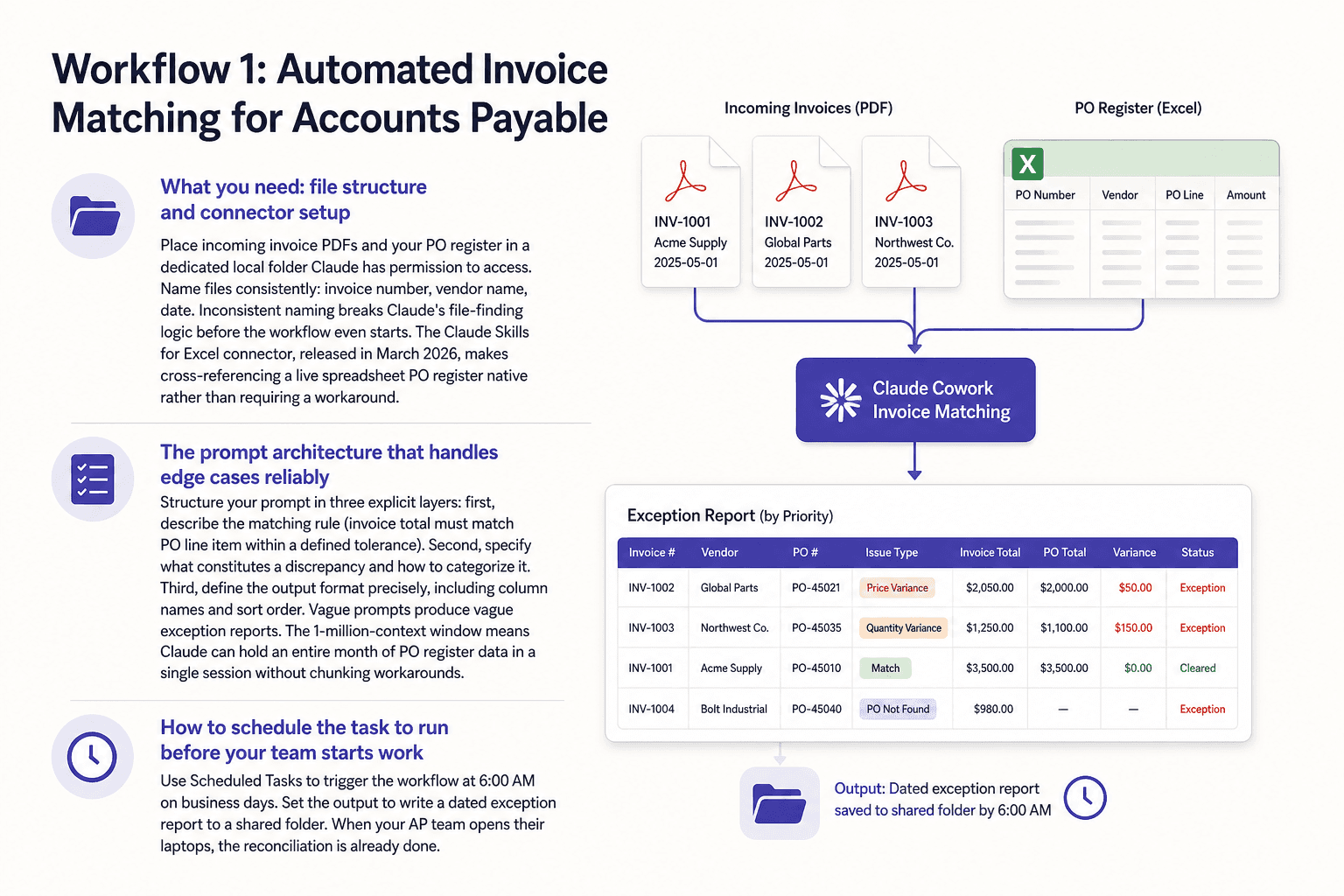
Workflow 1: Automated Invoice Matching for Accounts Payable
Manual invoice reconciliation is one of the most time-consuming tasks AP teams run daily. Claude Cowork can handle the comparison, flag exceptions, and produce a structured report before your team logs in.
What you need: file structure and connector setup
Place incoming invoice PDFs and your PO register in a dedicated local folder Claude has permission to access. Name files consistently: invoice number, vendor name, date. Inconsistent naming breaks Claude's file-finding logic before the workflow even starts. The Claude Skills for Excel connector, released in March 2026, makes cross-referencing a live spreadsheet PO register native rather than requiring a workaround.
The prompt architecture that handles edge cases reliably
Structure your prompt in three explicit layers: first, describe the matching rule (invoice total must match PO line item within a defined tolerance). Second, specify what constitutes a discrepancy and how to categorize it. Third, define the output format precisely, including column names and sort order. Vague prompts produce vague exception reports. The 1-million-context window means Claude can hold an entire month of PO register data in a single session without chunking workarounds.
How to schedule the task to run before your team starts work
Use Scheduled Tasks to trigger the workflow at 6:00 AM on business days. Set the output to write a dated exception report to a shared folder. When your AP team opens their laptops, the reconciliation is already done. Their job becomes reviewing flagged items, not generating the list.
Workflow 2: Supply Chain Disruption Monitoring with Claude Cowork
Manually triaging supplier update emails or shared-folder documents for risk signals burns 30 or more minutes daily for most supply chain managers. This workflow automates that triage.
Setting up folder monitoring with Connectors
Create a dedicated folder where supplier communications land, either exported from email or saved directly by your team. Grant Claude Cowork access to that folder. Set a Scheduled Task to scan it every morning. The Connector setup does not require code, but it does require you to define the folder path clearly in your task configuration.
Writing the classification prompt that separates noise from real risk
The prompt needs three categories: immediate risk (production delay, port closure, capacity cut), watch-list item (lead time extension, partial shipment notice), and informational only. Instruct Claude to extract supplier name, issue type, affected SKU or category, and estimated impact date for any item above informational. A prompt that tries to capture every edge case tends to over-flag and train your team to ignore the output. Start strict and loosen based on what you miss.
Routing outputs without building a custom integration
Write the output as a formatted text or CSV file to a shared folder your team already monitors. A Slack connector or email summary can work if already configured, but a shared folder report is the most reliable starting point and requires no additional permissions to debug.
If your supply chain spans multiple ERPs or data sources that Claude Cowork cannot natively reach, platforms like Predflow are built specifically to map these multi-system processes end-to-end, with edge case handling and human oversight built in rather than bolted on. Worth evaluating if your process complexity exceeds what a single-agent setup can reliably handle.
Workflow 3: End-of-Day Operations Report Generation
Someone on your team currently assembles an end-of-day operations summary by hand. They pull numbers from department files, format them, and send the report. This workflow removes that task entirely.
Organizing source files so Claude can find them reliably
Create a single source folder with one subfolder per department. Each subfolder holds that day's data export, named with a consistent date format. Claude does not search intelligently through disorganized folder trees. The folder structure is the architecture of the workflow.
Using Co-work Projects to maintain context across report runs
Co-work Projects, released in March 2026, allow Claude to retain context between sessions. This means you brief Claude once on your report format, data definitions, and exception thresholds. Every subsequent run references that project context automatically. You do not re-instruct Claude each evening.
Adding charts and diagrams directly inside the output
The March 2026 charts and diagrams in chat feature means Claude Cowork can generate visual summaries as part of the report output, not just text tables. Configure your prompt to request a trend line for daily throughput and a bar comparison for department output. The report your team receives is decision-ready, not raw data.
Workflow 4: Vendor Onboarding Document Processing
Processing a new vendor submission packet manually takes hours. Claude Cowork can read the PDF, extract the fields, validate against a checklist, and output a structured record in minutes.
Structuring the intake folder Claude monitors
Create one intake folder for unprocessed submissions and one output folder for completed records. Move each vendor packet into the intake folder when it arrives. Use Scheduled Tasks to trigger processing at a defined interval, or run it manually when a batch has accumulated. The separation between intake and output prevents Claude from reprocessing completed files.
The validation prompt that catches missing or inconsistent fields
Define your compliance checklist as a numbered list inside the prompt. Instruct Claude to check each field, mark it present or missing, and flag any inconsistency between fields (for example, a tax ID that does not match the registered business name format). Do not write a prompt so strict that it flags every edge case as a hard error. Distinguish between blocking issues that halt onboarding and advisory flags that need human review.
Outputting structured data your team can act on immediately
Specify the output as a CSV row per vendor with defined column headers. Your team imports it directly into your vendor management system without reformatting. Two common mistakes to avoid: giving Claude a folder with inconsistent file naming, which breaks file-finding logic (fix: enforce a naming convention before files enter the intake folder), and writing a validation prompt so strict it errors on every submission (fix: separate hard-stop conditions from advisory flags in the prompt).
Workflow 5: Finance Reconciliation Checks Using Claude Cowork
Period-end reconciliation done manually under deadline pressure is where errors happen. Claude Cowork can compare two financial data exports, categorize every mismatch, and produce an audit-ready exception log.
Preparing your data exports for reliable ingestion
Export both data sets as CSVs with identical column headers and consistent date formats. Any formatting difference between the two files becomes a false mismatch in the output. Standardize exports at the source before running the workflow. One session setup per reconciliation period is all that is needed.
Prompt design for categorizing discrepancy types accurately
Define discrepancy categories explicitly in the prompt: amount variance, missing transaction, duplicate entry, and date mismatch. Instruct Claude to assign one category per flagged line item and include the source file reference for each. This is what makes the output auditable rather than just a list of problems.
Formatting output for audit trail requirements
Request output as a dated Excel or CSV file with a summary tab (total discrepancies by category) and a detail tab (line-by-line exceptions). The 1-million-context window is practically significant here: Claude can hold an entire fiscal quarter of transaction data in one session. Finance teams running reconciliation on large ledgers no longer need to break the data into chunks and merge results manually, which is where errors typically multiply.
Workflow 6: Multi-Tool Process Coordination with Claude Cowork Channels
The fragmented-tool problem in operations is not a data problem. It is a handoff problem. Claude Cowork Channels, released in March 2026, addresses this directly.
What Claude Cowork Channels enable that single-agent setups cannot
A single Claude Cowork agent handles one task in one session. Channels allow separate Claude Code instances or workflow steps to pass outputs to each other in sequence. Code execution in one step feeds document generation in the next, which feeds file movement in the third. The manual handoff between those steps disappears.
A practical three-step coordination example for ops teams
Step one: a Claude Code instance processes a raw data export and outputs a clean CSV. Step two: a Cowork agent reads that CSV and generates a formatted report. Step three: a file movement task deposits the report in the shared folder and archives the source file. Claude Code Channels connect these steps so the sequence runs without a person manually starting each one.
Where human oversight checkpoints belong in the chain
Insert a review checkpoint between step two and step three. Claude flags the report for a 15-minute human review window before the file moves. If no rejection is received within the window, the workflow continues. This is a feature, not a limitation. It gives your team process visibility and a clear intervention point without rebuilding the entire chain when something looks wrong.
Workflow 7: Scaling Repetitive Research and Data Enrichment Tasks
Hiring more staff to handle growing data enrichment volume is not the only option. Claude Cowork combined with the Claude Marketplace offers a different path for certain task types.
What the Claude Marketplace adds to your Cowork setup
The Claude Marketplace, launched in March 2026, provides pre-built skill integrations that extend what Claude Cowork can do natively. For enrichment tasks like vendor profile research, public data lookups, or product record completion, marketplace skills reduce the prompt engineering required to get reliable structured output.
Designing a repeatable enrichment task that runs on schedule
Create a master input file where new records are added as they arrive. Configure a Scheduled Task to process new rows on a daily cadence: Claude reads the input, enriches each record using the relevant skill, and appends results to an output file. Claude Memory, free as of March 2026, allows Claude to retain your output format preferences and field definitions between runs without re-specifying them each time.
Knowing when this approach hits its ceiling
This workflow works well for research that draws on publicly available or locally accessible information. When enrichment requires authenticated API access to proprietary databases, or when the data must be current within minutes rather than hours, a purpose-built agent platform becomes necessary. Claude Cowork is not designed for real-time data ingestion from secured external systems. Recognizing that ceiling early saves the effort of building a workflow that will stall at the integration layer.
Frequently Asked Questions
What is Claude Cowork and how is it different from regular Claude?
Claude Cowork is a local desktop agent that can read files, execute code, run scheduled tasks, and coordinate multi-step workflows on your machine. Regular Claude is a chat interface. The difference is action versus conversation.
Does Claude Cowork work on Windows or only Mac?
Claude Cowork currently requires a Mac with Apple Silicon (M1 or later) and macOS Sonoma or later. It is not supported on Intel Macs or Windows machines at this time.
Which subscription plan do I need to use Claude Cowork?
You need a Claude Pro plan at a minimum. Claude Max provides higher usage limits, which matters for teams running scheduled workflows multiple times per day.
Can Claude Cowork connect to external tools like Slack or my ERP system?
Claude Cowork includes Connectors that support select external tools. It does not connect natively to authenticated enterprise ERP systems. Slack integration is possible through specific connector configurations, but custom enterprise API connections require additional setup outside of Claude Cowork's native scope.
How do I set up a Scheduled Task in Claude Cowork?
In Claude Cowork, navigate to the Scheduled Tasks section and define the trigger time, the workflow prompt, the file paths Claude should access, and the output destination. Scheduled Tasks run automatically at the defined time without requiring you to initiate the session manually.
Is Claude Cowork suitable for enterprise back-office workflows or is it better for individual use?
Claude Cowork is capable for back-office workflows that live within local file environments on a Mac. It handles document processing, reconciliation, and reporting tasks well. For workflows that span multiple authenticated systems, require real-time data, or must scale across large teams, a dedicated enterprise automation platform is a more appropriate fit.
Conclusion
The decision is simpler than it looks. If your workflow lives inside local files, runs on a Mac, and involves tasks like document processing, reconciliation, reporting, or research enrichment, Claude Cowork is genuinely capable today. The seven setups in this article will get you moving this week without a developer.
If your process spans multiple authenticated systems, requires real-time external data, or needs to handle high-stakes exceptions reliably at scale, you are approaching the ceiling of what a local single-agent tool is built for. That is not a failure of the tool. It is a signal to evaluate what you actually need.
Operations teams that match the right tool to the right workflow scope gain something concrete: the ability to scale output without scaling headcount.
If your workflows are hitting the complexity ceiling, see how Predflow maps and automates end-to-end business processes, built for the edge cases Claude Cowork was not designed to handle. Explore Predflow
Bring 20 NetSuite bills to a 30-minute teardown
We will walk your actual invoices through capture, 3-way match and posting on the call, and tell you which steps an agent can take over. No prep beyond the PDFs.
FAQ
Frequently asked questions
What exactly is an AI agent
An AI agent is an autonomous system designed to handle specific business tasks end-to-end. Unlike simple chatbots, AI agents can reason, take actions, integrate with tools, and follow defined workflows.