AI AGENTS
How to build Multi-Agent Systems in Claude Code
Finance teams and supply chain managers waste hours on manual data handoffs that AI can handle automatically. Here's exactly how to build a Claude Code AI agent system that connects every step of the workflow.

Gautam Borad
Founder, Predflow

Finance teams spend hours each week manually moving data between systems that could, in theory, hand off to each other automatically. Supply chain managers copy exception reports from one tool and paste them into another. The work is predictable, repetitive, and completely unsuited to a human doing it. A Claude Code AI agent system built around multi-agent architecture solves this at the structural level, not by automating one step, but by wiring the entire workflow together. This guide walks you through exactly how to build that system, from architecture design to deployment, with no manual handoffs left standing.
What Is a Claude Code AI Agent and Why Multi-Agent Architecture Changes the Equation
Single-agent limits: where one LLM agent stalls on real workflows
A single Claude Code session processes work sequentially. It completes one task, then starts the next. On a workflow with five dependent steps, your total time is the sum of every step plus the context overhead of holding all five tasks in one session. More critically, a single agent handling too many responsibilities produces lower-quality outputs. Specialization matters. A session that extracts data, validates it, formats a report, routes it for approval, and logs the result is doing too many jobs with one instruction set.
Beyond speed, there is a reliability problem. Complex workflows require distinct reasoning modes. Data extraction needs precision. Validation needs rule-following. Reporting needs structured output. Forcing one LLM agent to context-switch across all of these degrades each one.
Multi-agent architecture: how specialized agents divide and conquer
Multi-agent architecture solves this by assigning each job to a dedicated agent. One agent extracts. One validates. One reports. One routes. Each runs against focused instructions with a clean context window. They run in parallel where tasks allow it, and they hand off to each other where sequence is required.
The result is that complex, multi-step business workflows run end-to-end without a human acting as the router between systems. The future of production AI is not one massive model doing everything. It is a coordinated team of smaller, specialized agents, each staying in its lane, reporting back to an orchestrator that owns the outcome.
The four core characteristics of an AI agent that make orchestration possible
What is a Claude Code AI agent? A Claude Code AI agent is an autonomous session that can read files, execute commands, call tools, and produce structured outputs without step-by-step human instruction. It operates with a defined goal, uses available tools to pursue it, evaluates its own output, and either completes the task or requests input when blocked. These four characteristics, goal-directedness, tool use, self-evaluation, and structured handoffs, are what make agents composable into larger systems.
Any agent missing one of these characteristics becomes a bottleneck in a multi-agent chain. Goal-directedness sets the exit condition. Tool use extends what the agent can reach. Self-evaluation catches errors before handoff. Structured handoffs ensure the next agent receives usable input.
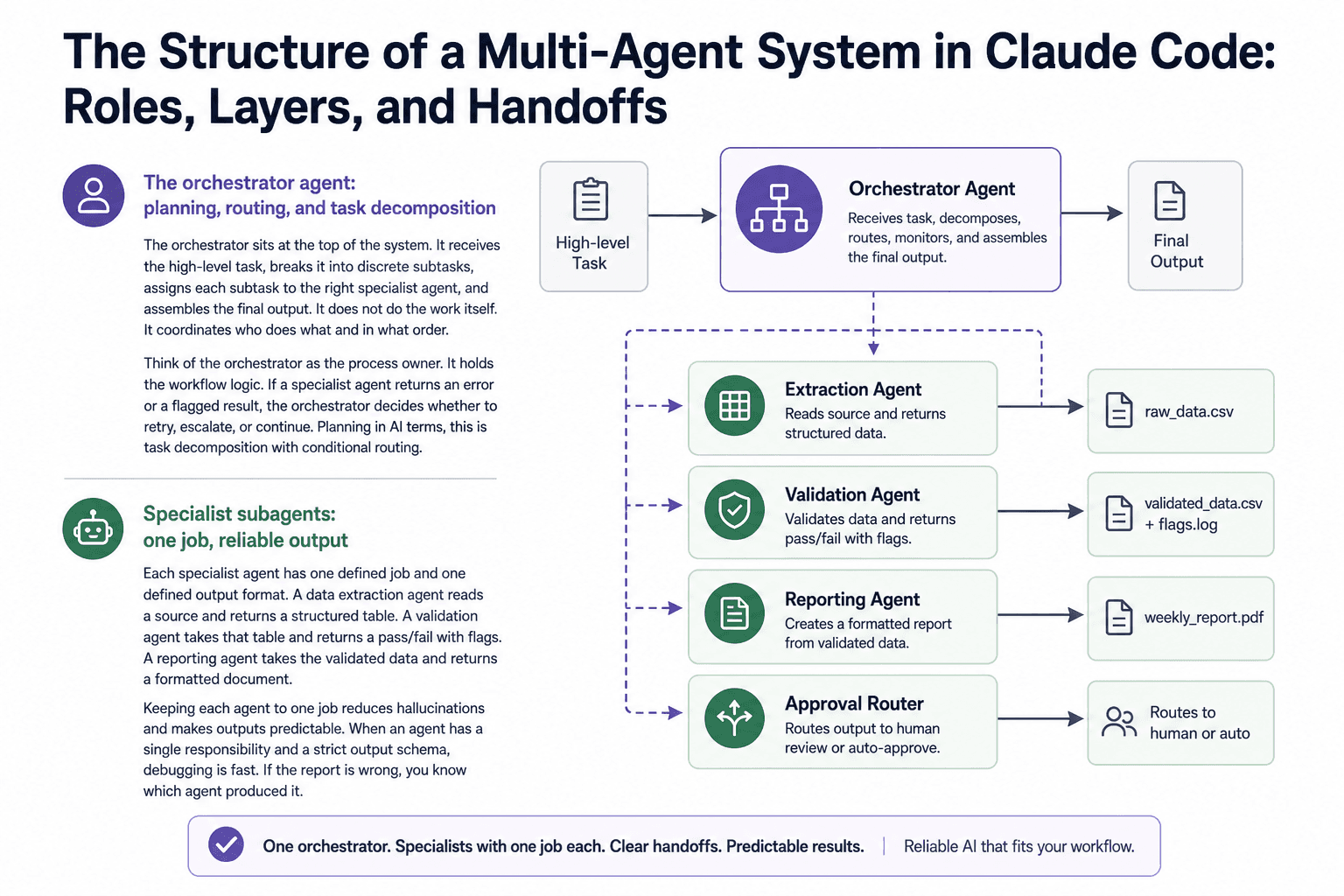
The Structure of a Multi-Agent System in Claude Code: Roles, Layers, and Handoffs
The orchestrator agent: planning, routing, and task decomposition
The orchestrator sits at the top of the system. It receives the high-level task, breaks it into discrete subtasks, assigns each subtask to the right specialist agent, and assembles the final output. It does not do the work itself. It coordinates who does what and in what order.
Think of the orchestrator as the process owner. It holds the workflow logic. If a specialist agent returns an error or a flagged result, the orchestrator decides whether to retry, escalate, or continue. Planning in artificial intelligence terms, this is task decomposition with conditional routing.
Specialist subagents: one job, reliable output
Each specialist agent has one defined job and one defined output format. A data extraction agent reads a source and returns a structured table. A validation agent takes that table and returns a pass/fail with flags. A reporting agent takes the validated data and returns a formatted document.
Keeping each agent to one job reduces hallucinations and makes outputs predictable. When an agent has a single responsibility and a strict output schema, debugging is fast. If the report is wrong, you know which agent produced it.
Simple architecture for a finance workflow:
Each arrow is a handoff. Each handoff is a file or structured output the next agent reads. No human touches the data between steps.
Knowledge-based agents and memory across sessions
Knowledge-based agents in artificial intelligence maintain a structured representation of what they know, what rules apply, and what decisions have been made. In Claude Code, this is implemented through a CLAUDE.md file in each agent's working directory. This file carries the rules, constraints, context, and prior decisions the agent needs to operate correctly.
Without this, each session starts from zero. With it, the agent inherits the relevant knowledge from every previous run without carrying dead conversation history.
How agent handoffs replace manual process steps
Every manual handoff in a business workflow is a point where work stops, a person checks something, and work resumes. Multi-agent systems in Claude Code replace those stops with structured file outputs that the next agent reads automatically. The orchestrator checks that the output exists and meets the schema before passing it forward. The human only enters when the orchestrator flags an exception.
How to Build a Claude Code AI Agent System Step by Step
Step 1: Map the workflow before touching any tools
Write out every step in your current process on paper or a whiteboard. Identify every point where a human moves data from one place to another, makes a routing decision, or checks work before it continues. These are your handoff candidates. Do not open Claude Code until this map exists.
Why this matters: agents built without a process map replicate the chaos of the existing workflow instead of fixing it.
If you want this step handled for you, Predflow's approach maps your existing workflow first, then builds agents around it. The system fits your process, not the other way around, which prevents the fragmented tool coordination that makes manual workflows painful in the first place.
Step 2: Define agent roles and output schemas
For each step in your process map, define one agent role and one output format. Use strict schemas: column names, data types, flag fields, and character limits where relevant. Treat these like versioned function signatures, not loose descriptions.
The difference between amateur prompting and production-grade agent engineering is this shift: from "instructions" to versioned, schema-enforced functions with defined failure modes. A schema-enforced output means the next agent in the chain always receives what it expects. Without it, downstream agents fail silently.
Step 3: Set up the orchestrator with task routing logic
Write the orchestrator's instructions to include: the full task sequence, the input and output file for each specialist agent, the conditions under which it should flag for human review, and the format for the final assembled output. The orchestrator should not need to reason about how to do each task. It routes and assembles.
Why this matters: an orchestrator that tries to do specialist work becomes the single-agent bottleneck you were trying to escape.
Step 4: Build and constrain each specialist subagent
Each specialist gets its own CLAUDE.md with its single job, its input format, its output schema, and its failure behavior. Keep instructions tight. A data extraction agent does not need to know about the reporting format. Give it only what it needs to do its one job correctly.
Why this matters: narrow context produces more reliable outputs and makes debugging fast when something goes wrong.
Step 5: Wire handoffs and test failure modes
Connect the agents by having the orchestrator pass the output file path from each specialist to the next. Then deliberately break the system: send a malformed input, introduce a missing field, pass an empty file. Watch what each agent does and what the orchestrator does in response.
Three failure modes to test before going live:
Missing output file: the previous agent failed silently and wrote nothing. Does the orchestrator catch it or pass an empty path forward?
Schema mismatch: the output has the wrong column name or data type. Does the receiving agent error cleanly or produce garbage output?
Partial completion: the agent completed 80% of the task and stopped. Does the orchestrator detect the incomplete output or mark it as done?
Step 6: Add human oversight checkpoints
Identify the two or three points in the workflow where a wrong decision costs the most. Place human review checkpoints at those points only. The orchestrator pauses and flags for input. Everything else runs without interruption.
Why this matters: over-automating without checkpoints creates confidence in a system that may be producing errors you cannot see until they compound.
Claude Code AI Agent Orchestration: Managing Multiple Agents Without Losing Control
Using Anthropic's multi-agent orchestration features in Claude Code
Anthropic's Code with Claude 2026 release shipped native multi-agent orchestration into Claude Code. This includes the ability to define an orchestrator and up to 25 specialist subagents in a single API call, with shared file system access and parallel execution. For operations teams, this means the coordination logic that used to require custom scaffolding is now built into the platform.
The Outcomes feature addresses one of the hardest problems in production agent systems: enforcing output quality without constant human review. You define a rubric describing what a correct result looks like. The agent grades its own output against it, iterates, and only completes when it passes. This is relevant for workflows like invoice validation or exception reporting, where a wrong output has real downstream consequences.
Logging handoffs and maintaining process visibility
Every handoff in a multi-agent system should write a log entry: what was passed, when, from which agent, to which agent, and whether the receiving agent accepted or flagged it. Store these logs in a shared directory the orchestrator can read. When something goes wrong, the log tells you exactly where the breakdown occurred.
Zero process visibility is the most common reason multi-agent systems fail in operations environments. The system works until it doesn't, and no one can see why.
When to trigger human review vs. let agents proceed
Set explicit thresholds in the orchestrator's instructions. If a validation agent flags more than a defined number of rows, pause and route to a human. If an extraction agent returns fewer results than expected, flag it rather than passing an incomplete file forward. Build these conditions before going live, not after the first incident.
Comparing agent frameworks: what Claude Code offers vs. alternatives
Platforms like CrewAI and LangGraph offer agent orchestration with more developer-facing control over agent graphs and memory structures. Claude Code's advantage is the combination of a capable base model with native orchestration, file system access, and tool use in a single environment. For operations teams without dedicated ML engineers, the lower setup overhead matters more than framework flexibility.
The question of agentic AI versus generative AI is relevant here. Generative AI produces output from a prompt. Agentic AI pursues a goal across multiple steps, using tools and making decisions along the way. Multi-agent Claude Code systems are agentic by definition.
Real Workflow Examples: Multi-Agent Systems for Finance and Operations Teams
Accounts payable automation: invoice intake to approval routing
Workflow: Invoice arrives via email, data is extracted manually, entered into the ERP, matched to a PO, and routed for approval. Pain point: Manual data entry creates errors. Matching is slow. Approval routing is inconsistent. Multi-agent replacement: An extraction agent reads the invoice and outputs a structured record. A validation agent matches it against the PO database and flags discrepancies. An approval routing agent sends it to the right approver based on amount and vendor rules. What the team stops doing: Manual data entry, manual PO matching, and manual routing decisions.
Supply chain exception handling: flagging, escalating, and resolving
Workflow: Supply chain managers review daily reports, identify delays or shortfalls, and manually escalate to suppliers or internal teams. Pain point: Exceptions are caught late. Escalation is inconsistent. Resolution tracking is manual. Multi-agent replacement: A monitoring agent reads the daily feed and flags exceptions against defined thresholds. An escalation agent routes each flag to the right contact with the relevant context. A resolution tracking agent updates the log when the exception closes. What the team stops doing: Daily manual report review and ad hoc escalation decisions.
Operations reporting: aggregating data from fragmented tools
Workflow: Operations managers pull data from three separate tools every week, combine it manually in a spreadsheet, and format a summary report. Pain point: The process takes hours. Data is often inconsistent across sources. The report is always slightly out of date. Multi-agent replacement: Three extraction agents pull from each tool simultaneously. A consolidation agent merges and deduplicates the outputs. A reporting agent formats the final document against a fixed template. What the team stops doing: Manual data pulls, spreadsheet merging, and formatting.
Frequently Asked Questions
What is the difference between generative AI and agentic AI?
Generative AI produces output from a single prompt. It responds once and stops. Agentic AI pursues a goal across multiple steps, using tools, evaluating its own output, and making sequential decisions until the task is complete. Claude Code multi-agent systems are agentic: each agent acts, evaluates, and either hands off or requests input rather than waiting for the next human prompt.
How many agents should a Claude Code multi-agent system have?
Start with the minimum number that eliminates manual handoffs in your current workflow. For most business processes, three to five agents cover extraction, validation, routing, and reporting. Adding more agents increases coordination overhead without proportional benefit unless the workflow genuinely requires additional specialization.
What are knowledge-based agents and do I need them in my system?
Knowledge-based agents in artificial intelligence maintain a structured set of rules, facts, and prior decisions they use to guide their behavior. In Claude Code, a CLAUDE.md file serves this function. You need it if your agents must apply consistent business rules across sessions, such as approval thresholds, formatting standards, or vendor-specific logic. Without it, each session starts without that context.
Can I build a multi-agent system in Claude Code without coding experience?
The architecture and routing logic require some structured thinking, but the implementation in Claude Code is closer to structured instruction-writing than traditional coding. The harder part is Step 1: mapping your existing process clearly enough that each agent's job is unambiguous. The technical setup follows from a good process map.
How does Claude Code handle errors when one agent in the chain fails?
By default, Claude Code sessions surface errors and stop. In a multi-agent system, the orchestrator should be explicitly instructed to check each specialist's output before passing it forward and to route flagged or missing outputs to a human review step rather than continuing. This must be designed into the orchestrator's instructions. It does not happen automatically without those conditions defined.
Conclusion
If your team is still manually routing data between systems, the problem is structural. A multi-agent Claude Code system addresses it at that level, replacing human handoffs with agent handoffs that run 24/7 without variation. But the system only works if you map the process before building it. Tools built first, without a process map, replicate the fragmentation they were meant to fix.
Building this yourself is possible with the steps in this guide. It requires discipline around output schemas, failure mode testing, and human oversight placement. The risk is skipping those steps under time pressure and deploying a system that looks automated but breaks quietly.
If you want to skip the build and get a multi-agent system mapped to your existing workflow, see how Predflow designs agents around your process, not the other way around.
Bring 20 NetSuite bills to a 30-minute teardown
We will walk your actual invoices through capture, 3-way match and posting on the call, and tell you which steps an agent can take over. No prep beyond the PDFs.
FAQ
Frequently asked questions
What exactly is an AI agent
An AI agent is an autonomous system designed to handle specific business tasks end-to-end. Unlike simple chatbots, AI agents can reason, take actions, integrate with tools, and follow defined workflows.