Supply Chain
Claude Agents Team: How to Automate AP, Ops, and Supply Chain Workflows
Your AP queue shouldn't freeze because one person called in sick. Here's how a Claude agents team handles invoice matching, ops, and supply chain work around the clock.

Gautam Borad
Founder, Predflow
Your AP team spends hours every day matching invoices to purchase orders, chasing down discrepancies, and updating spreadsheets that three other systems should already know about. When one person calls in sick, the whole queue freezes.
Single AI agents hit a ceiling here. They work sequentially, hold one context at a time, and stall the moment a task branches across systems or requires parallel decisions. A Claude agents team changes this by running a coordinating lead agent alongside multiple specialist agents, each handling a distinct part of the workflow simultaneously.
This guide shows you how to map your existing processes, structure agent roles for AP, operations, and supply chain, and deploy with the oversight controls that regulated back-office environments require.
What a Claude Agents Team Actually Is (And Why It Outperforms a Single Agent)
A single LLM agent handles tasks one step at a time within a single context window. That works for simple, linear tasks. It breaks down when a workflow spans multiple systems, requires concurrent processing, or involves decision branches that can run independently.
A Claude agents team solves this with a two-tier structure: one orchestrator agent that plans and delegates, and multiple specialist subagents that each execute a defined piece of the work.
Orchestrator agent vs. specialist subagents: roles explained
The orchestrator agent holds the overall goal. It breaks the workflow into subtasks, spawns subagents with specific instructions, and synthesizes their outputs into a coherent result.
Each subagent operates in its own session with its own file scope. It receives a spawn prompt that defines exactly what it should do, which files it can touch, and what output it must return to the orchestrator.
How agent orchestration handles parallel workstreams
Because each subagent runs in its own session, multiple subagents can work at the same time. In an AP workflow, one agent can validate invoice data while another queries the ERP for matching POs and a third checks vendor payment history. None of them wait for the others to finish.
Real-world testing comparing a single Claude Code agent against a Claude agents team on the same project confirmed this clearly. The team lead spun up multiple agents, each with their own session, that built, communicated, and coordinated together. Giving each teammate explicit file boundaries in the spawn prompt was the key factor that prevented agents from overwriting each other's work.
When a single agent is enough vs. when you need a team
Use this table to decide before you build.
Dimension | Single Agent | Claude Agents Team |
|---|---|---|
Task complexity | Linear, single-system | Multi-step, cross-system |
Parallelism needed | No | Yes |
Exception handling | Basic | Role-specific |
Context size | Fits in one window | Exceeds single context |
Best for | Summarizing, drafting, simple lookups | AP reconciliation, supply chain monitoring, ops routing |
If your workflow has more than two sequential handoffs or touches more than one external system, a team structure earns its complexity.
Mapping Your Process Before You Build: The Step Most Teams Skip
Teams that skip process mapping build agents that work in demos and break on the third real invoice. The agents have no shared understanding of where one job ends and another begins, so they either duplicate work or leave gaps.
Before opening any agent builder, document your workflow at the task level.
How to identify manual handoff points in your current workflow
Walk through the last ten times a process completed and mark every moment a person passed something to another person or system. Each handoff is a potential agent boundary.
Look specifically for moments where work sits in an email inbox, a shared folder, or a chat message waiting for someone to act. Those are your highest-value automation targets.
Separating deterministic steps from judgment-required steps
Deterministic steps follow fixed rules: if PO number matches and amount is within tolerance, approve. These are safe to automate fully.
Judgment-required steps involve exceptions, policy interpretation, or relationships: a vendor dispute, an unusual line item, a new supplier not in the system. These need a human-in-the-loop checkpoint, not full automation.
Defining file and data boundaries for each future agent role
Each agent you plan to build needs a clear answer to: what data does it read, what does it write, and where does its output go? Overlapping data access is the root cause of agents producing conflicting outputs.
Define these boundaries on paper before writing a single spawn prompt.
Process mapping checklist. Answer these before building:
What event or document triggers this workflow?
What is the first action a human takes after the trigger?
Where does the workflow wait on a human decision or approval?
Which external systems does the process touch, and in what order?
What are the three most common exception scenarios?
What does a completed, correct output look like?
Which steps run sequentially and which could run in parallel?
Where does the process currently break or slow down most often?
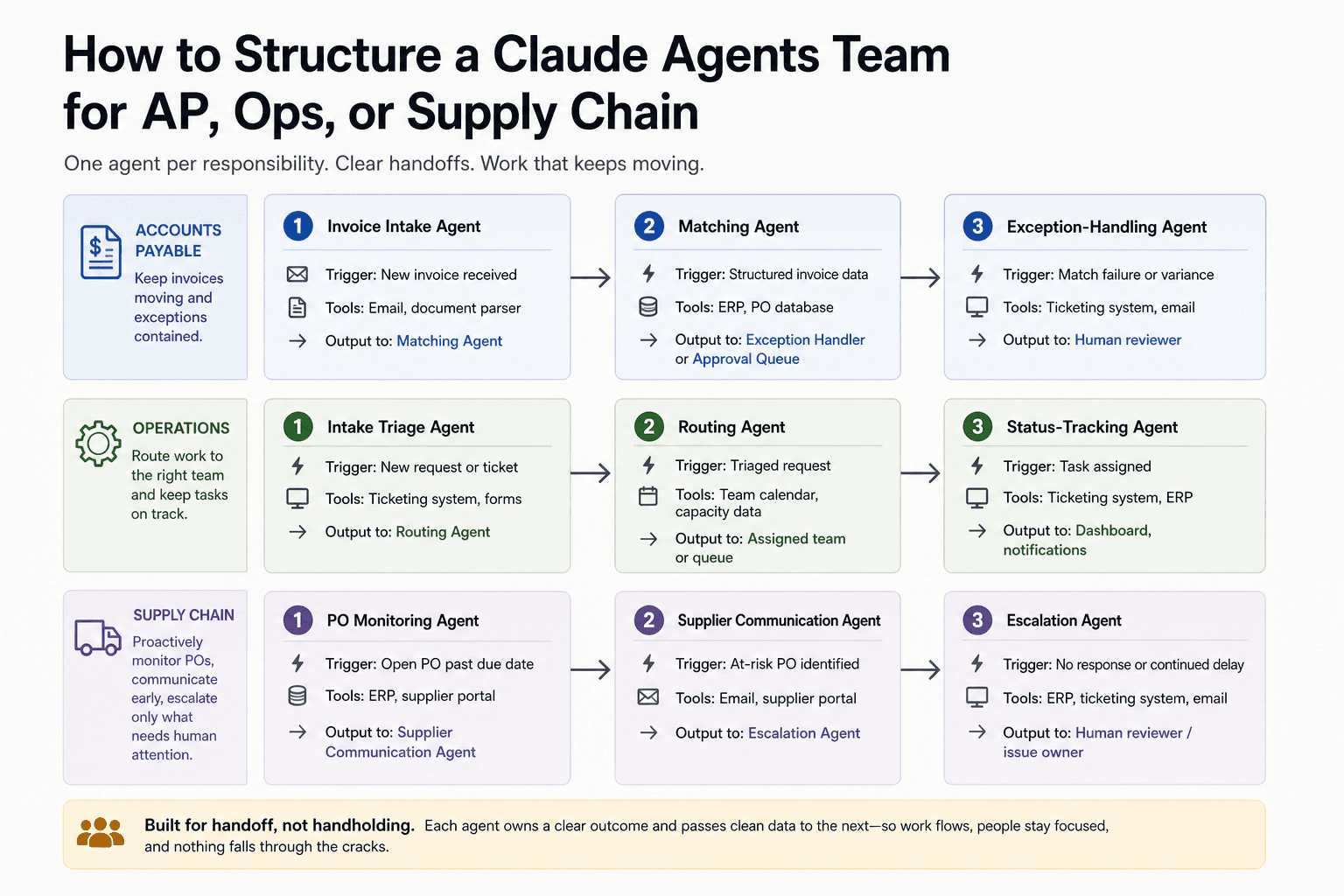
How to Structure a Claude Agents Team for AP, Ops, or Supply Chain
With your process mapped, you can assign agent roles with precision. The goal is one agent per distinct responsibility, with clean data handoffs between them.
Accounts payable: invoice intake agent, matching agent, exception-handling agent
Agent Role | Trigger | Tools It Touches | Output Passed To |
|---|---|---|---|
Invoice Intake | New invoice received | Email, document parser | Matching Agent |
Matching Agent | Structured invoice data | ERP, PO database | Exception Handler or Approval Queue |
Exception Handler | Match failure or variance | Ticketing system, email | Human reviewer |
The intake agent extracts and structures data. The matching agent compares against open POs. The exception handler isolates mismatches and routes them for human review without stalling the rest of the queue.
Operations: intake triage agent, routing agent, status-tracking agent
Agent Role | Trigger | Tools It Touches | Output Passed To |
|---|---|---|---|
Intake Triage | New request or ticket | Ticketing system, forms | Routing Agent |
Routing Agent | Triaged request | Team calendar, capacity data | Assigned team or queue |
Status Tracker | Task assigned | Ticketing system, ERP | Dashboard, notifications |
Supply chain: PO monitoring agent, supplier communication agent, escalation agent
Agent Role | Trigger | Tools It Touches | Output Passed To |
|---|---|---|---|
PO Monitor | Open PO past due date | ERP, supplier portal | Supplier Comms Agent |
Supplier Comms | Late or missing delivery | Email, supplier portal | Escalation Agent or log |
Escalation Agent | No response or critical delay | Ticketing system, email | Procurement manager |
Writing spawn prompts that prevent agents from overwriting each other
The spawn prompt is where most teams either succeed or waste tokens. Each prompt must state the task, define exactly which files or data fields the agent can write to, and specify what the output format must be before passing to the next agent.
A practical pattern: include a file boundary declaration at the top of every spawn prompt. Something like "You may only write to invoice-staging-folder. Do not modify matched-invoices-log." This mirrors the approach that the Claude Code agent teams community validated for preventing teammates from colliding on shared data.
If you want to skip the process-mapping design work entirely, Predflow maps your existing workflows and assigns agent roles with exception logic already built in. It connects to the tools your team uses today, so you avoid the token burn and file collision problems that come from starting with agents before the process is defined.
Claude Agents Team Deployment: What Human Oversight Must Cover
Agentic AI and generative AI are different in a way that directly affects how much oversight your back-office processes need.
Generative AI produces outputs for a human to review and act on. Agentic AI takes actions autonomously across systems on behalf of a human. In accounts payable or supply chain, that distinction means agentic AI can approve payments, send supplier emails, or update ERP records without waiting for a person to click confirm.
What is agentic AI vs generative AI in a back-office context
Generative AI is a drafting tool. Agentic AI is an executing tool. The accountability model changes completely when an agent can write to your ERP or trigger a payment.
This is not a reason to avoid agentic workflows. It is a reason to design human checkpoints deliberately rather than leaving them to chance.
Setting human-in-the-loop checkpoints for exceptions and approvals
Not every step needs a human checkpoint. The right approach is to require human review only where the cost of an error is high or the decision involves judgment the agent was not designed for.
Define your checkpoints around these triggers: invoices above a payment threshold, new vendor records, first-time exception types, and any action that writes to a system of record for the first time.
Monitoring agent logs without drowning in noise
Most teams either monitor nothing or try to read every log line. Neither works. Set alerts on specific signals instead.
Log signals worth monitoring:
An agent retried a tool call more than three times
A subagent returned empty output to the orchestrator
The orchestrator rerouted a task to a different subagent than expected
An exception handler escalated the same error type more than twice in one day
A spawn prompt produced no action within a defined time window
These signals tell you where the process design has a gap, not just where an agent failed.
Common Claude Agents Team Failures and How to Fix Them
Failure Mode | Root Cause | Fix |
|---|---|---|
Token burn with no useful output | Spawn prompt too vague; agent loops seeking clarity | Add specific task scope, file boundaries, and expected output format to spawn prompt |
Agents overwriting shared files | No file boundary defined in spawn prompt | Declare write-only paths per agent in the spawn prompt; use read-only flags for shared references |
Subagent returns empty output | Tool call failed silently or prompt scope too narrow | Add fallback instructions and a required minimum output structure to the spawn prompt |
Orchestrator loops without resolving | Subagent output format does not match what orchestrator expects | Standardize output schemas between agents; define acceptance criteria in the spawn prompt |
Agents duplicating the same work | Overlapping task definitions across spawn prompts | Map each agent to a single, named responsibility before writing any prompts |
Team runs but process still breaks on exceptions | Exception paths not modeled before build | Return to process mapping; document every known exception scenario and assign it an agent role |
Token burn without clear output: causes and spawn prompt fixes
Vague spawn prompts are the primary cause. When an agent does not know what done looks like, it keeps working. The fix is adding a "task complete" condition to every spawn prompt. State what output the agent must produce and in what format before passing control back to the orchestrator.
Agents overwriting shared files or producing conflicting outputs
This is a design problem, not a model problem. Giving each agent its own write-only path and read-only access to shared reference files eliminates most collisions. Define this in the spawn prompt, not the system configuration.
Subagent goes silent or returns empty: diagnostic steps
Check the tool call log first. Silent subagents almost always hit a failed API call or a data format mismatch. Add a required output line to the spawn prompt: if the agent cannot complete the task, it must return an error description rather than nothing.
When to restart a teammate vs. restart the whole team
Restart a single subagent when the failure is isolated to one tool or one data path. Restart the full team when the orchestrator has lost track of task state, subagent outputs are contradicting each other, or the workflow has branched in a way the original spawn prompts did not account for.
Frequently Asked Questions
What is a Claude agents team and how does it differ from a single AI agent?
A Claude agents team consists of an orchestrator agent and multiple specialist subagents, each running in its own session with defined responsibilities. A single agent works sequentially within one context window. A team runs parallel workstreams, handles multi-step cross-system processes, and routes exceptions without stalling the main workflow.
What is the difference between agentic AI and generative AI?
Generative AI produces content or analysis for a human to review. Agentic AI takes autonomous actions across systems, such as updating records, sending communications, or triggering approvals. In back-office workflows, agentic AI requires deliberate human oversight checkpoints because it executes, not just suggests.
How many agents should a Claude agents team have for an AP workflow?
Three agents cover most AP workflows: an invoice intake agent, a matching agent, and an exception-handling agent. Adding more agents before mapping the process creates coordination overhead without adding value. Start with three and add roles only when a specific step creates a bottleneck.
Do I need to replace my existing ERP or tools to use a Claude agents team?
No. Agent teams are designed to work with existing systems. Each agent connects to the tools it needs through APIs or integrations. The goal is to automate the handoffs between your current tools, not replace them.
How do I prevent agents in a team from overwriting each other's work?
Declare explicit file and data boundaries in each agent's spawn prompt. Assign each agent a write-only path and give it read-only access to shared reference data. Agents that do not have a defined write path should not be able to modify shared files at all.
What human oversight is required when running an AI agent team on supply chain processes?
Human review is required at payment approval thresholds, new vendor onboarding, first-time exception types, and any action that writes to a system of record for the first time. Set log alerts for repeated tool call failures, empty subagent outputs, and unexpected orchestrator rerouting rather than reviewing every log line.
What to Do Next
If your AP, ops, or supply chain workflow has more than three manual handoffs and touches more than two systems, a Claude agents team structure is worth building now. The architecture exists. The agent types are proven in real deployments.
The honest constraint is upfront design investment. Teams that start with agent builders before completing process mapping will hit token burn, file conflicts, and the same exception failures covered in the troubleshooting section above. The process map is not optional prep work. It is the actual work.
Your next concrete step is documenting one workflow at the handoff level using the checklist in this guide. Once you can answer all eight questions for a single process, you have enough to write your first spawn prompts and test a three-agent team.
If you want to skip the process-mapping guesswork, see how Predflow maps your existing workflows and assigns agent roles with exception handling built in. Request a workflow assessment at Predflow.
Bring 20 NetSuite bills to a 30-minute teardown
We will walk your actual invoices through capture, 3-way match and posting on the call, and tell you which steps an agent can take over. No prep beyond the PDFs.
FAQ
Frequently asked questions
What exactly is an AI agent
An AI agent is an autonomous system designed to handle specific business tasks end-to-end. Unlike simple chatbots, AI agents can reason, take actions, integrate with tools, and follow defined workflows.