AI AGENTS
Artificial Intelligence Investment Banking: 7 Back-Office Uses
Discover 7 artificial intelligence investment banking use cases helping back-office teams cut manual work, speed up reporting, and reduce operational risk.

Gautam Borad
Founder, Predflow

Investment banks are pouring billions into AI. One major institution alone allocated a substantial portion of its $105 billion 2026 technology budget to AI infrastructure and model deployment. Almost all of that attention lands on front-office functions: deal origination, trading signals, client advisory. Meanwhile, back-office teams are still manually reconciling data between disconnected systems, chasing approval chains, and rebuilding the same regulatory reports every quarter.
Artificial intelligence investment banking adoption has a visibility problem. The headline deployments are real, but the operational drag that slows execution lives downstream, in accounts payable queues, compliance logs, invoice exception stacks, and risk spreadsheets that nobody updates until something breaks.
These 7 use cases are not theoretical. They are the specific back-office workflows where AI is eliminating manual handoffs, cutting software expenses, and letting lean teams scale without adding headcount.
Why Back-Office Teams Are the Real Bottleneck in Artificial Intelligence Investment Banking Adoption
Front-office AI gets the coverage. Back-office teams get the consequences.
The gap between front-office AI headlines and back-office reality
Tier-one banks are deploying AI at enterprise scale for M&A advisory, research synthesis, and trading. But the workflows that support those functions, document intake, compliance logging, invoice processing, and risk reporting, still run on manual effort and fragmented enterprise software solutions.
The result is a compounding inefficiency. A front-office team closes faster with AI assistance, then hands off to a back-office team that takes three times as long to process the paperwork. AI in banking sector discussions rarely address this gap because the ROI on back-office automation is harder to photograph.
Three symptoms that signal a back-office workflow is ready for AI automation
Artificial intelligence in investment banking delivers the clearest returns when three conditions are present. First, the process runs on the same logic repeatedly but requires someone to manually trigger each step. Second, errors are expensive, not just inconvenient, because they create compliance exposure or payment delays. Third, the work requires pulling data from more than two systems before a decision can be made.
If a workflow matches all three, it is a viable candidate for AI automation. The following seven use cases cover the workflows where all three conditions are almost always true. Business process mapping examples from both mid-size banks and large institutions show these patterns repeat reliably across team sizes.
Use Case 1: Automated Document Extraction for Due Diligence Packages
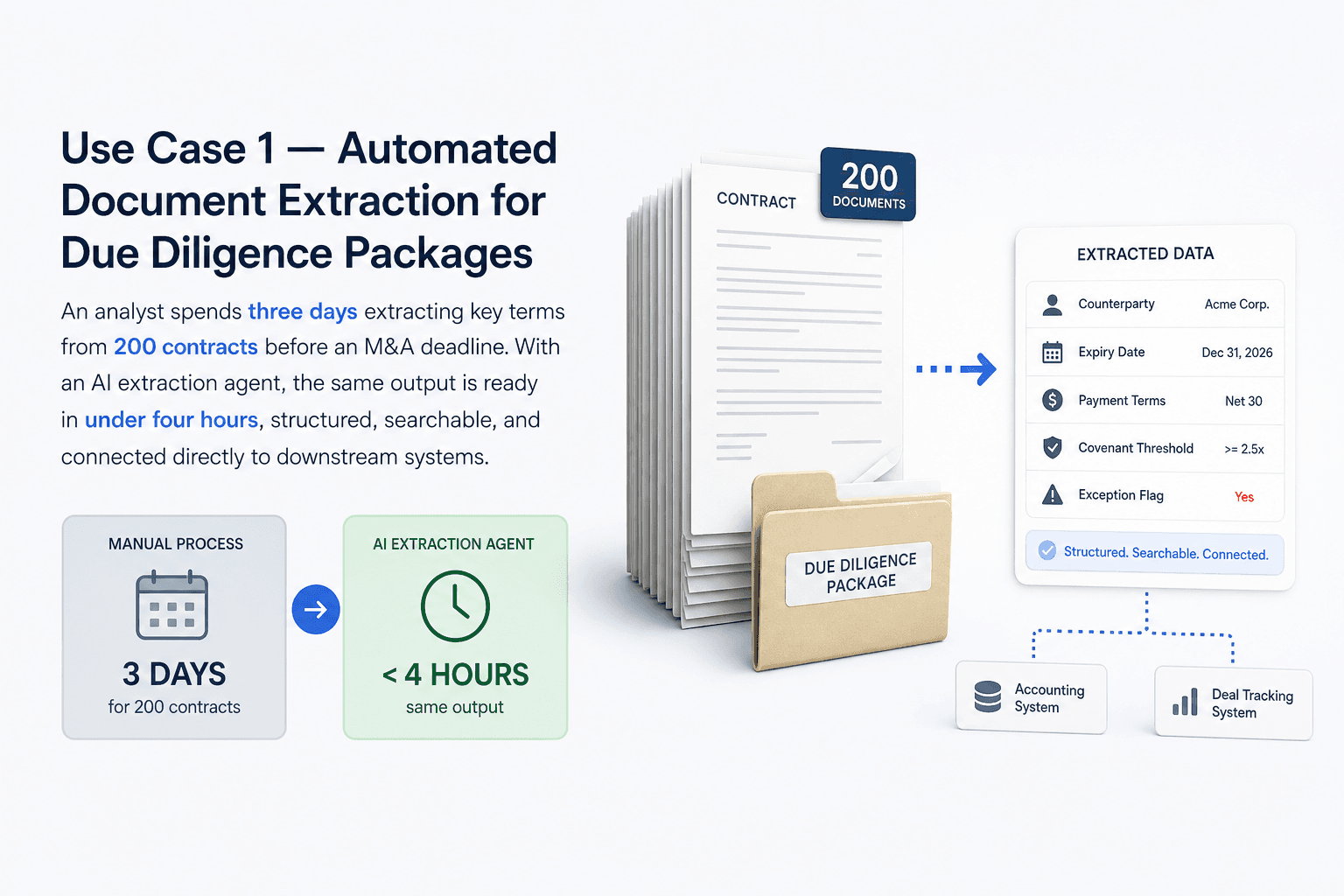
An analyst spends three days extracting key terms from 200 contracts before an M&A deadline. With an AI extraction agent, the same output is ready in under four hours, structured, searchable, and connected directly to downstream systems.
What the manual workflow looks like today
Due diligence document review is one of the most time-intensive back-office tasks in investment banking. An analyst opens each file, reads for relevant clauses, copies values into a tracking sheet, and flags exceptions manually. For a mid-size deal with 150 to 300 documents, this takes days. Errors accumulate because the work is repetitive and the volume is high.
The downstream cost is not just analyst hours. Delays in document extraction delay legal review, which delays deal timelines. Business information systems that depend on manual data entry inherit every human error made upstream.
How AI extraction agents handle unstructured data at volume
AI document extraction agents use OCR-based processing to read contracts, offering memoranda, and financial statements regardless of format. They identify and pull defined fields: payment terms, counterparty names, expiry dates, covenant thresholds, and flag anything that falls outside expected parameters.
The output lands directly in structured format, ready for accounting software integration or export to the deal tracking system. No reformatting. No copy-paste. The analyst shifts from data entry to reviewing exceptions and verifying edge cases, which is where their judgment actually adds value. EDMS tools that connect to these agents give teams a permanent, searchable record of every extracted document.
Use Case 2: AI-Driven Compliance Monitoring and Audit Trail Generation
Manual compliance log reviews happen on a schedule. Regulatory violations do not.
Replacing periodic manual reviews with continuous monitoring
Most back-office compliance processes run on a weekly or monthly review cycle. An operations team member pulls logs, scans for anomalies, and documents findings. Between reviews, non-compliant activity sits undetected. This is not a process design choice. It is a capacity constraint.
Automated performance monitoring changes the model. AI agents scan transaction logs, communication records, and system events in real time. When activity deviates from defined compliance rules, the agent flags it immediately rather than waiting for the next scheduled review. The shift from periodic to continuous matters in regulated environments where the cost of a missed alert is significant. Banking risk and management teams that adopt this model report fewer late-stage compliance discoveries.
What a machine-generated audit trail covers that manual logs miss
Human-maintained audit logs record what reviewers noticed. Machine-generated audit trails record everything. Every action, every system event, every exception, with timestamps and rule references attached automatically.
That distinction matters when regulators request evidence of process controls. A machine-generated trail is complete by design, not by memory. Auditing software tools that integrate with AI monitoring agents produce trails that are consistent, tamper-evident, and formatted for regulatory submission.
One important caution: artificial intelligence risks in compliance contexts include model drift and false negatives. An agent trained on historical patterns treats new transaction structures as normal until enough examples accumulate to recalibrate. Human oversight at defined intervals remains an operational requirement, not an optional layer. SOC software and SIEM monitoring tools used alongside AI agents provide the redundancy that prevents blind spots from becoming exposure.
Use Case 3: Intelligent Invoice and Accounts Payable Automation
Accounts payable teams in investment banking often process hundreds of invoices per week. Most of that time goes to matching, routing, and chasing approvals rather than making decisions.
The five-step invoice lifecycle AI can fully automate
AI agents handle the full invoice workflow without manual triggers between steps:
Receipt: Agent ingests invoice from email, portal, or EDI and extracts structured data using OCR
Three-way match: Agent compares invoice against purchase order and delivery confirmation automatically
Exception routing: Mismatches above defined thresholds are flagged and routed to the correct reviewer
Approval: Matched invoices within policy are approved without human intervention
Payment scheduling: Approved invoices are queued in the billing system software according to payment terms
Teams that previously spent four to six hours per invoice on complex vendor accounts reduce that to under 30 minutes, with most of that time spent on genuine exceptions rather than routine processing. Expense management software and procurement software that integrate with the automation layer receive clean, structured data at each stage.
Handling exceptions without halting the entire queue
The failure point of most invoice automation tools is exception handling. When an invoice does not match, the entire queue pauses while someone investigates. That negates most of the time savings.
This is where most point solutions break down. They automate the happy path but route every exception back to a human queue. Predflow's AI agents are built around process mapping first, which means edge cases are anticipated before deployment, not discovered in production. The result is an invoice automation workflow that handles the 20% of exceptions automatically, not just the 80% of clean invoices.
Use Case 4: Risk Scoring Automation for Credit and Counterparty Exposure
Static spreadsheet models calculate risk at a point in time. Counterparty exposure changes continuously.
From quarterly spreadsheet updates to continuous counterparty monitoring
Most credit and counterparty risk scoring in back-office teams runs on quarterly cycles. A risk analyst updates inputs, recalculates scores, and distributes a report. By the time the report reaches decision-makers, some of the underlying data is already three months old.
Real time monitoring system design using AI agents replaces this cycle with continuous scoring. The agent ingests live market data, counterparty financials, payment history, and external signals, then recalculates exposure scores on a defined cadence, hourly, daily, or on trigger events. Stock market artificial intelligence models that power front-office trading decisions use similar real-time data pipelines. The same infrastructure logic applies to back-office risk monitoring.
Identifying the right data inputs and cost of transition is the prerequisite step. Teams that skip this analysis deploy models that are technically functional but operationally unreliable because they are scoring against the wrong variables.
Keeping humans in the loop without slowing the process down
AI-assisted risk scoring means an analyst reviews AI output before decisions are made. Fully autonomous risk decisions mean the AI acts without review. Back-office teams in regulated environments need the first model, not the second.
The practical implementation keeps humans at two specific checkpoints: threshold breach review and model output validation on a defined schedule. Between those checkpoints, the AI agent runs without interruption. Artificial intelligence risks in this context include model drift as market conditions shift and over-reliance on historical patterns during novel stress events. Building those review checkpoints into the workflow from the start, rather than adding them reactively, is what separates a reliable deployment from a liability. The best AI for stock market risk analysis is the one paired with clear human escalation rules.
Use Case 5: Automated Regulatory Reporting and SLA Tracking
A regulatory report that required a two-day manual data pull from four separate systems can be generated in under 30 minutes by an AI agent that maintains live connections to all four sources.
Connecting data sources to reporting outputs without manual assembly
Back-office managers who own regulatory deadlines currently spend more time assembling data than analyzing it. An analyst pulls figures from the trading system, the risk platform, the ledger, and a separate compliance database, reconciles discrepancies manually, and formats the output for submission. That process runs on every reporting cycle.
Automated reporting tools connected to live data sources eliminate the assembly step. The AI agent pulls, reconciles, and formats automatically, then presents the output for a final human review before submission. SLA management tools integrated with the reporting agent send alerts when a deadline is approaching and the data pipeline has not yet completed, giving the team time to intervene before a breach rather than explaining one.
SLA breach prediction versus SLA breach reaction
Most teams manage SLA compliance reactively. They discover a breach when a deadline passes. AI-powered monitoring and evaluation tools shift this to prediction. The agent tracks completion rates against time remaining, calculates risk of non-delivery, and escalates early when the trajectory points toward a miss.
The operational difference is significant. A team that knows 48 hours in advance that a reporting deadline is at risk can re-prioritize. A team that discovers the breach at 5 PM on the due date cannot. Service monitoring tools and APM application performance monitoring systems used alongside reporting agents give back-office managers a real-time view of where each workflow stands. That visibility replaces the status meeting, the email chain, and the end-of-day scramble.
Use Case 6: AI-Powered Analyst Workflow Assistance and Research Summarization
Junior analysts in back-office and operations roles spend a disproportionate share of their time on work that does not require their judgment: pulling data, formatting reports, and drafting internal memos from templates.
What "analyst augmentation" actually means in practice
Analyst augmentation is not AI replacing the analyst. It is AI completing the low-judgment steps so the analyst focuses on the high-judgment ones. In practice, this means an AI agent reads 40 pages of company filings and produces a structured summary with key metrics extracted. The analyst reviews the summary, checks the edge cases, and adds contextual judgment.
For internal memo drafting, the agent produces a first draft from a defined template and data inputs. The analyst edits and approves. Intelligence software built for these workflows shortens the first draft step from two hours to 15 minutes. The analyst still owns the output. Artificial intelligence in investment banking creates the most durable value when that ownership boundary stays clear.
Guardrails that prevent AI-generated research errors from reaching clients
Improper use of AI in financial contexts creates real exposure: reputational risk, regulatory risk, and client trust erosion. Two guardrails are operational requirements, not optional.
First, data management protocols must be established before deployment. This means centralizing the data sources the agent draws from and ensuring they are accurate, current, and formatted consistently. An agent producing research summaries from stale or incomplete data produces confident-sounding errors. Second, a human review checkpoint before any AI-generated output reaches an external stakeholder is non-negotiable. This checkpoint is most effective when it is built into the workflow as a required step, not left to individual discretion. B2B software deployments that skip these guardrails create the same liability they were designed to reduce.
Use Case 7: End-to-End Back-Office Process Orchestration Across Disconnected Systems
Each of the first six use cases is valuable on its own. But deploying them as six separate point solutions recreates the fragmentation problem they are meant to solve.
Why point solutions create the same fragmentation problem they claim to solve
Seven tools. Seven logins. Seven data handoffs that each require someone to confirm the previous step completed correctly. This is how most back-office AI deployments look 18 months after launch. Each tool performs well in isolation. Between tools, the same manual coordination that existed before AI is still running, just in different places.
Enterprise software solutions that optimize one workflow without connecting to adjacent workflows shift the bottleneck rather than removing it. The operations manager still chases status updates. The audit trail is still fragmented across systems. Integrated software solutions address this only when the integration layer is designed before individual tools are selected.
What a unified AI orchestration workflow looks like in a mid-size back-office team
After orchestration: one workflow layer connects document extraction, compliance monitoring, invoice processing, risk scoring, and reporting into a single supervised process. One audit trail. Human oversight at four defined checkpoints. No manual handoffs between systems.
The before state requires staff to monitor seven tools and bridge the gaps manually. The after state requires staff to review exceptions and approve outputs at the points where judgment matters. Business operations software that operates as an orchestration layer rather than a standalone tool reduces the coordination cost that point solutions ignore. Software lifecycle management becomes manageable because the orchestration layer owns the integration, not the individual teams using each tool.
How to Choose the Right Artificial Intelligence Investment Banking Workflow to Automate First
Start with the workflow that is most expensive to get wrong, not the one that is easiest to automate.
A three-criteria prioritization checklist
Use these three criteria to rank your candidate workflows before committing to a deployment:
Process frequency: Workflows that run daily or weekly deliver faster ROI than quarterly processes because the time savings compound faster.
Error cost: Prioritize workflows where a mistake creates compliance exposure, payment delays, or client impact over workflows where errors are merely inconvenient.
Integration complexity: Start with workflows that touch two or three existing systems rather than eight, because lower integration complexity means faster deployment and fewer edge cases to map.
Score each candidate workflow against all three criteria. The highest-scoring workflow is your pilot. Business process mapping examples from investment banking back-office contexts consistently show that accounts payable, compliance monitoring, and regulatory reporting score highest across all three.
The process mapping step most teams skip before deploying AI
Most teams select a tool first, then try to fit their process around it. This produces automations that work on the standard path and fail on every exception. Benchmarking tools and capacity management tools can quantify the current process, but the mapping step itself requires someone to document every decision point, every exception type, and every system handoff before a single AI agent is configured.
Teams that do this mapping work before deployment discover that 30 to 40 percent of their manual steps exist only because a previous system could not handle them automatically. Removing those steps from the process before automating produces a cleaner, faster deployment than automating a broken process at speed.
Frequently Asked Questions
What is artificial intelligence investment banking and how is it different from traditional automation?
Artificial intelligence investment banking refers to the use of AI systems to perform or assist with banking workflows, from deal analysis to back-office processing. Unlike traditional automation, which follows fixed rules and breaks when inputs vary, AI agents handle variable inputs, learn from exceptions, and make contextual decisions within defined boundaries.
Which back-office tasks in investment banking are easiest to automate with AI first?
Invoice processing, document extraction, and regulatory report assembly are the most common starting points. These workflows are high-frequency, rule-based at their core, and expensive when errors occur, which makes them strong candidates by all three prioritization criteria.
What are the main risks of using artificial intelligence in investment banking operations?
The main risks include model drift over time, false negatives in compliance monitoring, over-reliance on AI outputs without human review, and data quality problems that produce confident but incorrect outputs. Establishing human oversight checkpoints and data management protocols before deployment addresses most of these risks.
How long does it typically take to deploy an AI workflow automation in a back-office team?
Deployment timelines vary by workflow complexity and integration requirements. Simple single-system automations can go live in four to eight weeks. Multi-system orchestration deployments with exception handling built in typically take three to six months, with the process mapping phase accounting for a significant share of that time.
Do AI agents in investment banking replace back-office staff or assist them?
In current deployments, AI agents assist back-office staff by handling repetitive, rule-based steps and routing exceptions for human review. The evidence from tier-one bank deployments shows a shift in what staff spend their time on, from data entry and assembly to judgment and exception management, rather than a reduction in headcount at the team level.
Conclusion
You now have seven specific use cases and a three-criteria framework for prioritizing the first one. The decision left is not whether to automate. It is whether to automate piecemeal with point solutions or map the full process first and deploy an orchestration layer.
Point solutions are faster to start. They deliver results within a single workflow and require less upfront design work. Orchestration-first deployments take longer to configure but compound in value as each connected workflow reduces the coordination cost of the next one. For back-office teams with more than three manual handoffs in a single workflow, the orchestration approach is the more durable investment.
If your back-office team has identified one or more of these workflows as a priority, Predflow offers a free process mapping session to show you exactly where AI agents would eliminate the most manual handoffs before you commit to a deployment. Book your session.
Bring 20 NetSuite bills to a 30-minute teardown
We will walk your actual invoices through capture, 3-way match and posting on the call, and tell you which steps an agent can take over. No prep beyond the PDFs.
FAQ
Frequently asked questions
What exactly is an AI agent
An AI agent is an autonomous system designed to handle specific business tasks end-to-end. Unlike simple chatbots, AI agents can reason, take actions, integrate with tools, and follow defined workflows.