AI AGENTS
What Are AI Workers? A New Category of Business Software
Your team shouldn't spend hours copying data and chasing approvals. AI workers are a new category of business software that handles the repetitive work so your people don't have to.

Sanya Shah
Co-founder, Predflow
Your team is spending hours each week copying data between systems, chasing approvals through email chains, and re-entering information that already exists somewhere else in your stack. Headcount requests get rejected. Backlogs grow. And the work does not stop.
Hiring more staff is not a sustainable answer. But basic automation breaks the moment a vendor sends an invoice in the wrong format or an order quantity does not match the purchase order. That gap, between what RPA bots can handle and what a human would manage without thinking, is exactly where AI workers operate.
AI workers are a distinct category of business software. They sit between simple rule-based automation and fully autonomous AI systems. They handle real process complexity, reason across multiple steps, and connect fragmented tools without requiring you to rebuild your existing stack.
By the end of this article, you will know exactly what AI workers are, how they differ from other automation tools, and whether they are the right fit for your operation.
What AI Workers Actually Are (And What They Are Not)
Most teams encounter AI workers through vendor marketing that blurs the line between chatbots, RPA bots, and genuine AI agent workflow tools. The definitions matter because they determine what the software can actually do when your process breaks.
AI Workers vs. RPA Bots: The Key Operational Difference
RPA bots follow fixed rules. They execute the same sequence of clicks and data transfers reliably, as long as nothing changes. When a field moves, a format shifts, or an exception appears, the bot stops and waits for a human.
AI workers handle variation. They interpret context, decide between options, and continue the process when conditions change. The operational difference is not speed. It is resilience.
AI Workers vs. Chatbots and Standalone LLM Agents
Chatbots respond to inputs. LLM agents generate text, summaries, or recommendations. Neither completes a multi-step process across real business systems without constant prompting.
AI workers execute. They connect to your ERP, read an invoice, match it to a purchase order, flag discrepancies, route exceptions, and log the outcome. They act inside a workflow rather than alongside it.
The Four Core Characteristics of an AI Worker
Multi-step reasoning. The agent plans across a sequence of tasks, not just one response at a time.
Context retention. It carries information from earlier steps forward, so later decisions stay accurate.
Tool integration. It connects to real business systems and takes actions inside them.
Exception handling. When a step fails or an edge case appears, it either resolves it or routes it to a human with full context.
Here is how these categories compare at a glance:
Capability | RPA Bot | Chatbot | AI Worker |
|---|---|---|---|
Handles exceptions | No | No | Yes |
Understands context | No | Partial | Yes |
Multi-step reasoning | No | No | Yes |
Integrates across systems | Limited | No | Yes |
How AI Workers Fit Into Business Process Architecture
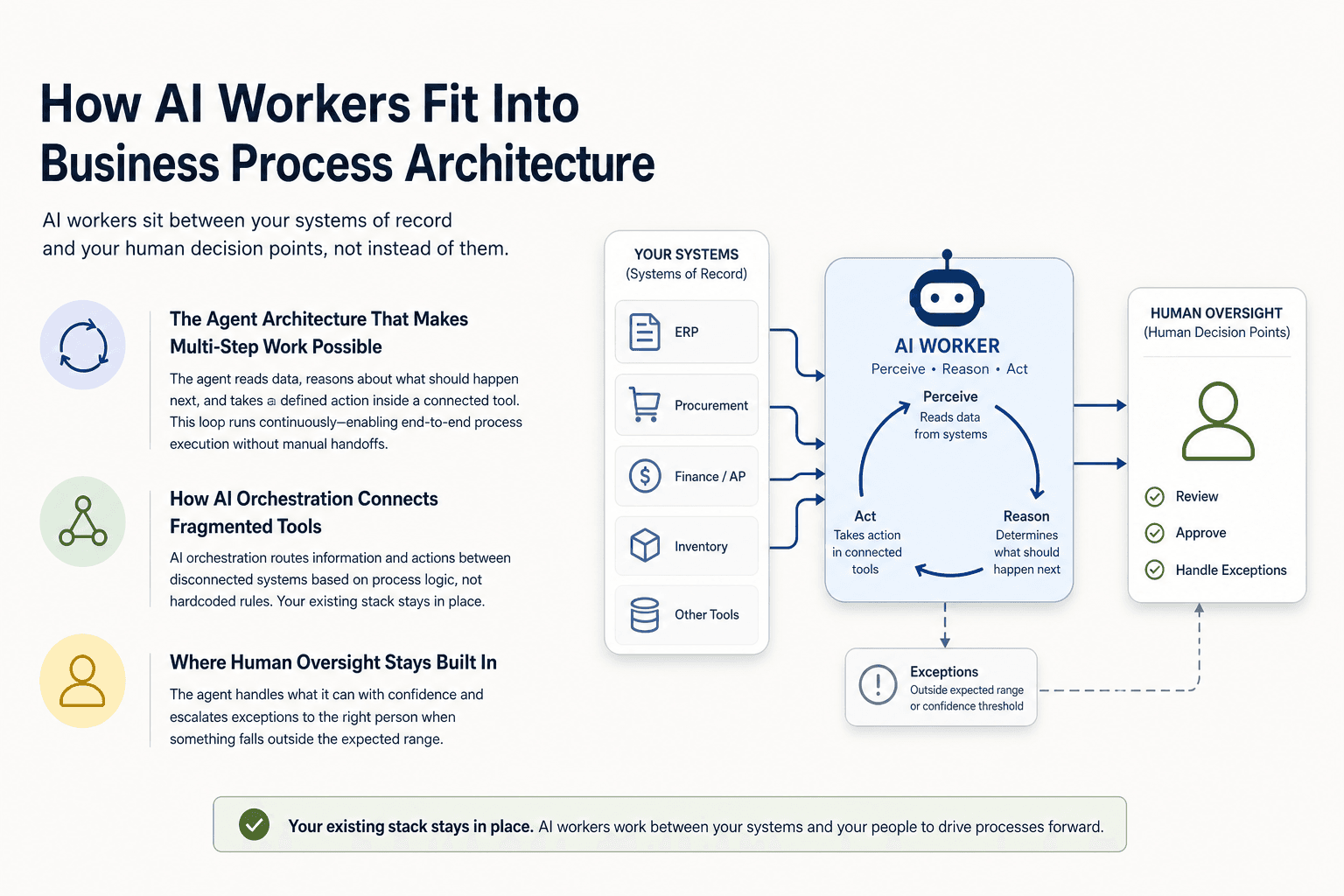
The most common fear among operations leaders is that deploying AI workers means replacing existing tools or rebuilding integrations from scratch. It does not. AI workers sit between your systems of record and your human decision points, not instead of them.
The Agent Architecture That Makes Multi-Step Work Possible
AI agent architecture works through a perception, reasoning, and action loop. The agent reads data from a system, reasons about what should happen next based on its knowledge base and instructions, and then takes a defined action inside a connected tool.
This loop runs continuously. It does not require a human to trigger each step. That is what makes end-to-end process execution possible without manual handoffs.
How AI Orchestration Connects Fragmented Tools
Most back-office operations run across four to ten disconnected systems. AI orchestration is the coordination layer that routes information and actions between those tools based on process logic, not hardcoded rules.
A workflow agent does not replace your ERP or your procurement system. It reads from them, writes to them, and passes exceptions to the right person when something falls outside the expected range. Your existing stack stays in place.
Where Human Oversight Stays Built In
Deploying automation without mapping human oversight into the process is one of the most consistent ways AI implementations fail. When businesses skip this step, errors compound silently until a process breaks in a way that is expensive to unwind.
Government guidance for employers implementing AI in the workplace now explicitly recognizes human oversight as a core requirement, not an optional layer. The principle is straightforward: AI handles repetitive execution, humans handle judgment calls and exceptions that carry real consequences.
Practically, this means defining specific checkpoints before deployment. Which decisions require a human signature? Which exceptions get auto-routed versus escalated? Mapping these before the agent goes live is not slowing down deployment. It is what makes deployment safe.
The mistake organizations make most often is adopting AI tools before answering these questions. The architecture follows the process design. It does not replace it.
The Four Types of AI Workers Relevant to Business Operations
Understanding which type of AI worker fits your process is the step that separates useful deployment from expensive disappointment. Each type has a distinct function, a best-fit use case, and a real limitation.
Task Agents: Single-Process Automation at Scale
A task agent executes one defined process repeatedly and at volume. It handles functions like data extraction, document classification, and form submission across large batches. It works best in accounts payable for high-volume invoice ingestion. Its limitation is scope: it does not reason across dependent steps or make decisions when inputs vary.
Knowledge-Based Agents: Context-Aware Decision Support
A knowledge-based agent reasons against a structured knowledge base to answer questions or classify inputs. It handles functions like policy-based approval routing, contract clause checking, and vendor risk categorization. Knowledge-based agents in artificial intelligence work best when decisions follow defined rules but the input format varies. The limitation is that they rely on the quality and completeness of the knowledge base they reference.
Workflow Agents: End-to-End Process Execution
A workflow agent manages a full process from trigger to resolution, coordinating multiple steps and tools in sequence. It handles functions like purchase order matching, exception escalation, and cross-system status updates without requiring a human to manage each handoff. Platforms like Predflow are built around this sequence: map the process, identify exception patterns, then assign the right agent type, rather than deploying tools and hoping the workflow follows. The limitation is setup time. Workflow agents require thorough process mapping before they run reliably.
Multi-Agent Systems: Coordinating Across Departments
A multi-agent system runs several agents in parallel or in sequence, each handling a distinct piece of a larger process. It handles functions like end-to-end procurement cycles where vendor communication, internal approval, and ERP update all happen across different teams. The limitation is coordination complexity. Multi-agent architectures require clear ownership of handoffs between agents, or exceptions fall into gaps between them.
How to Deploy AI Workers Without Breaking What Already Works
This framework gives you something concrete to bring to an internal planning meeting. Each step has a deliverable. None of them require a technical team to complete.
Step 1: Map the Process Before Choosing the Tool
Write out every step of the process you want to automate, including every system it touches, every person who handles it, and every point where it currently breaks or slows down.
The deliverable is a written process map showing every system touchpoint and handoff. Without this, you cannot evaluate whether a tool fits your process. You can only guess.
Step 2: Identify Edge Cases Your Current Process Already Fails On
Look at the last 30 days of exceptions, escalations, and errors in the process you mapped. These are not random. They follow patterns. Document them.
The deliverable is a list of the ten most common failure modes in your current process. This list becomes the test criteria for any AI worker you evaluate. If a tool cannot handle your known failure modes, it will not handle the unknown ones either.
Step 3: Define the Human Oversight Checkpoints
A significant share of employees admit to using AI tools improperly at work, often because no guidelines exist. Governance is not bureaucracy. It is the reason exceptions get resolved instead of ignored.
Before deployment, define which decisions require human approval, which exceptions get escalated, and who is responsible for each category. The deliverable is a written oversight map that matches your process map from Step 1. This step is non-negotiable. Skipping it does not speed up deployment. It creates liability.
Step 4: Measure Against a Baseline, Not Against Potential
The most common credibility problem with AI deployments is measuring results against aspirational benchmarks rather than the current manual process. Finance leaders lose confidence in implementations that promise theoretical throughput gains instead of showing actual comparison to baseline.
The deliverable is a measurement framework: how long does the current process take per unit, what is the current error rate, and what does a 20% improvement look like in real numbers. Measure against that. Adjust from there.
Where AI Workers Are Already Replacing Manual Work in Finance and Supply Chain
Operations leaders who treat AI workers as a future consideration are not avoiding risk. They are accepting a different kind of risk: the gap between their process efficiency and their competitors' continues to widen while they wait.
Large enterprises have already made the structural shift. Companies reducing corporate headcount are simultaneously increasing AI infrastructure investment. That is not cost-cutting. It is a deliberate reallocation of operational capacity.
Accounts Payable: Invoice Matching and Exception Routing
AI workers in AP extract invoice data, match it against purchase orders and receipts, flag discrepancies, and route exceptions to the right reviewer without manual intervention. Teams that run this process manually report that exception handling alone consumes the majority of AP staff time. Automating the match and escalation cycle changes what those staff members spend their day doing.
Supply Chain: Vendor Communication and Order Discrepancy Handling
When a purchase order does not match a shipment confirmation, someone has to catch it, contact the vendor, document the resolution, and update the system. AI workers handle this loop across dozens of vendors simultaneously. The throughput difference is not marginal.
Operations: Cross-System Status Reporting Without Human Relay
Operations managers frequently spend hours each week pulling status information from multiple systems to answer questions that should answer themselves. An AI worker that monitors system states and surfaces exceptions in real time removes the human relay entirely. The manager sees what needs a decision. Everything routine runs without them.
Frequently Asked Questions
What is the difference between an AI worker and an AI agent?
An AI agent is the technical component that perceives inputs, reasons, and takes actions. An AI worker is the business-layer application built on one or more agents to complete a defined work process. An AI worker includes the workflow design, the oversight rules, and the integration layer. An AI agent is the mechanism inside it.
Do AI workers replace human employees or work alongside them?
AI workers handle repeatable execution. Humans handle judgment, exceptions that carry real consequences, and decisions requiring context the system does not have. The practical result is that team members spend less time on data entry and status chasing, and more time on work that requires their judgment.
What is agentic AI and how does it differ from generative AI?
Generative AI produces content, such as text, summaries, or code, in response to a prompt. Agentic AI takes actions across systems to complete a process. The difference is execution. Generative AI answers a question. Agentic AI does the work.
How long does it take to deploy an AI worker for a back-office process?
Deployment time depends on process complexity and the quality of the process map before implementation starts. Simple single-step task agents can go live in weeks. Workflow agents handling multi-system processes with defined exception logic typically take four to twelve weeks. The process mapping phase is where most of that time is spent, and it is not time wasted.
What happens when an AI worker encounters an exception it cannot handle?
A properly designed AI worker escalates the exception to a human with full context: what triggered the exception, what the agent attempted, and what decision is needed. The process does not stop. It pauses at the right checkpoint, with the right information, for the right person.
Conclusion
If your team is spending meaningful hours each week on manual handoffs, exception routing, or cross-system status updates, the question is no longer whether AI workers are relevant to your operation. It is whether you start mapping your processes now or wait until the efficiency gap between your team and your competitors becomes visible to leadership.
The right starting point is not a tool purchase. It is a process audit. Document one process this week, map every touchpoint and every known failure mode, and you will have more clarity about where AI workers fit than any vendor demo will give you.
If you want to see how Predflow maps your existing workflows before recommending any automation, request a process review.
Bring 20 NetSuite bills to a 30-minute teardown
We will walk your actual invoices through capture, 3-way match and posting on the call, and tell you which steps an agent can take over. No prep beyond the PDFs.
FAQ
Frequently asked questions
What exactly is an AI agent
An AI agent is an autonomous system designed to handle specific business tasks end-to-end. Unlike simple chatbots, AI agents can reason, take actions, integrate with tools, and follow defined workflows.