AI AGENTS
AI in Automation: Use Cases, Tools, and Steps to Start
Most teams don't lack technology — they lack clarity on where AI in automation actually delivers. Here's how to cut through the noise and take your first real step.

Sanya Shah
Co-founder, Predflow

A finance team manually keying 400 invoices a week while their ERP sits connected to nothing. An operations manager who knows AP headcount needs to double if volume grows 20%. The frustration is not a lack of technology. It is a lack of clarity on where to start and what AI in automation actually solves versus what it just promises.
Most teams automate the wrong things first. They pick a tool before mapping the process, hit edge cases in week two, and quietly abandon the project. This guide cuts through that cycle. It covers which processes are genuinely ready to automate, which tool types match which problems, and what a realistic first deployment looks like from day one.
What AI in Automation Actually Means for Business Operations
AI in automation means software that handles business tasks end-to-end by making decisions, not just following fixed rules. Unlike scripts that break when inputs change, AI-based systems read context, handle variation, and escalate exceptions to humans when needed. This applies directly to operations like invoice processing, purchase order matching, and payroll validation.
RPA vs AI agents: where rules end and judgment begins
Robotic process automation, or RPA, follows a defined set of steps to complete a task. It clicks, copies, and pastes with precision. But when an invoice arrives with a missing PO number or a vendor name spelled two different ways, a basic RPA process stops and waits for human input.
AI agents handle that variation. They read the invoice, check vendor records, infer the likely match, and either resolve it or flag it with context attached. The agent makes a judgment call rather than throwing an error.
Capability | RPA (Rule-Based) | AI Agent |
|---|---|---|
Decision-making | Follows fixed rules only | Evaluates context and chooses the best action |
Exception handling | Stops and escalates all exceptions | Resolves common exceptions; escalates only true edge cases |
Scalability | Degrades when rules multiply | Adapts as volume and variation increase |
What is workflow automation versus intelligent automation
Workflow automation connects steps in a defined sequence. A form submission triggers an email, which triggers a record update. It works well when every scenario is predictable.
Intelligent automation adds a layer of reasoning. It can read an unstructured document, extract the relevant fields, validate them against a database, and route the result based on what it finds. That is the difference between moving data and understanding it.
Why the difference matters when you choose a solution
Buying an RPA tool for a process that has high exception rates creates maintenance work, not savings. Buying an AI agent platform for a fully predictable, low-volume task is overspending on capability you do not need.
Matching tool type to process complexity is the first real decision in any automation project. Agentic process automation sits at the top of this stack, handling multi-step, judgment-heavy workflows across systems without human handoffs at each step.
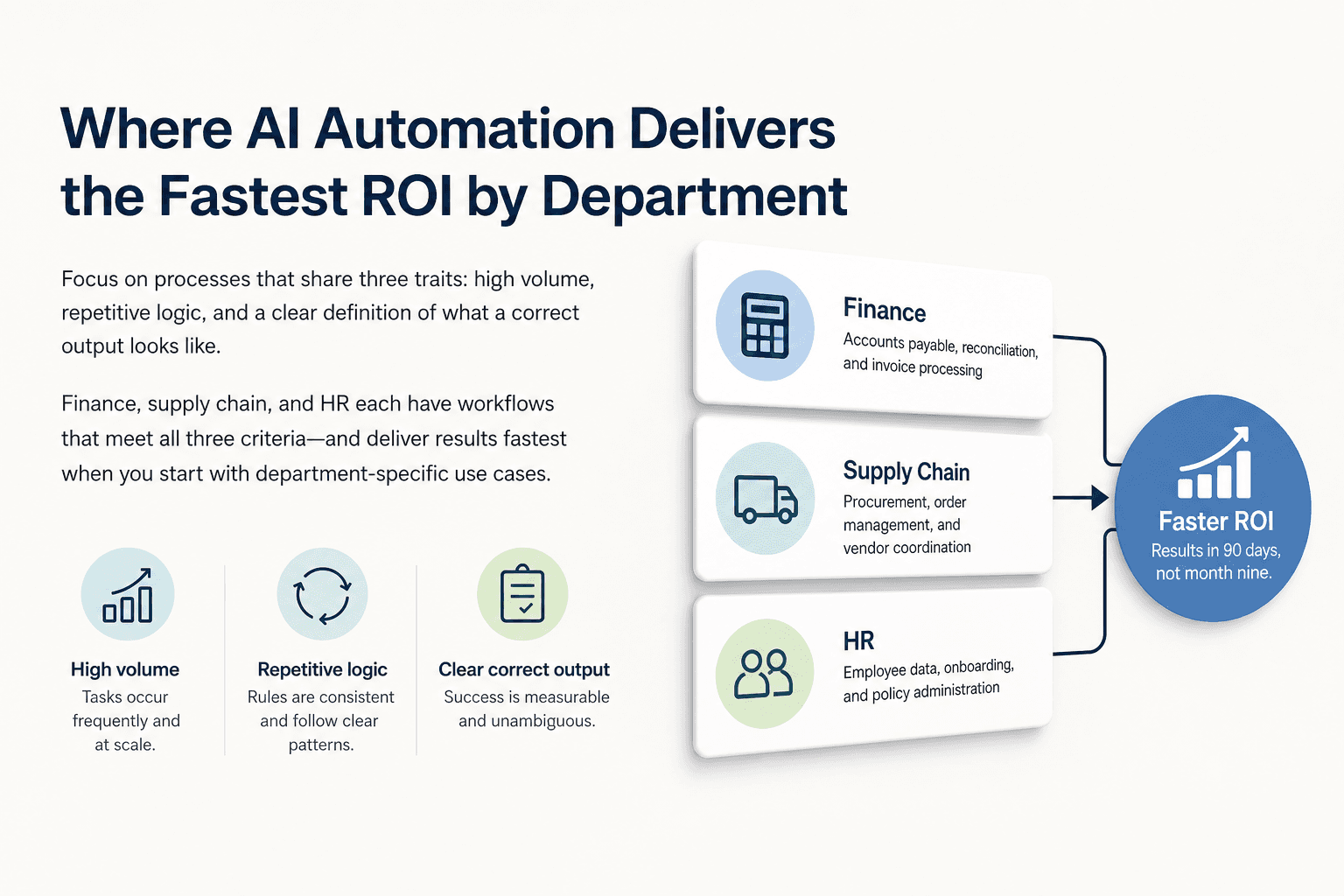
Where AI Automation Delivers the Fastest ROI by Department
The processes worth automating first share three traits: high volume, repetitive logic, and a clear definition of what a correct output looks like. Finance, supply chain, and HR each have workflows that meet all three criteria.
Proving ROI and identifying high-impact use cases are consistently the hardest parts of scaling automation programs. Starting with department-specific use cases, rather than trying to automate broadly, is what separates teams that see results in 90 days from those still building a business case at month nine.
Finance: accounts payable, reconciliation, and invoice processing
Three-way PO matching is the clearest starting point in AP automation. The system matches the purchase order, the goods receipt, and the vendor invoice automatically. Matched invoices move to payment without a human touching them. Exceptions get flagged with the specific mismatch highlighted, not just an error code.
Teams that implement accounts payable automation solutions at this level typically recover hours of manual review per week per processor and reduce duplicate payment risk significantly.
Common automatable tasks in finance:
Invoice data extraction and GL coding
Reconciliation automation across bank feeds and ledger entries
Accounts receivable follow-up and payment status updates
Supply chain: procurement, order management, and vendor coordination
Supplier onboarding is a high-friction, document-heavy process in most supply chains. Automated supply chain tools can collect vendor documents, validate compliance fields, and trigger approval workflows without a coordinator manually chasing each submission.
Sales order automation and procure-to-pay automation close the loop between demand signals and purchase execution, reducing the gap between when an order is confirmed and when procurement acts on it.
Common automatable tasks in supply chain:
Purchase order generation from approved requisitions
Vendor document collection and compliance checking
Order status updates and exception alerts to stakeholders
HR and back-office: onboarding, expense reporting, and document processing
I-9 verification is a time-bound compliance task that HR teams often handle manually during onboarding surges. Automated HR workflows can collect documents, verify fields, and log completion with an audit trail, cutting processing time from days to hours.
Expense management automation handles receipt capture, policy checking, and reimbursement routing without back-and-forth between employees and finance. Document processing automation covers the broader category of any workflow that starts with an unstructured input, such as a contract, a form, or a scanned document.
Common automatable tasks in HR and back-office:
New hire document collection and verification
Expense report review and policy flagging
Offboarding task coordination across IT, HR, and facilities
How to Choose the Right AI Automation Tools Without Overbuying
The most common tool selection mistake is choosing based on brand recognition or feature lists rather than process fit. Teams end up with enterprise platforms that require months of configuration for workflows that a lighter solution could handle in weeks.
Before evaluating any tool, address the process first. Automating a broken or undocumented workflow amplifies the problem rather than solving it.
Matching tool type to process complexity
Low-complexity, high-volume, fully predictable processes fit basic workflow automation platforms. These handle sequential steps with clear triggers and no decision logic required.
Mid-complexity processes with some variation but defined exception handling fit RPA in automation or no-code workflow tools. High-complexity processes with unstructured inputs, multi-system logic, and significant exception rates require AI agent platforms or dedicated AI workflow automation infrastructure.
Key categories: workflow platforms, RPA tools, and AI agent platforms
Workflow automation platforms connect apps and trigger actions based on events. They work well for notifications, data syncing, and simple approvals.
RPA tools are suited for UI-based tasks where no API exists and the steps are stable. AI agent platforms handle reasoning, document understanding, and cross-system coordination where variation is the norm.
Teams evaluating n8n alternatives or similar tools are often at the mid-complexity tier, needing more than basic triggers but not yet requiring full agentic process automation.
One pattern that separates successful deployments is starting with process mapping rather than tool selection. Predflow takes this approach. Before building any agent, it maps your existing workflow, identifies edge cases, and designs for human oversight at every handoff. That means you are not buying software and hoping it fits. You are getting a workflow built around how your operation actually runs.
Questions to ask before signing a contract
Run through this checklist before evaluating any business process automation platform:
Is this process fully documented and consistent enough that a new hire could follow it on day one?
What percentage of cases hit exceptions, and are those exceptions currently handled consistently?
Does this tool integrate with the systems this workflow already touches?
Who owns the workflow post-launch, and do they have the access to maintain it?
Can the tool be tested on a subset of real volume before full deployment?
If the answer to question one is no, fix the process before touching the tool.
Four Steps to Start AI in Automation Without Stalling
Most automation projects do not fail because of technology. They fail because teams skip the structural work and jump straight to configuration. This sequence keeps deployments on track.
Step 1: Map the process before touching any tool
Write out every step of the workflow as if you were training a new employee from scratch. If the process does not make sense on paper, it will not make sense when automated.
Ask yourself: "If I had to train a new employee to do this task, would the process make sense?" If the answer is no, fix the process first. Document every input, decision point, and output. Identify where humans currently make judgment calls, because those are the spots that will need specific handling in the automation design.
Step 2: Identify one high-volume, low-exception workflow to pilot
The pilot should be a workflow that runs at least weekly, has a clear correct output, and currently fails less than 10% of the time. Accounts payable automation system setup, automated quotations, or sales order automation are all strong candidates because the logic is defined and the volume is measurable.
Start with one workflow. Breadth comes after the first proof point is established and the team has visibility into what the automation is doing.
Step 3: Define what human oversight looks like at each handoff
Zero process visibility is what kills trust in automation after launch. Before go-live, decide: what gets flagged, who receives the flag, how fast must they respond, and where does the audit trail live?
Build escalation paths before they are needed. If an invoice does not match and the agent cannot resolve it, the flag should route to a named person with the context attached, not sit in a queue. This is how you maintain accuracy and keep the team confident in the system.
Step 4: Measure, learn, and expand to connected workflows
After four weeks, measure three things: volume processed, exception rate, and time saved per processor. Use that data to identify the next connected workflow. If AP matching is running cleanly, the natural expansion is into reconciliation automation or procure-to-pay automation, since the same data is already flowing through the system.
Automation compounds when workflows are connected. Isolated automations deliver point savings. Connected ones reduce entire process chains.
Common AI Automation Mistakes That Stall Real Deployments
These are not edge cases. They are what happens to most first-time automation projects across finance, HR, and operations. Knowing them in advance is cheaper than learning them mid-deployment.
Automating a broken process and amplifying the problem
If the current process has inconsistent inputs, undocumented exceptions, or competing versions across team members, automating it moves those problems faster and at scale. The errors do not disappear. They multiply.
The fix is to standardize the process on paper before building any automation. One documented version, agreed by the people who run it.
Skipping edge-case planning and losing team trust
The first time an automation handles an exception incorrectly and no one catches it, the team stops trusting the system. That trust is hard to rebuild.
Before launch, collect 20 real examples of past exceptions and decide explicitly how each type should be handled. Your team needs to understand not just how the AI system works, but when to override it and where it hands off to human judgment. Document those decisions. Build them into the workflow, not into informal workarounds.
Buying enterprise platforms before validating the use case
Enterprise business process automation platforms require significant configuration, change management, and integration work. Committing to one before a pilot is validated means absorbing that cost without proof the use case delivers ROI.
Start with the smallest tool that can prove the concept. Once the pilot confirms volume, accuracy, and time savings, the business case for a larger platform is real rather than assumed.
Frequently Asked Questions
What is the difference between RPA and AI automation?
RPA follows fixed rules to complete defined tasks and stops when inputs fall outside those rules. AI automation uses trained models to read context, make decisions, and handle variation without stopping. RPA works for stable, predictable tasks. AI automation is needed when the workflow involves unstructured data, exceptions, or multi-step reasoning.
Which business processes benefit most from AI automation?
Processes with high volume, repetitive logic, and structured outputs deliver the fastest results. Accounts payable automation, invoice reconciliation, procurement workflows, HR document processing, and sales order automation are consistently the highest-value starting points across industries.
How long does it take to implement an AI automation workflow?
A focused pilot on a single, well-documented workflow can be live in four to eight weeks. Broader deployments across departments take longer, typically three to six months, depending on system integrations and process complexity. Starting with one workflow and expanding is faster overall than trying to automate broadly from the start.
Can small or mid-sized businesses afford AI automation tools?
Yes. The tool category matters more than company size. Workflow automation platforms and mid-tier AI agent solutions are accessible at price points that make sense for teams processing 200 to 2,000 transactions per month. The ROI case is straightforward when the cost of manual processing is calculated against the tool cost.
What is agentic process automation and how is it different from traditional workflow automation?
Agentic process automation uses AI agents that reason, plan, and act across systems to complete multi-step workflows end-to-end. Traditional workflow automation connects predefined steps in a fixed sequence. The difference is judgment. Agents handle variation and exceptions; traditional automation stops or escalates when anything falls outside the defined path.
Conclusion
You now have a clear picture: which processes to target first, how to evaluate tools against your actual process maturity, and what the first four weeks of a real deployment should look like. The question is not whether to automate. The question is whether to build this internally or bring in a team that has already mapped these workflows across industries.
Internal pilots are valid. But most teams stall at Step 1, either because the process is not as documented as assumed, or because edge cases surface in week two and there is no plan for them. Both problems are solvable with experience on the side of the design.
Operations that scale without proportional headcount growth are built on connected, well-mapped automation, not isolated point solutions.
If you want to skip the trial-and-error phase, see how Predflow maps and automates your workflows end-to-end. Book a process audit to get started.
Bring 20 NetSuite bills to a 30-minute teardown
We will walk your actual invoices through capture, 3-way match and posting on the call, and tell you which steps an agent can take over. No prep beyond the PDFs.
FAQ
Frequently asked questions
What exactly is an AI agent
An AI agent is an autonomous system designed to handle specific business tasks end-to-end. Unlike simple chatbots, AI agents can reason, take actions, integrate with tools, and follow defined workflows.