Backoffice Ops
AI Automation Services: Use Cases, Tools, and ROI for Ops Teams
Your ops team isn't inefficient — your processes are. Here's how AI automation services are eliminating the manual work that's quietly draining productivity every month.

Gautam Borad
Founder at Predflow

Your AP team spends three days each month manually matching invoices to purchase orders. Your supply chain manager is chasing approval emails across five threads. Your HR coordinator is copying the same employee data into four different systems. None of this is a people problem. It is a process problem, and ai automation services exist specifically to eliminate it.
This article is not a definition guide. It is a decision guide for ops leaders who are ready to deploy automation and need to know where to start, what to expect, and how to evaluate the tools in front of them.
One critical warning before you dive in: the most common reason automation projects fail is not bad tooling. Teams automate workflows that are already broken. Automating an inefficient process does not fix it. It accelerates the dysfunction. The sequence matters. Process clarity comes before tool selection, every time.
What AI Automation Services Actually Do (Beyond Basic RPA)
Most ops leaders have heard of RPA. Fewer have a clear mental model of where RPA stops and AI automation begins. Getting this distinction right determines whether you pick the right tool or spend months deploying something that breaks every time an exception appears.
RPA vs. AI Automation: Where Rules End and Context Begins
RPA (robotic process automation) follows explicit rules. It clicks, copies, pastes, and navigates interfaces based on instructions you define upfront. It works well when inputs are predictable and the process never changes.
AI automation adds context awareness. It reads intent, interprets variation, handles unstructured inputs like PDFs or emails, and makes judgment calls within defined boundaries. When the invoice format changes or an approval route deviates, AI handles it. RPA stops and waits for a human.
Dimension | RPA | AI Automation |
|---|---|---|
Decision-making ability | Rule-based only | Context-aware, adaptive |
Handling exceptions | Fails or escalates to human | Interprets and resolves within set parameters |
Setup complexity | Low, if process is stable | Higher upfront, more durable long-term |
Maintenance overhead | High when processes change | Lower with continuous learning built in |
Best-fit use case | Stable, structured, repetitive tasks | Variable inputs, judgment-required workflows |
Also read: How the same posting problem was solved inside SAP
What Is Workflow Automation vs. Agentic Process Automation
Workflow automation connects steps in a defined sequence. If X happens, do Y, then Z. It is linear, predictable, and useful for approvals, notifications, and data routing.
Agentic process automation is different. An AI agent monitors a process, interprets what is happening, decides what action to take, and executes it without a human scripting every branch. It handles the 20% of cases that break standard workflows.
Intelligent automation combines both: structured workflows for routine steps and AI agents for the edge cases that used to land in someone's inbox at 4pm on a Friday.
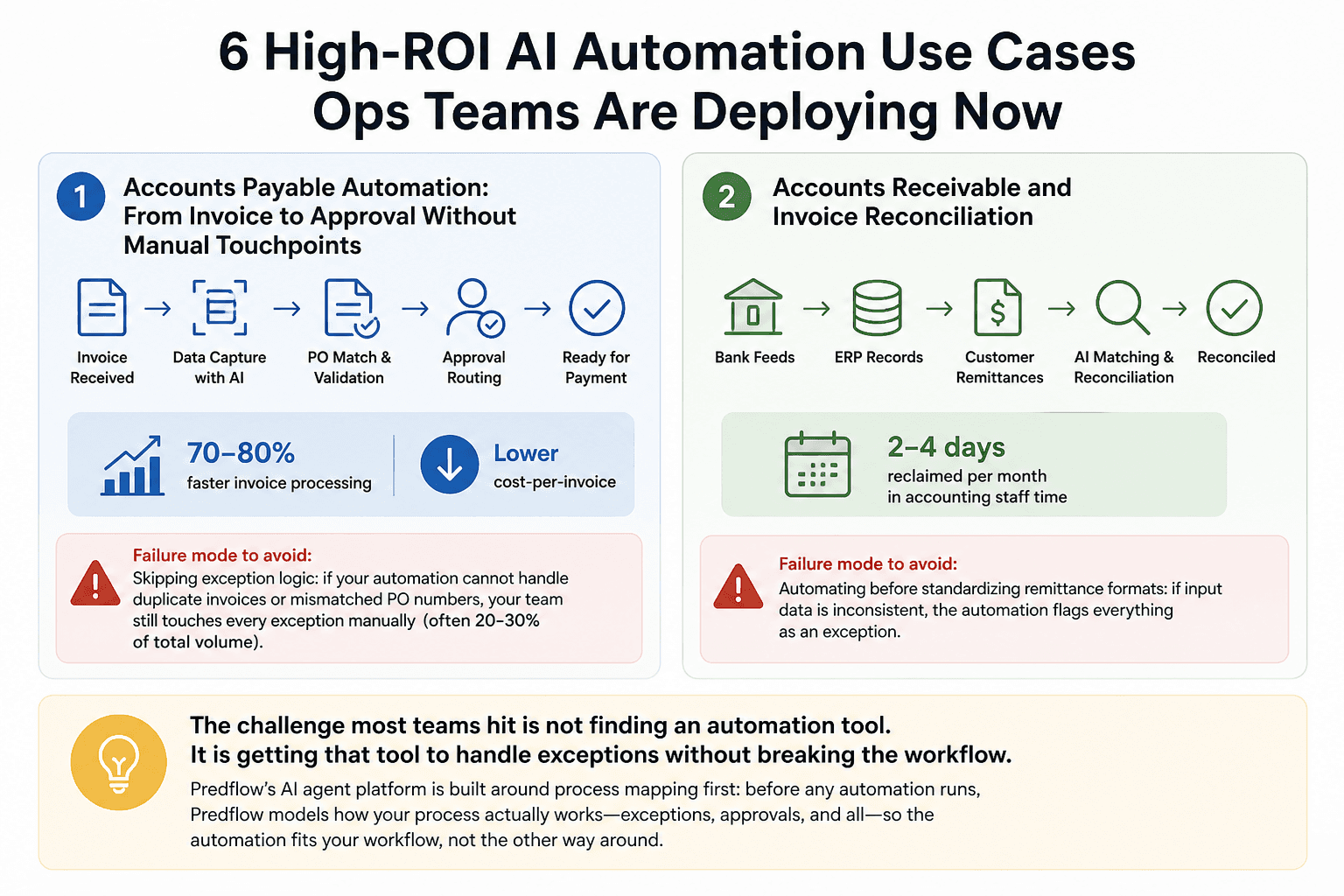
6 High-ROI AI Automation Use Cases Ops Teams Are Deploying Now
These are not theoretical applications. They are the deployment areas where ops teams are seeing measurable returns right now, paired with the specific failure mode to avoid in each one.
1. Accounts Payable Automation: From Invoice to Approval Without Manual Touchpoints
AP automation replaces manual invoice receipt, data entry, PO matching, and approval routing with an end-to-end automated workflow. Teams that automate AP typically cut invoice processing time by 70 to 80 percent and reduce cost-per-invoice significantly. The failure mode is skipping exception logic: if your automation cannot handle duplicate invoices or mismatched PO numbers, your team still touches every exception manually, which is often 20 to 30 percent of total volume.
2. Accounts Receivable and Invoice Reconciliation
Reconciliation automation eliminates the manual matching of payments to open invoices across bank feeds, ERP records, and customer remittances. Teams moving from manual to automated reconciliation routinely reclaim two to four days per month in accounting staff time. The failure mode is automating before standardizing remittance formats: if input data is inconsistent, the automation flags everything as an exception.
The challenge most teams hit is not finding an automation tool. It is getting that tool to handle exceptions without breaking the workflow. Predflow's AI agent platform is built around process mapping first: before any automation runs, Predflow models how your process actually behaves, including edge cases like duplicate invoices, mismatched PO numbers, or approval escalations. The result is an AP or reconciliation workflow that handles the 20 percent of exceptions that cause 80 percent of manual work.
3. Supply Chain and Procurement Automation
Supply chain management automation covers purchase order generation, supplier communication, delivery confirmations, and three-way matching. Automated supply chain workflows reduce manual procurement touchpoints and shrink lead times on routine purchase cycles. The failure mode is automating procurement without connecting it to inventory data, which creates orders that conflict with real-time stock levels.
4. HR Process Automation: Onboarding, Compliance, and Payroll Data
HR automation tools handle new hire data entry, document collection, system provisioning, and compliance checklist completion without manual coordination. Automated onboarding reduces time-to-productivity for new hires and removes the error risk of copying data across systems. The failure mode is automating onboarding before mapping which systems need to talk to each other, leaving gaps that still require manual intervention.
5. Expense Management and ERP Automation
Expense management automation connects receipt capture, policy checking, approval routing, and ERP posting into a single flow. ERP automation reduces month-end close time by eliminating manual journal entries and reconciliation steps. The failure mode is deploying expense automation without defining policy rules in the system first, which pushes policy enforcement back onto approvers rather than removing it.
6. Sales Order and Order-to-Cash Automation
Sales order automation handles order intake, validation, inventory checks, fulfillment triggers, and invoicing without manual handoffs between sales, ops, and finance. O2C automation shortens the cash conversion cycle and reduces errors between order entry and billing. The failure mode is automating the order creation step without connecting it to the fulfillment and AR systems, which just moves the manual work downstream.
How to Evaluate AI Automation Services: A Decision Framework for Ops Teams
Picking a tool before mapping your process is the single most common reason automation implementations stall. Before evaluating any vendor, you need to know exactly what your process does, where it breaks, and what constitutes a successful exception resolution.
Process Mapping Before Tool Selection: Why Sequence Matters
Automating a workflow that contains unnecessary steps or manual bottlenecks does not eliminate those problems. It accelerates them. Before any vendor conversation, document your current workflow step by step, identify every exception type and how it is currently handled, and define what "done" looks like for each scenario.
This is not about perfecting the process before automating it. It is about understanding it well enough to know what the tool needs to do.
Point Solution vs. Business Process Automation Platform: Which Fits Your Stack
A point solution automates one function well. An AP automation tool handles invoices. An hr automation tool handles onboarding. They are faster to deploy and easier to evaluate.
A business process automation platform connects multiple functions into a single automation layer. It is the right choice when your biggest inefficiency lives in the handoff between departments, not within a single one.
If your pain is contained to one function, start with a point solution. If your pain is in the connective tissue between finance, HR, and ops, a platform approach will serve you better long-term.
5 Criteria to Vet Any AI Automation Vendor
Exception handling capability: Confirm how the tool handles inputs that fall outside normal parameters. Ask for a live demonstration with a real edge case from your workflow.
Process mapping methodology: Vendors who start with tools rather than process understanding tend to build automations that break under real conditions.
Human oversight and escalation design: The automation should flag exceptions to a human with enough context to resolve them quickly, not just stop the workflow.
Integration depth with your existing ERP or CRM stack: Shallow integrations that require manual data exports defeat the purpose of automation.
Continuous improvement feedback loop: The tool should improve as your process evolves, not require a full rebuild when a form field changes.
AI Automation Services by Team: Matching the Right Tool to the Right Function
The right category of automation tool depends on where your highest-volume, lowest-value manual work currently sits.
Finance and AP Teams: Automation Software Built for Invoice and Reconciliation Workflows
Finance teams lose the most time to manual data handling between invoice receipt and payment posting. The right category of tool is accounts payable automation software with document processing automation built in. Look for intelligent document capture that handles variable invoice formats without manual template setup.
Supply Chain and Procurement Teams: Automated Procurement and Procure-to-Pay Tools
Procurement teams deal with approval bottlenecks, supplier communication gaps, and PO tracking across disconnected systems. Procure to pay automation tools solve this by connecting requisition, approval, PO issuance, and receipt confirmation in one automated flow. Look for tools with supplier portal integration and three-way match capability.
HR Teams: Human Resources Automation Software for Onboarding and Compliance
HR teams re-enter the same employee data across multiple systems at every hire and termination. Human resources automation software eliminates this by creating a single trigger point that pushes data to every connected system automatically. Look for tools that handle conditional logic, such as different onboarding paths for contractors versus full-time employees.
Cross-Functional Ops: Workflow Automation Platforms That Span Departments
When the problem is not within a function but between functions, a workflow automation platform that connects finance, HR, and supply chain is the right layer. These platforms act as the connective tissue between point solutions, routing data and decisions across departments without manual handoffs. The capability to look for is a visual workflow builder with native ERP and CRM integration, real-time exception routing, and audit logging for compliance. This is where the platform versus point-tool decision from the previous section becomes critical: cross-functional pain requires a platform-level answer.
What AI Automation Services Cost vs. What They Return: ROI Benchmarks
The business case for automation is not just cost reduction. It is the cost of what you avoid building as you scale.
Typical Cost Reduction Ranges by Function
These are industry benchmark ranges, not guarantees. Actual results depend on process complexity and implementation quality.
Function | Typical Cost or Time Reduction |
|---|---|
Accounts payable / AR | 60 to 80 percent reduction in processing time |
HR onboarding | 50 to 70 percent reduction in admin time per new hire |
Supply chain / procurement | 30 to 50 percent reduction in manual procurement touchpoints |
Expense management | 40 to 60 percent reduction in processing and approval cycle time |
Time-to-Value: When Do Teams See ROI?
Point solutions deployed against a well-mapped process typically show measurable ROI within 60 to 90 days. Platform deployments that span departments take longer, often three to six months, because the integration layer requires more configuration. Teams that skip process mapping before deployment consistently report longer time-to-value regardless of tool.
The Hidden Cost of Not Automating
Scaling a manual operation means hiring proportionally to volume growth. Every new invoice, new hire, or new purchase order adds incremental headcount cost. Automation breaks that equation by absorbing volume growth without adding staff, which is the only way ops teams scale without a corresponding rise in payroll.
Frequently Asked Questions
What is AI automation and how is it different from traditional RPA?
AI automation uses machine learning and context-aware agents to handle variable inputs, interpret unstructured data, and make judgment-based decisions within defined parameters. Traditional RPA follows fixed rules and fails when inputs deviate from the expected format. AI automation handles the exceptions that RPA cannot.
Which business processes benefit most from AI automation services?
Accounts payable, invoice reconciliation, HR onboarding, procurement, and expense management consistently deliver the highest ROI because they combine high transaction volume, repetitive manual steps, and structured data that AI can process reliably.
How long does it take to implement AI workflow automation?
Point solutions targeting a single function typically go live in four to eight weeks when the underlying process is well-documented. Cross-functional platform deployments range from three to six months depending on integration complexity and the number of exception types that need to be modeled upfront.
What should I look for in a business process automation platform?
Prioritize exception handling capability, depth of ERP and CRM integration, human escalation design, and a continuous improvement mechanism. A platform that cannot handle edge cases reliably will create more manual work, not less.
Can AI automation services integrate with our existing ERP or CRM?
Yes, but integration depth varies significantly between vendors. Look for native connectors to your specific ERP or CRM rather than generic API access. Shallow integrations that require manual data exports reduce the actual automation coverage and increase maintenance overhead over time.
Where to Go From Here
You now have a use case map, a vendor evaluation framework, and ROI benchmarks you can take to a CFO conversation. The decision in front of you is not whether to automate. It is which single process to automate first.
The most common reason automation projects stall is starting with a complex, cross-departmental workflow before proving value in one function. Pick your highest-volume, most repetitive process. Accounts payable, invoice reconciliation, and HR onboarding are the right starting points for most ops teams. Map the process completely before selecting a tool.
If you want to see how Predflow maps and automates your specific workflow before committing to a build, request a process assessment at predflow.com.
Bring 20 NetSuite bills to a 30-minute teardown
We will walk your actual invoices through capture, 3-way match and posting on the call, and tell you which steps an agent can take over. No prep beyond the PDFs.
FAQ
Frequently asked questions
What exactly is an AI agent
An AI agent is an autonomous system designed to handle specific business tasks end-to-end. Unlike simple chatbots, AI agents can reason, take actions, integrate with tools, and follow defined workflows.