AI AGENTS
AI Agents for Business: Where They Pay Back, Where They Fail, and How to Pick the First One
Learn how to deploy ai agents for business that solve real workflow gaps—not just FAQs. Pick the right use case and avoid the most common rollout mistakes.

Gautam Borad
Founder at Predflow
![Editorial illustration for AI Voice Bots: How They Work and How to Build One [2026]](https://framerusercontent.com/images/WwQiVcPGSsSEXNqwqRCEUCM7Q.png?width=1536&height=1024)
A finance manager greenlights an AI agent rollout. Six weeks later, the agent handles basic FAQs adequately. But the manual handoffs between the ERP and the approval system, the cross-system reconciliation that eats Tuesday afternoons, the exception emails that bounce between three inboxes: untouched. That is the pattern most AI agent deployments follow. Not a failure of the technology. A failure of scope.
AI agents for business deliver real ROI, but only on the right workflows. Most first deployments underdeliver because teams automate what is easy to demo, not what is expensive to do manually. Redirecting customers to help articles is not automation. Answering simple questions is not an agent. The work that actually consumes 60% of an operations team's week lives in the messy middle: approvals, reconciliations, exceptions, and cross-system handoffs.
This guide identifies which workflows pay back, diagnoses why most deployments fail in the first 90 days, and gives you a four-filter framework to pick the right first agent.
What AI Agents for Business Actually Do (Beyond the Pitch)
The four core characteristics of a functioning business AI agent
A real business AI agent has four defining characteristics:
It perceives its environment. The agent reads live data from connected systems, not a static knowledge base.
It reasons and decides. It evaluates conditions and chooses an action, rather than following a fixed script.
It acts inside real workflows. It writes to systems, triggers approvals, routes tasks, or flags exceptions. It does not just respond with text.
It learns from feedback. It adjusts behavior based on outcomes, escalations, and human corrections over time.
If a tool cannot do all four, it is not an AI agent. It is a chatbot with a better UI.
AI agent vs. chatbot vs. agentic AI: the practical difference
The confusion between these three terms is where most buying decisions go wrong.
Chatbot or Basic Automation | AI Agent |
|---|---|
Responds to a single input with a pre-written answer | Reads context across multiple inputs and acts accordingly |
Follows a fixed decision tree | Evaluates conditions and selects from multiple possible actions |
Operates inside one interface | Connects to and acts across multiple systems |
Escalates by failing silently or looping | Escalates with context, flagging what it could not resolve and why |
Resets after each conversation | Retains task state across a multi-step workflow |
Agentic AI goes one level further. Where a single AI agent handles one defined workflow, agentic AI coordinates multiple agents working in parallel across departments. Think of it as the difference between one specialist and a coordinated team. For most businesses starting out, a single well-scoped agent on one high-friction workflow is the right first move.
Generative AI produces content: text, code, images. An AI agent acts on the world. The difference between generative AI and agentic AI is the difference between a writer and an operator. Both use language models, but only one closes the loop on a business process.
How AI agent workflow differs from traditional automation
Traditional automation, like rule-based RPA, executes rigid sequences. It breaks when the input deviates from the expected format. An AI agent workflow handles variability. It reads a vendor invoice in an unexpected format, maps the fields to the correct schema, checks against the purchase order, and routes for approval or flags the discrepancy.
The structure of an AI agent includes a perception layer, a reasoning engine (typically an LLM), a memory component, and an action layer connected to external tools and systems. That architecture is what separates an agent from a macro.
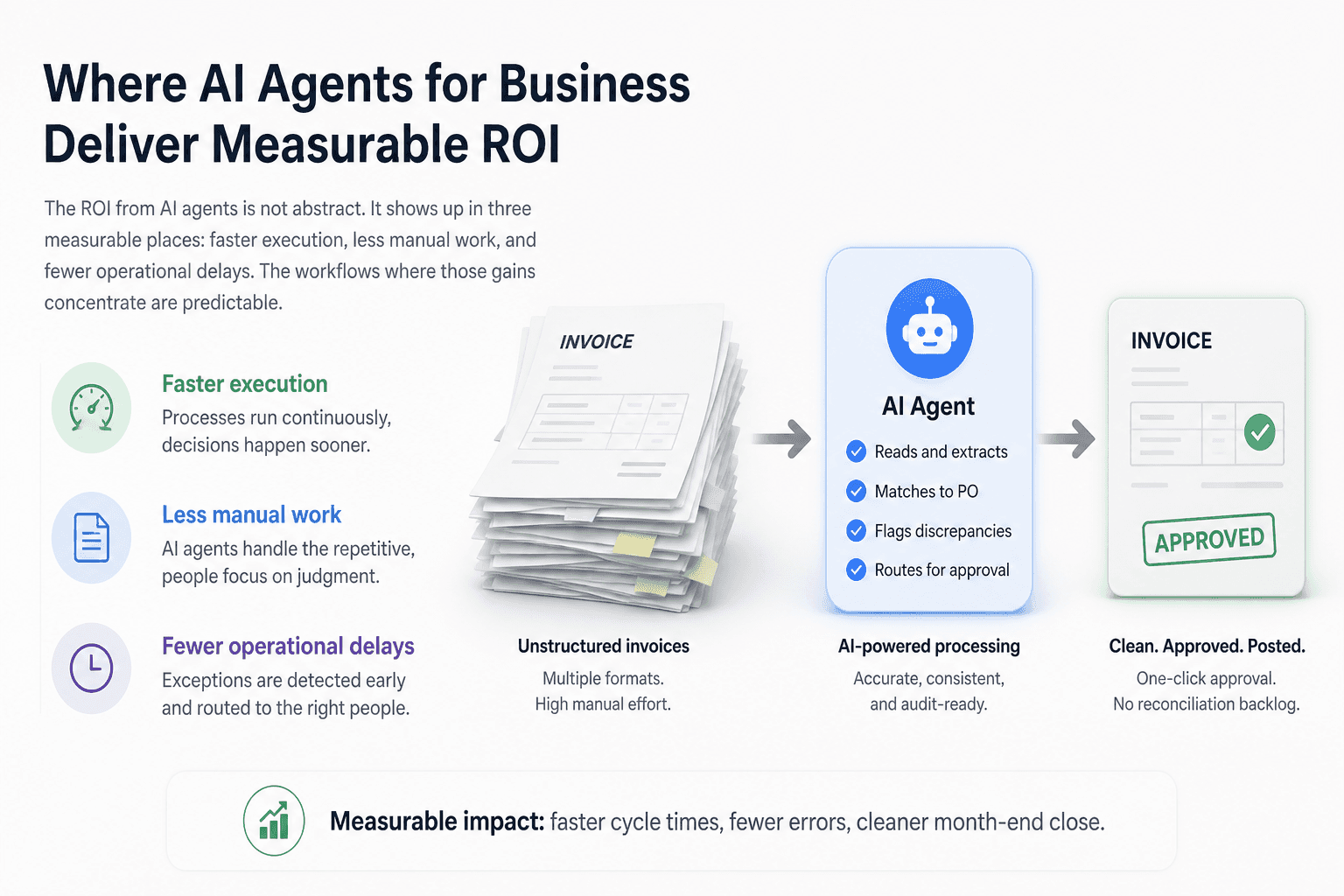
Where AI Agents for Business Deliver Measurable ROI
The ROI from AI agents is not abstract. It shows up in three measurable places: faster execution, less manual work, and fewer operational delays. The workflows where those gains concentrate are predictable.
Finance and accounts payable: invoice processing and reconciliation
Invoice processing is one of the highest-friction workflows in any mid-size business. A single invoice can touch five people: the vendor sends it, AP receives it, a manager approves it, finance reconciles it against the PO, and someone manually keys the result into the ERP. Each handoff adds delay and error surface.
An AI agent built for this workflow reads incoming invoices regardless of format, extracts line items, matches them against purchase orders in the system of record, flags discrepancies with a reason code, and routes clean invoices for one-click approval. The manual work that remains is judgment-based, not mechanical.
For accounts payable teams managing high invoice volumes, the gain is not just speed. It is the elimination of the reconciliation backlog that compounds every month-end close.
Supply chain and operations: exception handling and status routing
In supply chain, the expensive work is not the standard order. It is the exception. A delayed shipment triggers a chain: the 3PL needs to be contacted, the warehouse needs a revised ETA, the customer needs an update, and someone needs to decide whether to expedite or substitute.
That chain typically runs through email, spreadsheets, and three different systems. An AI agent monitors for trigger conditions, pulls status data from the relevant systems, and routes the exception to the right person with context already assembled. The operations manager makes the call. The agent handles the coordination.
Status routing, shortage alerts, and supplier escalations are all structured enough for an agent to handle reliably, and all high enough volume that the manual cost is significant.
Customer operations: resolution workflows beyond FAQ deflection
The common mistake in customer operations is deploying an AI agent to deflect tickets to help articles. Customers with real problems, refund disputes, order confirmation failures, or delivery issues, do not want a link. They want a resolution.
AI agents built for customer operations connect to the order management system, pull the specific transaction record, determine what resolution is available based on policy, and either resolve it autonomously or prepare a complete summary for a human agent to close in one interaction. That is the difference between deflection and resolution. The ROI from resolution workflows is measurable in handle time, escalation rate, and customer satisfaction.
AI agents are augmenting teams here, not replacing them. The human handles the judgment calls. The agent handles the data assembly and the clean-path resolutions.
Why Most Business AI Agent Deployments Fail in the First 90 Days
Mistake 1: Starting with a tool instead of a mapped process
Most AI agent deployments start with a vendor demo. The demo shows a clean scenario: an invoice arrives, the agent processes it, everyone applauds. What the demo never shows is the invoice that arrives as a scanned PDF with a handwritten PO number, the one that references a contract that lives in a different system, or the one where the vendor number does not match any record.
When teams buy the tool before mapping the process, they configure the agent for the clean path. The messy middle, which is where 40% of real volume lives, gets routed to exceptions that no one planned for.
This is the gap Predflow was built to address. Unlike tools-first platforms, Predflow starts with process mapping, documenting the exact workflow, edge cases, and system touchpoints before a single agent is configured. The result is agents that handle the messy middle of real operations, not just the clean-path scenarios a demo environment shows.
Mistake 2: Deploying agents disconnected from live system data
An AI agent without live data access is a chatbot with extra steps. It cannot reconcile an invoice against a purchase order it cannot read. It cannot route a supply chain exception if it cannot query the 3PL's status feed. It cannot resolve a customer issue if it has no access to the order record.
A knowledge base in AI is useful for context. It is not a substitute for system integration. The agent needs read and write access to the systems that own the data. That means API connections, proper permissions, and data that is current, not cached from last night's export.
Teams that skip this step deploy agents that answer general questions adequately and fail on every case that requires specific operational data. That is not ROI. That is a more expensive FAQ page.
Mistake 3: Scoping too broadly instead of one high-friction workflow
The instinct to automate everything at once is understandable. The business case feels stronger when the scope is bigger. But broad scope is where deployments die. The agent is configured for five workflows simultaneously, none of them fully mapped, and the edge cases from each workflow collide.
Start with one high-friction workflow. Define done precisely. Run it in a controlled environment with human oversight. Measure the result. Then expand. Controlled deployment delivers measurable value faster than aggressive automation, every time.
How to Pick Your First AI Agent for Business: A Four-Filter Decision Framework
The best AI agent is the one that solves a defined bottleneck you can measure. Apply these four filters to any candidate workflow before committing time or budget.
Filter 1: Is the workflow repetitive with clear rules and measurable volume?
Evaluating question: Does this workflow run on identifiable rules, and do you process it at least weekly at meaningful volume?
Green light: The process has clear inputs, defined outputs, and documented decision rules. Volume is high enough that automation saves at least several hours per week.
Red flag: The workflow requires frequent judgment calls that are not documented anywhere, or volume is too low to justify the configuration cost.
Filter 2: Can the agent connect to the systems that own the data?
Evaluating question: Does your candidate agent platform have proven integrations with the specific tools this workflow touches?
Green light: The platform has native connectors or documented API access to your ERP, CRM, or core operational systems. Permissions can be scoped appropriately.
Red flag: The vendor says integration is possible but cannot show a working example with your stack. "We can build that" is a red flag at the evaluation stage.
Filter 3: Does the platform support human oversight and exception escalation?
Evaluating question: When the agent encounters a case outside its scope, what happens and who gets notified?
Green light: The platform has configurable escalation paths, a clear audit trail, and the ability for a human to review and override any agent decision.
Red flag: The platform's answer to edge cases is "the agent will handle it." No escalation path means no control, and no control means one bad decision compounds into many.
Filter 4: Can you measure success within 60 days?
Evaluating question: Can you define a specific metric today that will tell you whether this deployment worked?
Green light: You can name the metric now: invoice processing time, exception handle time, manual touchpoints per transaction. Baseline is known or measurable.
Red flag: Success is defined as "the team feels less burdened." That is not a metric. If you cannot measure it, you cannot defend the budget in 90 days.
What to Demand from an AI Agent Platform Before You Sign
Integration depth: APIs, permissions, and live data access
A reliable AI agent platform earns its place by connecting deeply to existing systems, not by requiring you to change them.
Confirm native connectors or documented REST API access for every system the workflow touches
Verify that permissions can be scoped to the minimum required access. Write access to a production ERP is a risk that needs controls
Ask specifically about data freshness. Does the agent query live data, or does it work from a batch export?
Test the integration with real data before signing. A sandbox demo is not sufficient proof
Reliability and edge-case handling: what happens when the process breaks
Every AI agent workflow will encounter inputs it was not built for. The platform's behavior at that boundary determines whether the deployment succeeds or erodes trust.
Ask for the vendor's escalation path documentation. Not a description. The actual configured workflow
Confirm that unhandled exceptions are logged with enough context for a human to diagnose and resolve quickly
Ask how the agent handles partial data, ambiguous inputs, or system timeouts
Establish uptime and response time SLAs in writing before deployment
Human oversight controls and audit trail requirements
In finance and operations contexts, an AI agent that cannot be audited is a liability, not an asset.
Every agent action should be logged with a timestamp, the input that triggered it, and the decision the agent made
Human override must be accessible at every step, not just at the escalation endpoint
Confirm the platform can produce an audit trail that satisfies your compliance or finance team requirements
Check whether the oversight dashboard is usable by an operations manager, not just an engineer
Frequently Asked Questions
What are the four core characteristics of an AI agent?
A functioning business AI agent perceives its environment through live data, reasons to make decisions rather than following a fixed script, acts inside real systems by writing, routing, or triggering actions, and learns from feedback over time. A tool missing any one of these four characteristics is automation, not an agent.
What is the difference between agentic AI and generative AI?
Generative AI produces content, such as text, code, or images, in response to a prompt. Agentic AI acts on the world. It uses a language model as its reasoning engine but connects that reasoning to real systems, completes multi-step tasks, and closes the loop on a business process without requiring a human to execute each step.
How long does it take for an AI agent to show ROI in a business workflow?
On a well-scoped, single-workflow deployment, measurable results appear within 30 to 60 days. The key condition is that success metrics are defined before deployment starts. Broad or poorly scoped deployments rarely show clear ROI within 90 days because there is no clean baseline to compare against.
Can AI agents work with existing business software and tools?
Yes, provided the platform has proper API access or native connectors to the relevant systems. The agent's value depends entirely on its ability to read from and write to the systems that own the operational data. Integration depth is the most important vendor evaluation criterion before any other feature.
What types of AI agents are best suited for back-office operations?
Knowledge-based agents with structured decision logic work well for rule-driven processes like invoice matching and compliance checks. For workflows that involve variable inputs and exception handling, agents built on LLM reasoning with live system access perform better. The right agent type depends on how structured the process inputs are.
What is agentic RAG and does my business need it?
Agentic RAG, or retrieval-augmented generation, is an architecture where an AI agent dynamically retrieves relevant information from a knowledge base before reasoning and acting. It is most useful when the agent needs to answer questions grounded in proprietary documents, policies, or product data. For pure workflow automation with structured system data, standard API integration is more reliable than RAG.
Conclusion
If you have read this far and can already name one workflow that meets three or more of the four filters, you do not need more research. You need a vendor conversation with a specific process on the table.
If you are still deciding which workflow to start with, do one exercise before anything else. Map a single process end to end, from trigger to resolution, and count every manual handoff. More than four handoffs in a repeatable workflow is a strong signal that an agent can eliminate most of them reliably.
The real risk in AI agent adoption is not moving too slowly. It is moving too broadly, automating the wrong workflow first, and burning credibility on a deployment that fails because the scope was wrong. That is the mistake that pushes AI investment back by a year in most organizations.
If you have a workflow in mind and want to pressure-test it against the four filters with someone who has mapped hundreds of business processes, talk to the Predflow team. No demo script. Just your process and whether an agent can handle it reliably.
Bring 20 NetSuite bills to a 30-minute teardown
We will walk your actual invoices through capture, 3-way match and posting on the call, and tell you which steps an agent can take over. No prep beyond the PDFs.
FAQ
Frequently asked questions
What exactly is an AI agent
An AI agent is an autonomous system designed to handle specific business tasks end-to-end. Unlike simple chatbots, AI agents can reason, take actions, integrate with tools, and follow defined workflows.