AI AGENTS
AI Agent vs RPA vs Chatbot: What Each One Automates, and How to Tell Which You Actually Need
AI agent vs RPA vs chatbot — which one solves your workflow problem? Compare all three with real examples and find the right fit for your business.

Gautam Borad
Founder at Predflow
![Editorial illustration for AI Voice Bots: How They Work and How to Build One [2026]](https://framerusercontent.com/images/s6EBBaCFS4KZfJpnHDCMCNBoeA.png?width=1536&height=1024)
You automated an invoice process with RPA. It ran cleanly for three months. Then a vendor updated their PDF layout, shifted a field name, and the script silently broke. Invoices stacked up. No one knew until the AP team started getting calls from suppliers.
That failure is not a sign that automation does not work. It is a sign that the wrong kind of automation was chosen for that specific job.
The real question in 2025 is not whether to automate. It is whether the tool you picked can handle what your process actually demands. RPA, AI agents, and chatbots solve genuinely different problems. Confusing them leads to broken pipelines, maintenance debt, and teams that distrust automation entirely.
By the end of this article, you will be able to match your specific workflow problem to the right tool, without guessing and without a consultant.
What Each Tool Actually Does (Without the Marketing Language)
Most confusion about ai agent vs rpa starts with vendors using these terms interchangeably. They are not interchangeable. Each tool has a distinct input requirement, a distinct capability boundary, and a distinct failure mode.
RPA: A Script That Clicks Through Screens So You Do Not Have To
Definition: RPA is software that follows a fixed sequence of steps across applications, mimicking what a human would click, copy, and paste.
Input it needs: Structured, predictable data in a consistent format. Same field, same location, every time.
What it cannot do: Handle variation. If a form changes, a column shifts, or a document layout differs from the template, the script fails. RPA runs silently in the background like a predefined batch job. It does not read context. It executes the script it was given, nothing more.
AI Agents: Software That Reads Context and Makes Decisions Across Systems
Definition: An AI agent is software that interprets context, evaluates conditions, and takes action across systems, including when the situation does not match a preset rule.
Input it needs: Structured or unstructured data. Emails, PDFs, API responses, database records. Format flexibility is the point.
What it cannot do: Guarantee deterministic outcomes on every run the way RPA can. AI agents introduce probabilistic decision-making, which requires guardrails, exception flagging, and human oversight for high-stakes processes.
Unlike RPA, an AI agent can interact directly with systems, APIs, third-party users, and dynamic data sources. It adapts based on context and user intent rather than executing a fixed path.
Chatbots: Conversation Interfaces, Not Process Engines
Definition: A chatbot is a conversation layer that responds to user input through text or voice, typically following decision trees or language models.
Input it needs: A user prompt or question.
What it cannot do: Execute multi-step backend processes autonomously. A chatbot can retrieve information or trigger a workflow. It does not run the workflow itself. Treating a chatbot as a process automation tool is the most common category error in this space.
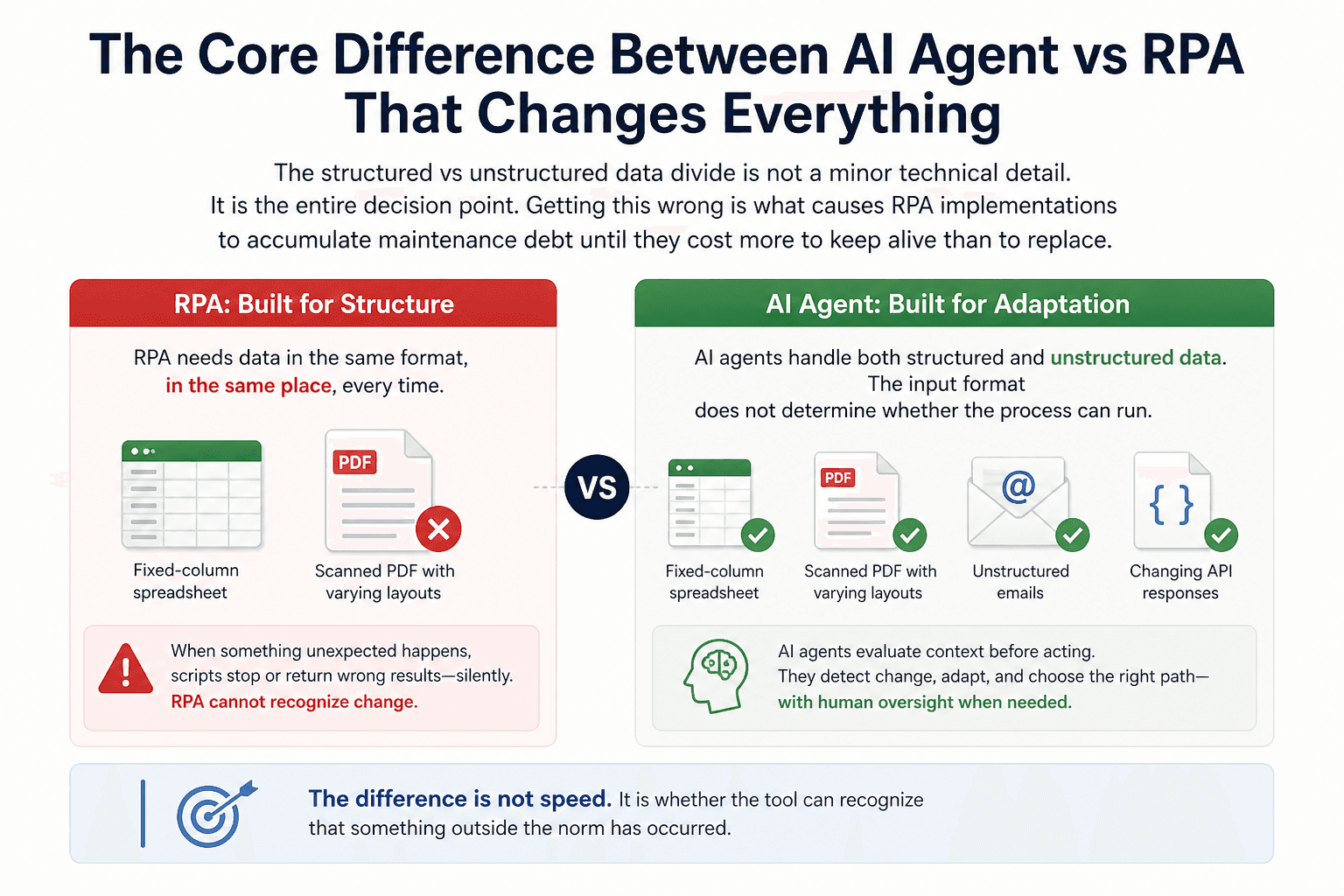
The Core Difference Between AI Agent vs RPA That Changes Everything
The structured vs unstructured data divide is not a minor technical detail. It is the entire decision point. Getting this wrong is what causes RPA implementations to accumulate maintenance debt until they cost more to keep alive than to replace.
Structured Data vs Unstructured Data: Why Input Format Determines Which Tool Wins
RPA needs data in the same format, in the same place, every time. A purchase order that always arrives as a fixed-column spreadsheet is a strong RPA candidate. An invoice that arrives as a scanned PDF from dozens of different suppliers, each with a different layout, is not.
AI agents handle both. They can extract line items from a PDF without knowing the template in advance, classify an email as an exception requiring escalation, or pull relevant data from an API response that changes structure month to month. The input format does not determine whether the process can run.
Fixed Logic vs Adaptive Decisions: What Happens When the Unexpected Occurs
RPA executes fixed logic. When something unexpected happens, the script stops or produces a wrong output silently. There is no mechanism for the tool to recognize that the situation has changed.
AI agents evaluate context before acting. When a document looks different from prior examples, the agent can flag it, route it for review, or apply a different extraction strategy. The difference is not speed. It is whether the tool can recognize that something outside the norm has occurred.
"AI can handle unstructured information, such as classification, extraction, and sentiment analysis, while RPA is much stronger at structured or repeatable information."
That distinction determines which tool belongs in which part of your workflow. It is not about which technology is newer or more advanced. It is about what your process actually feeds the tool.
Why RPA Breaks Are Not Bugs. They Are the Design
When your RPA script breaks after a system update, that is not a failed implementation. That is the architecture working exactly as designed. RPA uses system-specific scripts tied to the exact state of the interface it was built against. Change the interface and the script breaks.
AI agents integrate through API-driven connections to dynamic ecosystems. When a downstream system updates, the agent continues operating because it is not dependent on screen coordinates or field positions. The maintenance burden shifts from emergency fixes to continuous improvement of guardrails and capabilities.
Total Cost of Ownership: What AI Agent vs RPA Actually Costs Over Time
Implementation cost is the number teams use to make the initial decision. Maintenance cost is the number that determines whether that decision was right.
The 20-30% Annual Maintenance Tax That RPA Quietly Charges
RPA maintenance runs 20 to 30% of initial development cost every year. A $100,000 RPA implementation does not cost $100,000. It costs $120,000 to $130,000 in year two, more in year three as the system it automates continues to evolve.
This cost is structural. It comes from the architecture. Every system update, UI change, or process variation generates a maintenance event. Organizations with large RPA estates spend more engineer time keeping existing bots running than building new automation.
Why AI Agent Maintenance Costs Go Down While RPA Costs Go Up
AI agent maintenance runs 10 to 15% of initial development cost annually, and that cost decreases as the agent accumulates context and improves its handling of edge cases. The maintenance work shifts from emergency script repair to expanding what the agent can handle.
Enterprises that transitioned from RPA to AI agents have reported a 40% reduction in total cost of ownership within 24 months. That is not a marginal improvement. It is a structural cost curve reversal. One curve compounds upward. The other trends downward as capability matures.
Deployments tracked over three years show 210% ROI with payback periods under six months. The upfront investment in AI agents is typically higher than equivalent RPA. The three-year math runs in the opposite direction.
The 24-Month Break-Even Point Most Teams Do Not Calculate
Most teams compare RPA and AI agent costs at implementation and stop there. The 24-month calculation changes the result entirely. Factor in annual maintenance, the engineer hours spent on break-fix work, and the process failures that occur during downtime. RPA becomes more expensive than its sticker price within two years for any process that touches variable inputs or evolving systems.
If your team is at the point where RPA maintenance is consuming more engineer time than new automation work, Predflow's AI agent platform addresses that inflection point directly. It starts with process mapping rather than template deployment, so you are replacing the architecture causing the breaks, not rebuilding the same scripts on a new tool.
Which Automation Fits Which Workflow Problem: A Decision Framework
Matching the tool to the problem removes the guesswork. The table below covers the three primary cases. The fourth case, combining both tools, is covered separately below.
Use RPA When: The Process Is Stable, Structured, and Unlikely to Change
Workflow Condition | Right Tool | Why It Fits |
|---|---|---|
Fixed-format data entry across two systems | RPA | Consistent input means the script runs without variation |
Scheduled report extraction from a static database | RPA | No judgment needed, no format variance |
High-volume, identical transaction processing | RPA | Speed and repeatability are the only requirements |
ERP data migration between two known schemas | RPA | Both ends are structured and controlled |
RPA works when you can define every step in advance and the underlying systems will not change without planned maintenance windows.
Use an AI Agent When: The Process Involves Judgment, Exceptions, or Unstructured Inputs
Workflow Condition | Right Tool | Why It Fits |
|---|---|---|
Invoice processing from multiple supplier formats | AI Agent | Variable document layouts require contextual extraction |
Accounts payable exception handling and routing | AI Agent | Judgment on whether to approve, flag, or escalate |
Procurement email triage and response | AI Agent | Unstructured input, variable intent, required action |
O2C and procure-to-pay workflows with exceptions | AI Agent | Multi-system coordination with conditional logic |
HR document review across non-standard submissions | AI Agent | Unstructured inputs, policy-conditional decisions |
Use an AI agent when the process cannot be fully scripted because the inputs vary, the decisions require interpretation, or the downstream action depends on context.
Use a Chatbot When: The Problem Is Access and Response, Not Process Execution
Workflow Condition | Right Tool | Why It Fits |
|---|---|---|
Employee self-service for HR policy questions | Chatbot | Retrieves information, no process execution needed |
Customer order status inquiry | Chatbot | Lookup and response, triggered from existing data |
Internal IT helpdesk first-response triage | Chatbot | Routes tickets, does not resolve them |
A chatbot is the right tool when the friction is access to information, not execution of a process. If resolving the request requires coordinating across systems, making a decision, or taking a multi-step action, a chatbot alone will not close the loop.
Use RPA and AI Agents Together When: You Have Both Layers in the Same Workflow
Many real workflows contain both a structured layer and an exception layer. RPA handles the predictable, rules-based steps: pulling data from a system, entering validated records, generating standard outputs. AI agents manage what RPA cannot: reading a non-standard document, deciding how to handle a mismatch, routing an exception to the right reviewer, and resuming the process after resolution.
This handoff architecture is how mature automation implementations operate. RPA establishes the structural backbone. AI agents handle the judgment layer that sits above it. Neither tool is redundant. They operate on different parts of the same workflow.
How to Identify Which AI Agent vs RPA Problem You Actually Have Right Now
Reading a framework is useful. Applying it to your own process is what produces a next step.
Five Questions to Audit Your Current Automation Gap
Does your process receive data in a consistent, identical format every time?
Yes: RPA is viable. No: RPA will break here.Has your current automation broken after a system update in the past 12 months?
Yes: You have hit RPA's architectural ceiling. No: The current tool may still be adequate.Does your process require a human to review exceptions before the workflow continues?
Yes: An AI agent with exception flagging fits better than RPA alone. No: Continue with the current tool.Does your process involve documents, emails, or inputs that arrive in variable formats?
Yes: AI agent for the extraction layer. No: RPA can handle the input step.Is the primary user problem getting an answer, or getting a task completed?
Answer: Chatbot fits. Task completion: AI agent or RPA depending on process structure.
Red Flags That Mean Your RPA Implementation Has Already Hit Its Ceiling
These are operational symptoms, not technology concepts.
Rising maintenance tickets after routine system updates. If every vendor upgrade or ERP patch generates a support queue, the bot fleet has become a liability.
Manual exception handling that never decreased. RPA was supposed to reduce human intervention. If your team still manually processes the same volume of exceptions it did before the implementation, the automation is only handling the easy cases.
Process failures that no one notices until the damage is done. Silent RPA failures are a structural property of scripts that cannot self-assess. If you find out about a broken process from a supplier call or an overdue report, the tool cannot tell you it stopped working.
Automation projects stalled because the next process is "too complex." When the easy, structured processes are automated and the remaining backlog all involves judgment or variable inputs, RPA has reached its natural boundary.
Frequently Asked Questions
What is the main difference between an AI agent and RPA?
RPA follows a fixed script and works only with structured, predictable inputs. An AI agent interprets context, handles variable inputs including unstructured documents, and makes decisions when conditions fall outside predefined rules. RPA executes; AI agents evaluate and act.
Can AI agents replace RPA entirely?
Not in every case. For stable, high-volume, structured processes where the format never changes, RPA is faster to implement and operationally simpler. AI agents add value where judgment, variable inputs, or exception handling are part of the workflow. Most mature automation environments use both.
When does it make sense to use RPA instead of an AI agent?
Use RPA when the process is fully structured, the input format is fixed, the underlying systems are stable, and no decision-making is required. Data entry between two known systems, scheduled report generation, and identical transaction processing are strong RPA use cases.
What is a chatbot and how is it different from an AI agent?
A chatbot is a conversation interface that retrieves information or triggers a workflow in response to a user prompt. An AI agent executes multi-step processes autonomously across systems. A chatbot answers a question about an invoice status. An AI agent processes the invoice.
How much does it cost to switch from RPA to AI agents?
The upfront cost of AI agents is typically higher than equivalent RPA. The 24-month math reverses that. RPA maintenance runs 20 to 30% of development cost annually. AI agent maintenance runs 10 to 15% and decreases over time. Enterprises that have made the transition report a 40% reduction in total cost of ownership within two years.
What is intelligent automation and how does it combine RPA and AI?
Intelligent automation refers to workflows where RPA handles the structured, rule-based execution layer and AI agents manage exceptions, unstructured inputs, and context-dependent decisions. RPA provides the repeatable backbone. AI agents handle what falls outside the script. Together they cover processes that neither tool could handle alone.
Conclusion
Here is the decision in plain terms. If your top workflow problem involves stable, structured, predictable steps with no exceptions and no variation in input format, your existing RPA investment still has room to run. Extend it.
If your process involves judgment calls, variable documents, exception volumes that consume team time, or recurring breaks after system updates, you have already hit RPA's architectural ceiling. You are paying the maintenance tax every month for a tool that cannot solve the problem you actually have.
The most useful next step is not reading more comparisons. It is mapping the one process that breaks most often right now and asking whether the failure is a script problem or a judgment problem. That answer tells you which tool you need, and it takes less than an hour to determine.
If you have identified a process where judgment, exceptions, or unstructured data are the real bottleneck, see how Predflow builds AI agents around your specific process map, not around generic templates.
Bring 20 NetSuite bills to a 30-minute teardown
We will walk your actual invoices through capture, 3-way match and posting on the call, and tell you which steps an agent can take over. No prep beyond the PDFs.
FAQ
Frequently asked questions
What exactly is an AI agent
An AI agent is an autonomous system designed to handle specific business tasks end-to-end. Unlike simple chatbots, AI agents can reason, take actions, integrate with tools, and follow defined workflows.