Business Ops
8 Tools in Time Management for Operations Teams
Discover 8 tools in time management built for ops teams juggling approvals, handoffs, and systems. Fix the real workflow problems slowing your team down.

Sanya Shah
Co-founder, Predflow

By 9 AM, an operations manager has already fielded a missed vendor approval, discovered that two team members duplicated work on the same invoice, and realized the CRM and ERP still don't share data from last quarter's contract update. The problem is not discipline or effort. The problem is that most tools in time management were designed for individual knowledge workers, not for teams where every task touches another system, another person, or another approval chain.
Common time management mistakes, such as procrastination, poor scheduling, and overcommitting, are individual failures. (Source: the common mistakes people make in their time management) Operations teams rarely suffer from those. They suffer from structural failures: handoffs that fall through, processes that have no visibility layer, and tools that track time without addressing where that time actually disappears.
This article evaluates 8 tools in time management specifically against the needs of operations, finance, and back-office teams, not solo knowledge workers building personal productivity systems.
What Makes a Time Management Tool Actually Useful for Operations Teams
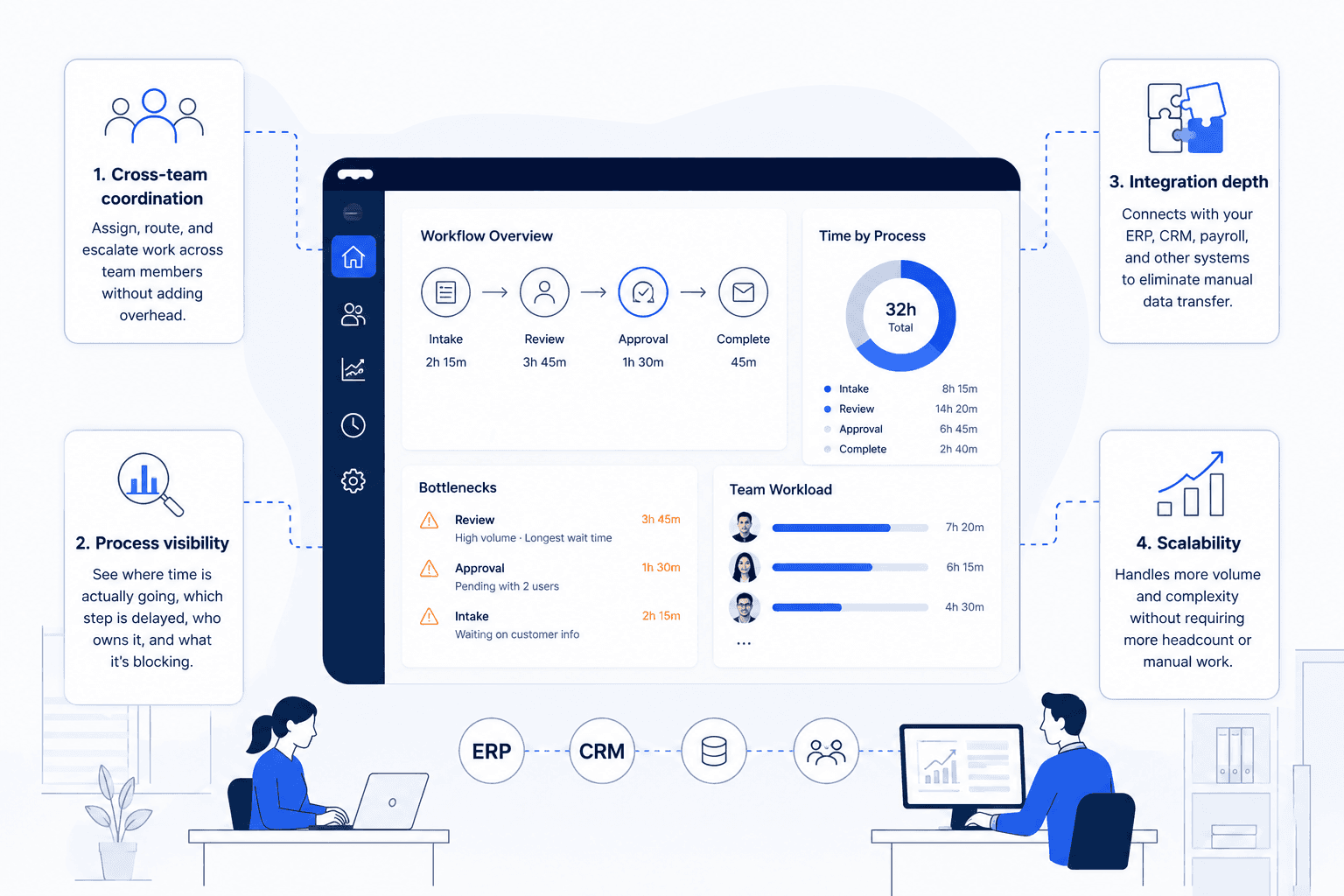
Most tools get reviewed on interface quality and feature count. Operations teams need a different filter. Here are the four criteria that separate tools built for operational workflows from tools built for individual productivity. (Source: 10 Time Management Tools & Practices | The Workstream)
Cross-team coordination vs. individual task management: A tool that tracks your tasks but can't assign, route, or escalate work across team members adds overhead instead of removing it.
Process visibility: can you see where time is actually going? Visibility means knowing which step in a workflow is delayed, who owns it, and what it's blocking, not just how many hours were logged this week.
Integration depth with systems your team already uses: A time management tool that doesn't connect to your ERP, CRM, or payroll system forces manual data transfer, which is exactly the problem it should solve.
Scalability: does the tool grow with volume or demand more staff? If doubling your invoice volume means doubling the manual work of updating statuses, the tool is not scaling, your team is.
Use these four criteria as a buying rubric when reading the tool descriptions below. No tool will score perfectly on all four. The goal is to identify which gaps you can accept and which ones will cost you.
The 8 Best Tools in Time Management for Operations Teams
Productivity YouTubers frequently demo ClickUp and Motion for personal scheduling: color-coded calendars, auto-scheduled task blocks, daily focus sessions. Those demos are optimized for solo knowledge workers. They do not show what happens when a five-step approval workflow breaks at step three, or when two departments need to reconcile task status across different tool instances. Evaluate every tool below against your operations context, not the demo scenario.
1. ClickUp: Unified task, timeline, and time tracking for ops-heavy teams
Best for: Operations teams that need project management planning tools, task tracking, and time logging inside one platform.
ClickUp consolidates task management, timeline views, and built-in time tracking in a single workspace, which reduces the tab-switching that fragments operations work. It supports cross-functional project visibility through shared dashboards and dependency tracking. Custom workflow automations handle routine status updates without manual input.
Limitation: Configuration overhead is high. Teams without a dedicated admin spend more time building the system than using it.
2. Toggl Track: Lightweight time tracking for teams that need billing or audit trails
Best for: Finance and accounts payable teams that need accurate time logs for vendor billing or compliance reporting.
Toggl Track's strength is simplicity: start a timer, tag a project, export a report. For teams managing billable hours across vendors or building audit trails, that simplicity is an asset rather than a compromise. It integrates with project tools and feeds data into cost estimation workflows cleanly.
Limitation: No native workflow management. It tracks time but cannot coordinate the work itself, which means it solves only one layer of the operations problem.
3. Motion: AI-driven scheduling for managers juggling constant priority shifts
Best for: Operations managers whose daily schedules are constantly disrupted by incoming escalations and shifting priorities.
Motion uses AI to auto-schedule tasks based on deadlines and availability, rebuilding the day's plan automatically when priorities shift. That automatic rescheduling is genuinely useful for managers who spend the first hour of every day manually re-sorting their task list. It applies AI-driven scheduling without requiring manual drag-and-drop calendar work.
Limitation: Motion optimizes for individual schedules. It does not coordinate handoffs between team members or provide cross-team process visibility.
4. Jira: Structured sprint and workload management for technical operations
Best for: Technical operations or IT teams running structured sprints and needing agile project management tools with detailed ticket tracking.
Jira's sprint boards, backlog management, and workload reporting make it one of the best agile tools for teams that operate in iterative cycles. It handles software project scheduling and resource management with precision. Reporting is detailed enough to support project monitoring and control across multi-team environments.
Limitation: Jira's configuration complexity and agile-native structure make it a poor fit for operations teams that work in continuous-flow processes rather than discrete sprints.
5. Asana: Workflow automation and cross-functional project visibility
Best for: Back-office teams coordinating multi-step processes across departments where project and task management tools need to span teams.
Asana's workflow builder automates routine handoffs: when task A is marked complete, task B is assigned automatically to the right person. Cross-functional project timelines give operations leaders visibility without requiring daily status meetings. It integrates with a wide range of content management tools and communication platforms.
Limitation: Asana's automation is rule-based and works well for predictable workflows. When conditional logic or exception handling is required, manual intervention is still needed.
6. Monday.com: Visual resource and workload management across departments
Best for: Operations leaders who need to balance workload across teams and want visual resource management tools without heavy configuration.
Monday.com's board and dashboard views make resource allocation visible at a glance, useful when managing staff across projects with competing deadlines. It supports OKR management and connects to CRM project management software through native integrations. Teams can build project monitoring systems that surface bottlenecks without exporting data manually.
Limitation: Pricing scales quickly with team size, and advanced automation features require higher-tier plans that push costs up for mid-sized operations teams.
7. Clockify: Free time tracking with payroll and attendance reporting hooks
Best for: Finance and HR-adjacent operations teams that need payroll and attendance software integration without additional licensing cost.
Clockify is one of the few open source project management tools with robust time tracking that connects directly to payroll workflows. Teams can track hours by project, department, or individual and export structured reports for payroll processing. The free tier covers most core features, which makes it viable for cost-conscious back-office teams.
Limitation: Clockify's project management features are basic. It works as a time tracking layer but requires another tool for workflow coordination.
8. Slack: Real-time coordination that reduces meeting overhead when configured correctly
Best for: Operations teams that need digital collaboration tools to replace status meetings and keep cross-team communication structured.
Collaboration software like Slack cuts meeting overhead when channels are organized around workflows rather than departments: a dedicated channel per project or process keeps context in one place. Slack's workflow builder automates simple request routing and approvals, which reduces the back-and-forth that slows operations work. Integrated with project tools, it becomes a real-time coordination layer rather than just a messaging app.
Limitation: Without deliberate channel governance, Slack creates notification overload that fragments attention, the opposite of what time management requires.
Where These Tools in Time Management Break Down at Scale
Each tool above does what it was designed to do. The breakdown is not a flaw in the tools, it is a mismatch between what individual tools can orchestrate and what operations workflows actually require.
Manual handoffs that tools can track but can't eliminate
Consider a vendor invoice that arrives and needs three things to happen: an approval routed to the correct manager based on invoice value, a PO match confirmed in the ERP, and a status update pushed to the payroll system. Each tool can log a task or send a notification. None of them can execute that conditional logic end-to-end without a human in the middle making it happen. Project monitoring systems can show the delay. They cannot prevent it.
Fragmented data across CRM, ERP, and project tools
Most operations teams manage work across three to five platforms. CRM project management software holds client data. A separate ERP holds financial records. Jira or Asana holds project status. When those systems don't share data automatically, someone spends time manually transferring information, and that manual step is where errors, delays, and audit gaps appear. Software configuration management in software engineering addresses this for technical projects; operations teams rarely have an equivalent layer.
The scaling trap: more volume means more tool overhead, not less
When invoice volume doubles, the number of approval routing decisions doubles. When vendor contracts increase, the number of manual cross-system updates increases. Time management tools add structure, but they do not remove the human decisions embedded in each handoff. The result is that scaling operations requires scaling headcount, not just adding tool licenses.
This is the gap Predflow was built for. Rather than replacing the tools your team already relies on, Predflow builds AI agents that orchestrate work across them, handling conditional logic, edge cases, and cross-system handoffs that no single time management tool can manage on its own. The starting point is always process mapping, not tool deployment, which means agents are built around how your operations actually work, not how a vendor assumes they do.
How to Choose the Right Tools in Time Management for Your Operations Context
Choose time management tools for operations teams by mapping your highest-friction workflows first, matching tool depth to workflow complexity second, and auditing integration requirements before committing to any platform.
Step 1: Map your highest-friction workflows before evaluating any tool
Action: Document where work stalls, not where it moves. List the five workflows that require the most manual intervention or generate the most escalations. That map tells you whether you need better task visibility, time tracking, scheduling automation, or cross-system coordination, and in what priority order.
Step 2: Match tool depth to workflow complexity, not team size
Action: Match the tool to the workflow, not the headcount. A ten-person finance team running conditional approval workflows needs software project planning depth, not a lightweight timer app. A fifty-person ops team with straightforward scheduling needs may be well-served by a simpler tool. Team size is a proxy; workflow complexity is the real variable.
Step 3: Audit integration requirements before committing to a platform
Action: List every system the tool must exchange data with before signing a contract. Software for planning and scheduling that cannot connect to your ERP creates a new manual step. Confirm native integrations, API availability, and whether the integration maintains data integrity bidirectionally, not just one-way exports.
FAQ
What are the most effective tools in time management for operations teams specifically?
ClickUp, Asana, and Monday.com consistently serve operations teams well because they combine task management, cross-team visibility, and workflow automation in one platform. The most effective choice depends on workflow complexity and integration requirements; no single tool fits every operations context.
How is time management software different from project management tools?
Time management software tracks how hours are spent: logging, reporting, and allocating time across tasks. Project management tools coordinate who does what, in what order, by when. For operations teams, both layers are necessary: time tracking for accountability, project coordination for process continuity.
Can AI replace traditional time management tools for back-office teams?
AI adds scheduling intelligence and conditional logic that rule-based tools lack, but it does not replace the need for structured task and time tracking. The more accurate framing is that AI orchestration sits above traditional tools, handling the handoffs and exceptions those tools surface but cannot resolve automatically.
What should operations teams look for in a time tracking tool with payroll integration?
Look for bidirectional data sync with your payroll system, not just export files. Clockify and Toggl Track both support payroll-adjacent reporting, but verify whether the integration pushes data automatically or requires manual export steps; that distinction determines whether the tool reduces work or creates a new manual process.
How do agile project management tools apply to non-software operations teams?
Agile software frameworks like scrum in software engineering were designed for iterative, sprint-based work. Operations teams running continuous-flow processes such as invoicing, procurement, and vendor management often find sprint structures artificial. Agile project management tools like Jira work best in operations contexts when adapted to support kanban-style continuous flow rather than fixed sprint cycles.
Conclusion
Before adopting any new tool, identify which of three profiles describes your team right now.
If your team lacks basic task visibility and time accountability, a tool from the list above will make a measurable difference: start with ClickUp or Asana and invest time in configuration. If your workflows already span multiple systems and manual handoffs are the bottleneck, a task tool will surface the problem without solving it; you need an orchestration layer above the tools you already have. If you haven't yet mapped where time is actually lost in your highest-friction processes, do that first; any tool deployed without that map will be adopted inconsistently and abandoned within six months.
The goal is not to have more tools. It is to reclaim the operational time currently lost between them.
If your team is hitting the ceiling that task tools can't fix, see how Predflow maps and automates your highest-friction workflows, no tool sprawl required. Explore Predflow
Bring 20 NetSuite bills to a 30-minute teardown
We will walk your actual invoices through capture, 3-way match and posting on the call, and tell you which steps an agent can take over. No prep beyond the PDFs.
FAQ
Frequently asked questions
What exactly is an AI agent
An AI agent is an autonomous system designed to handle specific business tasks end-to-end. Unlike simple chatbots, AI agents can reason, take actions, integrate with tools, and follow defined workflows.