AI AGENTS
5 Looxer AI Alternatives That Handle Invoice Processing End-to-End
Looxer AI handles extraction but leaves workflows leaking. Explore 5 alternatives that go beyond OCR to automate invoice processing end-to-end.

Gautam Borad
Founder, Predflow

An AP team processing 2,000 invoices a month should not still have three people manually keying data, chasing approvals over email, and rebuilding broken automations every time a vendor changes their PDF format. Yet that is exactly what happens when teams rely on tools that automate one step, extraction, and leave every handoff between systems completely manual. Looxer AI falls into this category for many finance teams: the OCR works, but the workflow still leaks.
The real problem is not poor extraction accuracy. It is that most invoice automation tools treat routing, exception handling, and ERP sync as the user's problem to solve. A common mistake when scoping these tools is asking only about extraction quality while ignoring what happens when an invoice arrives without a PO number, has a duplicate line item, or routes to an approver who is out of office.
This article evaluates five Looxer AI alternatives specifically on how well they handle the full workflow, extraction, routing, exception handling, and system sync, not just OCR accuracy.
What to Actually Evaluate Before Replacing Looxer AI
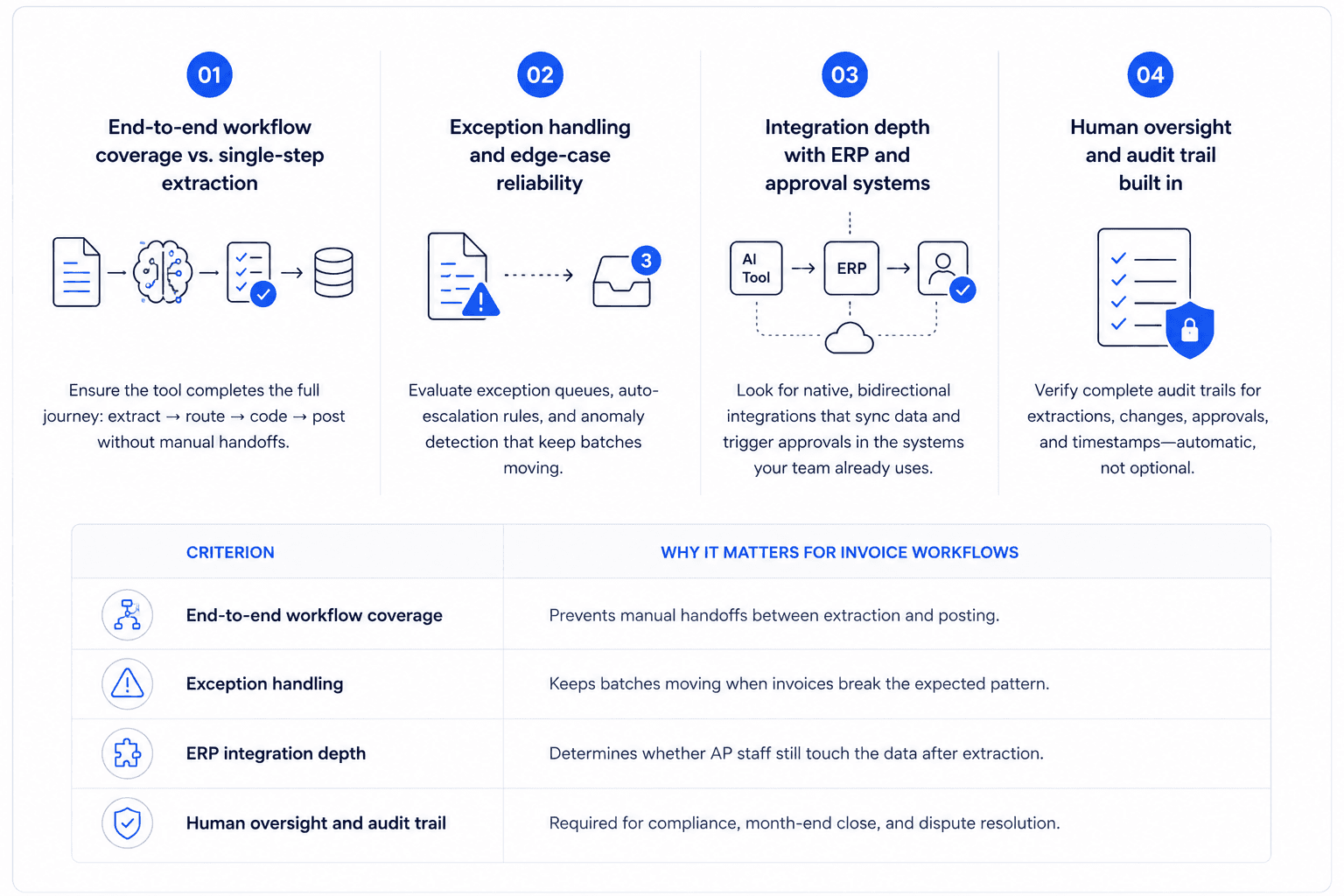
Switching tools without a clear evaluation framework means trading one gap for a different one. Score any alternative against these four criteria before shortlisting.
1. End-to-end workflow coverage vs. single-step extraction
Most tools excel at pulling data from a PDF. The question is what happens next. A tool with strong AI agent workflow coverage hands off extracted data directly to approval routing, GL coding, and ERP posting, without a human connecting the steps. If the answer to "what triggers the next step?" is "we configured a Zap for that," the tool does not have end-to-end coverage.
2. Exception handling and edge-case reliability
Exceptions are not edge cases in invoice processing, they are daily occurrences. Evaluate whether the tool has a defined exception queue, auto-escalation rules, and the ability to flag anomalies without stopping the entire batch. This is a core characteristic of a mature AI agent architecture: the system should handle what it can and surface what it cannot, without requiring manual monitoring.
3. Integration depth with ERP and approval systems
A tool that exports a CSV for manual import into SAP is not integrated. True integration depth means bidirectional data sync, native connectors to your ERP, and the ability to trigger approval workflows inside the system your approvers already use. Shallow integrations create manual handoffs that erase the time saved on extraction.
4. Human oversight and audit trail built in
AI automation in finance requires a clear record of every decision: what the system extracted, what it changed, who approved it, and when. Knowledge-based agents in artificial intelligence operate on rules and structured decision logic, which makes them auditable. Tools that process invoices as a black box create compliance risk. The audit trail should be automatic, not an add-on.
Criterion | Why It Matters for Invoice Workflows |
|---|---|
End-to-end workflow coverage | Prevents manual handoffs between extraction and posting |
Exception handling | Keeps batches moving when invoices break the expected pattern |
ERP integration depth | Determines whether AP staff still touch the data after extraction |
Human oversight and audit trail | Required for compliance, month-end close, and dispute resolution |
The 5 Best Looxer AI Alternatives for Finance and AP Teams
Nanonets: Best for teams who need fast OCR with some routing logic
Nanonets delivers strong extraction accuracy across invoice formats, including handwritten fields and multi-page documents. It supports basic approval workflows and can route invoices by vendor, amount, or department using configurable rules. The gap appears at the workflow edges: when an invoice does not match a known vendor or arrives with mismatched line items, the exception queue requires manual review without automated escalation. Approval routing still depends on integrations the team builds and maintains. Nanonets fits teams that need reliable extraction and are comfortable owning the orchestration layer themselves. It is not the right fit if your bottleneck is what happens after the data is extracted.
Hypatos: Best for large enterprises with complex GL coding requirements
Hypatos focuses on document process automation for enterprise finance teams, with particular strength in automated GL coding and multi-entity invoice handling. Its AI agent platform applies learned coding logic across invoice types, reducing the manual effort finance controllers spend on account assignment. The limitation is deployment complexity: Hypatos requires significant configuration time and typically needs IT involvement to connect to enterprise ERPs. Exception handling exists but surfaces issues as tickets rather than routing them automatically. Teams with standardized invoice formats across large volumes get the most value here. Smaller AP teams will find the setup overhead disproportionate to the problem they are solving.
Rossum: Best for high-volume extraction with a human-in-the-loop review layer
Rossum's design centers on a human-in-the-loop validation interface: extracted data is presented for fast human confirmation before it moves downstream. This makes it well-suited for teams that process high volumes but need a compliance checkpoint before ERP posting. The AI agent workflow is straightforward: extract, queue for review, post. The tradeoff is that the human review step is structural, not optional. Teams hoping to reduce headcount in AP will find Rossum requires a reviewer at every invoice. It is a better fit for teams that want faster human review rather than fewer humans in the process.
Docsumo: Best for smaller AP teams on a tighter budget
Docsumo positions itself as an accessible document AI tool, with pre-built extractors for invoices, receipts, and purchase orders. Setup is faster than enterprise tools, and pricing is structured for smaller volumes. The agent framework is limited: Docsumo extracts data and can push it to connected apps via webhook, but approval routing and exception handling require third-party tools like Zapier or Make. For a team processing under 300 invoices a month with a simple approval chain, this is workable. For teams with multi-step approvals, vendor-specific rules, or ERP sync requirements, the gaps become friction quickly.
Relevance AI: Best for teams building custom document agents without an engineering team
Relevance AI is an AI agent builder that lets operations teams design custom agents for document workflows without writing code. For invoice processing, this means teams can build agents that extract data, apply business rules, and trigger actions in connected systems, all configured through a no-code interface. The flexibility is genuine, but it comes with a configuration cost: the team must define the logic, map the exceptions, and maintain the agent as vendors and formats change. As a Relevance AI alternative approach, this is best for teams with a clear process already documented who want to encode it into an agent, rather than teams looking for an out-of-the-box solution.
Where Every Looxer AI Alternative Still Leaves Gaps
All five tools above solve extraction. None of them solve orchestration by default, and that distinction determines whether your AP team actually reduces manual work or just moves it to a different step.
The handoff problem: extraction is solved, orchestration is not
The moment an invoice is extracted, a set of decisions must happen: Which GL account? Which cost center? Does this need a two-level approval? Is there a matching PO? Most tools surface extracted data and stop there. The handoffs between extraction, validation, routing, and ERP posting remain the user's configuration problem. AI orchestration, coordinating multiple steps across systems without manual triggers, is what separates an extraction tool from a workflow solution. Teams that treat this as a configuration task end up rebuilding their automation stack every time a business rule changes.
Recent industry analysis has noted that autonomous agents have reached an inflection point where they can replace traditional SaaS services, but only for teams that solve the orchestration layer now rather than bolting on tools one at a time. Teams that get orchestration right today will not need to rebuild their stack in 18 months.
Why edge cases break most invoice agents in production
Most invoice agents are designed around the clean-path invoice: standard format, known vendor, matching PO, single currency. Production invoice queues are not clean. Invoices arrive without PO numbers, with line-item totals that do not add up, from new vendors not in the system, or as scanned images with rotation problems. When these arrive, most tools either fail silently or park them in a manual queue with no context. The exception handling gap is where AP teams spend most of their recovered time, which means they have not actually recovered it.
This is exactly the gap that Predflow addresses with a different methodology. Rather than starting with tool configuration, Predflow begins with process mapping, documenting the full invoice workflow including every exception path, before building any automation. The result is agents that handle edge cases reliably and flag exceptions with enough context for a human to resolve them quickly, rather than starting from scratch each time. Human oversight is built into the right checkpoints, not added as an afterthought.
How to Choose the Right Looxer AI Alternative for Your Team's Workflow
The five tools above are not interchangeable. Match your situation to the recommendation below before evaluating demos.
If you process under 500 invoices a month
Your priority is speed to value, not enterprise configuration depth. Start with Docsumo. Setup is fast, pricing fits smaller volumes, and the extraction accuracy handles standard invoice formats well. Accept that you will need a simple Zapier integration for ERP handoff and plan for that from day one.
If you need ERP-native approval routing
The tools that connect most directly to SAP, NetSuite, and Oracle are Hypatos and Rossum. Hypatos fits better if GL coding automation is the primary need. Rossum fits better if your compliance requirement means a human must touch every invoice before posting. Both require integration work, so factor in three to six weeks of setup time.
If exception handling and audit trails are your bottleneck
If the manual work in your AP team happens after extraction, chasing exceptions, resolving mismatches, documenting decisions, then no extraction tool solves your problem. Relevance AI gives you the flexibility to build agent logic around your exception rules, but you will need to define that logic clearly first. If you cannot document your exception process in writing today, you are not ready to automate it.
FAQ
What does Looxer AI actually do for invoice processing?
Looxer AI is a document extraction tool that uses AI to pull structured data from invoices, such as vendor name, line items, totals, and dates, and make it available for downstream processing. It handles the extraction step well but does not include native approval routing, ERP posting, or exception escalation logic. Teams that need full workflow automation typically need to connect Looxer AI to additional tools to complete the process.
Which AI invoice tool works best with SAP or NetSuite?
Hypatos and Rossum both have documented integrations with SAP and NetSuite. Hypatos is stronger for GL coding automation within SAP environments. Rossum connects to NetSuite with a human-in-the-loop review step built in. Both require integration configuration; neither offers a true plug-and-play connector without setup time.
What is the difference between agentic AI and generative AI for document workflows?
Generative AI produces content such as summaries, text, and classifications based on a prompt. Agentic AI takes actions across a workflow: it extracts data, makes routing decisions, triggers approvals, and handles exceptions without waiting for human input at each step. For invoice processing, the difference between generative AI and agentic AI is the difference between a tool that reads an invoice and one that processes it end-to-end.
Can AI agents handle invoice exceptions without human review?
Agents can handle exceptions that follow a defined rule, such as duplicate detection, amount thresholds, and missing fields, automatically. Exceptions that require judgment, such as a disputed charge or a vendor relationship decision, still need human review. The goal of good agentic AI in invoice workflows is not to eliminate human review but to route the right exceptions to the right person with enough context to resolve them in one touch.
How much does it cost to automate invoice processing with AI?
Pricing varies significantly by tool and volume. Docsumo is the most accessible entry point for smaller teams, typically starting under $500 per month for moderate volumes. Rossum and Nanonets price by page or document volume, with mid-market plans in the $1,000–$3,000 per month range. Hypatos and enterprise deployments are priced on contract. Factor in integration and configuration costs, which often equal or exceed the software cost in year one.
Make the Decision That Eliminates the Handoffs, Not Just the Keying
Picking the right extraction tool is step one. The teams that actually reduce AP headcount and eliminate invoice backlogs are the ones that solve orchestration, the routing, exception handling, and ERP sync that happens after extraction. Every tool in this list handles extraction. None of them handle orchestration out of the box.
If you are still comparing tools on extraction accuracy, use the decision framework in Section 1 to score each one against your actual workflow gaps. If you already know that extraction is not your bottleneck, that the manual work lives in the handoffs and exceptions, evaluate platforms built around workflow architecture first, not document parsing.
Explore how Predflow maps your invoice workflow before building any automation. Request a process review or start a free audit.
Bring 20 NetSuite bills to a 30-minute teardown
We will walk your actual invoices through capture, 3-way match and posting on the call, and tell you which steps an agent can take over. No prep beyond the PDFs.
FAQ
Frequently asked questions
What exactly is an AI agent
An AI agent is an autonomous system designed to handle specific business tasks end-to-end. Unlike simple chatbots, AI agents can reason, take actions, integrate with tools, and follow defined workflows.